.svg)

Atlassian AI agents are becoming visible, accountable teammates, and AMP (Agentic Multiplayer Protocol) is the framework that makes it happen. Atlassian announced AMP at Team '26 Europe in Amsterdam in October 2026.
Atlassian also shared how fast agents are spreading: 77% of its own pull requests last month were written entirely by agents, and its platform now handles more than 11 million agent invocations every month.
That speed creates a new problem. When agents write code, update tickets and edit documents, your teams need to know which agent did what, who is responsible for it, and what data it can reach.
This guide explains what Atlassian AMP is, how Atlassian AI agents work in Jira, Confluence and Loom, what is available today, and which governance steps to take now. It is based on Atlassian's Team '26 Europe announcements, and reviewed by Empyra's certified Atlassian consultants.
Key takeaways
- Atlassian AMP is a set of experiences, technologies and patterns for people and AI agents working together, inside and outside Atlassian tools.
- It has three layers: real-time and asynchronous collaboration, identity and shared presence, and context and governance.
- Atlassian AI agents appear with their own identity, presence and edit history. Dedicated agent accounts are coming soon.
- You can start the governance work (owners, permissions, data rules) today, before every feature ships.
Let's start with what AMP actually is.
What is Atlassian AMP?
Atlassian AMP (Agentic Multiplayer Protocol) is the framework that defines how people and Atlassian AI agents work together. Atlassian describes it as "a collection of human-centric experiences, technologies and patterns" that shape how people and agents collaborate, both on and off the Atlassian platform.
AMP is not a separate product you buy or install. It is a set of capabilities built into the Atlassian platform: Jira, Confluence, Loom, Rovo (Atlassian's AI assistant) and the Atlassian MCP server. For the official description, see Atlassian's AMP overview.
The key word is "multiplayer". Most AI use today is single-player: one person, one chat window, and the results stay with that person. AMP puts agents into shared spaces where the whole team can see what they are doing. As Atlassian put it at Team '26 Europe: "Working with AI isn't single-player anymore, it's multiplayer."
Atlassian was also clear about jobs. Co-founder and CEO Mike Cannon-Brookes said that "agents aren't replacing your people, they're joining your teams."
The three layers of Atlassian AMP
|
Layer |
What it means |
Example shown at Team '26 Europe |
|
1. Real-time and asynchronous collaboration |
New interface patterns show what agents are doing live, track their finished work, and flag when they need input. |
A Figma agent and several people editing one Confluence spec at the same time. |
|
2. Identity and shared presence |
Agent identity appears across Atlassian apps with clear attribution, so everyone knows who is a person and who is an agent. |
Agent cursors on a page, and edit history showing which agent wrote which section. |
|
3. Context and governance |
Agents use your company's context, with controls and scoped permissions that apply on and off the platform. |
Access to the Atlassian MCP server controlled through Atlassian Guard. |
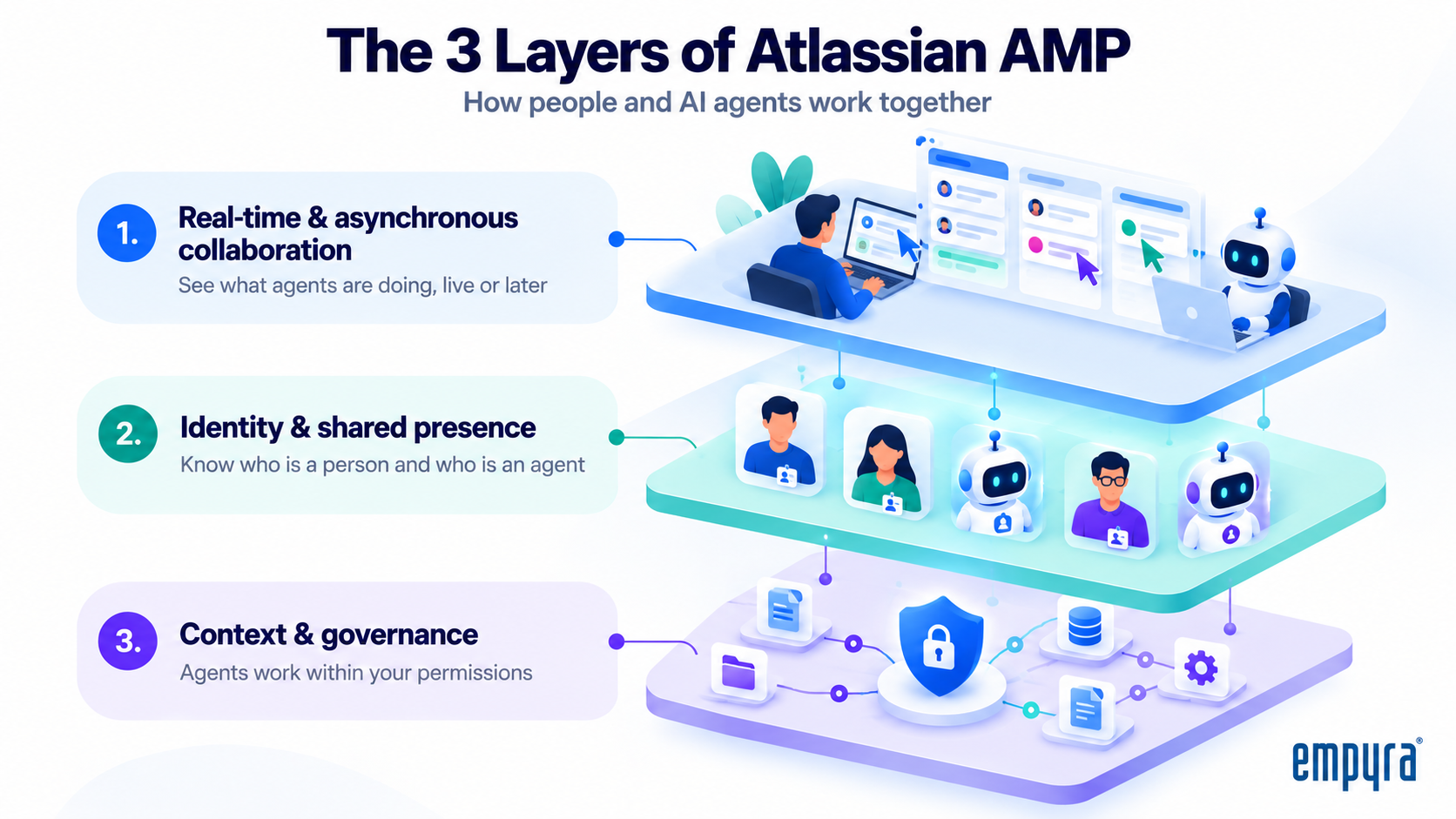
Atlassian stressed one point about the third layer: people must always be able to start work, handle exceptions and use their own judgement. AMP is designed to keep a person in charge.
So what does this look like in a real working day?
How Atlassian AI agents work in Jira, Confluence and Loom
Atlassian showed AMP through live demos rather than slides. Four of them show what changes for your teams.
1. AI agents in Jira
An agent session is one run of an AI agent working on a task, for example Claude fixing a bug from a developer's terminal. Until now, these sessions were invisible to everyone except the person running them.
At Team '26 Europe, Atlassian co-CTO Taroon Mandhana showed agent sessions appearing live on a Jira board. The demo covered:
Mike Cannon-Brookes called it one of the biggest shifts in Jira in 20 years. Jira moves from a picture of planned work to a system of record for the work that is actually happening.
Part of this is already live. In Jira Cloud, paid customers can assign work items to agents such as GitHub Copilot, Cursor and Claude, and open an agent's session on the work item. Atlassian also announced a closer partnership with OpenAI: soon you will be able to assign Jira work items directly to OpenAI's Codex cloud agents.
2. People and agents co-editing in Confluence
In the second demo, Atlassian's Sherif Mansour built a technical plan with Planner, a new feature in the Atlassian Teamwork Collection. A Figma agent, a ChatGPT agent and several people edited the same Confluence specification at once. Each agent had its own cursor and presence indicator. Afterwards, the page history showed which person or agent wrote each section, and which agents had read the page as context.
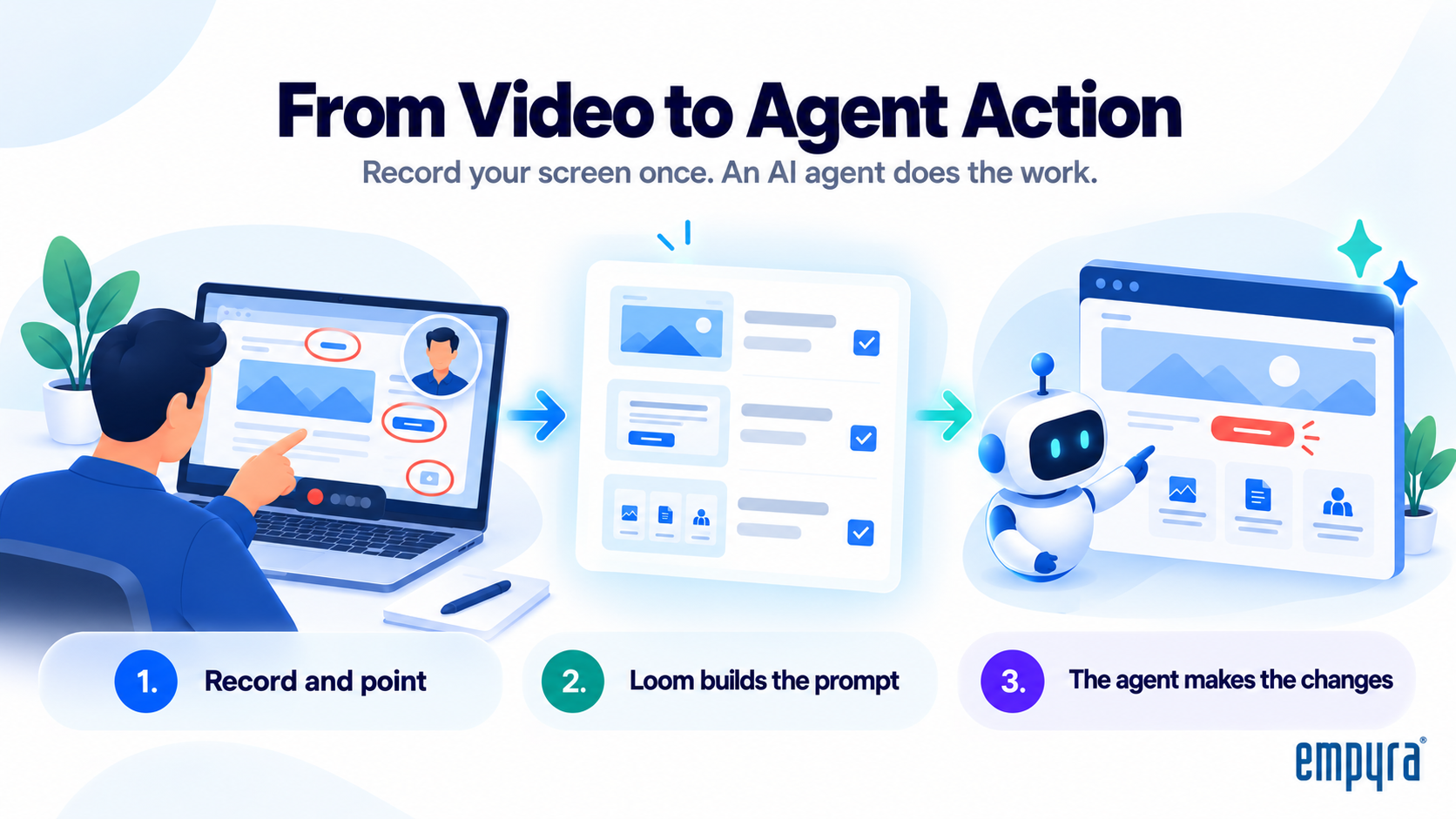
3. Briefing agents with a Loom video
The new Loom desktop app for Mac adds Record for agent. You record your screen, talk, and point at what needs to change. Loom then turns the recording into a prompt for an agent, with screenshots, acceptance criteria and links. In the demo, three website changes recorded in one Loom were completed by a Figma Make agent: a shorter hero image, a red "Make a booking" button, and footer icons taken from a Confluence page.
4. Outside agents through the Atlassian MCP server
Model Context Protocol (MCP) is an open standard that lets AI tools connect to other software. Atlassian announced an all-new MCP server, rebuilt from the ground up:
- More than 200 tools, up from dozens in the first version.
- Access to almost all Atlassian apps, plus context from the Teamwork Graph.
- Support for custom Forge apps and Atlassian Marketplace apps, with custom Rovo agents coming soon.
- Access controls through Atlassian Guard.
- Up to 25% fewer tokens when used with SaaS apps, according to Atlassian.
Atlassian said millions of people use the server every month, making more than 15 million tool calls a day. To connect your own AI tools, see our Atlassian Rovo MCP Server guide.
All four demos rely on the Teamwork Graph, Atlassian's map of your company's knowledge, work, people, conversations, code and assets. It now holds more than 250 billion connected objects, up from 150 billion six months earlier. Atlassian also added more than 20 connectors in that time, including Zoom and Gong. Learn more in What is Atlassian Teamwork Graph.
These demos show what Atlassian AI agents can do. The next question is how to keep them under control.
Atlassian AI agent governance: five questions for every agent
AMP gives you the tools to see and control Atlassian AI agents, but it does not set your policies for you. Before agents scale, every agent in your organisation needs a clear answer to these five questions.
1. Who owns this agent?
Every agent needs a named person who is accountable for its output, access and cost. This matters because many agents act on a person's behalf. Atlassian explained at Team '26 Europe that a Rovo Work task (a longer, multi-step AI job) runs as the person who started it and inherits all of their permissions. In practice, the person who starts an agent is responsible for what it does.
2. Whose permissions does it use?
Today, most agents act with the permissions of the person who launched them. Atlassian announced non-human identities to change this: Rovo and third-party agents get their own dedicated account, so admins can fully control what each agent can see and do. Atlassian's written announcement says these are coming soon. Until every agent has its own account, treat agent access as an extension of user access.
3. What data can it reach?
An agent can find anything its permissions allow. That means every over-broad permission becomes a way for AI to surface sensitive content. Review Confluence space and Jira project permissions, decide which Teamwork Graph connectors users may add, and use Atlassian Guard to control access. Atlassian also announced Atlassian DLP (data loss prevention), which applies real-time policies and redacts sensitive information across AI chats and connected tools.
4. How is its work reviewed?
AMP shows who did what: agent cursors, avatar stacks and page history record which person or agent contributed. Use that visibility to decide where a person must approve agent output before it is used, for example production code, customer-facing content and change approvals. Then build those approval steps into your Jira workflows.
5. What does it cost?
Agent work consumes AI usage. From 3 December 2026, Atlassian bills Rovo usage beyond each plan's allowance at $0.01 per credit, as explained in our Atlassian Rovo pricing guide. Atlassian also showed a way to spot waste: DX's Model Fit score flags agent runs that could have used a cheaper model. In Atlassian's own example, 59% of 3,200 documentation runs in one month could have done so. Give every agent a budget owner, check how many Rovo credits each user gets, and estimate your usage with our Rovo Credits Calculator.
Empyra tip: Record the answers in a simple agent register, with one row per agent: owner, purpose, permissions, data access, review step and budget owner.
[Consultant to add: one real observation from an Empyra Rovo rollout, for example a permission gap found during setup.]
With these questions answered, the next step is knowing which features you can use today.
Atlassian AI agent and AMP features: available now vs coming soon
Not everything Atlassian announced has shipped yet. This table shows each AMP-related capability and its status as Atlassian has described it. Most features need Rovo enabled, and rollout varies by plan and region.
|
Capability |
Status |
|
AMP experiences across the Atlassian platform |
Introduced at Team '26 Europe, rolling out |
|
Assign Jira work items to agents (Rovo, GitHub Copilot, Cursor, Claude) |
Available now in Jira Cloud |
|
Local and cloud agent sessions shown live on Jira boards |
Announced, no date given |
|
Assign Jira work items to OpenAI Codex |
Coming soon |
|
All-new Atlassian MCP server (more than 200 tools) |
Available now |
|
Custom Rovo agents through the MCP server |
Coming soon |
|
Loom desktop app for Mac with Record for agent |
Announced at Team '26 Europe |
|
Planner in the Teamwork Collection |
Early access |
|
Non-human identities (dedicated agent accounts) |
Announced, coming soon |
|
Atlassian DLP for AI chats and connected tools |
Announced |
|
EU AI inference |
Rollout started |
Status checked on 21 October 2026. Atlassian updates these often, so confirm in your admin settings before you plan a rollout.
The good news is that you do not need to wait for every feature. Here is how to prepare in the next 30 days.
A 30-day Atlassian AMP readiness plan
You can get ready for Atlassian AI agents in four weeks. This is the order Empyra's consultants recommend, because each week builds on the one before.
Week 1: Take inventory. You cannot govern what you cannot see.
Week 2: Fix permissions and data. Agents see what your permissions allow, so clean up before you scale.
Week 3: Set ownership and review rules. Turn the five questions above into written rules.
Week 4: Pilot with one team. Test the rules on real work before a wider rollout.
What Atlassian AI agents mean for your team
Atlassian AI agents are moving from side tools to named teammates in Jira, Confluence and Loom. AMP gives you the visibility and the controls, but the results depend on your groundwork: clean permissions, clear owners and a cost plan. Teams that start now will be ready when dedicated agent accounts and the remaining features arrive.
If you would rather not do this alone, this is where a partner can help.
How Empyra helps you get AMP-ready
Empyra is an Atlassian Platinum Solution Partner with specializations in Teamwork Foundations, Software Development, Cloud Migration and Service Management. Our 80+ certified Atlassian consultants help teams adopt Rovo and Atlassian AI agents without losing control of data, access or cost.
We can support each step of the 30-day plan:
Ready to bring Atlassian AI agents into your teams safely? Get your free AI Readiness Assessment or talk to an Empyra consultant.
Related reading
Still have questions? The most common ones are answered below.
.png?width=364&height=116&name=sales%20radar%20ai%20logo%202026%20%20(280%20x%2084%20px).png)



.svg)