.svg)

If you've spent any time in Jira or Confluence over the past year, you've probably also spent time bouncing between five other tabs — an AI chat window, a search bar, a wiki page, a ticket — trying to piece together context that already exists somewhere in your systems. That constant context-switching is exactly the problem the Model Context Protocol was built to solve.
Model Context Protocol (MCP) is an open standard that allows AI tools to securely connect to and act on real business data, instead of operating in isolation. Atlassian was one of the earliest major enterprise vendors to adopt it, and today Model Context Protocol quietly powers how millions of people search, summarize, and update their Jira and Confluence work directly from AI assistants like Claude and ChatGPT. The product behind all of this is Atlassian's Remote MCP Server — the company's official, cloud-hosted bridge that connects Jira, Confluence, and Rovo to any MCP-compatible AI client.
In this blog, we'll break down what Model Context Protocol actually is, why Atlassian adopted it, what Atlassian's Remote MCP Server is and how it works, how the Atlassian Rovo MCP Server works across Jira, Confluence, and Compass, what security controls are built in, and what it all means for teams who rely on Atlassian tools every day. We'll also look at how a partner like Empyra can help you actually put Model Context Protocol to work.
1 . What Is Model Context Protocol (MCP)?
At its core, Model Context Protocol is a standardized way for AI applications to connect to external data sources and tools. Instead of an AI vendor building a custom, one-off integration for every single data source — and instead of every software company building a custom AI plugin for every single AI assistant — Model Context Protocol gives both sides a common language to talk to each other.
Think of it like a universal adapter. Before USB-C, every device needed its own proprietary cable. Model Context Protocol does something similar for AI: rather than Jira needing one integration for Claude, another for ChatGPT, and another for a coding assistant, it exposes its data once through an MCP server, and any MCP-compatible AI client can plug in and use it.
A few things worth understanding about Model Context Protocol before we go further:
-
It's open, not proprietary.Model Context Protocol was originally developed by Anthropic and released as an open standard, meaning any company can build an MCP server or an MCP-compatible client.
- It works in both directions. An MCP server can let an AI read data (search, summarize, fetch) and, with the right permissions, write data (create issues, update pages, take multi-step actions).
- It respects existing permissions. Model Context Protocol doesn't bypass access controls — a well-built MCP server, like Atlassian's, enforces the same permission boundaries a user already has.
- It's rapidly becoming an industry norm. In a short span, Model Context Protocol has gone from an experimental protocol to something adopted across major software vendors, IDEs, and AI platforms.
For teams already deep into Jira, Confluence, and Rovo, this matters because Model Context Protocol is the mechanism that lets your existing Atlassian data show up naturally inside the AI tools your team already uses — without rebuilding your workflows from scratch.
2 . Why Atlassian Adopted Model Context Protocol
Atlassian didn't approach Model Context Protocol as an isolated feature — it built on top of infrastructure it already had. The company's Teamwork Graph, a data layer that connects work, knowledge, people, and goals across Atlassian and third-party tools, was already the "secret sauce" behind Rovo Search, Chat, and Agents. Model Context Protocol gave Atlassian a way to extend that same intelligence outward, into places teams already work, rather than confining it to Atlassian's own products.
That shift in ambition is the real story here. Instead of only building AI features inside Jira and Confluence, Atlassian used Model Context Protocol to make its data available inside whichever AI tool a team already prefers — an IDE, an agent platform, or an LLM like Claude.
The rollout timeline shows how quickly this moved from experiment to enterprise infrastructure:
|
Milestone |
What Happened |
|
May 2025 |
Atlassian launches the Remote MCP Server in beta, with Claude as the first official AI partner |
|
Early adoption |
Jira and Confluence become the most requested connectors among partners and customers |
|
February 2026 |
The Rovo MCP Server reaches General Availability (GA), adding enterprise-grade controls |
|
Post-GA expansion |
Compass joins Jira and Confluence as a supported product; the client ecosystem grows to 16+ AI tools |
|
Mid-2026 |
Atlassian reports over 5 million MCP tool calls per day and 1 million+ monthly users |
Atlassian has described this approach as staying true to being "open by design" — building on a shared industry standard rather than locking customers into a single AI vendor. For teams and partners alike, that's a meaningful signal: Model Context Protocol isn't a side experiment, it's becoming core infrastructure for how Atlassian's ecosystem plans to work with AI going forward. Organizations exploring Atlassian AI consulting are increasingly starting the conversation with Model Context Protocol, precisely because it defines how AI tools are allowed to interact with enterprise data.
3 . How Atlassian's Remote MCP Server ( Rovo MCP Server) Works
It's worth being precise about what the Rovo MCP Server, officially launched as Atlassian's Remote MCP Server, actually is. The word "remote" is doing real work in that name: unlike a self-hosted or local MCP server that a team would need to install, run, and patch on its own infrastructure, Atlassian's Remote MCP Server is a fully managed, cloud-hosted service running on Cloudflare infrastructure, so there's nothing for your team to deploy or maintain.
It is not an AI model itself — Atlassian isn't building a competing chatbot. Instead, it's a governed access layer that sits between external AI clients and Atlassian's product APIs, handling authentication, authorization, and structured data exchange so that any connected AI client — whether a browser-based assistant or a local desktop app connecting through a lightweight proxy — can work with your Jira, Confluence, and Compass data safely.
Here's what becomes possible once an AI client is connected through Model Context Protocol:
-
Semantic search and fetch — Ask a natural-language question like "find the latest incident postmortem for checkout failures," and the AI can search across Jira issues and Confluence pages, not just match keywords, and pull back the right result.
- Summarize work items or pages — Get a plain-language summary of a Jira epic, a sprint's open issues, or a long Confluence page without opening either tool.
- Create and update content — Turn a drafted spec or meeting summary into an actual Confluence page in the right space, or create Jira issues (including in bulk) directly from a conversation.
- Multi-step, agentic actions — Chain several actions together in a single request, such as creating a set of linked issues, enriching them with context pulled from other sources, and posting a summary page.
- Compass component data — With MCP support extended to Compass, teams can also search, create, and link software catalog components alongside their Jira and Confluence work.
Here's a simple example of what this looks like in practice: a product manager, working inside Claude or ChatGPT, asks the AI to "summarize this sprint's blockers from Jira and draft a status update page in Confluence." Through the Rovo MCP Server, the AI client searches Jira for the relevant issues, pulls the context it needs, drafts the update, and creates the Confluence page — all without the PM leaving their AI assistant.
| Capability | What It Enables |
|
Semantic search & fetch |
Natural-language search across Jira and Confluence |
|
Create/update content |
Draft-to-publish workflows for issues and pages |
|
Multi-step actions |
Bulk issue creation, linked workflows, chained tasks |
|
Compass integration |
Search and manage software catalog components |
|
Cross-source enrichment |
Pull context from multiple tools into a single Jira item |
For teams managing complex project structures, this pairs naturally with existing Jira software project management practices — Model Context Protocol doesn't replace how you run Jira, it changes how easily that data reaches you.
4 . Which AI Tools Connect via MCP Today
One of the defining qualities of Model Context Protocol is that it's client-agnostic. Atlassian launched its Remote MCP Server with Claude as the first partner, but because Model Context Protocol is an open standard rather than an Anthropic-exclusive feature, the list of compatible AI clients has expanded significantly since then.
As of the Rovo MCP Server's General Availability release, supported AI clients include:
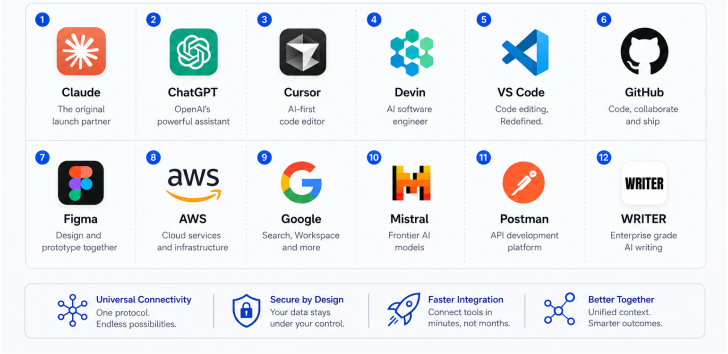
| AI Client Category | Examples |
|
Conversational AI assistants |
Claude, ChatGPT |
|
Developer tools / IDEs |
VS Code, Cursor, GitHub, Devin |
|
Design & productivity tools |
Figma, Postman |
|
Cloud & enterprise platforms |
AWS, Google, Mistral, WRITER |
The practical implication for a business evaluating AI adoption is flexibility. Because Model Context Protocol isn't tied to one AI vendor, your organization isn't locked into a single assistant just because it's connected to your Atlassian data. Teams already relying on Atlassian integration services to connect Jira and Confluence with the rest of their tech stack will recognize this pattern — Model Context Protocol simply extends that same open-integration philosophy to AI.
5 . Security & Governance: How Model Context Protocol Keeps Enterprise Data Safe
For any enterprise evaluating AI adoption, security is usually the first and most important question, and it's a fair one — Model Context Protocol by definition involves giving external AI clients some form of access to business data. Atlassian built its Rovo MCP Server with that concern front and center.
Key security and governance features include:
-
OAuth-based authentication — Users sign in with their existing Atlassian account, and access is granted through standard OAuth consent, not shared credentials.
-
Existing permission boundaries respected — Model Context Protocol doesn't create a new, separate access model. If a user can't see a Jira project or Confluence space today, that restriction carries over when they use an AI client.
-
Domain allowlists and IP allowlisting — Admins can control which AI client domains are trusted and restrict access based on IP ranges, giving IT teams enforcement control at the network level.
-
Audit logging — Tool invocations and first-time app installs are logged, so administrators can monitor exactly how Model Context Protocol is being used and investigate unusual activity.
-
Governed access at scale — Every request flows through Atlassian's existing permission system, which is a meaningful difference compared to many community-built MCP servers that don't offer the same level of enterprise control.
This governance layer is precisely why Model Context Protocol has been able to scale into enterprise environments rather than remaining a developer novelty, and it's a large part of why administrators can monitor exactly how it is being used across the organization. It gives security and compliance teams a reason to say yes to AI adoption, instead of blocking it outright. Organizations formalizing this internally often pair Model Context Protocol rollout with a broader Atlassian managed services engagement, so permissions, allowlists, and audit policies are set up correctly from day one rather than reactively.
6 . Real-World Impact: What the Adoption Numbers Show
It's one thing to describe Model Context Protocol conceptually — the adoption data tells a more convincing story. Less than 6 months after the Rovo MCP Server reached General Availability, Atlassian reported that more than 1 million users were relying on it every month to do real work through AI agents, with over 5 million MCP tool calls happening every single working day, a number that continues to climb month over month.
That scale matters for two reasons:
-
This is not experimental usage. Millions of daily tool calls means Model Context Protocol has become embedded in how enterprise teams actually search, create, and update work — not a novelty demo.
-
Value concentrates around context-rich work. Atlassian's own analysis ties this growth back to the Teamwork Graph — the same context layer that connects work, people, knowledge, and code — suggesting that the more connected and well-structured your Jira and Confluence data is, the more value your team gets from MCP-powered AI.
An emerging trend worth watching is the rise of "MCP apps" — custom interfaces that partners and internal teams build on top of MCP tools, combining Atlassian data with AI capabilities in ways tailored to a specific business process. This is where implementation expertise starts to matter as much as the protocol itself, and it's an area explored further in Empyra's case studies covering real Atlassian implementations.
7 . Why This Matters for Your Team
Strip away the technical detail, and Model Context Protocol solves a problem every team already feels: too many tools, too much context lost between them, and too much manual copy-pasting to keep AI assistants useful.
Here's what Model Context Protocol-enabled workflows change in practical terms:
-
Reduced context-switching — Team members get answers and take action from within the AI tool they're already using, instead of jumping between five different applications.
-
Faster decision-making — Because AI can pull real, current Jira and Confluence data instead of relying on what a person remembers or manually copies over, summaries and recommendations are more accurate.
-
Agentic, multi-step workflows — Instead of a single question-and-answer exchange, MCP-connected AI can complete a sequence of actions — searching, drafting, creating, and linking — in one request.
-
Freedom of tool choice — Because Model Context Protocol is an open standard, your organization isn't forced into one AI vendor just to get value from your Atlassian data.
-
Consistency with governance — All of this happens without bypassing the access controls your admins already have in place.
For teams already running structured project workflows, this builds naturally on top of existing setups such as Jira workflow management services — Model Context Protocol doesn't ask you to rebuild your processes, it makes the data inside them easier to reach.
8 . How Empyra Helps Teams Implement Model Context Protocol
Understanding what Model Context Protocol can do is one thing — configuring it correctly, securely, and in a way that actually fits your team's workflows is another. This is where a Certified Atlassian partner adds real value.
Empyra helps organizations move from "we've heard of Model Context Protocol" to "our teams are using it safely and effectively," through:
-
MCP setup and configuration — Connecting the Rovo MCP Server to the right AI clients for your organization, and configuring scopes correctly from the start.
-
Admin controls and governance — Setting up domain allowlists, IP allowlisting, and audit logging so your security and compliance teams have full visibility from day one.
-
Workflow design — Identifying where MCP-powered AI genuinely saves time in your Jira and Confluence processes, instead of adding AI for its own sake.
-
Training and enablement — Helping teams learn effective prompts and workflows so adoption doesn't stall after the initial rollout.
-
Custom MCP-based integrations — Building tailored solutions where off-the-shelf configuration isn't enough, drawing on deep experience across the Atlassian ecosystem.
If your organization is exploring how to bring Model Context Protocol into your Jira, Confluence, or Rovo environment, Empyra' Atlassian Expert team can guide the rollout end to end — from initial configuration to team-wide adoption. Teams that also need structured onboarding can pair this with Empyra's Atlassian training programs to make sure the whole organization, not just early adopters, gets value from MCP-connected AI.
Conclusion
Model Context Protocol has moved fast — from Atlassian's Remote MCP Server beta launch with a single AI partner to enterprise-grade infrastructure powering millions of daily interactions across Jira, Confluence, and Compass. What makes it significant isn't just the technology itself, but what it represents: an open, governed way for enterprise data to meet AI tools wherever teams already work, without sacrificing security or forcing vendor lock-in.
As Atlassian continues expanding Model Context Protocol support across more products and more AI clients, the organizations that get ahead of this shift — with the right configuration, governance, and training in place — will be the ones getting real productivity gains, not just running a proof of concept.
If you're ready to explore what Model Context Protocol could look like inside your own Jira and Confluence environment, Book a Free consultation With Empyra.
.png?width=364&height=116&name=sales%20radar%20ai%20logo%202026%20%20(280%20x%2084%20px).png)


.svg)