.svg)

If you're on Jira, Confluence, or Jira Service Management Cloud, chances are you've already seen Rovo show up in your workspace. Atlassian's AI layer is now bundled into paid plans across the board, which makes it tempting to assume it's simply "free" once you're already paying for a subscription. It isn't quite that simple. Every AI action inside Rovo draws from a metered pool called Rovo credits and understanding that system is the difference between predictable AI costs and an unpleasant surprise on your next invoice.
This guide breaks down Atlassian Rovo pricing in plain language: what Rovo credits are, how many you get on each plan, what actually consumes them, and — most importantly — how to avoid overage costs once Atlassian's new billing rules take effect. By the end, you'll know exactly how to read your organization's usage dashboard and make an informed call on whether your current plan gives you enough headroom.
What's changing on December 3, 2026: Atlassian has confirmed that extra usage billing for Rovo credits takes effect on this date. Until then, organizations can track usage in Atlassian Administration, but overage charges beyond your included allowance are not yet enforced. Once the change lands, admins who leave "extra usage" switched on (the default setting) will start seeing metered charges once their pooled Rovo credits run out.
1 . Understanding Atlassian Rovo Pricing: What Is Rovo and How It's Priced
Rovo is not a separate product you buy and install — it's Atlassian's AI layer woven directly into Jira, Confluence, Jira Service Management and the broader Teamwork Collection. If your organization is on a paid Standard, Premium, or Enterprise cloud subscription for any of these products, Rovo is already included, and Rovo credits are bundled in automatically rather than sold as a standalone line item.
That said, there are a few conditions and distinctions worth knowing before you dig into the credit math:
- Verified domain requirement. To activate Rovo, your organization admin needs to be on a verified business domain, such as @yourcompany.com. Atlassian will not enable Rovo on organizations registered under a generic email domain like gmail.com or outlook.com. This is a common blocker for smaller teams that signed up with a personal email.
- Rovo vs. Rovo Dev vs. Rovo Standard. These three names get confused constantly, so it's worth separating them upfront:
- Rovo is the core AI experience inside Jira, Confluence, and JSM — chat, search, agents, and Teamwork Graph context.
- Rovo Dev is a distinct product built for software engineers, with its own separate credit pool and its own pricing (more on that later).
- Rovo Standard is a standalone access tier for people in your organization who don't hold a paid Jira, Confluence, or JSM seat but still need Rovo access.
Understanding this distinction matters because Atlassian Rovo pricing questions almost always trace back to one of these three products, and each one is billed and metered differently. For the rest of this guide, we're focused primarily on core Rovo and its credit system, with a dedicated section later comparing it to Rovo Dev.
2 . What Are Rovo Credits? The Core Unit Behind Atlassian Rovo Pricing
At the center of Atlassian Rovo pricing sits a single concept: Rovo credits. Atlassian defines Rovo credits as its unit of measurement for usage of AI capabilities and for access to enriched context delivered through the Teamwork Graph (TWG) — the intelligence layer that connects data across your Atlassian apps and select external tools.
In practice, this means every time a user or an AI agent interacts with Rovo's intelligence — asking a question in Rovo Chat, triggering an agent, or pulling enriched context via the Teamwork Graph CLI or the Atlassian Rovo MCP server — that interaction is measured in credits. The number of credits consumed depends on how complex the request is and how much computational effort Atlassian's systems need to fulfill it.
A few structural details are essential to understanding how the credit system actually behaves day to day:
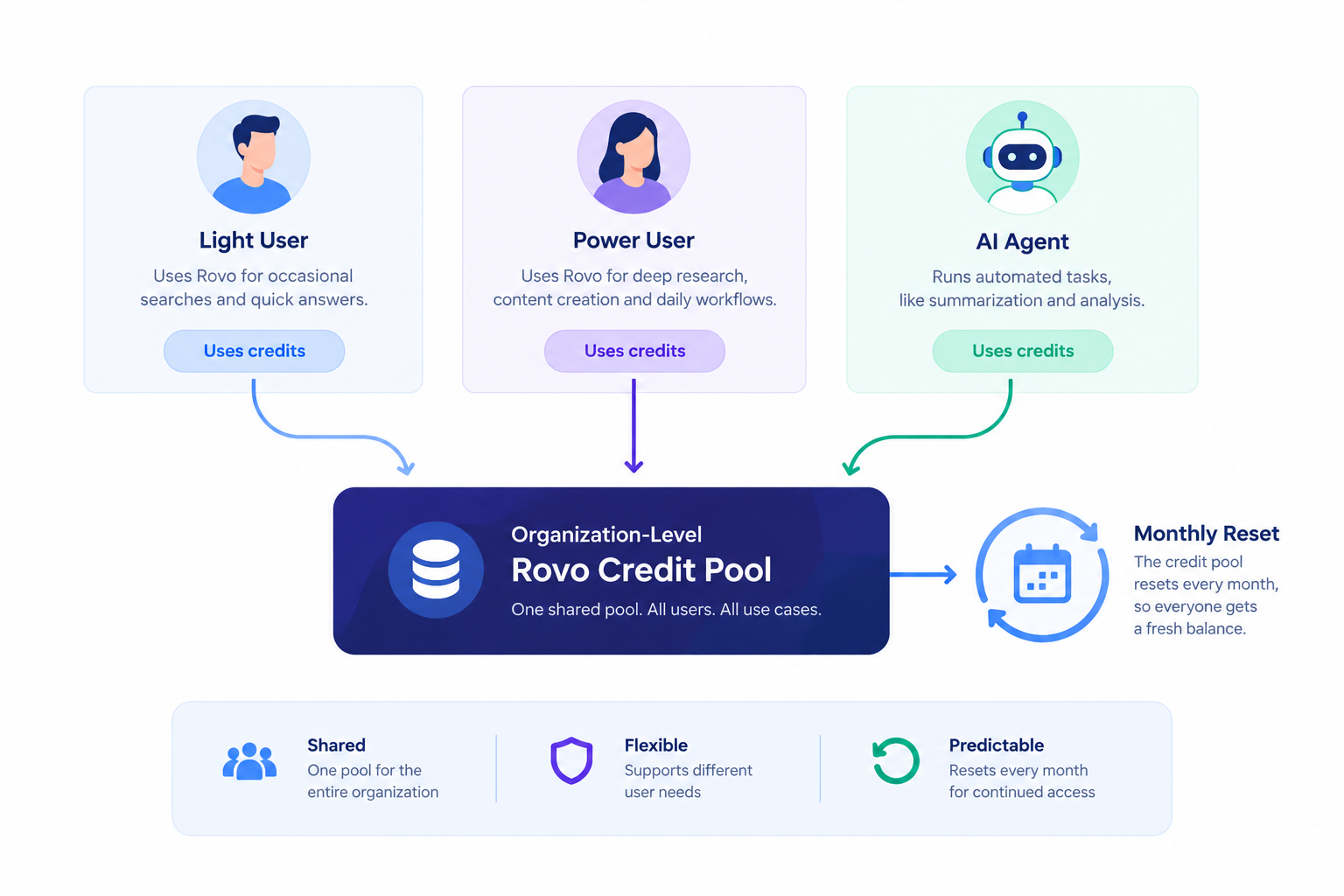
- Credits are pooled at the organization level. Rather than assigning a fixed personal quota to each individual, all Rovo credit allowances across your organization combine into a single shared pool. This means a power user who asks Rovo dozens of questions a day can draw more heavily from the pool, while a light user who barely touches AI features consumes very little — the two balance each other out across your workforce.
- Credits aggregate across products. The more eligible Atlassian offerings your organization holds, the larger your combined Rovo credit pool becomes. A company running both Jira and Confluence receives the combined allowance from both subscriptions rather than two separate, siloed pools.
- Allowances reset monthly and don't roll over. Your organization's Rovo credit allowance refreshes every month on your usage billing date. Unused credits from a quiet month do not carry forward — so a month where your team barely uses Rovo doesn't build up a reserve for a busier month later.
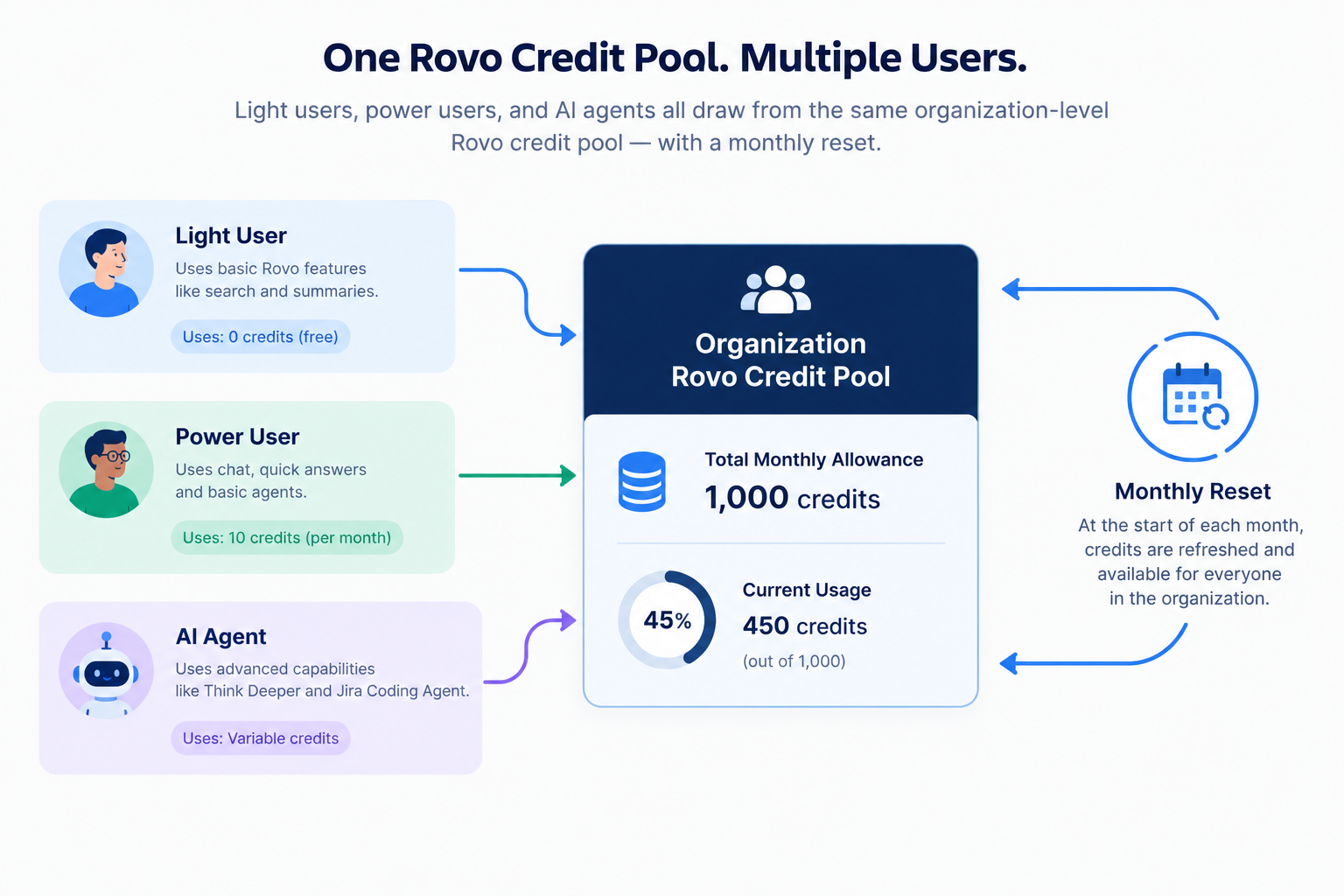
This pooled, resetting structure is exactly why monitoring usage matters. A single department running an unusually AI-heavy sprint can eat into the shared allowance for the entire organization, even if most other teams are barely using Rovo at all.
3 . Rovo Credits Allowance by Plan: Atlassian Rovo Pricing Breakdown
The actual number of Rovo credits your organization receives depends entirely on which Atlassian products and plan tiers you're subscribed to. Atlassian publishes a clear per-user, per-month allowance for each eligible offering:
| Offering | Standard | Premium | Enterprise |
| Jira | 25 credits | 70 credits | 150 credits |
| Confluence | 25 credits | 70 credits | 150 credits |
| Service Collection | 250 credits | 700 credits | 1,500 credits |
| Teamwork Collection | 250 credits | 700 credits | 1,500 credits |
(All figures are Rovo credits per user, per month.)
Notice the gap between standalone products and the bundled collections. Teamwork Collection and Service Collection offer up to 10x higher Rovo allowances compared to standalone Jira or Confluence at the equivalent plan tier. If your organization already leans on Teamwork Collection, you're sitting on a substantially larger buffer before overage becomes a concern — which is worth factoring in if you're deciding between individual product subscriptions and a bundled collection.
Because the allowance is pooled at the organization level, the real math happens at scale. Atlassian gives a helpful worked example: an organization with 100 Confluence Premium users and 100 Jira Premium users would calculate its monthly pool as:
(100 users × 70 credits) + (100 users × 70 credits) = 14,000 Rovo credits per month
That 14,000-credit pool is then shared across every eligible user in the organization, regardless of which specific product each person primarily works in. For a mid-sized company running several hundred licensed seats, this pooling effect can mean tens of thousands of Rovo credits available monthly — but it can just as easily get consumed faster than expected if a handful of teams adopt agentic AI features heavily.
4 . What Consumes Rovo Credits? A Closer Look at Atlassian Rovo Pricing Tiers
Not every AI interaction inside Atlassian's tools costs the same. Rovo credits are consumed by what Atlassian calls "billable events," and these fall into two broad categories: Intelligence and Context. You can check your Rovo credit calculator with us.
Intelligence: AI Actions and Agent Interactions
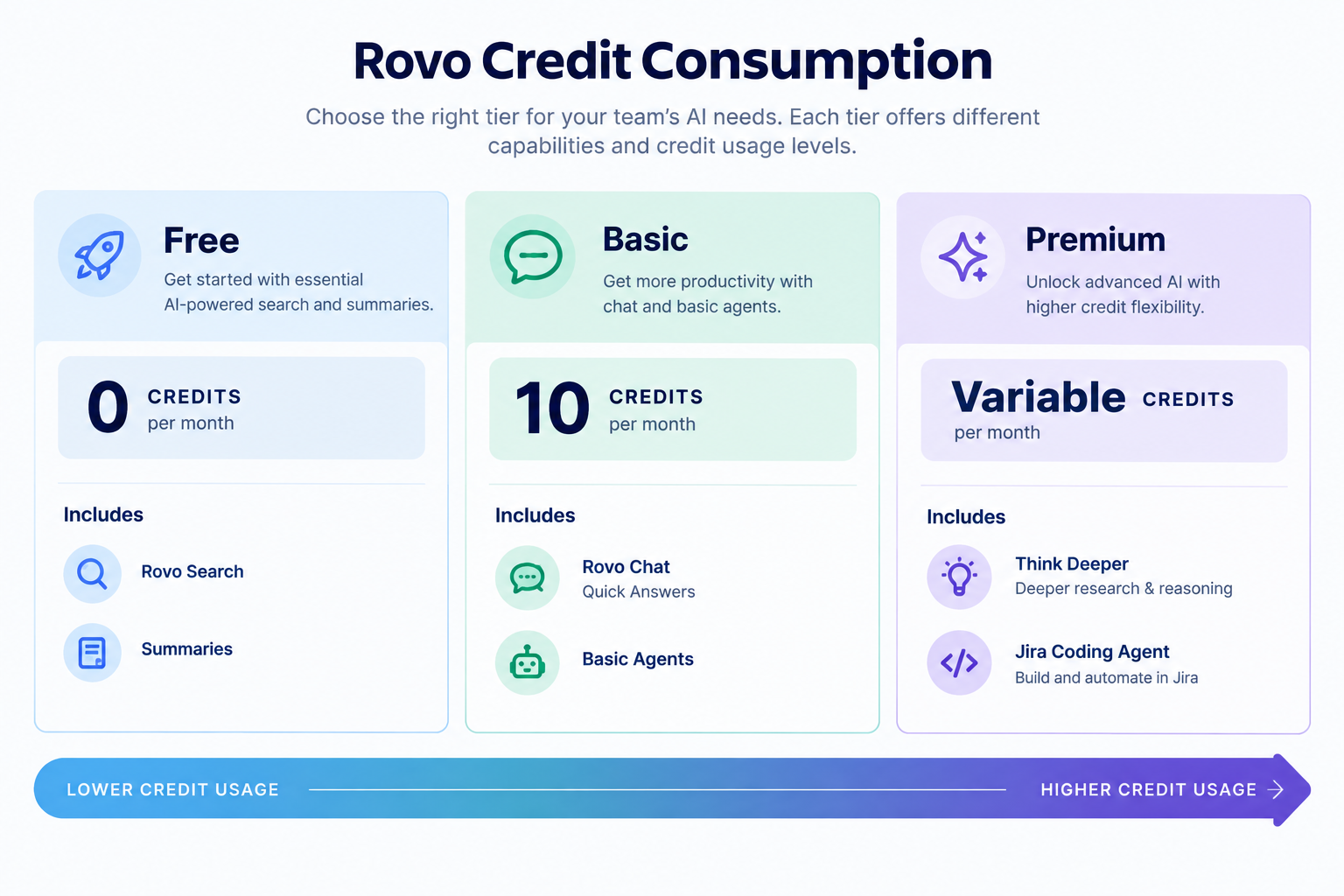
Intelligence credits are consumed whenever a user or an agent invokes AI to perform an action — asking Rovo Chat a question, running an agent, or generating content. Atlassian further splits this category into three sub-tiers based on complexity:
- Free tier: Embedded AI features that enhance work you're already doing cost nothing. This includes Rovo Search across Atlassian apps, inline Definitions, and automatic Summaries.
- Basic tier (10 credits per event): Conversational and agentic AI that delivers fast, lightweight responses. Examples include Rovo Chat's Quick Answers mode, Rovo space creation, Workforce Management Routing in Jira Service Management, and basic Rovo Agents that don't allow model selection.
- Premium tier (variable credits): Advanced AI work requiring deeper reasoning, multi-step orchestration, and more context. This covers Advanced Rovo Agents with model selection, Rovo Chat's Think Deeper mode, Confluence AI-generated slides, the Jira Coding Agent, Request Resolver, and Alert Intelligence in JSM.
Context: Teamwork Graph API and Tool Calls
The second category covers credits consumed when enriched context is pulled from the Teamwork Graph via its API or CLI — including when third-party AI tools like Claude or ChatGPT query Atlassian data through the Rovo MCP server.
- Free TWG calls include installing the Teamwork Graph CLI and Rovo MCP server, plus simple write operations (like updating a single Jira work item) or single-product lookups (checking one Jira issue or Confluence page).
- Enriched TWG calls involve complex, cross-product queries — for example, summarizing a team's recent activity across Jira, Confluence, and Bitbucket in one request. The vast majority of these enriched calls cost between 1 and 10 Rovo credits per call, depending on how much context traversal is required.
Why Some Requests Use More Credits Than Others
This is where "variable pricing" comes into play, and it's a core part of understanding Atlassian Rovo pricing beyond the flat headline numbers. Simple AI work — like a single-pass answer in Quick Answer mode — uses a fixed, modest number of credits. But Think Deeper mode, which plans, searches, reasons, and iterates through multiple steps (with automatic quality checks that retry if the answer isn't good enough), can consume meaningfully more credits depending on:
-
Reasoning steps — how many logical layers the system works through to reach an answer
-
Search volume — how much content needs to be scanned and synthesized
-
Tools invoked — the number of external tools and data sources called during the process
-
Model power — which specific AI models are applied at each stage
5 . How to Avoid Overage Costs on Your Rovo Credits
This is the section that matters most if you're trying to keep Atlassian Rovo pricing predictable. Here's exactly how the overage mechanics work, and what you can do proactively.
What Happens When You Approach Your Limit
Atlassian doesn't let organizations get blindsided. Billing and organization admins receive automatic notifications when usage reaches 80% and 100% of the included Rovo credit allowance. Once you hit that 100% mark, one of two things happens depending on your settings:
- If extra usage is turned on (the default setting): Metered AI features keep working without interruption, and billing continues up to whatever spending cap the admin has configured. Once that cap is reached, billable interactions pause until the monthly allowance resets or additional credits are purchased.
- If extra usage is turned off: Billable interactions pause immediately once the allowance is exhausted, and won't resume until the next monthly reset or a manual credit purchase.
The Actual Overage Rate
For organizations that choose to allow extra usage beyond their included allowance, Atlassian's list price is $0.01 per Rovo credit, which works out to $10 per 1,000 credits. Prepaid usage packs are also available, and Atlassian offers volume discounts on annual credit packs for organizations that want more budget predictability.
You can check in detail - https://www.empyra.com/blog/rovo-credits-per-user
Five Practical Steps to Stay Ahead of Overage Costs
- Start monitoring usage now, before billing takes effect. Go to Atlassian Administration → Insights → Platform usage → Rovo credits to see your total allowance, current consumption, app-level trends, per-user usage, and which specific features are driving credit use.
- Export detailed usage data for deeper analysis. Atlassian lets you export a CSV of usage data covering feature, user, agent, timestamp, and number of credits consumed per event — up to three months of history or 1 million usage events, whichever comes first.
- Set a spending cap instead of disabling extra usage entirely. A hard cap keeps your budget in check without abruptly cutting off employees mid-task, which tends to cause more support tickets than it saves in cost.
- Reassess your plan if you're consistently near the ceiling. If your organization regularly hits 80%+ of its Rovo credit allowance, moving to Teamwork Collection — with its roughly 10x higher allowance — is often more cost-effective than repeatedly buying overage packs.
- Follow Atlassian's own tiered guidance. For organizations already over their allowance, Atlassian recommends one of three paths: enable extra usage with a defined spending cap, upgrade to a higher-allowance plan like Teamwork Collection, or purchase prepaid usage packs for added flexibility.
Taking even one or two of these steps in the next 30 days puts you in a much stronger position before the December 3, 2026 billing change takes full effect.
6 . Rovo Dev Pricing vs. Rovo Credits: How They're Billed Differently
If your engineering team is using Rovo Dev — Atlassian's AI coding agent for professional developers — it's important to know that Rovo Dev runs on an entirely separate credit system from core Rovo. Confusing the two is one of the most common mistakes teams make when trying to forecast Atlassian Rovo pricing.
- Rovo Dev Free gives each eligible developer 350 Rovo Dev credits per user, per month, per site. Once that allowance is used up, Rovo Dev simply stops working until the next monthly billing cycle resets the count.
- Rovo Dev Standard is a paid upgrade priced at $20 per user, per month, which includes 2,000 Rovo Dev credits per user, per month — nearly six times the free allowance. This tier is aimed at teams that rely on Rovo Dev regularly for code review, CLI-driven development, and pull request analysis.
- If paid extra usage is enabled on a Rovo Dev Standard subscription, developers can continue working past their allowance unless an admin has set a specific limit.
- Overage on Rovo Dev Standard is billed at the same headline rate as core Rovo: $0.01 per additional credit.
The key takeaway: Rovo Dev credits and core Rovo credits are tracked, reported, and billed independently, even though they share the same per-credit overage price point. If your organization uses both products, you'll want to monitor two separate usage dashboards rather than assuming one pool covers everything.Use the Rovo Credits Calculator to estimate your team’s monthly AI credit requirements based on team size and usage intensity.
7 . Is Atlassian Rovo Pricing Worth It? A Practical Cost Perspective
Whether Atlassian Rovo pricing represents good value depends heavily on how your teams actually use AI features day to day — and it's worth going in with realistic expectations rather than assuming "included" means "unlimited."
Consider a simple scenario: a Premium-plan user receives roughly 70 Rovo credits per month. If a single Rovo agent interaction costs around 10 credits under a flat-rate assumption, that works out to only about seven AI questions per person, per month, before that individual's share of the pooled allowance is exhausted. For a team that wants to lean on Rovo Chat or agents daily — not just occasionally — that allowance can disappear surprisingly fast.
It's worth balancing this against Atlassian's more recent, more granular pricing model. The flat "10 credits per action" estimate reflects an earlier, simpler view of the system. Atlassian's current documentation (effective from the August 2026 pricing update) formalizes a tiered, variable-cost structure where free actions like Rovo Search cost nothing, Basic actions cost a fixed 10 credits, and Premium actions like Think Deeper or the Jira Coding Agent scale with complexity. In other words, teams that mostly use lightweight chat and search features will likely stretch their allowance much further than the simple "70 ÷ 10" math suggests — while teams leaning heavily into agentic, multi-step AI workflows will burn through credits faster.
The honest takeaway is this: Rovo is genuinely easy to underestimate for AI-heavy teams. The "it's included in your subscription" framing is accurate as far as it goes, but it can mask real usage risk once agents, Think Deeper mode, and cross-product Teamwork Graph queries enter the picture. Checking your organization's live usage dashboard in the first 30–60 days after rollout is a far more reliable way to gauge true cost than relying on published averages alone.
8 . Why Choose Empyra for Atlassian Rovo Pricing and Rovo Credits Management
Navigating Atlassian Rovo pricing on your own — figuring out the right plan tier, forecasting Rovo credit consumption across departments, and getting ahead of the December 2026 billing change takes real time and Atlassian licensing expertise most internal IT teams don't have bandwidth for. That's where Empyra comes in.
As an Atlassian platinum solutions partner, Empyra helps organizations move past the guesswork in three practical ways:
- Right-sizing your Atlassian plan. We analyze your team's actual Rovo credit usage patterns — not just headcount — to recommend whether Standard, Premium, Enterprise, or Teamwork Collection genuinely fits your AI usage, so you're not overpaying for allowance you'll never touch or under-provisioning and risking constant overage.
- Proactive usage monitoring and cost control. Our team sets up ongoing tracking of your organization's Rovo credit consumption, flags departments approaching the 80% threshold before Atlassian's own alerts fire, and helps configure sensible spending caps so the December 3, 2026 billing change doesn't catch your finance team off guard.
- Hands-on rollout and optimization support. From verifying domain eligibility and activating Rovo correctly, to training teams on which AI features (like Quick Answers vs. Think Deeper) deliver the most value per credit, Empyra makes sure your investment in Atlassian Rovo pricing actually translates into productivity gains — not just a new line on your bill.
If your organization is evaluating Rovo for the first time, or already worried about where your Rovo credits are going, talk to Empyra about a usage audit before the new billing rules take effect.
Conclusion
Atlassian Rovo pricing is straightforward at a glance — it's bundled into your existing Jira, Confluence, or Teamwork Collection subscription — but the underlying Rovo credits system rewards a closer look. Credits are pooled at the organization level, reset every month without rolling over, and get consumed at different rates depending on whether you're running a simple search or a multi-step Think Deeper query. Plan tiers range from 25 credits per user on Jira Standard up to 1,500 credits per user on Enterprise-level Teamwork Collection, and overage — once billing begins on December 3, 2026 — will run at $0.01 per credit for anyone who exceeds their allowance.
The single best move any organization can make right now is proactive: check your Rovo credit usage dashboard today, understand which teams and features are driving consumption, and decide before the billing change whether your current plan, spending caps, or a shift to a higher-allowance collection makes the most sense. Get that right, and Atlassian Rovo pricing stays exactly what it should be — predictable, and firmly within your budget.
.png?width=364&height=116&name=sales%20radar%20ai%20logo%202026%20%20(280%20x%2084%20px).png)





.svg)