.svg)

AI assistants have quietly become part of everyday work. People ask ChatGPT to draft a status update, lean on Claude to summarise a document, or use Cursor to write code faster. The problem is that none of these assistants natively know anything about your Jira backlog, your Confluence knowledge base, or the incident that's currently on fire in production. Giving an AI a clever prompt is easy; giving it secure, permission-aware access to real company data is not.
Atlassian's answer to that gap is the Atlassian Rovo MCP Server, an integration layer that lets external AI tools work with Jira, Confluence, and other Atlassian products without punching holes in your security model. It formalises what many teams were already doing informally — copying Jira data into ChatGPT or Claude — into something IT can actually see, govern, and trust. That shift from ad hoc workaround to sanctioned integration is what makes this release worth understanding in detail.
This guide covers what the Rovo MCP Server is, why Atlassian built it, how the architecture works, and which products and AI clients it supports today. It also walks through real-world use cases, security considerations, common misconceptions, and how to get started, so you finish with a practical, end-to-end understanding rather than just a feature list.
1. What Is the Atlassian Rovo MCP Server and Why It Matters
The Atlassian Rovo MCP Server is a cloud-hosted integration layer that gives external AI clients — think ChatGPT, Claude, Cursor, or VS Code — secure, permission-aware access to Jira, Confluence, and related Atlassian products. It's built on the Model Context Protocol (MCP), an open standard that defines how AI applications discover and call tools exposed by a server. Atlassian built it because Rovo, the company's own AI layer, was never meant to be the only AI experience teams would ever use. People were already bringing Jira and Confluence questions into ChatGPT and Claude by copying and pasting content manually, which is slow, error-prone, and risky from a data-governance standpoint, and the Rovo MCP Server closes that gap by giving those external tools a sanctioned, secure way in.
- Rovo AI is Atlassian's native AI product — the chat assistant, agents, and search experience built directly into Jira and Confluence.
- Rovo MCP Server is the connector layer that exposes that same underlying data and Teamwork Graph context to third-party AI clients outside the Atlassian ecosystem.
- It is not an AI model itself — it doesn't generate text, reason, or make decisions. It simply authenticates requests, checks permissions, and routes structured data back to whichever AI client is asking.
- It is a secure integration layer, not a chatbot — the intelligence still comes from the connected AI client; the Rovo MCP Server's job is trustworthy plumbing.
2. Why Did Atlassian Build the Rovo MCP Server for Enterprise AI
Before MCP existed, every AI vendor that wanted to work with Jira had to build and maintain its own custom integration against Atlassian's REST APIs. ChatGPT needed one connector, Claude needed another, Cursor needed a third, and so on, each with its own authentication flow, its own interpretation of Jira's data model, and its own security review. That fragmented approach created a familiar set of headaches for both Atlassian and its ecosystem partners, and it's worth understanding exactly what those problems were before looking at how MCP solved them.
- Duplicated development effort — every AI vendor was solving the same integration problem independently, which slowed down how quickly new tools could plug into Jira and Confluence.
- Inconsistent permissions — without a shared standard, some integrations risked exposing more data than a user should see, since permission logic had to be reimplemented correctly by every single vendor.
- Difficult maintenance — any change to Jira's API meant every downstream integration could break, creating an ongoing maintenance tax across the whole ecosystem.
- Security concerns — IT and security teams had little visibility into which third-party tools were touching company data, or what those tools were doing with it.
The Model Context Protocol solved this by giving Atlassian one standard to build against instead of a dozen. Rather than shipping a new bespoke connector every time a new AI tool launches, Atlassian built the Rovo MCP Server once, and any MCP-compatible client can now connect to it using the same authentication flow, the same permission model, and the same set of tools.
3. What Is Model Context Protocol (MCP) and Why It Matters
Model Context Protocol was created by Anthropic as an open standard for connecting AI applications to external tools and data sources. Since its release, it has been adopted well beyond its original creator — OpenAI, Google, GitHub, and Cursor have all added MCP support to their respective AI products, which is exactly why an Atlassian MCP server can plug into so many different AI clients out of the box. Understanding this protocol matters because it's the foundation everything else in this guide is built on.
The easiest way to think about MCP is as USB-C for AI: before USB-C, every device needed its own proprietary charger and cable. USB-C gave manufacturers one connector that just works across phones, laptops, and accessories. MCP does the same thing for AI — instead of a unique integration for every AI-tool-to-data-source pairing, there's one protocol that both sides agree to speak.
|
Without MCP |
With MCP |
|
Many separate integrations, one per AI vendor |
One standard integration that any MCP client can use |
|
Different APIs and authentication flows to learn |
One protocol, one authentication pattern |
|
Hard to maintain as APIs and AI tools evolve |
Easier to maintain — updates happen once, centrally |
4. How Does the Atlassian Rovo MCP Server Actually Work
At a high level, every request that flows through the Rovo MCP Server follows the same pattern, regardless of which AI client initiated it. A person asks a question in natural language, and behind the scenes a chain of authentication, permission, and data-retrieval steps runs before an answer ever reaches the screen. None of this is visible to the end user, but understanding it is essential for anyone responsible for approving or securing the rollout.
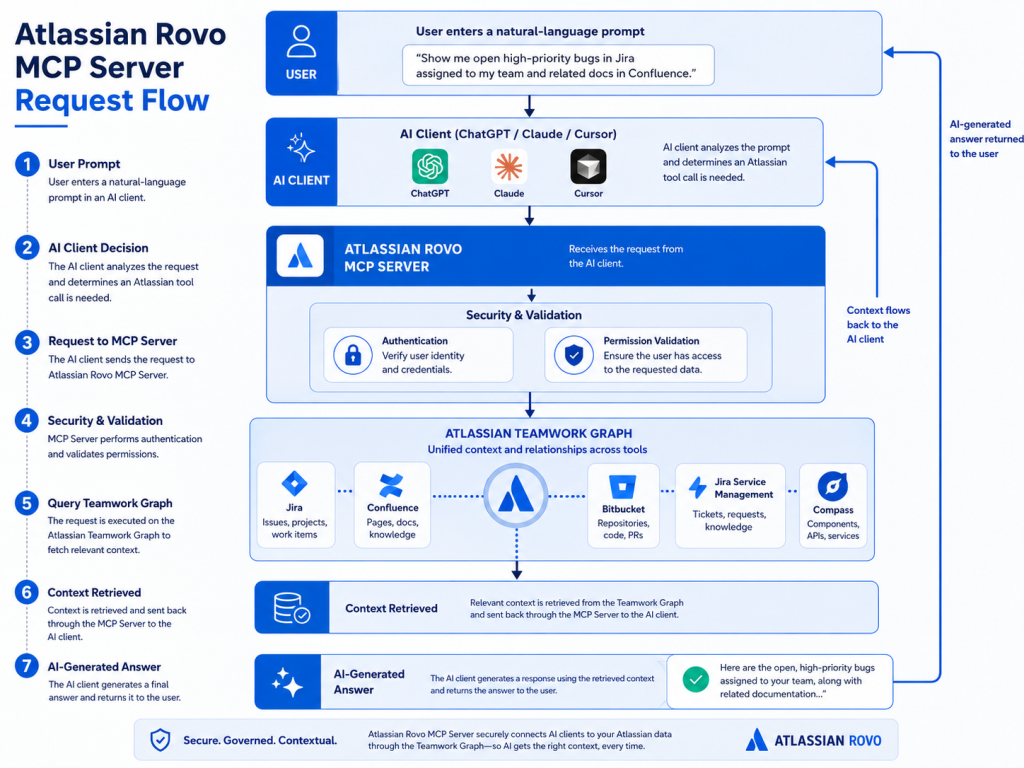 Breaking that down into discrete steps:
-
The AI receives a prompt — a user types something like "summarise this week's P1 incidents" into ChatGPT, Claude, or their IDE.
-
The AI client sends a request — recognising Atlassian data is needed, it calls the appropriate tool on the Rovo MCP Server.
-
MCP authenticates the request — the server verifies identity through OAuth or an API token.
-
Permission check — access is validated against the specific projects or spaces the request touches.
- Searches the Teamwork Graph — rather than querying one isolated system, related context is pulled across connected products.
- Queries Jira, Confluence, Bitbucket, JSM, or Compass — the relevant product API fetches the actual issues, pages, or pull requests.
- Returns structured context — data comes back in a format the AI client can reason over, not a raw text dump.
- The AI generates the answer — the connected client, not the MCP Server, turns that context into the summary or action the user sees.
5. Understanding the Atlassian Rovo MCP Server Architecture in Depth
Zooming in from the request flow, the Rovo MCP Server is really built from four distinct layers, each responsible for one piece of trust and functionality. Understanding these layers matters most for security and platform teams evaluating whether this integration is safe to roll out. Each layer has a narrow, well-defined job, which is part of why the overall system is easier to audit than a patchwork of custom API integrations.
Authentication Layer
This is the entry point for every request — it determines whether a caller gets a seat at the table before any data is touched. Atlassian supports more than one authentication method so different products and clients can connect in the way that suits them best.
- OAuth 2.1 — the primary method, using a browser-based consent flow so users explicitly authorise each connecting client.
- API tokens — a scoped alternative for products that don't yet support full OAuth, such as JSM and Bitbucket Cloud tools.
- Enterprise authentication — admins can layer on domain and IP allowlists so only approved clients and networks can reach the server.
- Permissions are enforced, not bypassed — the AI only accesses data the authenticated user is already authorised to see.
- Roles apply automatically — there's no separate permission model; access simply inherits whatever already exists in your Atlassian Cloud site.
- Least-privilege by design — a user with read-only access to a project cannot use an AI client to write to it.
- Search Jira — run JQL or natural-language searches across issues the user can see.
- Create / Transition Issue — draft a new issue or move it through its workflow, e.g. "In Progress" to "Done".
- Read / Update Confluence — fetch, semantically search, or edit page content.
- Search Bitbucket — browse repositories, pull requests, and pipeline results.
Permission Layer
Arguably the most important part of the architecture, since it stops an AI assistant from becoming a shortcut around existing access controls. There is no parallel permission system to configure or maintain separately — the server always defers to what already exists in Jira and Confluence.
Tool Layer
MCP tools are the discrete, named actions that an AI client is allowed to call — think of them as a curated menu rather than open-ended API access. Grouping tools by product and intent also makes it much easier for admins to reason about exactly what an AI client can and cannot do.
Admins grant or revoke access to these tools at the permission-group level, so a company can allow read access broadly while restricting write actions like issue creation to a trusted group.
Teamwork Graph Layer
The Teamwork Graph is what elevates the Rovo MCP Server from "just another API wrapper" into something genuinely smarter. Instead of treating Jira, Confluence, and Bitbucket as isolated silos, the graph maps the relationships between the work items, people, and documents that live inside them, which is what allows an AI client to reason across products instead of one at a time.
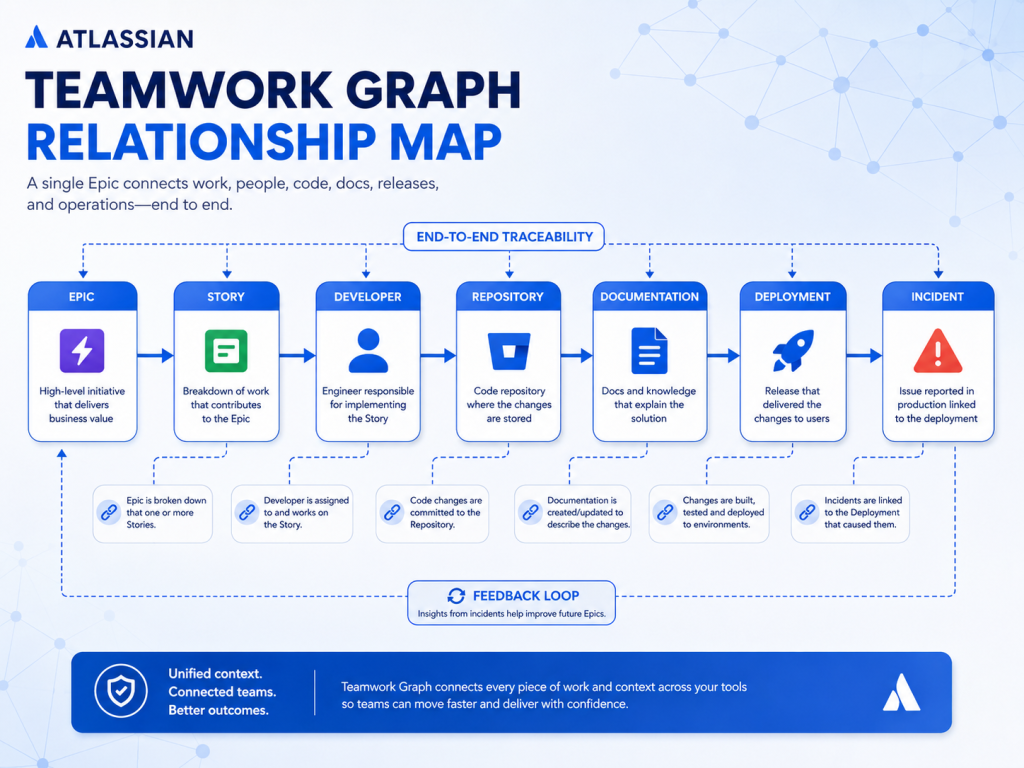 In practice, this means an AI assistant can answer a question like "which recent deployment caused this incident?" by tracing a path across five different Atlassian products, instead of requiring a human to manually cross-reference each tool one at a time.
6. Which Atlassian Products Does the Rovo MCP Server Support
The Rovo MCP Server doesn't just cover Jira — it spans most of the core System of Work products, with the specific action set varying by product and authentication method. Knowing this table well is useful when scoping which teams can benefit first, since not every product supports the same depth of access yet.
|
Product |
Supported Actions |
|
Jira |
Search, create, edit, and transition issues |
|
Confluence |
Read pages and spaces, create and update content |
|
Bitbucket |
Browse repositories, manage pull requests, check pipelines |
|
Jira Service Management |
Read and manage alerts, incidents, and requests |
|
Compass |
Read and update software component and catalog data |
|
Teamwork Graph |
Cross-product context and relationship search |
7. Which AI Clients and Tools Work With Rovo MCP Server
Because the Rovo MCP Server speaks a standard protocol, the list of compatible clients has grown quickly since launch and now spans consumer assistants, IDEs, and platform-level agents. The table below covers the most widely used clients, though it is far from the complete list at this point.
|
AI Client |
Supported |
|
ChatGPT |
✓ |
|
Claude |
✓ |
|
Cursor |
✓ |
|
GitHub Copilot |
✓ |
|
VS Code |
✓ |
|
Gemini |
✓ |
Atlassian has also added support for clients like AWS, Devin, Docker, Figma, and Postman, and any MCP-compatible client can connect via the standard protocol endpoint. Check the official documentation for the current, canonical list before finalising a rollout plan, since new clients continue to be added.
8. Real-World Use Cases for Atlassian Rovo MCP Server Teams
The value of the Atlassian Rovo MCP Server becomes clearest when you look at how different teams actually put it to work day to day, rather than as an abstract architecture diagram. The five categories below cover the patterns Empyra sees most often across engineering, support, and leadership teams.
AI-Powered Jira Management
Jira is usually the first place teams turn once MCP is connected, since so much day-to-day work already lives there. The following patterns are some of the quickest wins for a team just getting started.
- Standup summaries that write themselves from yesterday's completed issues and today's in-progress work.
- Bulk issue triage where an assistant reviews a backlog and suggests priority or label changes.
- Sprint health checks that flag blocked or at-risk stories before they threaten a release date.
Confluence Knowledge Search
Confluence spaces tend to grow faster than anyone can keep track of manually, which makes semantic search one of the most immediately useful capabilities the Rovo MCP Server unlocks.
- Instant answers to questions like "what's our current SOC 2 policy?" without hunting through spaces manually.
- Onboarding acceleration where new hires ask an assistant to summarise team documentation instead of reading it cold.
- Content freshness checks that surface pages contradicting more recent decisions logged elsewhere.
Software Development
With Bitbucket now part of the Rovo MCP Server, coding assistants can reason about code and Jira work items in the same conversation, closing a gap that used to require constant tab-switching.
- Pull request summaries generated from a Bitbucket diff, saving reviewers time before they open the code.
- Code review assistance where an agent cross-references a PR against its linked Jira issue.
- Unfamiliar codebase exploration by asking an assistant to browse repositories and explain a module first.
ITSM Automation
Incident response is one of the highest-pressure moments for any team, and having an AI assistant pull context automatically from Jira Service Management can shave meaningful time off resolution.
- Incident summaries that consolidate related JSM alerts into one readable narrative for on-call engineers.
- Auto-drafted postmortems built from the incident timeline and linked Confluence runbooks.
- Ticket triage that suggests responses based on similar past cases and knowledge-base articles.
Executive Reporting
Leaders rarely need raw Jira data — they need a synthesised view of progress, and this is where cross-product context via the Teamwork Graph pays off most visibly.
- Weekly status reports compiled automatically across multiple Jira projects, no copy-pasting into a deck.
- Sprint summaries that translate engineering detail into a plain-language update for stakeholders.
- Project health snapshots showing what's on track, at risk, or blocked, based on real work-item data.
9. Example AI Prompts You Can Use With Rovo MCP Server
One of the easiest ways to understand the practical value of the Rovo MCP Server is to see the kind of natural-language requests it enables once an AI client is connected. None of the examples below require the user to open Jira, run a JQL query, or dig through Confluence spaces manually.
- "Summarise all P1 incidents opened this week."
- "Create Jira issues from these meeting notes."
- "Show blocked stories in Sprint 42."
- "Find the latest Confluence page about SOC 2."
- "Draft release notes from completed Jira issues."
The AI client handles the retrieval and phrasing, while the Rovo MCP Server quietly makes sure it only ever sees the data the signed-in user is already allowed to see.
10. Security and Enterprise Governance for Rovo MCP Server
For most enterprises, security is where the real evaluation happens, and it's the area Atlassian has invested in most heavily as the Rovo MCP Server has matured from beta to general availability. The controls below are what typically satisfy a security review.
- OAuth 2.1 authentication — every connection begins with an explicit, browser-based consent flow.
- Permission inheritance — AI clients never get broader access than the signed-in user already has.
- Audit logs — tool invocations and first-time app installs are logged for full visibility.
- AI usage controls — admins enable or disable specific tools and auth methods at the org level.
- Approved client allowlists — domain allowlisting lets admins approve which external AI tools can connect.
- IP allowlist enforcement — tool calls are checked against configured IP ranges, even after authentication.
Atlassian has been direct here: MCP clients can act on every connected product using the signed-in user's existing permissions, so the recommended practice is least privilege, reviewing high-impact write actions before confirming, and monitoring audit logs for unusual activity.
11. Key Benefits of Using the Atlassian Rovo MCP Server
Pulled together, the architecture and governance controls translate into a fairly clear set of practical benefits for teams that adopt it. Most organisations notice the productivity gains first, but the security and consistency benefits tend to matter just as much over time.
- Better AI context — assistants answer with real, current data instead of guessing at project details.
- Secure enterprise AI — every request respects existing permissions, so there's no separate security model to manage.
- Faster workflows — summaries, reports, and issue creation happen in seconds inside the tool people already use.
- Cross-product search — the Teamwork Graph lets one query span Jira, Confluence, and Bitbucket at once.
- Less manual work — routine tasks like status updates and ticket triage can be delegated to an AI agent.
- Better documentation — AI-assisted drafting keeps Confluence pages current instead of stale.
- Higher productivity — less time context-switching between tabs, more time on real decisions.
12. Atlassian Rovo MCP Server vs Traditional API Integrations
|
Traditional API Integration |
Atlassian Rovo MCP Server |
|
Requires custom code per AI tool |
Uses a standard protocol any MCP client can speak |
|
Vendor-specific implementation |
Universal — works across ChatGPT, Claude, Cursor, and more |
|
Difficult, ongoing maintenance |
Centrally maintained and updated by Atlassian |
|
Multiple separate integrations to manage |
A single integration layer covering multiple products |
|
Limited context for AI reasoning |
Rich, cross-product context via the Teamwork Graph |
13. Common Misconceptions About the Atlassian Rovo MCP Server
A few misunderstandings come up repeatedly whenever this topic is discussed with IT and security teams, so it's worth addressing the most common ones directly before you plan a rollout.
"Is Rovo MCP an AI?"
No. It doesn't generate answers on its own; it's the secure connector that supplies data to whichever AI client is asking. The reasoning and language generation always happen inside the connected client, not the server itself.
"Does it replace Jira?"
No. Jira and Confluence remain the systems of record — the server simply gives external AI tools a sanctioned way to read and write to them. Nothing about how your teams use Jira day to day needs to change.
"Can it bypass permissions?"
No. Every request is checked against the authenticated user's existing permissions before any data is returned, and this check happens on every single call, not just at initial connection.
"Does it store my data?"
It's designed as a pass-through layer for authentication and routing, not a separate data warehouse. Even so, review Atlassian's current documentation for the specifics that apply to your site before finalising a security assessment.
"Does it work only with ChatGPT?"
No. The ChatGPT connector made headlines, but the server works with any MCP-compatible client, including Claude, Cursor, VS Code, and Gemini, with more being added regularly.
14. Why Organisations Should Adopt the Rovo MCP Server
For decision-makers weighing whether this is worth prioritising, the case tends to come down to a handful of strategic factors rather than any single feature. Taken together, these factors explain why so many enterprises are moving quickly from evaluation to rollout.
- Enterprise AI without shadow IT — replaces informal copy-pasting of Jira data into AI tools with a governed connection IT actually controls.
- Secure governance built in — audit logs, allowlists, and permission inheritance mean security teams aren't building guardrails from scratch.
- Productivity gains that compound — AI-assisted workflows on top of real Jira and Confluence context save time otherwise spent on manual updates and searches.
- Reduced integration complexity — one connection point replaces a growing list of one-off integrations as new AI tools emerge.
- Future-ready architecture — MCP is an open, widely adopted standard, so adopting it avoids lock-in to a single AI vendor's roadmap.
- A foundation for agentic workflows — AI agents taking on multi-step tasks need exactly this kind of governed, permission-aware access.
15. How Empyra Helps Businesses Implement Atlassian AI
Rolling out Rovo and the Rovo MCP Server well takes more than flipping a switch in admin settings — it takes a clear-eyed look at your Jira and Confluence setup, permission model, and team readiness. As an Atlassian platinum Solution Partner, this is the implementation work Empyra does day to day, and the areas below are where clients most often ask for support.
- AI readiness assessment — reviewing your Atlassian Cloud setup to identify what needs cleaning up first.
- Jira optimisation — refining workflows and fields so AI-generated summaries and issues are actually accurate.
- Confluence governance — organising spaces and permissions so AI search surfaces current, correct information.
- Rovo implementation — configuring Rovo AI features and agents to match how your teams work.
- MCP adoption guidance — helping you choose which AI clients and tools to enable first, and in what order.
- Security and permission review — auditing your access model before AI tools can read or write to it.
- User enablement and training — practical prompts and workflows so adoption sticks past the initial rollout.
- Ongoing managed support — help as Atlassian expands supported products, clients, and governance features.
Final Thoughts on Adopting the Atlassian Rovo MCP Server
The Atlassian Rovo MCP Server marks a significant step forward in securely connecting enterprise AI with business-critical knowledge stored in Jira, Confluence, and other Atlassian tools. Rather than replacing existing Atlassian applications or Rovo's AI capabilities, it extends trusted access to external AI clients such as ChatGPT, Claude, Cursor, and modern IDEs through the open Model Context Protocol (MCP).
Its greatest strength lies in combining enterprise-grade security, permission-aware access, auditability, and flexibility within a standards-based integration framework. As AI adoption continues to accelerate, organisations that establish strong governance, well-managed permissions, and a clear implementation strategy today will be better positioned to leverage future advancements, including broader Atlassian integrations, enhanced AI clients, and more intelligent agentic workflows powered by the Teamwork Graph.
.png?width=364&height=116&name=sales%20radar%20ai%20logo%202026%20%20(280%20x%2084%20px).png)



.svg)