.svg)
-Sep-17-2026-08-20-34-2634-AM.svg)
Expert Atlassian Integration Services for Jira, ITSM & DevOps
Atlassian Integration Services connect Jira, Confluence, Jira Service Management, and other Atlassian tools with third-party systems such as CRM, ERP, DevOps, and ITSM platforms. These services include integration design, API configuration, middleware setup, data synchronization, workflow automation, and security compliance. The goal is to streamline cross-system collaboration, eliminate data silos, and improve operational efficiency across teams.
Atlassian Integration Services That Work For Your Business
You probably have problems with your tools not working together which can cause a lot of issues. For example your data might not be up to date. You might have security problems or your workflow might not be very good. These kinds of problems can cause confusion make your work slower and mean you miss out on opportunities. In the end this can make your business less competitive.
We want to help people who run businesses do a job. We know that every business is different, with its way of doing things its own tools and its own goals. Our Atlassian integration services are made to be flexible so they can work with your business. They can grow with you. We make sure our services meet your business needs. Atlassian integration services are what we offer to help you. Our goal is to provide integration services that work for your business.
.png?width=1024&height=1024&name=October%20_SM%20(5).png)
Key Benefits for Leaders and Decision-Makers

Enhanced Efficiency
.png?width=600&height=576&name=Heading%20(2).png)
Improved Collaboration

Greater Visibility
Scalability & Flexibility

Data-Driven Insights

Security & Compliance
Integrate Atlassian with Your CRM, ERP, and DevOps
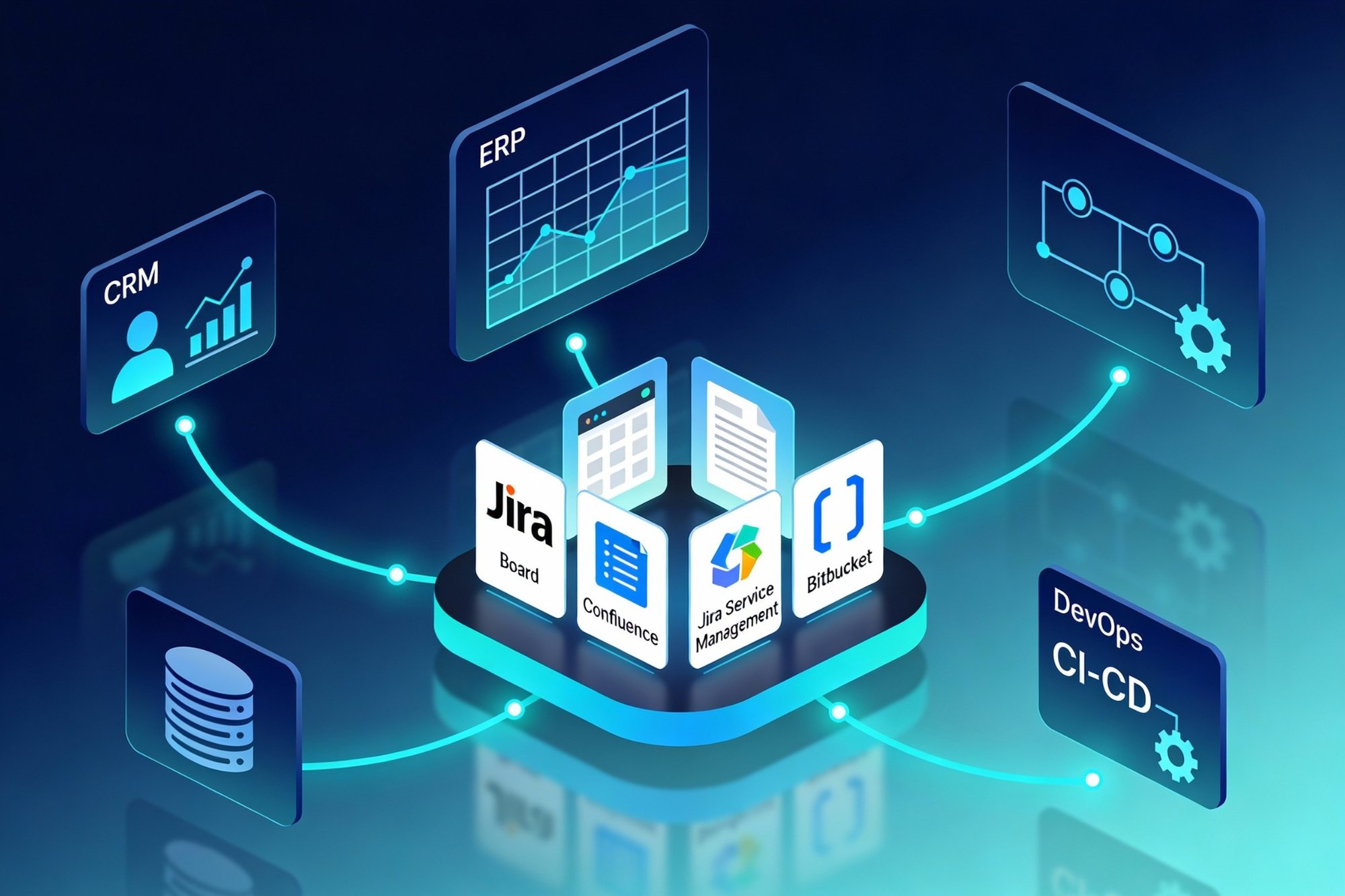
Beyond Atlassian products, we specialize in integrating Atlassian tools with a wide range of third-party applications and services. Whether it's CRM systems, ERP platforms, or other enterprise software, Our goal is to make sure all your tools work well together.
CRM Integration
You can link your customer relationship management system with Jira. This gives your teams a view of customer interactions. It also helps streamline your customer service processes. Jira and CRM systems work better together.
ERP Integration
You can connect your enterprise resource planning system with Jira. This helps with project tracking and resource management. It ensures projects are delivered on time and, within budget. Jira and ERP systems are a match.
DevOps Integration
Jira can be integrated with your CI/CD pipelines. It can also be connected with monitoring tools and other DevOps tools. This creates an efficient development environment.
Empyra’s Atlassian Tool Stack








Why Choose Empyra?

Proven Expertise

Tailored Solutions

Collaborative Approach

Commitment to Excellence
What Our Customers Have to Say
"Empyra has been extremely helpful in getting Cohen & Company’s Atlassian environments up and running. They have been able to provide great guidance in the options available and also have been able to execute on implementation of those options in a timely and effective manner. They have helped us bring in other departments outside of IT to utilize the service desk options to manage requests and workflows with great reviews from those teams."

Chief Technology Officer
Cohen and Company
"The Empyra consultant has allowed us to take the use of Atlassian's Jira product to new levels across the organization, providing significant improvements in workflows in IT as well as many Finance and Operations teams. There have been some complex requests that Empyra have dealt with, and all have been completed professionally, collaboratively, and efficiently. Empyra have always been super responsive, and are keen to work with the various OTC teams to solve their individual business needs."
.png?width=64&height=63&name=Group%2037380%20(1).png)
Roger Abrahams, Senior Vice President - IT
OTC Industrial Technologies
"As our exclusive Atlassian partner, we brought Empyra in to plan, execute and manage our Atlassian migration to the cloud. From pre to post migration activities and support, Empyra was there to support our project team every step of the way. The migration went as smoothly as possible, and there was no major impact to our business operations."
.png?width=64&height=63&name=Group%2037380%20(2).png)
Sr. Manager, Portfolio Management
"I was very pleased with the consistent can-do attitude the Empyra team brought to each meeting, they quickly came up with solutions, suggestions, recommendations on our various challenges and pitfalls during the migration. My team and I really appreciated that the Empyra team made themselves available 24/7 to troubleshoot with us or answered any questions raised in a timely manner."
Sr. Manager, Portfolio Management
"I'd like to extend a heartfelt thank you to the Empyra team for their exceptional support during our migration of Confluence and Jira from server to cloud including 14 managed apps. Their expertise and dedication were instrumental in navigating this complex transition smoothly. We truly couldn't have achieved this milestone without their guidance and hard work. Their efforts were a crucial factor in the success of our migration project, and we are deeply appreciative of their partnership. Thank you, Empyra, for being such a reliable and effective ally in our journey to the cloud!"
Gavi Ornelas-Morales, Tools Support, Supervisor
University of California Office of the President





Start Your Atlassian Integration Journey
Connect Jira, Confluence, and your business tools with a scalable, secure integration strategy. Talk to our Atlassian experts to design, implement, and optimize integrations tailored to your workflows.
-3.svg)
.png?width=364&height=116&name=sales%20radar%20ai%20logo%202026%20%20(280%20x%2084%20px).png)





.svg)