.svg)

monday.com Project Management Software with Built-In AI for Modern Teams
As a certified monday.com partner, Empyra helps organizations implement and maximize monday.com's AI Work Platform, combining industry-leading project management with monday Sidekick, AI Blocks, and autonomous Agents that actively monitor work, surface risks, and reduce the manual effort that slows teams down. Whether you're managing a single team or a complex project portfolio, Empyra ensures your organization gets to outcomes faster.
Key Features of monday.com Project Management
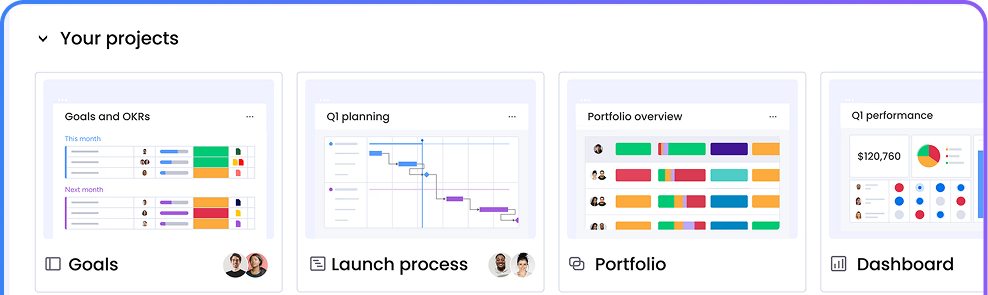
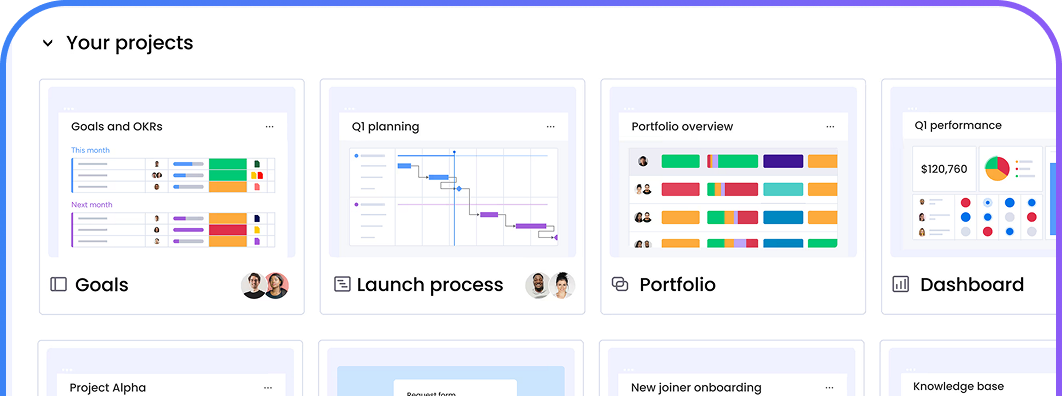
monday.com Project Management Software offers a flexible and visual platform to plan, track, collaborate, and deliver projects efficiently. Its intuitive features help teams streamline workflows, stay aligned, and make data-driven decisions. Enhanced by monday AI, Sidekick, and intelligent automations, teams can reduce manual effort, improve project visibility, and accelerate project delivery.
%20(1).png?width=2000&height=1125&name=Heading%20(49)%20(1).png)
Visual & Customizable
Centralized Collaboration
Task & Workflow Management
Assign tasks, track progress, and automate repetitive work with ease. Empyra enhances workflows with monday AI Blocks and intelligent automations that prioritize work, generate updates, and reduce manual effort.
Planning & Initiation
Monitoring & Reporting
Gain real-time visibility into project performance with AI-powered dashboards, automated summaries, Risk Insights, and Portfolio AI Reports that help teams identify risks earlier and make faster decisions.
AI Blocks & Autonomous Agents
How monday.com Project Management Software Works for Project Management
monday.com Project Management Software guides teams through every project stage, from planning to delivery, using a structured, visual, and collaborative system designed to improve clarity, accountability, and execution. Enhanced by monday AI, Sidekick, and intelligent automations, teams can streamline decision-making, reduce manual effort, and keep projects moving forward with greater efficiency and visibility.
%20(1).png?width=2000&height=1125&name=Heading%20(50)%20(1).png)
Plan Projects Smarter with AI
%20(1).png?width=2000&height=1125&name=Heading%20(51)%20(1).png)
Build Structured Workflows Faster
%20(1).png?width=2000&height=1125&name=Heading%20(52)%20(1).png)
Execute Work with Intelligent Automation
%20(1).png?width=2000&height=1125&name=Heading%20(53)%20(1).png)
Track Progress with AI-Powered Insights
Monitor project health through real-time dashboards, AI-generated summaries, Risk Insights, and reporting tools that help teams identify issues earlier, improve visibility, and make informed decisions faster.
%20(1).png?width=2000&height=1125&name=Heading%20(54)%20(1).png)
Connect Your Tools and Data Seamlessly
Integrate monday.com with Slack, Microsoft Teams, Google Workspace, Salesforce, and other business tools to create connected workflows powered by automation, collaboration, and actionable insights.
Task and Workflow Management with monday.com
monday.com Project Management Software enables teams to manage tasks and workflows with clarity, automation, and accountability, ensuring work moves smoothly across teams, stages, and project timelines. Enhanced by monday AI, intelligent automations, and AI Blocks, teams can reduce manual effort, improve visibility, and keep work progressing efficiently.
%20(1).png?width=2000&height=1125&name=Heading%20(55)%20(1).png)
Create, Assign, and Track Tasks
Easily create tasks, assign owners, set statuses, and monitor progress in real time. monday AI helps teams prioritize work, surface relevant updates, and maintain accountability across every stage of project execution.
%20(1).png?width=2000&height=1125&name=Heading%20(56)%20(1).png)
Manage Dependencies and Priorities
%20(1).png?width=2000&height=1125&name=Heading%20(58)%20(1).png)
Automate Repetitive Workflows
%20(1).png?width=2000&height=1125&name=Heading%20(59)%20(1).png)
Coordinate Work Across Teams
Keep teams aligned with centralized communication, shared workspaces, and real-time updates. monday AI and intelligent automations help streamline collaboration, improve visibility, and ensure work moves seamlessly across departments.
What Our Customers Have to Say
"monday.com and Empyra provided us with a scalable solution that allows my team to respond quickly to client requests. Additionally, the user-friendly UI with improved workflows helped our underwriting team manage the business in one platform alongside business development. Empyra has done a wonderful job and I envision a long-term relationship on a go-forward basis."
-Aug-01-2024-09-50-04-7382-AM.png?width=100&height=100&name=Untitled%20design%20(14)-Aug-01-2024-09-50-04-7382-AM.png)
Daniel Cottrel
Managing Partner, VasarcaRx
"monday.com and Empyra provided us with a scalable solution that allows my team to respond quickly to client requests. Additionally, the user-friendly UI with improved workflows helped our underwriting team manage the business in one platform alongside business development. Empyra has done a wonderful job and I envision a long-term relationship on a go-forward basis."
Daniel Cottrel
Managing Partner, VasarcaRx
"monday.com and Empyra provided us with a scalable solution that allows my team to respond quickly to client requests. Additionally, the user-friendly UI with improved workflows helped our underwriting team manage the business in one platform alongside business development. Empyra has done a wonderful job and I envision a long-term relationship on a go-forward basis."
Daniel Cottrel
Managing Partner, VasarcaRx
"monday.com and Empyra provided us with a scalable solution that allows my team to respond quickly to client requests. Additionally, the user-friendly UI with improved workflows helped our underwriting team manage the business in one platform alongside business development. Empyra has done a wonderful job and I envision a long-term relationship on a go-forward basis."
Daniel Cottrel
Managing Partner, VasarcaRx
"monday.com and Empyra provided us with a scalable solution that allows my team to respond quickly to client requests. Additionally, the user-friendly UI with improved workflows helped our underwriting team manage the business in one platform alongside business development. Empyra has done a wonderful job and I envision a long-term relationship on a go-forward basis."
Daniel Cottrel
Managing Partner, VasarcaRx
"monday.com and Empyra provided us with a scalable solution that allows my team to respond quickly to client requests. Additionally, the user-friendly UI with improved workflows helped our underwriting team manage the business in one platform alongside business development. Empyra has done a wonderful job and I envision a long-term relationship on a go-forward basis."
Daniel Cottrel
Managing Partner, VasarcaRx

Book a Free monday.com Project Management Consultation
Connect with our monday.com experts to evaluate your project management needs and goals. Get a free consultation with tailored recommendations, setup guidance, and best practices.

.png?width=364&height=116&name=sales%20radar%20ai%20logo%202026%20%20(280%20x%2084%20px).png)




.svg)