Untitled design (20)-1

Atlassian Rovo: AI Powered Search, Chat & Agents

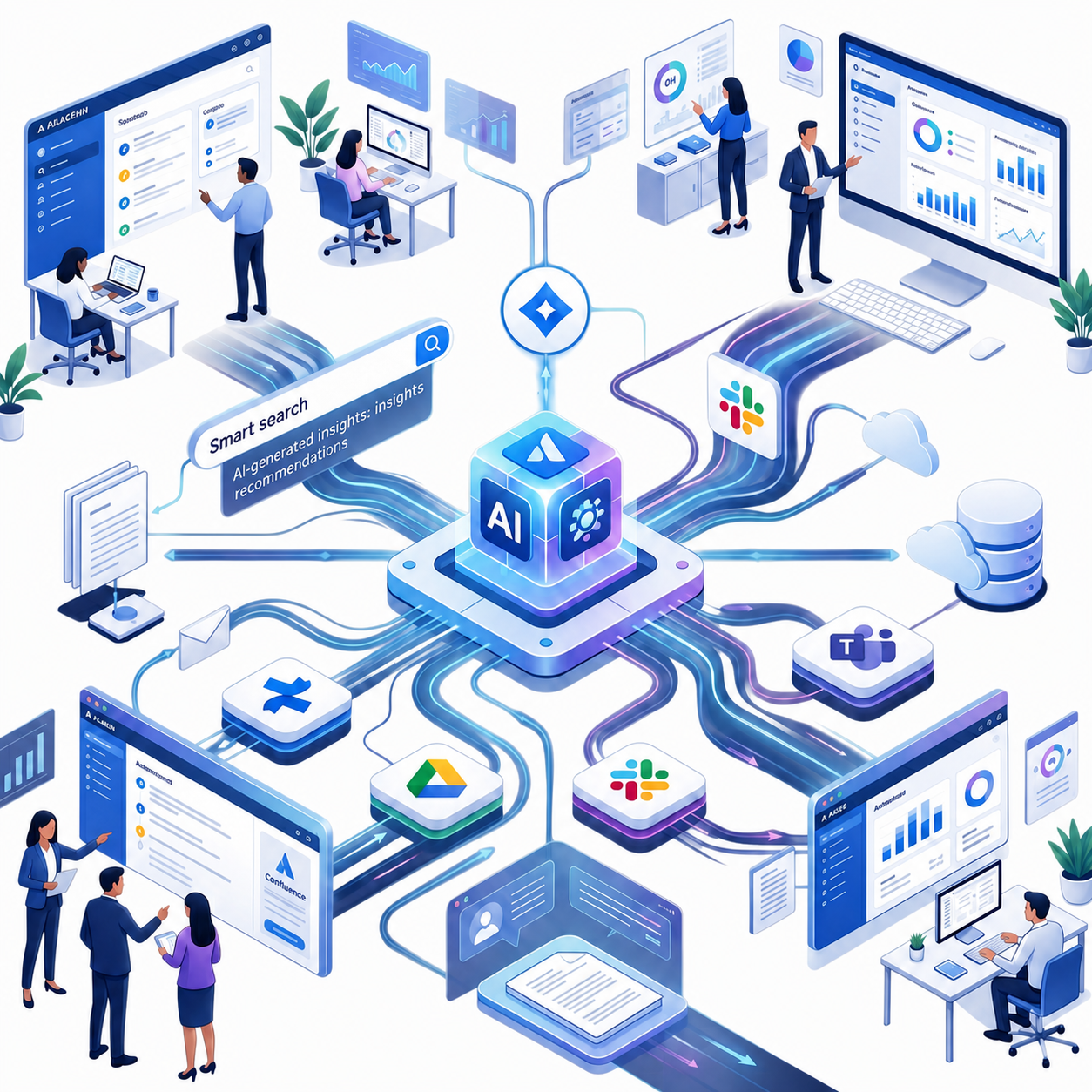
Atlassian Rovo is Atlassian's AI platform for enterprise search, chat and agents. It connects Jira, Confluence, Google Drive, Slack, Microsoft Teams and many other tools through the Teamwork Graph, which Atlassian says now holds more than 250 billion objects and relationships. At Team '26 Europe, Atlassian expanded Rovo well beyond search and chat. It now includes a native desktop app, a mobile app, Rovo Work (a cloud workspace for long-running tasks), source code context, and AMP (Agentic Multiplayer Protocol) so people and AI agents can work together with clear identity and governance. Our Atlassian AI consulting team helps you plan, implement and scale Rovo across your organization.

Trusted by 1000+ happy customers from internationally

Capital Group
Victoria
Rocky
CTC
NASA
bcg
Lbrand
carribean

How Atlassian Rovo Simplifies Enterprise Search and Workflow Automation

Atlassian Rovo solves one of the most common enterprise challenges—information scattered across multiple tools and teams. In most organizations, data silos and disconnected platforms make it difficult to find relevant knowledge quickly, leading to slower decisions and reduced productivity. Rovo addresses this by using AI to unify search, connect data sources, and enable automated workflows across the enterprise.

At its core, Rovo combines intelligent enterprise search with AI-driven assistance to turn fragmented information into actionable insights. Instead of just retrieving data, it helps teams understand context, connect related work, and execute tasks directly within their workflow. This is powered by AI capabilities and a connected data model through the Teamwork Graph, which links people, content, and projects into a single intelligent system.

Not sure how Rovo differs from the AI features already built into Jira and Confluence? Read our guide on the difference between Atlassian Intelligence and Rovo.
Solid White Background With No Subject

Rovo Search

  • Cross-tool Discovery:Finds exact documents, data, or insights without needing to know which specific platform holds them.
  • Contextual Insights: Provides knowledge cards and summarizes company-specific data right inside your search results.
  • Faster results: Atlassian reports that Rovo search results are about 40% faster than they were a year ago.
  • More connectors: More than 20 new connectors were added in six months, including Zoom (for meeting transcripts) and Gong (for sales calls).
  • Code and data in search: Search results can now include source code and live business data, not only documents and tickets.

Rovo Chat

  • Action-Oriented: Users can chat with the AI to brainstorm, ask clarifying questions, or give it commands (e.g., “Summarize the recent meeting and draft a Jira ticket for this task”).

  • Multi-tasking: Acts as a teammate that helps resolve bottlenecks and manage projects dynamically.
  • Scheduled chats: Automate repeat requests such as a daily to-do list or a weekly summary.
  • Pinned and shareable chats: Pin the chats you use most, and share a chat with specific people using the same permission model as Confluence pages.
  • Voice input: Speak your request instead of typing it.

Rovo Agents & Studio

  • Automated Workflows:Agents can be assigned to tasks such as updating Jira backlogs, organizing Confluence pages, or supporting employee onboarding.
  • Rovo Studio: Allows users to build custom AI agents and workflows using natural language or connect external tools via the MCP (Model Context Protocol) gallery.
  • Agent session memory: Rovo now saves what agents learn in a session so the next person or agent working in the same area does not start from zero.
  • Agents with their own identity: Rovo and third-party agents can have dedicated accounts, so you control what each agent can see and do.
Announcements

What's New in Atlassian Rovo: Team '26 Europe Announcements

At Team '26 Europe, Atlassian announced a large set of Rovo and platform updates built around three ideas: context (what your AI knows), collaboration (how people and agents work together) and confidence (how you stay in control as work speeds up). Here is what matters for enterprise teams.

New Rovo desktop and mobile apps

  • A native Rovo desktop app that opens from a keyboard shortcut, on top of any other app.
  • Drag and drop recent files straight into an email or message, without hunting for links.
  • Click and hold any window to add it as context for a Rovo chat.
  • A new Rovo mobile app to check chats and agent tasks on the go.
  • Rovo is also available on the web, embedded inside Jira and Confluence, and in the command line (CLI).

A bigger and smarter Teamwork Graph

  • 250+ billion objects and relationships, up from 150 billion six months earlier.
  • New Data context: live metadata from more than 20 sources such as Databricks, Snowflake, Tableau and BigQuery, so Rovo can answer questions and build charts inside Confluence pages.
  • Source code context (generally available): Rovo understands functions, symbols and classes across GitHub and Bitbucket, including Data Center versions. GitLab support is planned next.
  • Agent sessions as context: conversations with agents are stored in the graph and distilled into reusable session memory, which Atlassian says saves tokens across tools.

AMP: Agentic Multiplayer Protocol

AMP is Atlassian's framework for people and AI agents to work together, on and off the Atlassian platform. It has three layers:

  • Collaboration: agents work live or in the background, show their progress, and ask for input when needed.
  • Identity and presence: you can see which person or agent did what, with clear attribution.
  • Governance: scoped permissions and controls so people stay in charge of decisions. 

Loom upgrades

  • Loom desktop app for Mac.
  • Record for an agent: talk, point and select on screen, and Loom turns it into a structured prompt for an AI agent.
  • AI Overlays: automatically generated motion graphics for your videos.
  • Interactive PR reviews: each pull request becomes a short video that explains what changed, how it was built and how it was tested.

New Atlassian MCP server

The rebuilt Atlassian MCP server lets AI tools such as Claude, ChatGPT, Cursor and Figma use your Teamwork Graph context.

  • About 220 tools, compared with dozens before.
  • Reads unstructured content such as whiteboards.
  • Works with Forge apps and Marketplace apps.
  • Access governed through Atlassian Guard.
  • Up to 25% fewer tokens, according to Atlassian.

Rovo Work: AI that finishes bigger jobs

Rovo Work gives each Rovo session its own secure cloud sandbox. It can handle multi-step tasks that take minutes or even hours, such as deep research, building calculators or prototypes, and writing code, even after you close your laptop. It uses the same Teamwork Graph, follows your existing permissions, and supports enterprise settings such as data residency.

Artifacts app

Artifacts is a new place to store, find, share and secure AI-generated outputs such as HTML pages, prototypes, 3D renders and Markdown files. Items can come from Rovo, ChatGPT, Codex and other tools, or be dragged in. Artifacts stay live when embedded in Confluence pages, Jira work items, whiteboards and projects, and they are searchable and permissioned.

Agent sessions inside Jira

Agent sessions from local and cloud agents (including Claude, Cursor, Codex and Rovo) can now appear on the Jira board. Teams can see which agents need input, reply to them from Jira, and drag an untracked session onto the board to create or link a work item.

Empyra’s Atlassian Tool Stack

Jira
confluence (1)
Atlassian Intelligence-1-1
Rovo (1)
Jira Product Discovery
Bitbucket
Jira Align
jira Service Management (1)
Bamboo
Trello

ROI From Atlassian Rovo:Productivity and Efficiency Gains

Atlassian Rovo delivers strong ROI by improving search efficiency, reducing operational delays, and accelerating execution across engineering, support, and business teams. By combining AI-powered search with workflow automation, organizations gain measurable productivity improvements and faster decision-making across departments.

Search that actually finds what you need

Enterprise search becomes significantly more accurate as Rovo connects Atlassian tools and 40+ integrated apps, helping users save 30+ minutes daily and improve search success rates by up to 60%.

Less time searching, more time working

Rovo reduces search time across connected systems by nearly 70%, enabling teams to access relevant context instantly and focus more on productive execution instead of tool switching.

Reduced support workload

Support teams benefit from 15–40% ticket deflection and nearly 60% fewer repetitive queries as AI-powered automation handles routine requests and improves self-service efficiency.

Faster engineering delivery cycles

Engineering teams experience up to 45% faster PR cycles and around 40% reduced review time as AI assistance minimizes context switching and streamlines development workflows.

Faster rollout and higher adoption rates

Organizations achieve 25–35% faster deployment and up to 50% higher adoption by using structured onboarding, role-based training, and effective change management strategies.

Smarter decisions with faster insights

Teams make decisions up to 50% faster by using AI-generated summaries and connected data insights that provide instant cross-tool visibility and reduce reporting delays.

Control over AI spend and agent quality

As agent use grows, cost and quality need tracking. Atlassian's new tools show how agents are performing and how much AI is costing. For example, Atlassian shared that in one month, 59% of 3,200 documentation agent runs could have used a cheaper model, and its Strategy collection now shows AI spend against budget by team, model provider and initiative (open beta). Empyra helps you set this up so ROI stays visible.

Want to understand usage in detail? Read where your Rovo credits really go.

Approach to Implement Atlassian Rovo in Enterprises

Implementing Atlassian Rovo in an enterprise requires a structured, phased rollout that ensures fast time-to-value while maintaining security, governance, and scalability. The approach is designed to move from assessment to full-scale adoption with measurable ROI at every stage. Each phase focuses on delivering tangible outcomes such as improved search efficiency, automation speed, and knowledge accessibility.

Readiness & Use-Case Assessment

This initial phase focuses on identifying 3–6 high-value enterprise use cases and estimating potential ROI over a 3–6 month period. Teams define success metrics and pilot opportunities to ensure alignment with business goals.

Deliverables: Assessment report, ROI analysis, and pilot recommendations.

Activate & Secure Setup

Organizations enable enterprise-wide activation within 3–5 days, followed by permission configuration (2–3 days) and compliance/data residency setup (2–3 days). This ensures secure and controlled rollout across teams.
Deliverables: Org activation, access controls, and compliance documentation.

Where data residency matters, we also plan for Atlassian's EU AI inference, which is rolling out so prompts, model processing and results can stay within Europe.

Connect & Configure Search

Rovo is integrated with enterprise tools like Google Workspace, Microsoft 365, Slack, and GitHub to enable unified search. Optimization and analytics are configured to improve relevance and visibility.

Outcome: 60% higher successful search rate and approximately 30 minutes saved per user per day.

We also connect newer sources such as Zoom, Gong, source code repositories and structured data platforms like Snowflake, Databricks and BigQuery, so Rovo answers reflect your real work.

Pilot Chat & Agents

This phase introduces Rovo Chat and pre-built agents in a controlled environment. Teams validate performance with real users to ensure accuracy, usability, and workflow efficiency before scaling.

Outcome: Up to 70% faster answer discovery and validated, production-ready AI agents.

Optimize Knowledge & Automation

Enterprise knowledge structures in tools like Confluence are improved through better metadata, permissions, and cross-product automation. Natural language workflows and reusable automation libraries are introduced.

Outcome: 40–60% improvement in AI answer quality and 50% faster future automations.

Before scaling automations, review how Jira automation pricing is changing from flow runs to steps.

Training, Governance & Value Tracking

Organizations scale adoption through role-based training, power-user certification, and governance frameworks to prevent agent sprawl. Continuous monthly reviews track adoption and performance.

Outcome: Maintains around 85% agent effectiveness with consistent ROI and adoption growth insights.

Agent Governance & AI Spend Control

As agents join your teams, we set up dedicated agent accounts (non-human identities), review MCP and connector access, configure data loss prevention policies, and track agent effectiveness and AI spend. This keeps agent sprawl and unexpected token costs under control.

Deliverables: Agent access model, governance guidelines, and an AI spend and effectiveness dashboard plan.

Optimize

Continuously refine workflows and automations based on data and user feedback.

Support

Empyra provides training, support and guidance to ensure you can keep using Jira Work Management effectively and grow with it.We support your Jira Work Management needs.

Untitled design - 2025-12-17T165659.979

How Rovo Integrates with Jira & Confluence

Atlassian Rovo is deeply embedded within the Atlassian ecosystem, enabling seamless connectivity between work management and knowledge systems. It helps teams retrieve context-rich insights directly from Jira issues, Confluence pages, and connected third-party tools. This integration ensures users don’t just find information—they understand relationships across projects, documentation, and conversations.

Jira integration capabilities

Atlassian Rovo integrates with Jira to provide contextual issue search and smarter workflow navigation. It helps users quickly find tickets, understand dependencies, and track work progress without manual filtering.

Confluence knowledge search

Within Confluence, Rovo enables semantic search across documentation and delivers context-aware answers from multiple pages. This helps teams instantly surface relevant knowledge without needing exact keywords.

Cross-platform connectivity

Atlassian Rovo connects data across Jira, Confluence, and external tools like Slack and Google Drive to create a unified search experience. It allows users to discover related work, conversations, and files from a single interface.

Agent sessions on your Jira board

Agent work that used to stay hidden in a developer's terminal can now show up in Jira. Teams see every active agent, which ones are stuck, and can answer an agent's question from the board. Untracked agent sessions can be dragged onto the board to create a work item automatically, or linked to existing work.

Planner in Confluence and Jira

Planner lets people and agents build technical plans together in real time. It pulls context from your Teamwork Graph, adds a readiness assessment showing what is still missing, and helps turn the finished specs into Jira work items. It works from both Jira and Confluence.

Source code context

Rovo can search your code semantically, so a question like "which screens will not work in dark mode?" finds the right files even when the words do not appear in the code. The same code context is available in Rovo chat, in Jira and Confluence search, and through the MCP server.

Benefits of Atlassian Rovo For Enterprises

Atlassian Rovo helps enterprises accelerate decision-making, improve knowledge access, and reduce operational friction through AI-powered search and automation. It connects teams, tools, and data into a unified experience that improves efficiency across the organization. These capabilities translate into stronger collaboration and measurable productivity gains at scale.

Improved team productivity

Atlassian Rovo reduces time spent searching for information by surfacing relevant work instantly. Integrated with Jira, it helps teams quickly access issues, updates, and dependencies.

Faster knowledge access

Atlassian Rovo enables AI-driven search across platforms like Confluence to deliver precise, context-aware answers. This reduces time spent looking for documents and improves decision speed.

Smarter collaboration with AI

Atlassian Rovo connects conversations, tasks, and documents across tools to keep teams aligned. It recommends relevant context automatically, improving collaboration across departments.

Reduced repetitive work through automation

Atlassian Rovo automates repetitive search and information retrieval tasks. This allows teams to focus more on strategic work instead of manual coordination.

Better cross-tool visibility

Atlassian Rovo provides visibility across Jira, Confluence, and connected tools like Slack and Google Drive. It helps teams understand dependencies and context across multiple systems in one place.

Faster decision-making at scale

Atlassian Rovo supports faster enterprise decisions by delivering real-time insights from distributed data sources. Leaders can make informed choices without waiting for manual reports or updates.

Rovo Use Cases Across Teams and Enterprise Functions

Atlassian Rovo and its Rovo Agents help enterprises automate workflows, accelerate knowledge discovery, and improve decision-making across departments. By combining AI-driven search with intelligent agents, teams can resolve tasks faster and reduce dependency on manual coordination. This makes Rovo highly effective across IT, HR, engineering, and support functions.

IT & Operations use cases

Rovo Agents help IT and operations teams resolve incidents faster by surfacing related Jira tickets, logs and past fixes. New incident command center features bring incident, code and people context together, suggest likely root causes and recommend next steps. Change risk assessment also reviews complex releases and flags risks before deployment.

HR & onboarding use cases

Rovo Agents help HR teams by giving new employees instant answers across policies, documents and Confluence pages. Rovo can now generate tailored onboarding plans in Confluence for each new hire, and HR and IT teams can track onboarding tasks whether they are assigned to a person or an agent.

Engineering & Dev teams

Rovo supports engineering teams with technical documentation, architecture decisions and Jira issue history, and now with semantic code search across connected repositories. Interactive PR reviews with Loom turn long pull requests into short videos, and agent sessions on the Jira board show what every agent is doing.

Customer support teams

Rovo Agents enable support teams to resolve tickets faster by retrieving relevant solutions, past cases, and knowledge base articles. This improves response time and customer satisfaction through better workflow automation.

Leadership & strategy teams

Leaders can see how goals, priorities and investments connect, and the new AI capital management features (open beta in the Strategy collection) show AI spend against budget by team, model provider and initiative. This gives executives a clearer view of where AI is paying off.

Challenges Rovo Solves in Modern Enterprises

Atlassian Rovo is built to address some of the most persistent enterprise productivity challenges such as fragmented data, inefficient search, and disconnected workflows. By combining AI-powered search with Rovo Agents, it helps organizations reduce friction across tools and improve operational efficiency. The result is faster execution, better collaboration, and more informed decision-making across teams.

Data silos across tools

Atlassian Rovo helps eliminate data silos by connecting information across platforms like Jira and Confluence. Instead of scattered knowledge, teams get a unified view of work, documentation, and updates in one searchable experience.

Inefficient search systems

Traditional enterprise search tools often rely on keyword matching, which leads to incomplete or irrelevant results. Atlassian Rovo improves this by using AI-driven contextual understanding to deliver accurate and meaningful results. Users can quickly find issues, documents, and insights without manual filtering or repeated searches.

Manual workflows and delays

Rovo Agents reduce dependency on manual tasks such as searching, summarizing, and routing information. This helps teams eliminate delays caused by repetitive coordination and accelerates end-to-end workflow execution.

Context switching fatigue across tools

Employees often switch between multiple tools like Jira, Confluence, Slack, and Drive, which reduces productivity. Atlassian Rovo minimizes this fatigue by bringing cross-tool information into a single intelligent search experience. This allows users to stay focused without constantly changing platforms.

Lack of real-time insights for decision-making

Enterprises struggle with delayed updates and fragmented reporting across systems. Rovo Agents help surface real-time context from connected tools, enabling faster and more informed decision-making. This ensures leaders and teams always work with up-to-date information.

Slow onboarding and knowledge transfer

New employees often take time to understand systems, processes, and documentation scattered across platforms. Atlassian Rovo accelerates onboarding by enabling instant access to relevant knowledge across Jira and Confluence. This reduces ramp-up time and improves early productivity.

Struggling to Find the Right Information Across Jira, Confluence, and Other Tools?

With enterprise data scattered across multiple platforms, teams waste hours searching for context. Atlassian Rovo brings AI-powered unified search and contextual insights so your teams can instantly find what they need and act faster.

What Our Customers Have to Say

"Empyra has been extremely helpful in getting Cohen & Company’s Atlassian environments up and running. They have been able to provide great guidance in the options available and also have been able to execute on implementation of those options in a timely and effective manner. They have helped us bring in other departments outside of IT to utilize the service desk options to manage requests and workflows with great reviews from those teams."

Group 37380

Chief Technology Officer

Cohen and Company

"The Empyra consultant has allowed us to take the use of Atlassian's Jira product to new levels across the organization, providing significant improvements in workflows in IT as well as many Finance and Operations teams. There have been some complex requests that Empyra have dealt with, and all have been completed professionally, collaboratively, and efficiently. Empyra have always been super responsive, and are keen to work with the various OTC teams to solve their individual business needs."

Group 37380 (1)

Roger Abrahams, Senior Vice President - IT

OTC Industrial Technologies

"As our exclusive Atlassian partner, we brought Empyra in to plan, execute and manage our Atlassian migration to the cloud. From pre to post migration activities and support, Empyra was there to support our project team every step of the way. The migration went as smoothly as possible, and there was no major impact to our business operations."

Group 37380 (2)

Sr. Manager, Portfolio Management

"I was very pleased with the consistent can-do attitude the Empyra team brought to each meeting, they quickly came up with solutions, suggestions, recommendations on our various challenges and pitfalls during the migration. My team and I really appreciated that the Empyra team made themselves available 24/7 to troubleshoot with us or answered any questions raised in a timely manner."

Group 37380

Sr. Manager, Portfolio Management

"I'd like to extend a heartfelt thank you to the Empyra team for their exceptional support during our migration of Confluence and Jira from server to cloud including 14 managed apps. Their expertise and dedication were instrumental in navigating this complex transition smoothly. We truly couldn't have achieved this milestone without their guidance and hard work. Their efforts were a crucial factor in the success of our migration project, and we are deeply appreciative of their partnership. Thank you, Empyra, for being such a reliable and effective ally in our journey to the cloud!"

Group 37380 (1)

Gavi Ornelas-Morales, Tools Support, Supervisor

University of California Office of the President

Articles

Our Latest Blogs

November 18, 2026
The Jira vs Trello decision sounds simple until your team outgrows one tool or drowns in the other’s setup. Ch
November 18, 2026
Jira agents, the AI agents your team assigns work to, now show their work as agent sessions, so you can see wh
November 12, 2026
Rovo Work is a new mode in Rovo Chat that takes on complex, multi-step tasks and keeps running for minutes or

Customer Success Stories for Atlassian

See What our customers have to say

Tufts-University_case_study
Tufts University
rakuten-min
Rakuten
victoria-secret-min
Victoria’s Secret
jira-work_converted
Jira Work Management Implementation
OTC_case_study
OTC
Financial-Data-Company-Cloud-Adoption-Success-Story_converted
Financial Data Company Cloud Adoption Success Story

Book a Free Consultation with Our Atlassian Consulting Partner

Let’s talk about your challenges and how we can solve them—fill out the form and start your Atlassian journey with confidence.
Untitled design (21)-1

Frequently Asked Questions

Who can access Atlassian Rovo?

Atlassian Rovo is generally available to organizations using Atlassian Cloud products. Access depends on your subscription plan and rollout availability. Admins can enable Rovo features for eligible users within their Atlassian environment.

Does Rovo require AI expertise to use it?

No, Rovo does not require any AI knowledge or technical expertise. It is designed as a user-friendly, AI-powered solution that works in the background, helping teams search, summarize, and discover information naturally using everyday language.

Is Atlassian Rovo available for Data Center customers?

Since Rovo is built for Atlassian Cloud and relies on the Teamwork Graph, it's a natural addition to a Data Center-to-Cloud migration. Empyra's Atlassian Cloud Migration team can sequence your migration so Rovo's AI search and agents are activated as part of (or shortly after) your cloud transition. 

How does Rovo ensure data security and privacy?

Rovo respects your existing Atlassian permissions, so users only see data they are already allowed to see. Atlassian has also announced non-human identities for agents (dedicated accounts with controlled access), Atlassian DLP with real-time policies and automatic redaction across AI chats and connected tools, and EU AI inference, which keeps prompts, model processing and results inside Europe.

Where can I learn about Atlassian’s responsible AI and technology practices?

You can learn more about Atlassian’s responsible technology approach through their official Trust, Security, and Responsible Technology documentation. It outlines how AI systems like Rovo are designed with transparency, privacy, and ethical usage in mind.

Is Atlassian Rovo free to use?

Rovo availability and pricing depend on your Atlassian Cloud plan and rollout stage. In many cases, it is included as part of select cloud subscriptions or offered as an add-on feature. For exact pricing, it is recommended to check with Atlassian or your Atlassian solution partner.

Atlassian measures AI usage in Rovo credits, so Empyra can help you estimate and monitor usage before and after rollout.

You can estimate your monthly usage with our Rovo credits calculator.

How does Rovo integrate with Confluence, Jira, and other tools?

Rovo uses the Teamwork Graph to link Jira issues to related Confluence pages, Slack threads, and connected third-party tools, then surfaces that context directly inside the Jira interface - so users see related tickets, docs, and conversations without leaving their workflow. 

How does Rovo AI help service desk agents resolve tickets faster?

 Rovo Agents can surface related past tickets, relevant knowledge base articles, and suggested resolutions directly inside Jira Service Management, cutting the time agents spend searching for context before responding. This pairs with Empyra's Jira Service Management Consulting work to reduce ticket deflection and repetitive queries — see the "Reduced support workload" stat above. 

What makes Rovo different from traditional enterprise search?

Traditional enterprise search relies on keyword matching within a single tool. Rovo uses AI-driven contextual understanding across Jira, Confluence, and 40+ connected apps, powered by the Teamwork Graph, so results reflect actual relationships between people, projects, and content — not just keyword overlap. This is why Rovo improves search success rates by up to 60% compared to standard search tools. 

How does Rovo use integrations to surface cross-tool context in Jira?

Rovo connects Jira to Confluence pages, Slack threads, and other integrated tools through the Teamwork Graph, then surfaces that related context directly inside the Jira interface — so users see relevant tickets, docs, and conversations without leaving their workflow. 

Does Empyra offer Rovo managed services?

Yes. Empyra's Atlassian Managed Services extend to Rovo — covering ongoing optimization, agent governance, adoption tracking, and ROI monitoring after initial rollout, so your Rovo deployment keeps improving instead of stalling after go-live. 

How does Rovo compare to Amazon Q Business?

Both are enterprise AI platforms, but Rovo is built natively on Atlassian's Teamwork Graph, giving it deeper context across Jira, Confluence, and 40+ connected apps out of the box. Amazon Q Business is built for AWS-standardized environments. Teams already using Atlassian tools typically see faster time-to-value with Rovo since less custom integration is required. 

How can Rovo support onboarding and training for new employees?

Rovo accelerates onboarding by giving new employees instant AI-powered access to relevant Confluence documentation, policies, and Jira history — reducing the time spent asking colleagues or searching manually across scattered systems, which directly cuts ramp-up time. 

What is Rovo Work?

Rovo Work gives each Rovo session a secure cloud sandbox so it can run long, multi-step tasks such as research, prototypes or code, even after you close your laptop. It follows your existing permissions and data residency settings.

What is AMP (Agentic Multiplayer Protocol)?

AMP is Atlassian's framework for people and AI agents to work together in real time and in the background, with clear agent identity, attribution and governance, both on and off the Atlassian platform.

Does Rovo have a desktop or mobile app?

Yes. Atlassian announced a native Rovo desktop app and a Rovo mobile app at Team '26 Europe. Rovo is also available on the web, embedded in Jira and Confluence, and in the CLI.

Can Rovo search our source code?

Yes. Source code context is generally available, covering GitHub and Bitbucket (cloud and Data Center). GitLab support is planned next. Admins can turn it on from Admin Hub for repositories already connected to Jira.

Can Rovo use data from Snowflake, Databricks or BigQuery?

Yes. The new Data context brings live metadata from more than 20 sources, including Snowflake, Databricks, Tableau and BigQuery, into the Teamwork Graph. Rovo can then answer questions and build charts in Confluence.

Does Rovo work with ChatGPT, Claude or Cursor?

Yes. The new Atlassian MCP server lets third-party AI tools use Teamwork Graph context, and their agent sessions can be tracked in Jira. Atlassian also announced a closer partnership with OpenAI, so Jira work items can soon be assigned to Codex cloud agents.

Is EU AI inference available for Rovo?

Atlassian has started rolling out EU AI inference, so prompts, model inference and results stay within European borders, using models from OpenAI, Anthropic and Google. Check rollout status for your plan with Atlassian or Empyra.