.svg)

The right number of Rovo credits per user is whatever your team's measured behavior consumes, not the plan allowance divided by 10. In practice, a Jira Premium seat's 70 credits covers about 7 Basic chat messages a month. On Atlassian's current rate card, Search and Summaries are free, every Basic chat message (billed as Quick Answers) costs 10 credits, and Think deeper, advanced agents and the Jira Coding Agent cost a variable amount.
To size your Rovo credit pool reliably, export your organization's usage since August 31, 2026, group users into light, regular and heavy profiles, and compare that demand with the allowance your seats actually provide.
Key takeaways
- Rovo credit allowances range from 25 to 1,500 credits per user per month, depending on product and plan. All of them pool at the organization level.
- Each Basic chat message costs 10 credits, so conversational use burns credits far faster than "10 per chat" estimates suggest.
- Agents in automation rules, help-center agents and enriched MCP calls draw on the same pool without adding a single seat.
- Extra usage billing for Rovo credits starts on December 3, 2026, at $0.01 per credit beyond your allowance.
- Size your budget on expected demand and your spending cap on peak demand plus headroom.
Why trust this guide:
Empyra is an Atlassian Platinum Solution Partner with 15+ years of Atlassian experience, 80+ certified consultants and 1,000+ customers, including Rakuten, Victoria's Secret, Houston Community College, Sally Beauty and UC Office of the President. This is the sizing method our Atlassian license management services team uses ahead of the December 3, 2026 billing change.
For the fundamentals of what credits are and how overage works, read our Atlassian Rovo pricing guide. This post turns those rules into a number for your organization.
What changes on December 3, 2026
December 3, 2026 is the day usage-based pricing starts to cost money. From that date, Atlassian bills extra usage for Rovo credits: any usage beyond your organization's pooled monthly allowance is charged at $0.01 per credit, or pauses if extra usage is off. Until then, you can see your allowance and usage in Atlassian Administration without paying overage, which makes the next few weeks the best time to size your pool.
The same date brings usage billing for automation steps in Jira and Confluence cloud, so most teams face two meters at once. Our guide to Jira automation pricing covers the automation side.
Before December 3, do three things:
- Export your Rovo usage since August 31, 2026 and size your pool with the method below.
- Check your extra usage setting in Atlassian Administration and set a spending cap.
- Make sure organization and billing admins receive the 80% and 100% usage alerts.
Rovo credit allowance by plan
Every paid Jira, Confluence, Service Collection and Teamwork Collection cloud subscription includes a per-user monthly allowance of Atlassian Rovo credits.
|
Offering |
Standard |
Premium |
Enterprise |
|
Jira |
25 |
70 |
150 |
|
Confluence |
25 |
70 |
150 |
|
Service Collection |
250 |
700 |
1,500 |
|
Teamwork Collection |
250 |
700 |
1,500 |
Rovo credits per user per month. Source: Atlassian, How Rovo credits work.
Three rules decide how these allowances behave in practice:
-
They pool across the organization. A person with both a Jira and a Confluence seat adds both allowances to one shared pool. Atlassian lists per-user allocation as "coming soon."
-
They reset monthly. Allowances refresh on your usage billing date, and unused credits don't roll over. Always size against a single month.
-
Rovo Dev is separate. Rovo Dev uses its own credit pool and doesn't draw on these allowances, so keep it out of this model.
Why "seats × allowance ÷ 10" no longer works
Most published estimates divide the per-user allowance by a flat 10 credits per interaction. On Jira Premium, that gives 70 ÷ 10 = 7 interactions per person per month. On the current rate card, this shortcut fails in four ways.
It counts free usage as paid.
Rovo Search, Definitions and Summaries cost nothing. A user who mostly searches and summarizes may barely touch their share.
It counts conversations, not messages.
Atlassian bills each user message in chat as a separate event. A five-message thread in Basic chat, which Atlassian's credits page bills as Quick Answers, costs 50 credits, not 10.
It ignores variable Premium work
Several features are billed at variable rates:
-
Think deeper mode in Rovo Chat
-
Deep research mode, which can run for up to 15 minutes on a single request. Atlassian's credits page doesn't list it by name, so check its line in your usage export and treat it as one of your most expensive features.
-
advanced agents with model selection
-
Agents in Jira and the Jira Coding Agent
-
Confluence slides and Create with Rovo
-
Request Resolver, Alert Intelligence and the Self-service Agent
Each one's cost depends on reasoning steps, search volume, tools invoked and model power. Atlassian's rate card groups Premium work into three estimated ranges:
|
Task type |
What it involves |
Estimated Rovo credits per task |
|
Light |
Few sources, light reasoning, one output (e.g. AI-generated Confluence slides) |
10–200 |
|
Medium |
Many sources across time, structured reasoning, two or more outputs (e.g. release notes plus stakeholder updates) |
201–500 |
|
Heavy |
Broad aggregation, deep reasoning, multiple outputs (e.g. cross-team agents tracking roadmap risk) |
500+ |
Source: Atlassian's Rovo credits task-type rate card on How Rovo credits work, as of 30th Sept, 2026.
Put that next to the allowance table. A single light Premium task can use more than a Jira Premium user's entire 70-credit monthly share. These are estimates, which is why your own usage export is the only reliable way to price Premium work for your team.
It ignores demand that isn't tied to a seat.
Several sources draw on the same pool without adding a licensed user:
-
Rovo agents triggered by automation rules ("Use Agent" actions) consume Rovo credits for each agent invocation. The rule's own triggers, conditions and actions run on automation steps, so check your automation usage too.
-
Customer-facing agents in a JSM help center.
-
Third-party AI tools querying the Teamwork Graph through the Atlassian Rovo MCP server. Atlassian bills these enriched calls at a variable 1–10 credits each; basic single-product lookups and write operations are free.
One more catch: Atlassian applies the new rate card only to usage from August 31, 2026 onward. Averages built on earlier usage, including your own, measure the old model.
How many Rovo credits do you need? A 5-step sizing method
Step 1: Measure a baseline from your own usage
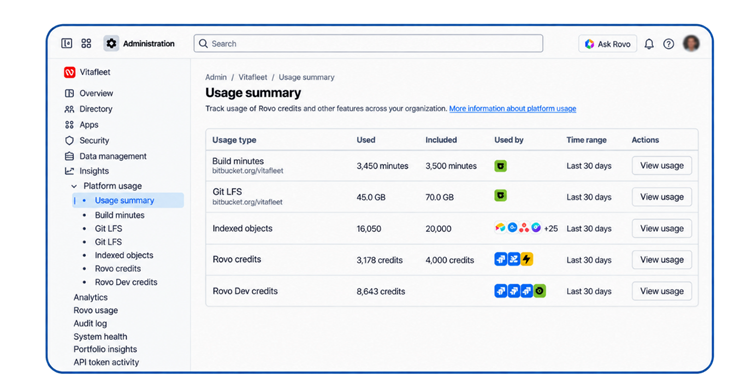
Organization admins can see usage in Atlassian Administration → Insights → Platform usage → Rovo credits. The dashboard shows:
- total allowance and current usage
- app-level trends
- user-level usage
- Which features consume credits
For sizing, you need the raw data, so select Export data. The CSV records feature, user, agent, timestamp and credits consumed per event. It covers up to three months or one million events, whichever comes first, and the download link expires after 24 hours.
Filter the export to events dated August 31, 2026 or later. Then build three summaries:
- Credits per user per month, sorted high to low. This feeds Step 2.
- Credits by feature. This shows whether demand comes from Basic chat, Premium reasoning or agents.
- Credits with no human user, such as automation agents, help-center agents and MCP/Teamwork Graph calls. These scale with ticket volume and integrations, not headcount, so they get their own line.
If Rovo is new to your organization and you have no usage data yet, start with our calculator to estimate Rovo credit usage by team size, then run a short pilot with a representative group to replace that range with real numbers.
Step 2: Group users into usage profiles
Individual users vary too much to model one by one. Profiles let you forecast the pool as a whole.
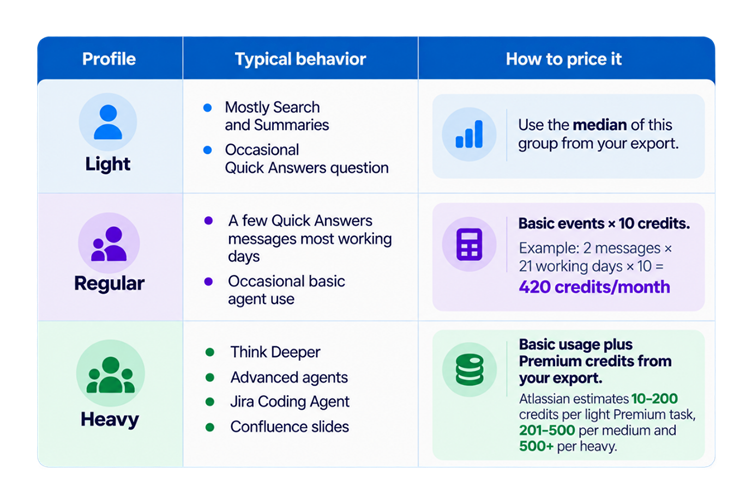 Split the per-user list from Step 1 at clear breaks in the data, then record each group's median credits per month. Medians stop one experimental power user from inflating a whole group. The worked examples below assume a median of 40 credits for light users, 420 for regular users, and 420 Basic credits plus Premium usage for heavy users. These are planning assumptions, not Atlassian benchmarks; replace them with your measured values. Because these examples count Basic usage only, they sit well below the planning bands in our Rovo credits calculator, which also include Think deeper, research and agent usage.
Step 3: Model your Rovo credit pool
Now compare supply (your seats' allowances) with demand (your profiles plus non-seat usage).
Rovo credit sizing worksheet
|
Line |
How to calculate |
Example: 60-user dev team on Jira Premium |
|
|
A. Monthly supply |
Σ (licensed users per product × plan allowance) |
60 × 70 = 4,200 |
|
|
B. Light demand |
light users × median credits |
20 × 40 = 800 |
|
|
C. Regular demand |
regular users × median credits |
30 × 420 = 12,600 |
|
|
D. Heavy demand |
heavy users × median credits (Basic + Premium) |
10 × 420 = 4,200 + Premium |
|
|
E. Non-seat demand |
automation agents + help-center agents + enriched Teamwork Graph / MCP calls |
0 in this example |
|
|
F. Monthly demand |
B + C + D + E |
17,600 + Premium |
|
|
G. Expected gap |
F − A (a negative number means spare allowance) |
13,400 + Premium |
|
|
H. Expected overage cost |
G × $0.01 per credit |
about $134/month + Premium |
|
Line H uses Atlassian's current list price for extra usage: $0.01 per credit, or $10 per 1,000 credits.
Don't have a full export yet? The Rovo credits calculator gives a monthly planning range by team size and usage profile. Use it for a first estimate, then refine it with this worksheet. It covers Rovo credits only, so size automation steps separately.
Step 4: Add headroom before you set a cap
A pool sized for this month's demand will usually be short within a quarter. Plan for three kinds of growth:
-
Beta features going GA. Beta AI features don't count against your allowance today, but Atlassian notes they may once generally available. Model every beta feature your teams use as if it were billed at its closest tier.
-
Adoption growth. Usage in the weeks after rollout rarely reflects steady state. If your export shows month-over-month growth, carry the trend forward.
-
Monthly variance. Size against your busiest month, not the average. Release cycles, quarter-end reporting and incident spikes push usage up at predictable times.
Pick a headroom percentage that matches the variance you actually saw, and apply it to line F. Use this padded figure for your spending cap. Keep line H unpadded, so finance sees expected spend while the cap sets the ceiling.
Step 5: Decide how to cover the gap
If line G is positive, you have three options.
Keep extra usage on, with a spending cap. Atlassian's documentation is inconsistent on whether extra usage is enabled by default, so confirm the setting in Atlassian Administration first. Set the cap at (padded demand − supply) × $0.01 in Atlassian's extra usage settings. This suits small or uncertain gaps. Admins get alerts at 80% and 100% of the allowance either way.
Buy prepaid usage packs. If the gap is steady, packs make the budget predictable, and Atlassian offers volume discounts on annual packs. Pack sizes and discounts depend on your agreement, so ask your Atlassian partner for a quote.
Move to a higher-allowance collection. Service Collection and Teamwork Collection include 10× the Rovo allowance of standalone Jira or Confluence on the same plan. Compare the license price difference against twelve months of line H. Note that list prices change on October 13, 2026, as covered in our Atlassian cloud price increase 2026 breakdown, so quote the collection at the rate you'll actually renew on.
One caution when you clean up licenses at the same time: reclaiming inactive seats lowers license cost but also shrinks your pool, because every seat carries its allowance. Run your Atlassian license optimization and your Rovo sizing as one exercise, not two.
Want a second pair of eyes on your usage export? Empyra's license management team will read your export, build the worksheet with you and recommend a spending cap before December 3.
Worked scenarios
These scenarios use Atlassian's published allowances and the $0.01 overage rate. The usage figures are illustrative assumptions chosen to show how the method behaves. They are not benchmarks or client data. Premium usage is left as a line to fill from your own export.
Rovo credits for Jira Service Management: ITSM team on Service Collection Premium
-
Supply: 40 agents × 700 = 28,000 credits
-
Regular demand: 40 agents × 3 Quick Answers messages × 21 days × 10 = 25,200
-
Non-seat demand: 3,000 requests per month routed by Workforce Management Routing × 10 = 30,000. Atlassian bills routing as a Basic event (10 credits) and counts each invocation as one event; this example assumes one invocation per routed request.
-
Premium demand: Request Resolver, Alert Intelligence and the help-center Self-service Agent [from your export]
-
Demand before Premium: 55,200 · Gap: 27,200 · Expected overage: about $272/month
A 700-per-user allowance looks generous, but it can be outrun by ticket volume rather than headcount. Model routing and customer-facing agents from your request forecast. Our Jira Service Management consulting team often starts here, because these are the AI features ITSM teams switch on first.
Development team on Jira Premium
-
Supply: 60 users × 70 = 4,200 credits
-
Light: 20 users × 40 = 800
-
Regular: 30 users × 420 = 12,600
-
Heavy (Basic portion only): 10 users × 420 = 4,200, plus Jira Coding Agent and Think Deeper usage [from your export]
-
Demand before Premium: 17,600 · Gap: 13,400 · Expected overage: about $134/month
At 70 credits per user, two Quick Answers messages a day already use six times the allowance. Premium work widens the gap fast: if each heavy user ran just one medium Premium task a month (201–500 credits on Atlassian's rate card), demand would rise by another 2,010–5,000 credits. This is where flat-rate estimates mislead most.
Mixed organization on Jira and Confluence Premium
This example has 250 people holding 200 Jira Premium seats and 150 Confluence Premium seats.
-
Supply: (200 × 70) + (150 × 70) = 24,500 credits
-
Light: 150 × 40 = 6,000
-
Regular: 80 × 420 = 33,600
-
Heavy (Basic portion only): 20 × 420 = 8,400, plus Premium [from your export]
-
Demand before Premium: 48,000 · Gap: 23,500 · Expected overage: about $235/month
The real decision here is a cap plus usage packs versus a move to Teamwork Collection, which raises the Premium allowance to 700 per user. You can only make that comparison with a real license quote placed next to twelve months of projected overage.
How Empyra helps you size and control Rovo credits
As an Atlassian Platinum partner, Empyra covers the full picture:
-
Sizing and cap strategy. Our license management team builds your worksheet from your real export, sets spending caps and weighs usage packs against a collection upgrade.
-
Reducing consumption. Our Atlassian consulting services team reworks automation rules and agent configurations that consume credits without adding value.
-
AI rollout and governance. Our Atlassian AI consulting practice helps teams choose between Quick Answers and Think Deeper, set usage ownership, and roll out agents with governance in place.
Get a Rovo credit number you can take to finance
The flat "allowance ÷ 10" estimate is simple, but it undercounts conversational chat and overcounts free usage. A sizing built on your own export, split into user profiles plus non-seat demand, gives you a number you can defend before December 3, 2026.
The fastest next step: book a Rovo usage audit with Empyra's Atlassian team.
.png?width=364&height=116&name=sales%20radar%20ai%20logo%202026%20%20(280%20x%2084%20px).png)





.svg)