.svg)

Most sales teams do not lose deals because of a weak product. They lose them because the sales pipeline is messy, follow-ups are missed, and nobody trusts the forecast. Reps spend hours updating records, managers chase status updates, and leads go cold while everyone waits for the next report.
A modern pipeline CRM fixes this by giving every deal a clear stage, owner, and next step. Now AI is taking it further by scoring leads, flagging risky deals, drafting follow-ups, and handling admin work automatically. In this guide, we explain how a pipeline CRM works in monday.com and how AI is changing the modern sales process, a shift we also break down in our complete guide to monday AI.
You will learn what a pipeline CRM is, why monday.com is a flexible choice, how AI improves every stage of the sales pipeline, and how to set up your own AI-powered pipeline CRM step by step. We also share the metrics to track, the mistakes to avoid, and how Empyra, a monday.com Platinum Partner, can help you get started.
1. What Is a Pipeline CRM?
A pipeline CRM is customer relationship management software built around the sales pipeline. Instead of only storing contacts, it tracks every deal as it moves through stages such as new lead, qualified, proposal, and closed. This gives reps a clear to-do list and gives managers a live view of revenue. Without a pipeline CRM, most teams fall back on spreadsheets and memory.
Pipeline CRM vs Sales Pipeline: What Is the Difference?
Your sales pipeline is the process, meaning the stages a prospect goes through before buying. A pipeline CRM is the software that manages that process. You can draw a sales pipeline on a whiteboard, but a pipeline CRM makes it visible, measurable, and automatic.
Key Features of a Pipeline CRM
- Visual deal board: Drag deals between stages to see progress at a glance.
- Contact and deal tracking: Keep emails, calls, notes, and files attached to every deal in the sales pipeline.
- Automation and reminders: Trigger tasks and alerts when a deal moves forward or goes quiet.
- Reporting and forecasting: Track pipeline value, win rate, and expected revenue in one place.
2. How the Modern Sales Process Has Changed
Buyers today research on their own, talk to several vendors, and involve more decision-makers than before. That makes every sales pipeline longer and harder to manage by hand. Teams now need a pipeline CRM that captures data automatically and tells them where to focus. This is exactly where AI is changing the game.
Longer Buying Cycles and More Channels
A single deal can now involve email, phone calls, video meetings, LinkedIn, and web forms. Each touchpoint creates data that a sales pipeline must capture. With monday.com integrations, a pipeline CRM brings all of it into one timeline so nothing is lost.
Why Spreadsheets and Manual Entry No Longer Work
Spreadsheets cannot send reminders, update stages, or show real-time forecasts. Manual entry also leads to missing fields, outdated deal values, and unreliable reports. When reps hate updating the CRM, the sales pipeline becomes fiction.
Why AI Is Now Part of the Sales Pipeline
AI reduces admin work, highlights the best opportunities, and predicts which deals may stall. Instead of just storing information, an AI-powered pipeline CRM actively guides the sales process. That means faster responses, cleaner data, and more accurate forecasts.
3. Why Choose monday.com as Your Pipeline CRM?
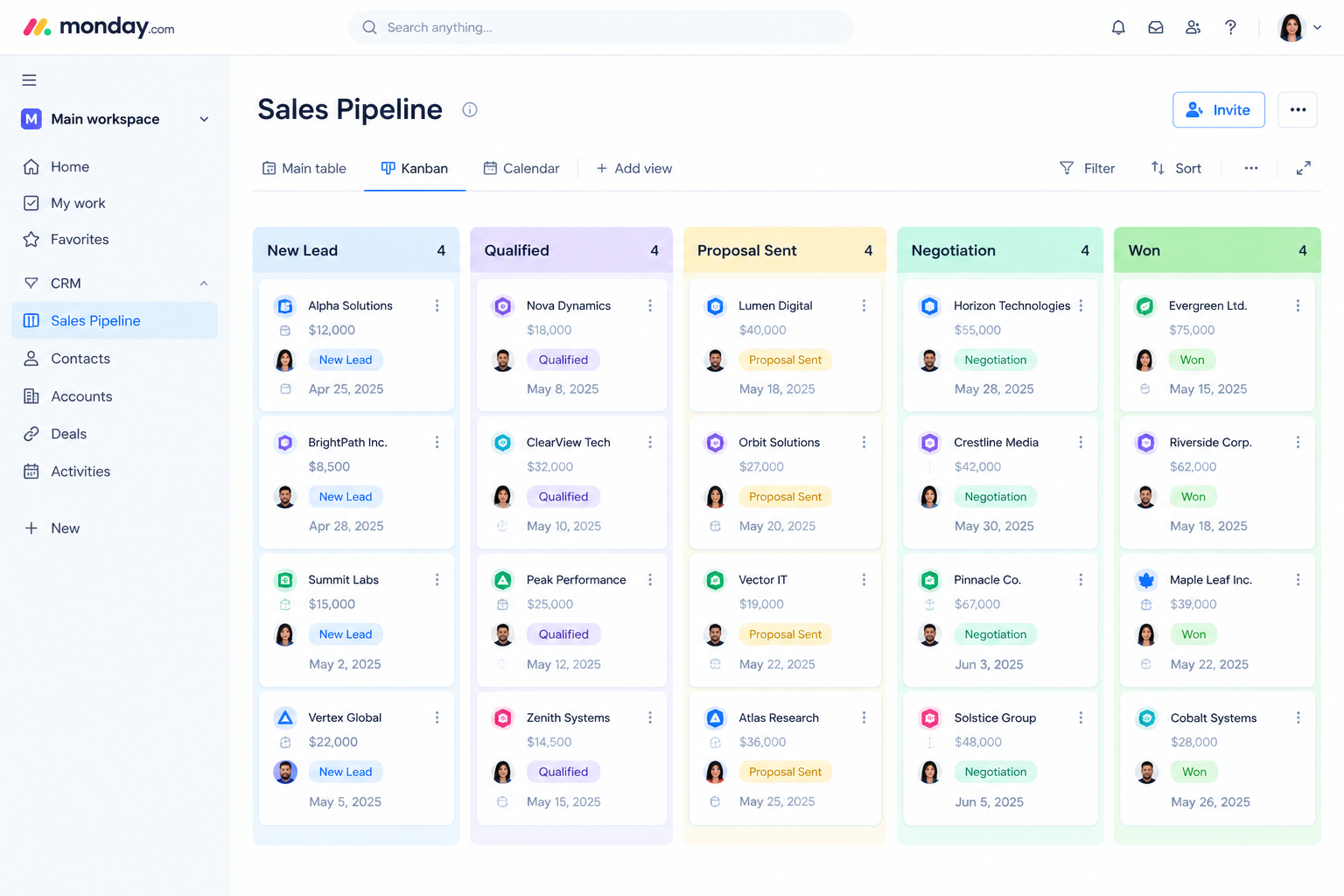
monday.com started as a flexible work management platform and now offers a dedicated CRM built on the same foundation. That flexibility is what makes monday.com CRM a strong pipeline CRM for teams that do not fit a rigid template. You can shape the sales pipeline around how your team actually sells, without writing code. Here is what stands out.
Visual Drag-and-Drop Pipeline Boards
Every deal appears as a card on a board, grouped by stage. Reps drag a deal forward as it progresses, and managers see the full sales pipeline instantly. The visual layout makes monday.com easy to adopt, which matters because a pipeline CRM only works when people use it.
No-Code Customization
You can add custom deal stages, fields, views, and permissions without a developer. A services company, an agency, and a SaaS team can each build a different sales pipeline in the same monday.com account. As your process changes, you simply edit the board, or even describe the change in plain language with monday vibe.
Automations, Integrations, and Dashboards
Automations handle repetitive tasks like assigning leads and sending alerts. Integrations connect email, calendar, and other business tools to your pipeline CRM. Dashboards turn deal data into live charts for the whole team.
4. How AI Is Transforming Your Pipeline CRM
AI is the biggest change to the pipeline CRM in years. Instead of waiting for reps to update records, AI reads activity, finds patterns, and recommends what to do next. In monday.com, AI features sit inside the same sales pipeline your team already uses. Here are the six areas where AI makes the biggest difference.
AI Lead Scoring and Prioritization
Not every lead deserves the same attention. AI looks at engagement, company fit, and past behavior to rank leads in your pipeline CRM. Reps then call the most promising prospects first instead of guessing. Before AI: reps sort leads by gut feel. With AI: the sales pipeline surfaces the best opportunities automatically.
Automated Data Capture and Activity Logging
Emails, calls, and meetings can be logged to the right deal without manual typing. This keeps your sales pipeline accurate and saves reps hours every week. Cleaner data also makes every report and forecast more reliable.
AI Deal Risk Detection
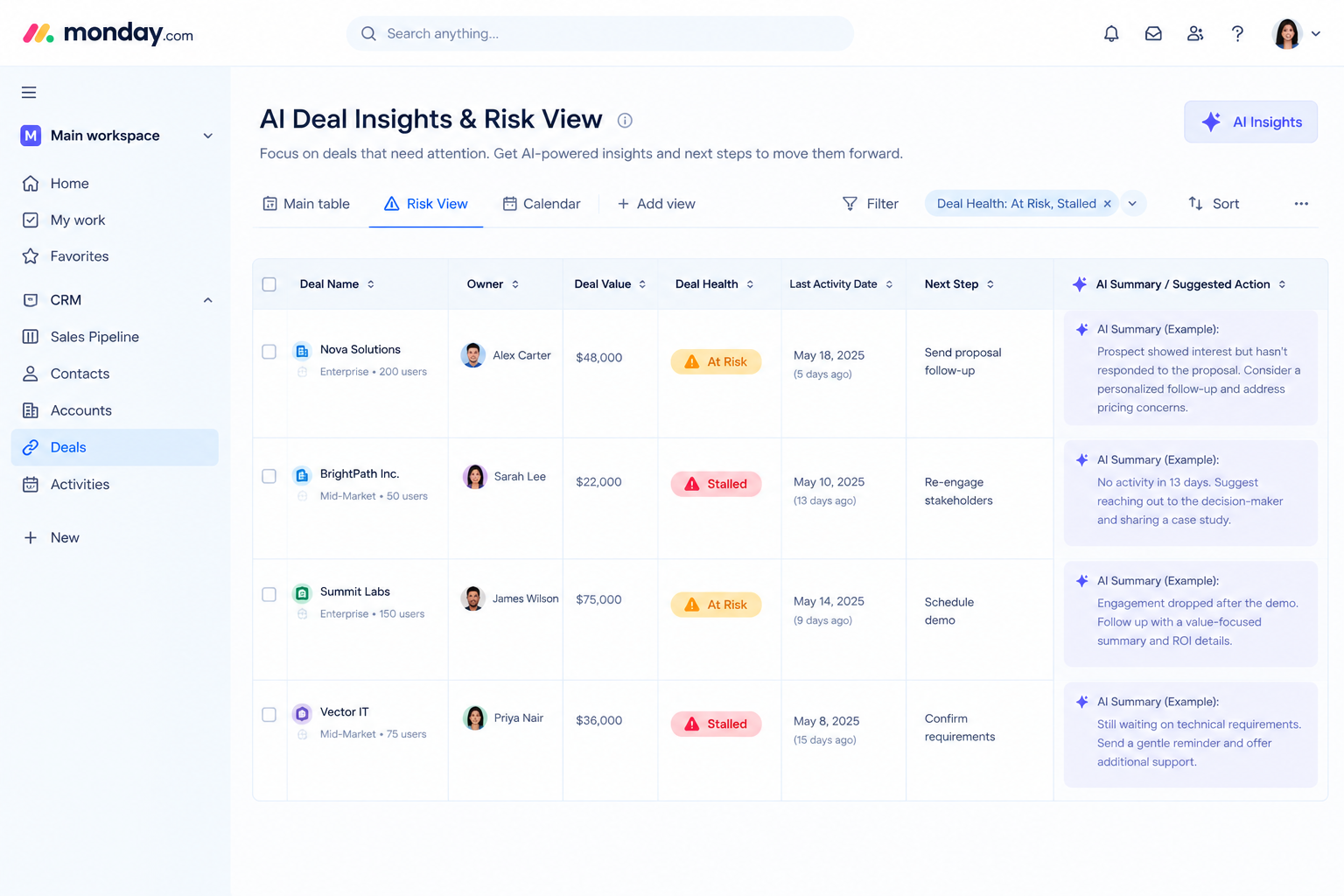
Deals rarely die suddenly. They go quiet first. AI watches activity levels and communication patterns, then flags at-risk deals in your pipeline CRM before they stall. Managers can step in early, and reps get suggested next actions.
Smarter Sales Forecasting
Traditional forecasts rely on rep opinions and optimistic close dates. AI-based forecasting uses real deal history, stage movement, and activity to predict revenue more realistically. Pipeline reviews become data-driven conversations instead of guessing games.
AI-Assisted Emails and Follow-Ups
AI can draft follow-up emails, summarize long threads, and suggest the next best action, which is exactly what monday Sidekick is built for. This keeps every deal in the sales pipeline moving, even when reps are busy. Reps still review and personalize each message, so quality stays high.
AI Agents and Workflow Automation
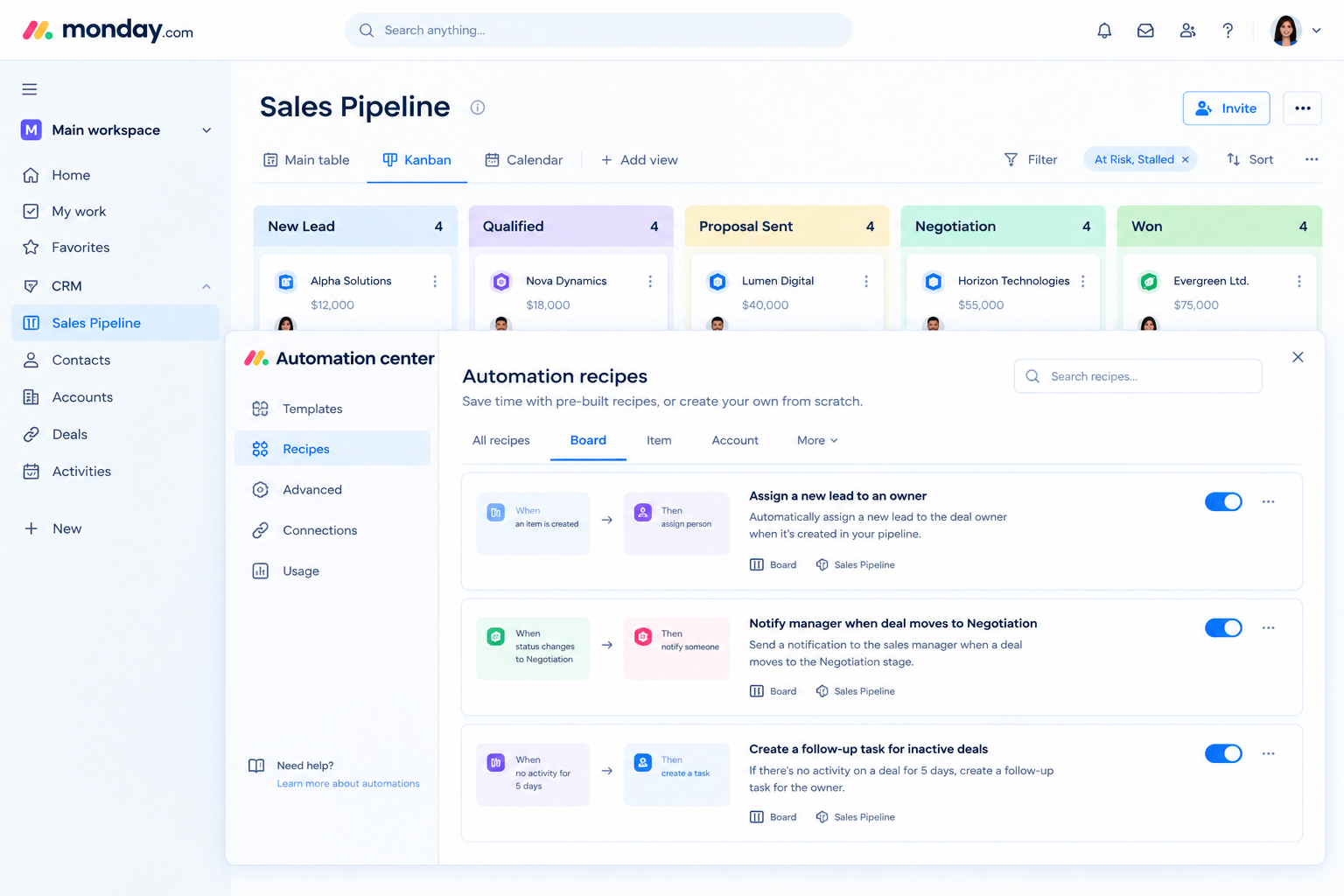
monday.com AI agents can handle routine tasks such as assigning new leads, updating deal stages, and creating follow-up tasks. When combined with monday.com automations, your pipeline CRM runs many steps on its own. Your team spends less time on admin and more time with buyers.
5. Traditional vs AI-Powered Pipeline CRM
The difference between a traditional pipeline CRM and an AI-powered one is the amount of work humans must do. In a traditional setup, people enter data, remember follow-ups, and build forecasts by hand. In an AI-powered monday.com setup, much of that work happens automatically. The table below summarizes the shift in the sales pipeline.
| Area | Traditional Pipeline CRM | AI-Powered Pipeline CRM in monday.com |
| Data entry | Manual updates by reps | Automated capture and logging |
| Lead prioritization | Gut feel | AI-assisted scoring |
| Deal risk | Noticed too late | Flagged early |
| Forecasting | Spreadsheet guesses | Data-driven predictions |
| Follow-ups | Rep memory | Triggered automatically |
6. How to Set Up an AI-Powered Pipeline CRM in monday.com (Step-by-Step)
Setting up a pipeline CRM is easier when you follow a clear order. Start with the process, then build the boards, then automate, and only then add AI. Skipping ahead is the most common reason monday.com setups fail. Here is the approach we use with clients at Empyra, and you can see more detail in our monday CRM implementation guide.
Step 1: Define Your Sales Pipeline Stages
Map how your team really sells, from first contact to closed deal. A common example is New Lead, Qualified, Proposal, Negotiation, and Won or Lost. Keep the number of stages small so the sales pipeline stays easy to read.
Step 2: Build Your Boards and Custom Fields
Create boards for leads, deals, contacts, and accounts, and connect them together. Add fields such as deal value, source, owner, and expected close date. Good structure at this stage makes every later step in your pipeline CRM easier, and our monday.com implementation consultants can build it with you.
Step 3: Connect Email and Calendar
Sync inboxes and calendars so conversations are tracked on each deal. This gives your pipeline CRM a complete activity timeline and feeds the AI with better data. Reps no longer need to copy and paste emails, and other tools can be linked through monday.com integration services.
Step 4: Add Automations
Automations remove repetitive work from the sales pipeline. Useful examples include:
- Lead assignment: Route new leads to the right rep automatically.
- Stage-change alerts: Notify managers when a large deal reaches negotiation.
- No-reply follow-up: Create a task if a prospect has not responded in five days.
Step 5: Turn On AI Features
Once your data is clean and your stages are clear, enable the AI features available in your monday.com plan. Start with one or two, such as summaries and deal risk flags, and expand as your team gains confidence. Always confirm current feature names and plan availability on monday.com, and review the monday.com pricing plans to see which tier includes what.
Step 6: Build Dashboards and Forecasts
Dashboards show whether your sales pipeline is healthy. Add widgets for these views:
- Conversion rate by stage: See where deals drop off.
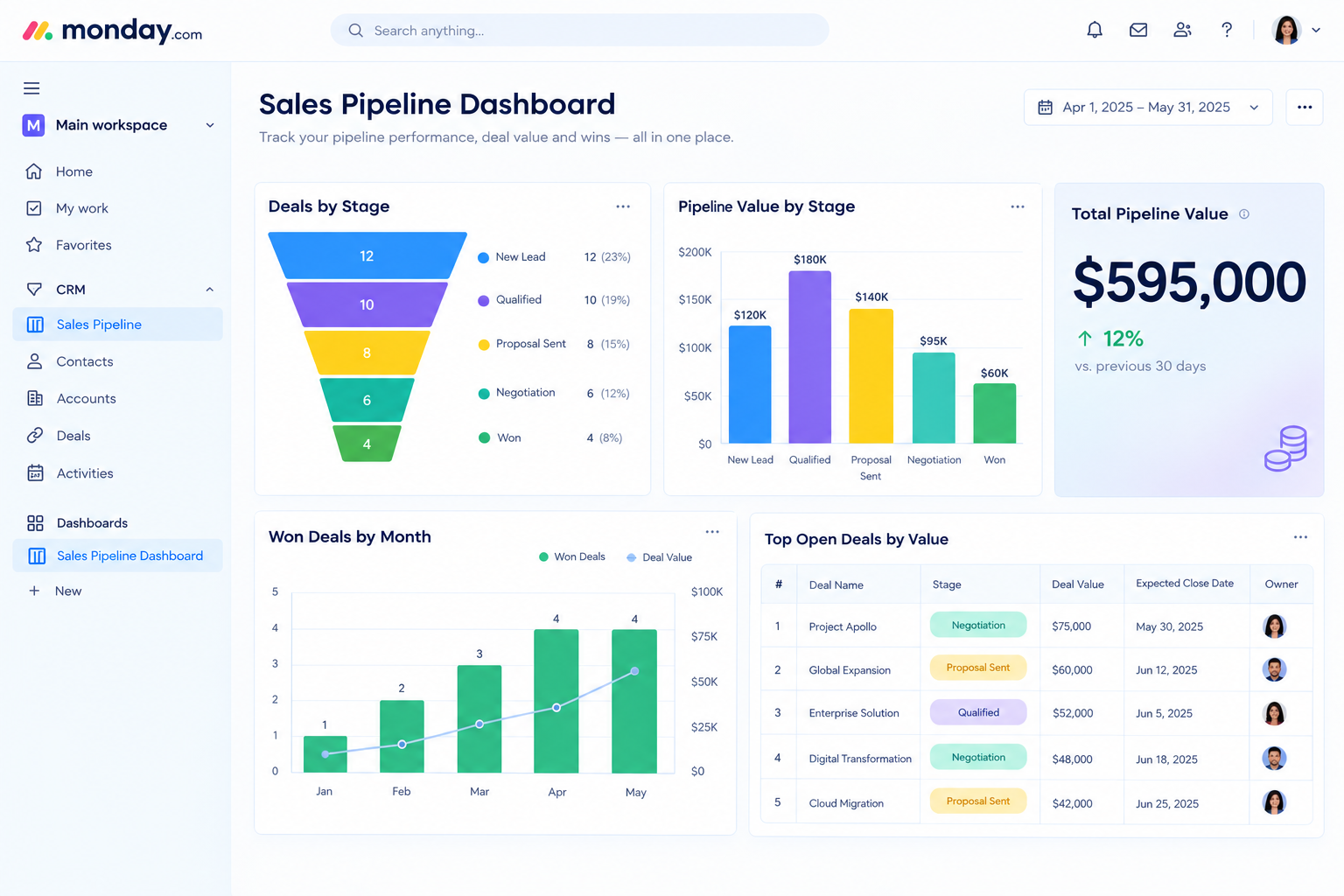
- Pipeline value by stage: Understand how much revenue sits in each step.
- Bottleneck view: Spot stages where deals stay too long.
7. Sales Pipeline Metrics to Track in Your Pipeline CRM
A pipeline CRM is only valuable if you act on the numbers it produces. The right metrics show where deals are won, where they stall, and where to coach your team. monday.com dashboards make these numbers visible in real time. Track the following to keep your sales pipeline healthy.
Pipeline Coverage and Win Rate
Pipeline coverage compares total pipeline value to your revenue target, and many teams aim for around three times the target. Win rate shows the percentage of deals you close. Together they tell you whether your sales pipeline is big enough and strong enough.
Sales Cycle Length and Pipeline Velocity
Sales cycle length is the average time from first contact to close. Pipeline velocity combines deal count, deal size, win rate, and cycle length into one speed measure. A faster sales pipeline usually means better adoption and cleaner follow-up.
Conversion Rate by Stage
This metric shows what percentage of deals move from one stage to the next. A sudden drop at one stage points to a process problem in your pipeline CRM, such as weak proposals or slow responses.
How monday.com Dashboards Track These Metrics
monday.com dashboards pull data from your deal boards and display it as charts, funnels, and numbers. You can build views for individual reps, managers, and executives. Because everything updates live, pipeline reviews become short and focused.
8. Best Practices for Using AI in Your Sales Pipeline
AI works best when it is built on a solid foundation. These habits help your team get reliable results from AI inside a pipeline CRM. They are simple to follow, but they separate teams that trust their data from teams that ignore it. If you are still choosing a platform, our roundup of the best CRM for small business shows what to look for.
- Keep CRM data clean: AI is only as good as the data it reads, so require key fields on every deal.
- Keep stage definitions consistent: Every rep should know exactly what qualifies a deal for each stage of the sales pipeline.
- Keep humans in control: Use AI for recommendations and drafts, but let reps make the final call on important decisions.
- Train the team and review regularly: Hold short monthly reviews to check what your monday.com setup is doing well and what needs tuning.
9. Common Mistakes to Avoid
Most failed CRM projects share the same problems. Avoiding these mistakes will save your team time and frustration. We see them often when we audit an existing pipeline CRM.
Too Many Pipeline Stages
Long stage lists confuse reps and slow down updates. Start with five or six stages and add more only if the data proves you need them.
Automating a Broken Process
Automation makes a process faster, not better. If your sales pipeline is unclear, fix the process first and then automate it with monday.com workflow management.
Skipping Training and Adoption
Even the best pipeline CRM fails when reps do not use it. Provide short training sessions and show reps how the CRM saves them time.
Trusting AI Output Without Review
AI can misread context or work with incomplete data. Treat scores and summaries as guidance, and double-check them before making major decisions.
10. Is monday.com the Right Pipeline CRM for Your Team?
monday.com is a strong choice for many teams, but no tool fits everyone. The right pipeline CRM depends on your team size, sales process, and budget. Here is an honest look at fit.
Who It Suits Best
monday.com works well for small and mid-size teams, agencies, and growing businesses that want a flexible, visual sales pipeline. It is especially strong if you also want to connect sales with project delivery on one platform, as explained in our guide to CRM project management software.
When Another Tool May Fit Better
If you need a very rigid, enterprise-grade process or a tool focused only on high-volume cold calling, a specialized CRM may suit you better. Being clear about this helps you choose the right pipeline CRM for the long term.
11. Why Choose Empyra for Your monday.com Pipeline CRM?
Choosing the right platform is only half the job. The other half is setting up your pipeline CRM so your team actually uses it. Empyra helps businesses design, build, and improve monday.com sales pipelines with practical AI and automation. Here is what you can expect when you work with us.
Certified monday.com Expertise
Empyra is a monday.com Platinum Partner and an Advanced Delivery Partner. Our team knows monday.com features, limits, and best practices, so your setup is done right the first time.
Experience Building Pipeline CRMs and AI Automations
Empyra was founded in 1997 and has over 25 years of experience, with more than 1,000 enterprise customers served across public, education, and corporate sectors. As an ISO 27001 certified company, we have built sales pipelines for teams with different processes, so we know which stages and automations actually work. You can learn more about us and our approach.
End-to-End Services
- Discovery and pipeline design: We map your sales process before building anything.
- Setup and customization: Boards, fields, views, and dashboards tailored to your team.
- AI and automation configuration: The right automations and AI features for your goals.
- Data migration: Move data from spreadsheets or another CRM into monday.com safely with our migration services.
- Training and ongoing support: Help your team adopt the new pipeline CRM and keep improving it.
Proven Results
The Managing Partner at VasarcaRx shared that monday.com and Empyra delivered a scalable solution that lets their team respond quickly to client requests. Every project ends with a clear plan to measure and improve your sales pipeline. Read more in our customer case studies.
Conclusion
The modern sales process is faster, more complex, and more data-driven than ever. Buyers expect quick answers, and sales teams need a clear view of every deal to deliver them. A pipeline CRM gives your team that structure, and AI adds the speed and insight needed to act on it.
With monday.com, you can build a flexible sales pipeline that scores leads, flags at-risk deals, automates follow-ups, and forecasts revenue more reliably than spreadsheets ever could. The best approach is simple. Start by defining clear pipeline stages, build clean boards, add automations for repetitive tasks, and then layer in AI features step by step. Track the right sales pipeline metrics, review them regularly, and keep your team involved so adoption stays high.
Remember that AI supports your reps rather than replacing them. If you want expert help, contact Empyra for a free consultation. Our certified team will design and build a monday.com pipeline CRM, with AI and automation, that fits how your team sells.
.png?width=364&height=116&name=sales%20radar%20ai%20logo%202026%20%20(280%20x%2084%20px).png)






.svg)