.svg)

monday AI is no longer a side feature bolted onto monday.com — in 2026, it's the engine behind how modern teams plan, automate, and execute work. If you've logged into your workspace recently and noticed a small star icon popping up next to columns, boards, and chat panels, that's monday AI quietly reshaping the platform from a project management tool into a full AI work platform. In this blog, we're going to walk through exactly how to use monday AI, breaking down every major piece of monday AI features — Sidekick, Vibe, Agents, and AI Blocks — with real setup steps, practical examples, and screenshot pointers so you can start building ai-powered workflows in your own account today.
1. What Is monday AI & ? A Quick Overview Of Monday AI Features
monday AI is the umbrella term for everything artificial intelligence does inside monday.com. It isn't one single tool — it's a collection of connected capabilities that all pull from the same underlying data in your boards, docs, and automations. When people ask "what is monday AI," the honest answer is that it's four things working together, plus a bridge (MCP) that lets outside AI tools like Claude or ChatGPT talk to your workspace directly.
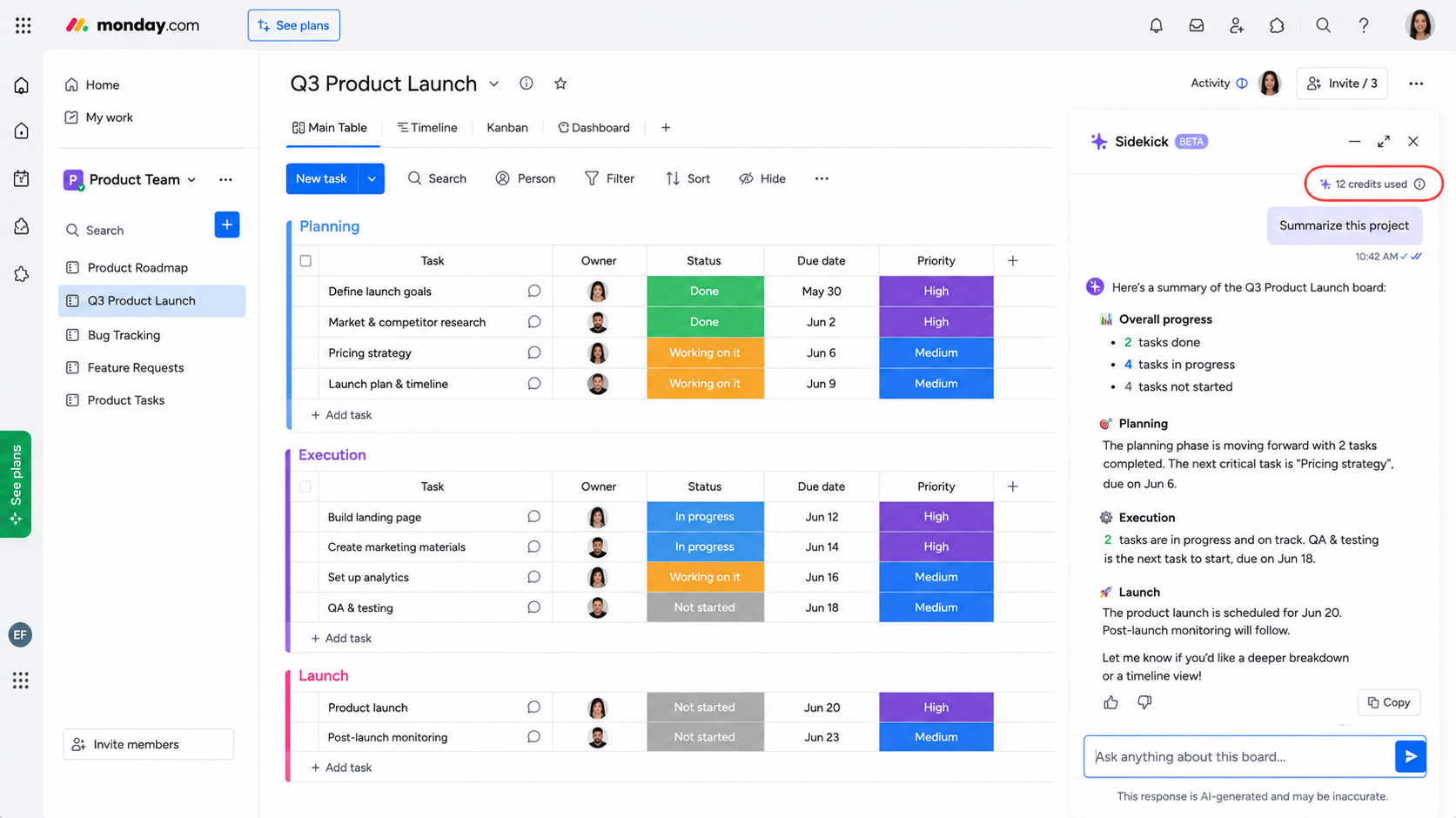
Every action inside monday AI, whether it's a quick Sidekick chat or a background Agent doing work while you sleep, runs on something called AI credits. Credits are the currency behind monday ai features, and since mid-2026, monday.com shifted Sidekick usage itself onto this credit-based system, alongside Sidekick image generation and AI workflow runs. Understanding this system early saves a lot of confusion later, especially for teams rolling out ai-powered workflows across multiple departments.
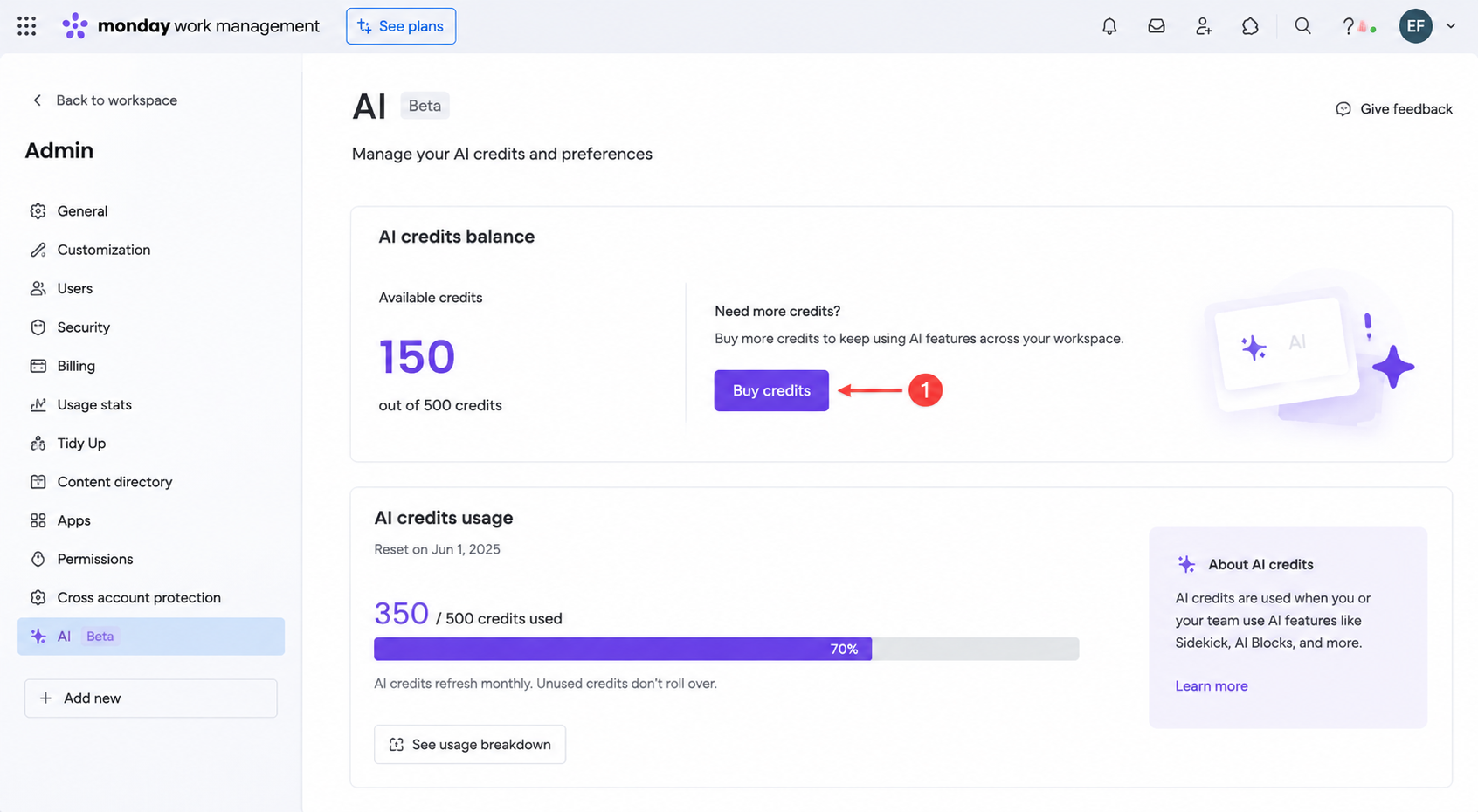
1.1 Why AI Credits Matter From Day One
Credits aren't just a billing detail — they shape how a team should plan its rollout of monday ai features. A department that jumps straight into heavy Agent usage without checking its credit allotment can burn through a monthly budget in days, while a team that starts with the free tools first builds familiarity at no cost.
- Trial credits exist for experimentation — new accounts get a starter allotment specifically so teams can test Sidekick, Vibe, and AI Blocks before paying for anything.
- Not all actions cost the same — a short categorization action costs far less than a long document summary or a multi-step Agent workflow.
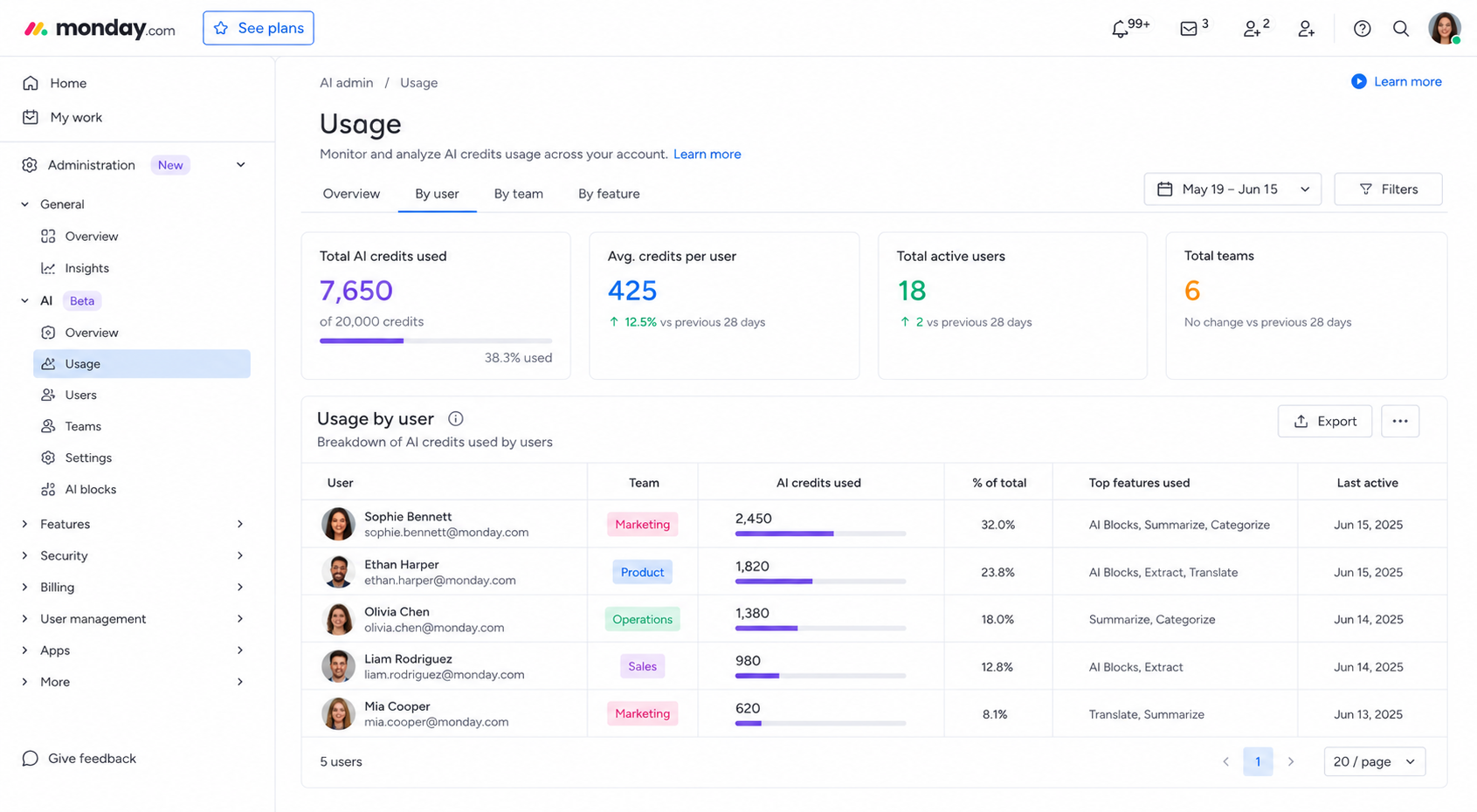
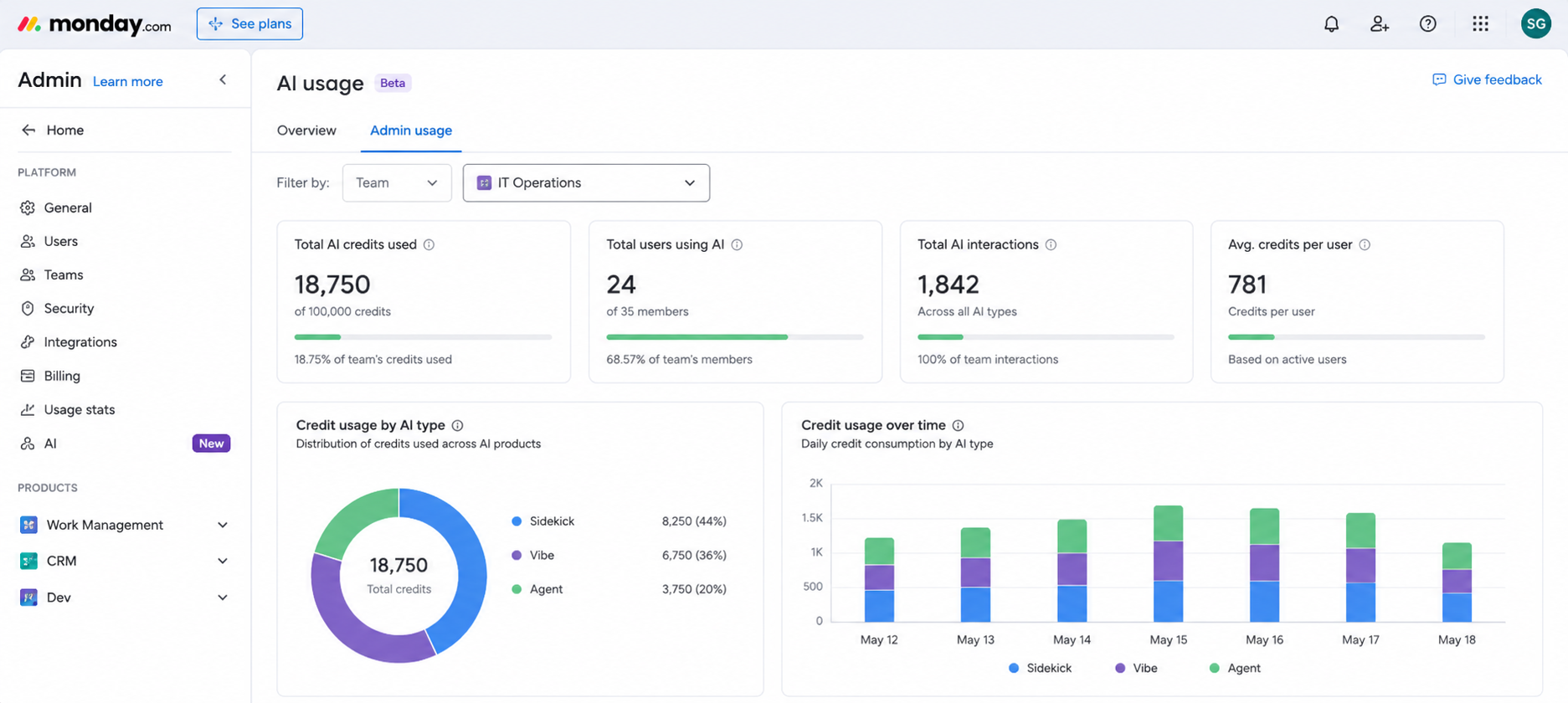
- Usage is trackable in real time — the Admin AI panel shows exactly how many credits have been spent and by whom, which matters once more than one person is using monday AI.
1.2 monday AI at a Glance
| Feature | What it does | Best for | Where to find it |
| Sidekick | Context-aware chat assistant | Summaries, Q&A, quick actions | Left panel / any board or doc |
| Vibe | No-code app/dashboard builder | Custom internal tools | Vibe tab in workspace |
| Agents | Autonomous background workers | Lead scoring, ticket triage, risk flags | Agent Factory / Agents Hub |
| AI Blocks | Modular AI actions (categorize, extract, summarize) | Automations & columns | Automation Center / column settings |
| MCP | Connects external AI (Claude, ChatGPT) to your workspace | Teams already using an external assistant | Admin/Integrations settings |
This table is worth bookmarking — most of the confusion around monday ai features comes from people not knowing which tool actually solves their problem. Sidekick answers questions and drafts text. Vibe builds things. Agents work independently in the background. AI Blocks are the raw components everything else is built on. Keeping this distinction clear from the start will save you from over-engineering a solution when a simpler tool would have worked just as well.
2. How to Enable AI on monday.com
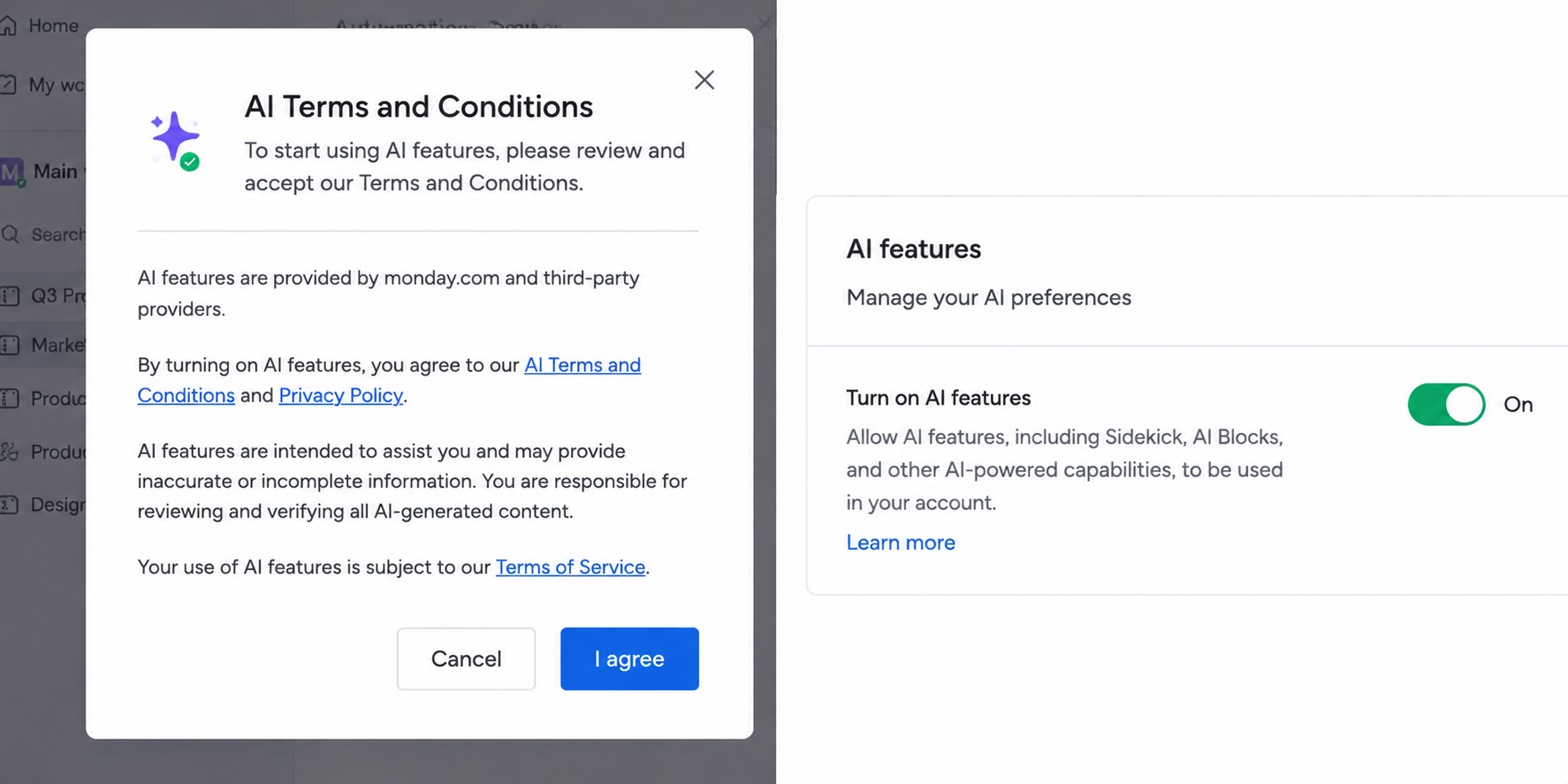
Before you can use any monday ai features, an account admin needs to turn AI on at the workspace level. This is a one-time setup, and once it's done, everyone on the account can start experimenting with the trial credits monday.com provides. The process itself takes only a few minutes, but skipping a step — like not accepting the AI-specific terms — is the most common reason new users can't find AI options where they expect them.
2.1 Step-by-Step Setup
- Open Admin settings — Go to your avatar in the bottom left, click Admin, and locate the AI section.
- Read and accept the AI Terms and Conditions — monday.com treats AI usage under a separate terms agreement from the rest of the platform, so this step is mandatory before anything unlocks.
- Enable AI features for the account — Toggle AI on; this activates the star icon across boards, columns, and automations.
- Check your trial credits — New accounts receive a starter allotment of credits specifically to test Sidekick, Vibe, and AI Blocks before committing to a paid credit plan.
- Assign permissions if needed — Larger teams may want to restrict who can spend credits, which is managed from the same Admin AI panel.
2.2 Common Setup Mistakes to Avoid
- Forgetting to accept the separate AI terms — this is the single most common reason the star icon never appears for a user.
- Not checking seat-level permissions — even after account-wide AI is enabled, individual seats may still need explicit access granted by an admin.
- Ignoring the trial credit expiration window — trial credits are typically time-limited, so testing monday ai features too slowly can mean losing free usage before your team has actually explored it.
Once enabled, you'll notice the AI star icon showing up almost everywhere — next to column types, inside the Automation Center, and in the left-hand navigation where Sidekick lives. That little icon is your visual cue that monday ai is available on that specific feature.
3. monday Sidekick: Your Personal AI Assistant
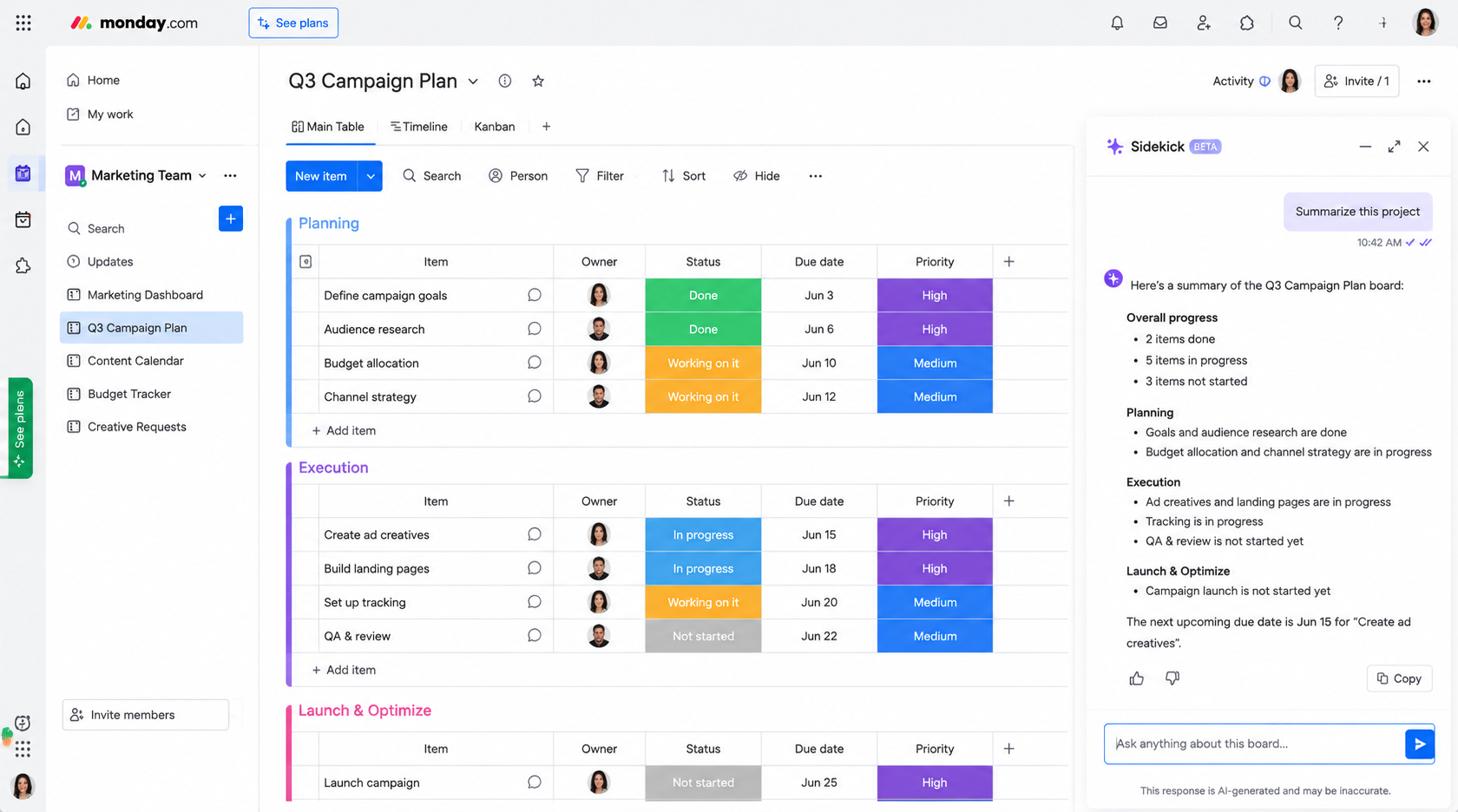
Sidekick is the most visible and most-used part of monday AI, and for most people, it's the entry point into the entire ecosystem. Think of it as a coworker who already knows everything happening across your boards, without you having to explain the context every time. Unlike a generic chatbot, Sidekick reads statuses, owners, deadlines, and update threads directly from your workspace before answering.
You can open Sidekick from almost anywhere — a specific board, an individual item, a Workdoc, or the persistent left panel that follows you across the account. This flexibility is part of what makes it one of the more genuinely useful monday ai features rather than a novelty add-on.
3.1 Practical Sidekick Prompts to Try
- "Summarize this project — risks, blockers, next steps." Sidekick pulls directly from item statuses and recent updates to generate an executive-style summary in seconds.
- "What should I tackle this week to unblock delivery?" This turns Sidekick into a prioritization tool, ranking tasks based on dependencies and deadlines.
- "Which tasks are late, why, and who owns them?" Useful for managers who want operational clarity without chasing people for status updates.
- "Draft a status update for the team." Sidekick writes internal communication drafts based on actual board data instead of a blank page.
3.2 What's New in Sidekick 3.0
As of the recent Sidekick 3.0 rollout, the assistant does more than talk — it can create sub-items, connect and mirror columns, and manage folders directly through conversation. That shift from "answering questions" to "taking action" is a big part of why monday AI now feels less like a chatbot and more like an operator embedded in your workflow.
- Sub-item creation — Sidekick can break a large task into smaller sub-items on request, without you manually building the structure.
- Column management — connecting or mirroring columns across boards can now happen through a plain-language request instead of manual configuration.
- Folder organization — Sidekick can reorganize folders and boards based on a described structure, which is especially useful during account cleanup.
4. monday Vibe: Build Custom Apps Fast
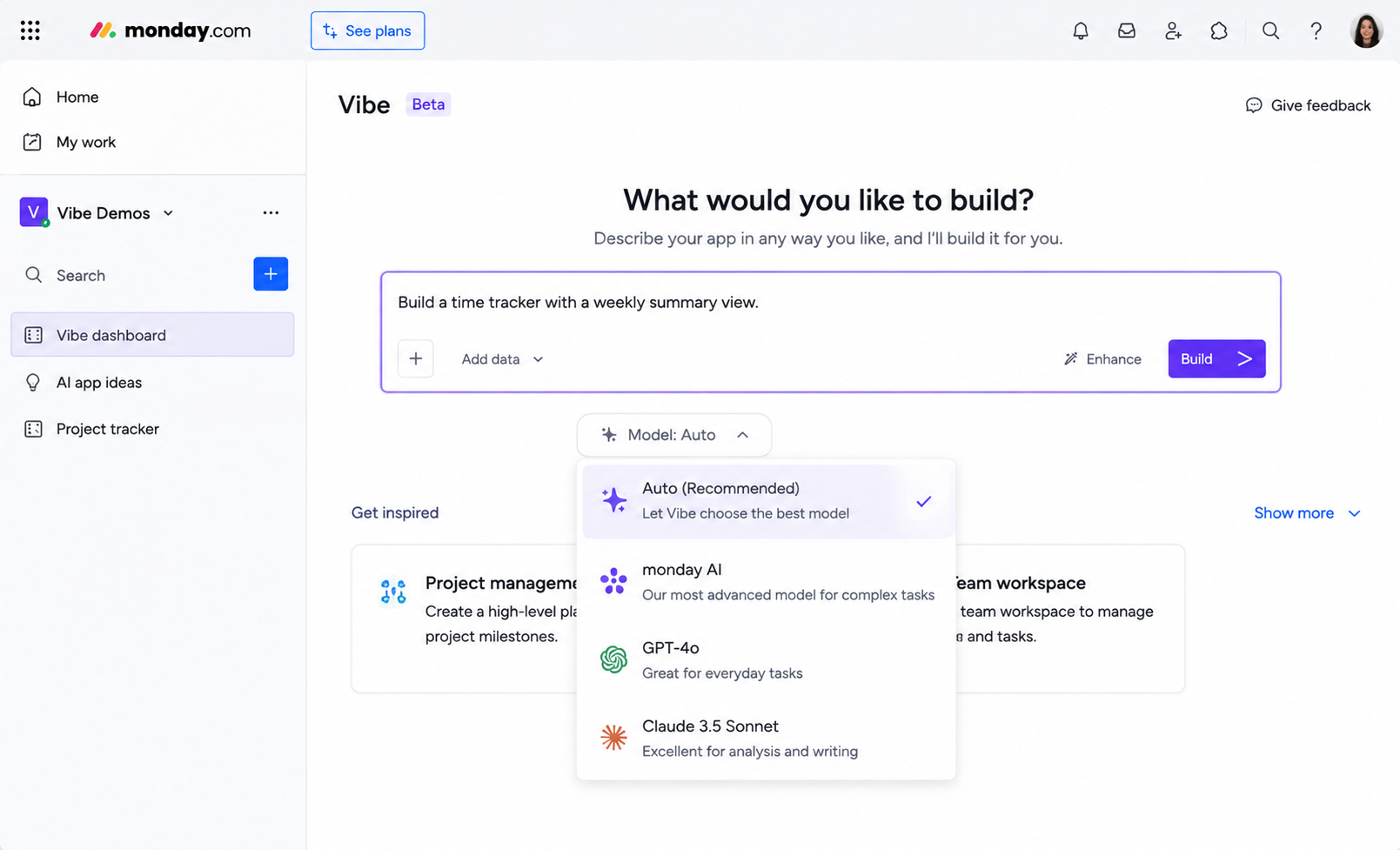
Vibe is where monday AI moves from answering and summarizing into actually building. If you've ever needed a custom internal tool — a time tracker, an intake form, a mini dashboard — but didn't have the budget or patience for a developer, Vibe is built for exactly that gap. You describe what you want in plain language, and Vibe generates working boards, views, and logic behind the scenes.
This is "vibe coding" in practice: no syntax, no drag-and-drop app builder to learn, just a conversation about what the tool needs to do. It's one of the clearer examples of ai-powered workflows replacing what used to be a multi-week IT request.
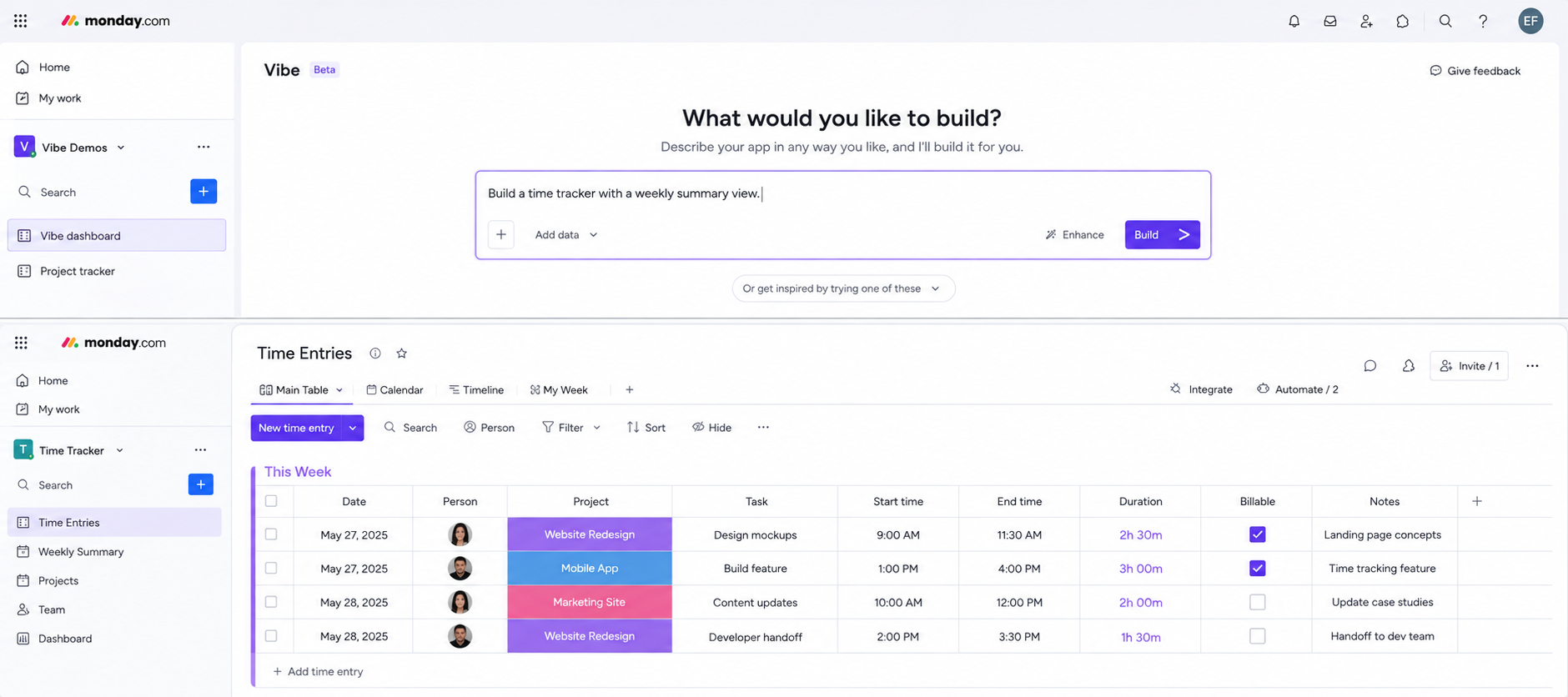
4.1 What You Can Build With Vibe
- Custom dashboards — pull data across boards into a single visual view without manual formula work.
- Internal micro-apps — things like approval trackers, resource booking tools, or survey collectors.
- Reports with real formatting — Vibe now supports exporting fully editable Word, PowerPoint, and Excel files, complete with formulas and layout intact.
- Inventory tools — newer Vibe capabilities include barcode and QR code scanning to link physical items directly to digital boards.
- Model-flexible builds — an AI model picker inside Vibe lets you choose which underlying AI engine powers the app you're building, giving more control over cost and output style.
4.2 When Vibe Is the Right Choice
Not every problem needs a custom app, so it helps to know when reaching for Vibe actually makes sense versus using an existing template.
- The need doesn't map to a standard template — if you've tried adapting a default board and it keeps falling short, that's usually a sign Vibe is the better route.
- The team needs something reusable — one-off requests may not justify a build, but recurring internal needs (like a weekly intake form) pay off quickly.
- Non-technical staff need to own the tool — Vibe puts building power in the hands of any user, not just admins or developers, which matters for smaller teams without dedicated IT support.
The realistic use case here is a marketing team needing a campaign tracker that doesn't map cleanly to a template, or an ops team wanting a sprint-velocity chart pulled from historical board data. Vibe was built for exactly these "almost, but not quite" situations where a stock template falls short.
5. monday Agents: Your Digital Workforce
Agents are the part of monday AI that runs without you actively prompting it. Where Sidekick waits for a question and Vibe waits for a build request, Agents work continuously in the background, monitoring boards and taking action based on rules you set. monday.com describes this as a "digital workforce," and functionally, that's an accurate description — these are autonomous or semi-autonomous processes doing real work on their own schedule.
You control exactly how much independence each Agent has. Some can be set to fully autonomous, taking action without approval; others flag things for a human to review before anything happens. This makes Agents one of the more powerful — and more carefully governed — monday ai features available.
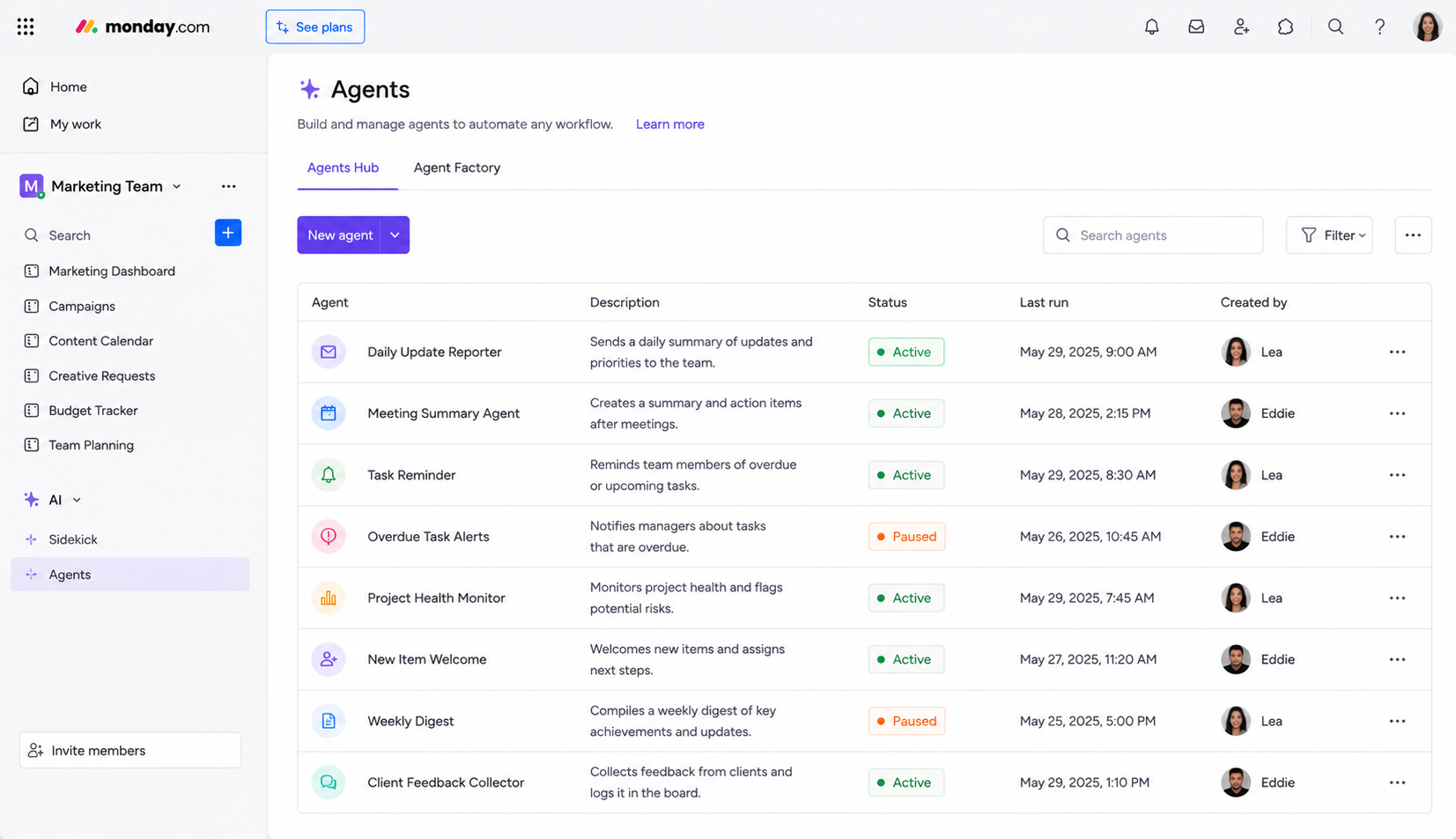
5.1 Ready-Made Agents Worth Knowing
- Lead Scorer — automatically ranks incoming leads based on criteria your team defines, so sales reps focus on the highest-value prospects first.
- Ticket Assignment Agent — routes support tickets to the right person or team without manual triage.
- Risk Analyzer — scans project data continuously and flags risks before they become blockers, rather than waiting for a status meeting to surface them.
- Meeting Summarizer — turns meeting notes or transcripts into structured summaries and action items automatically.
5.2 Building a Custom Agent With Agent Factory
Beyond the pre-built options, the Agent Factory lets you design custom agents tailored to a specific internal process — useful for teams whose workflow doesn't match any of the default templates.
- Define the trigger condition — decide what starts the Agent's work, such as a new item being created or a status changing.
- Set the action scope — choose exactly what the Agent is allowed to do, from simply flagging an item to reassigning it automatically.
- Choose the approval level — decide whether the Agent acts fully autonomously or pauses for human sign-off before completing an action.
- Test on a single board first — before rolling a custom Agent out account-wide, most teams pilot it on one board to confirm it behaves as expected.
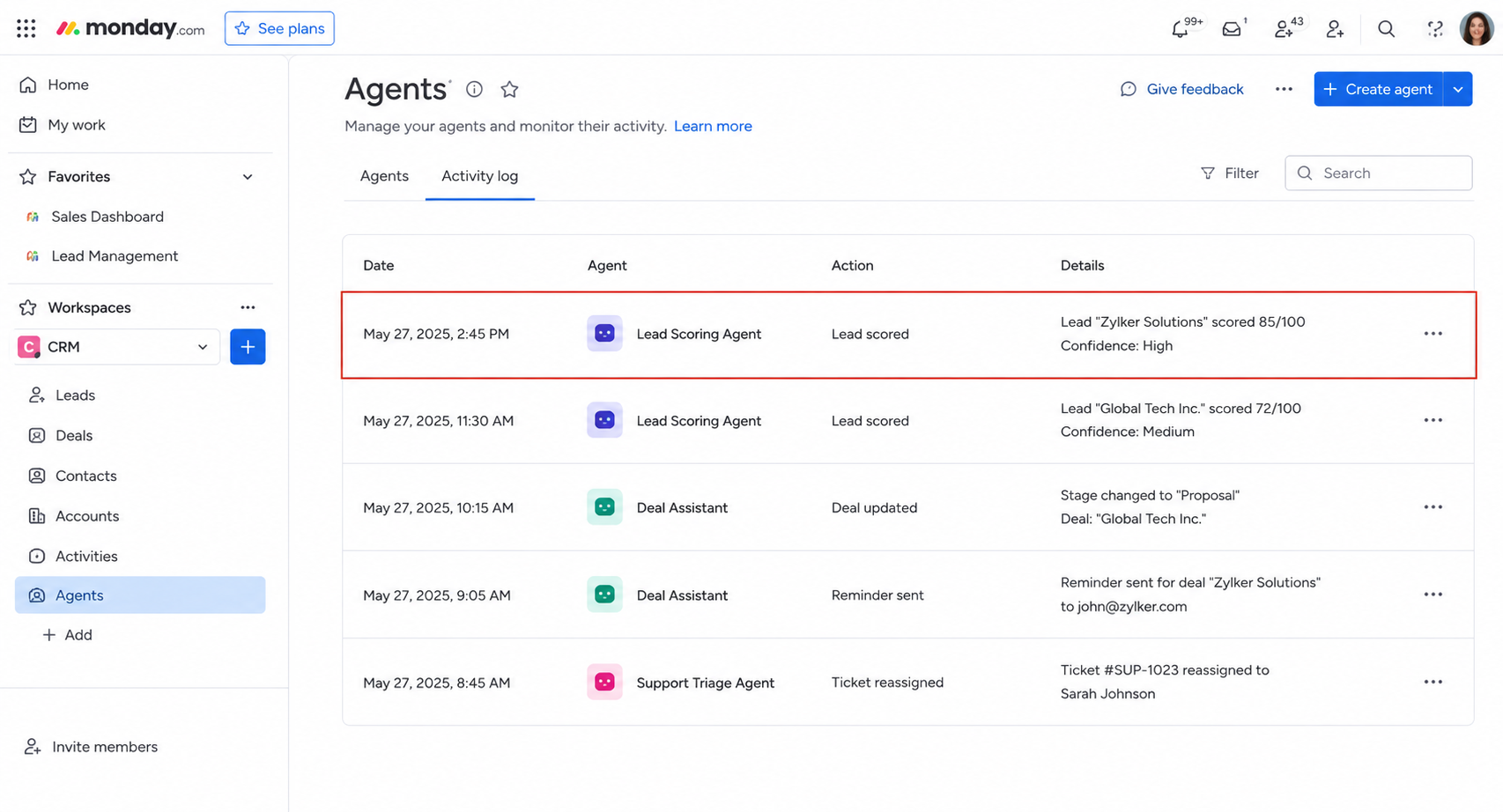
Every action an Agent takes is logged, which matters for both trust and credit tracking, since Agent activity consumes credits just like Sidekick and Vibe do.
6. AI Blocks: The Core Building Engine
If Sidekick, Vibe, and Agents are the visible face of monday AI, AI Blocks are the engine underneath all of it. These are modular, reusable AI actions that plug into columns, automations, and the AI Workflow builder. Every time an Agent scores a lead or a column auto-categorizes a request, there's an AI Block doing the actual work behind the scenes.
AI Blocks require no technical background to use, which is part of why they're described as the foundation of ai-powered workflows on the platform. You're essentially assembling small, purpose-built AI actions the same way you'd assemble any other automation — trigger, condition, action.
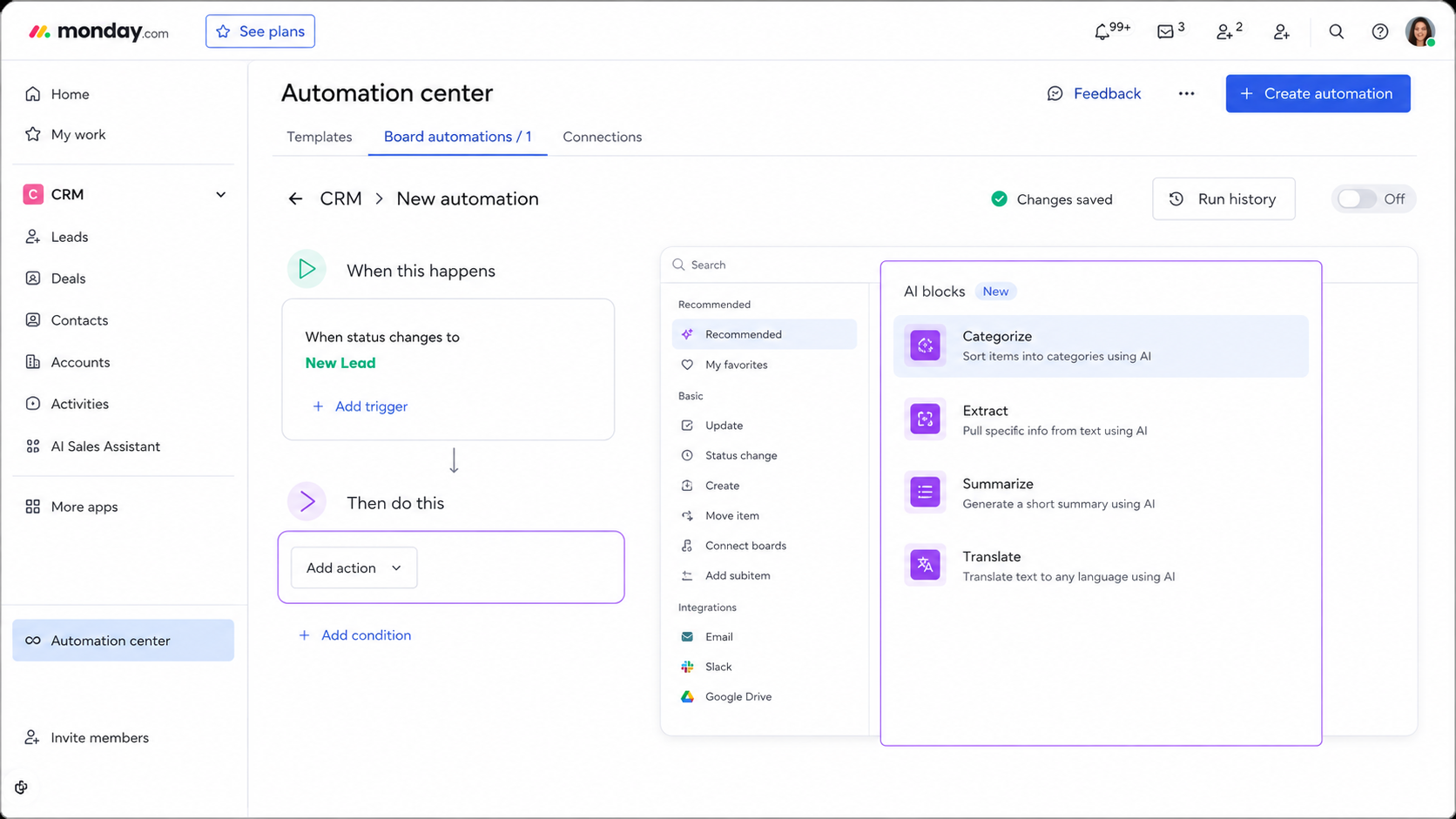
6.1 Common AI Block Actions
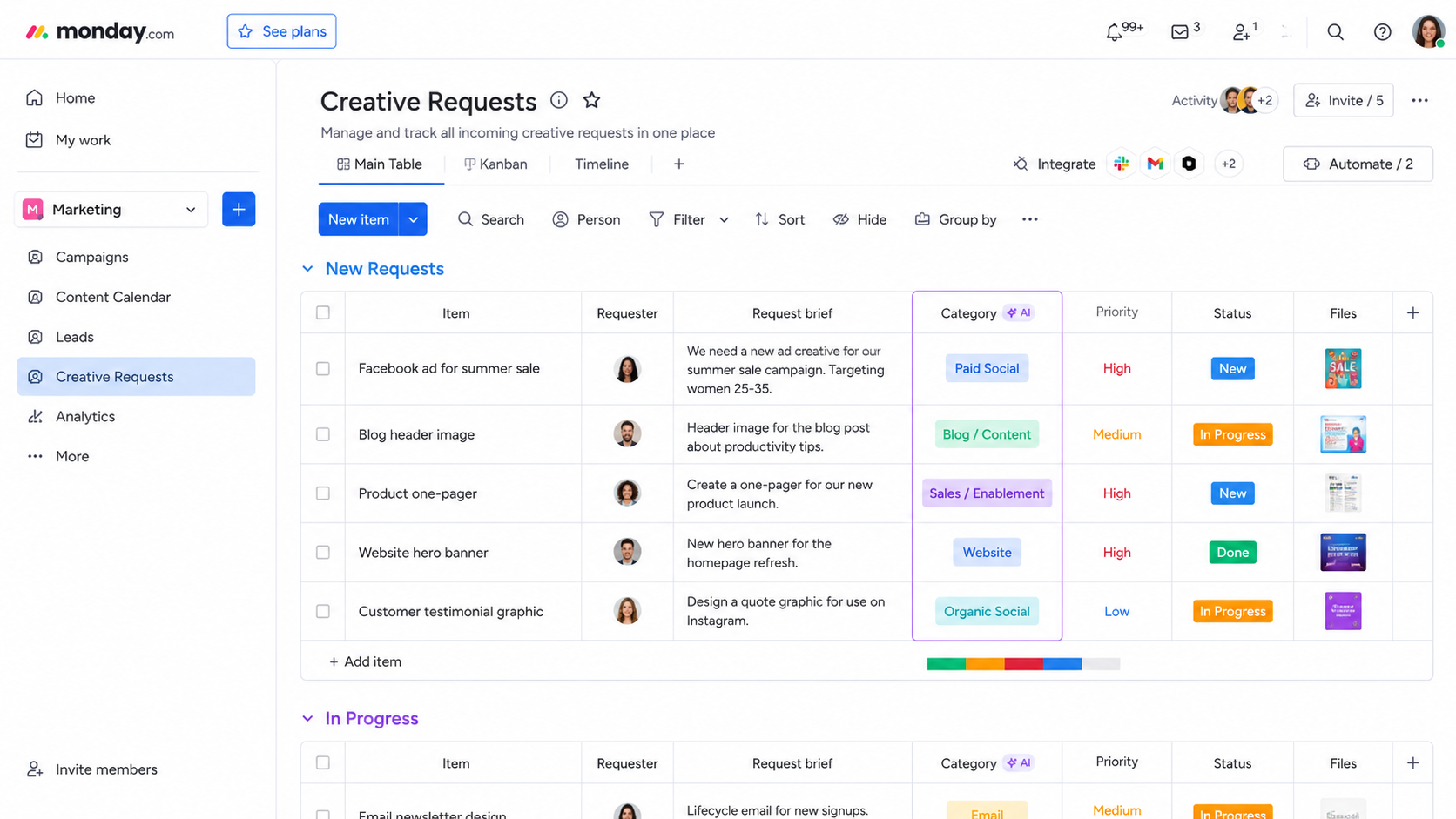
- Categorize — automatically sorts incoming items (like form submissions or support requests) into the right group or status.
- Extract — pulls specific data points out of longer text, such as pulling a deadline or budget figure out of a client email pasted into an update.
- Summarize — condenses long text columns or update threads into short, scannable summaries.
- Translate — converts text between languages directly inside a column, useful for distributed teams.
6.2 A Simple AI Block Example
A practical example: imagine a client intake form feeding into a board. An AI Block can automatically read each submission, categorize it by request type, and populate a status column — all without anyone touching it manually. That single block, applied at scale, is what most people actually mean when they talk about ai-powered workflows saving time.
7. Building AI-Powered Workflows: A Walkthrough
This is where the individual pieces of monday AI come together. Most teams start by using one feature in isolation — usually Sidekick — but the real value of monday ai features shows up when Blocks, Agents, and Sidekick are chained into a single process.
7.1 A Realistic End-to-End Example
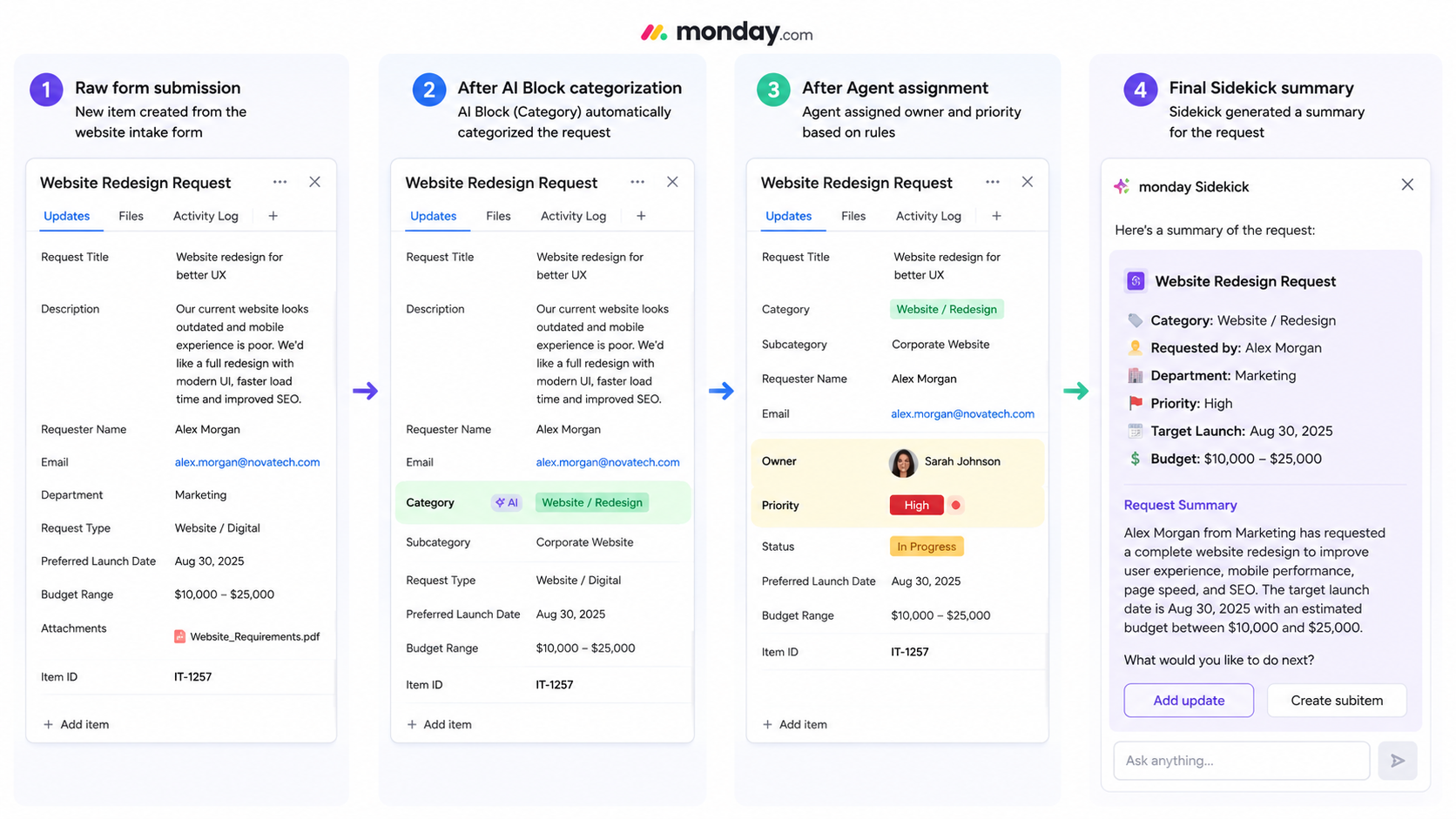
Here's a realistic example combining three tools into one workflow:
- Step 1 — AI Block categorizes the input. A new form submission comes in; an AI Block reads the content and automatically categorizes it by request type and urgency.
- Step 2 — An Agent scores and prioritizes it. The Lead Scorer or a custom agent reviews the categorized item against your criteria and assigns a priority ranking, then routes it to the right owner.
- Step 3 — Sidekick drafts the update. Once the item is assigned, Sidekick generates a short summary or notification draft for the team, pulling context from the board automatically.
7.2 Why Chaining Tools Beats Using One in Isolation
What used to take a person 20–30 minutes of manual sorting, reviewing, and messaging now happens in the background in seconds. This kind of layered setup is genuinely what ai-powered workflows look like in practice — not a single flashy feature, but several small AI actions working together across a process.
- Less handoff friction — each tool passes context automatically to the next step, so no one has to re-explain the situation.
- Fewer dropped items — automated categorization and prioritization mean nothing sits unassigned waiting for someone to notice it.
- Consistent output — Sidekick-generated summaries follow the same format every time, unlike manually written updates that vary by person.
8. monday AI Pricing & Credits in 2026
Every AI action inside monday.com — running an AI Block, firing an AI automation, chatting with Sidekick, or triggering an Agent — pulls from the same credit pool. Credits scale with complexity: a short categorization action costs less than summarizing a long document or running a custom multi-step Agent process.
Not everything requires credits, though. Several core monday ai features are included in every paid plan at no extra cost, which is worth knowing before you assume the whole system is metered.
8.1 What Costs Credits vs. What's Free
| Included Free | Consumes Credits |
| AI Formula Builder | Sidekick conversations |
| AI Docs Assistant | Sidekick image generation |
| Deal Insights / Risk Insights | AI Workflow runs |
| Prompt-to-Board | Complex custom AI Block prompts |
8.2 How Plan Type Affects Sidekick Access
Standard and Pro plan users currently get a small daily allotment of free Sidekick messages per seat, with additional usage available for purchase, while Enterprise accounts get an expanded package often referred to as Sidekick Plus.
- Standard/Pro plans — a limited number of free daily Sidekick messages per seat, with credit purchases available for anything beyond that.
- Enterprise plans — an expanded Sidekick Plus allotment included directly in the subscription, aimed at heavier organizational usage.
Credit costs shift over time — since pricing for monday ai features changes periodically, it's best to check monday.com's current pricing page directly before budgeting for a team-wide rollout.
9. Benefits of Using monday AI Daily
The appeal of monday AI isn't the novelty of chatting with an assistant — it's the measurable time and effort it removes from repetitive parts of daily work. Teams that adopt monday ai features consistently report fewer status meetings, faster decision cycles, and less manual data entry across boards.
9.1 Key Benefits
- Time savings — Sidekick-generated summaries and updates replace what used to be manually written status reports.
- Faster decision-making — Agents surface risks and blockers in real time instead of waiting for the next check-in.
- Lower technical barrier — Vibe allows non-developers to build internal tools that previously required an IT ticket.
- Reduced manual busywork — AI Blocks handle categorization, extraction, and translation automatically inside existing boards.
Scalability without added headcount — Agents work continuously in the background, covering ground a human team simply doesn't have hours for.
9.2 Before vs. After monday AI
| Task | Without monday AI | With monday AI |
| Weekly status update | Manually written, 30+ minutes | Sidekick drafts it in seconds |
| Lead prioritization | Manual review of every lead | Lead Scorer agent auto-ranks |
| Custom dashboard | Requires a dev or IT ticket | Built via a Vibe prompt |
These comparisons aren't hypothetical — they reflect the exact use cases monday.com highlights as the highest-adopted parts of its AI rollout, and they're a fair representation of what teams should expect once ai-powered workflows are actually built into daily operations rather than left as an unused feature.
10. Challenges & Limitations to Know
monday AI is genuinely useful, but it isn't a plug-and-play solution, and it's worth going in with realistic expectations. A few honest limitations show up consistently once teams move past the initial trial period.
10.1 Common Challenges
- Credit costs can add up — heavy Sidekick or Vibe usage across a large team can burn through credits faster than expected, making usage monitoring a real necessity rather than an afterthought.
- There's a learning curve — getting useful output from Agents and Vibe takes some trial and error with prompts; the first attempt rarely produces the exact result you want.
- Feature maturity varies — some capabilities, particularly newer Agents, are still being refined and may behave inconsistently across different account types.
- Governance takes active effort — admins need to actively manage permissions and credit limits, or usage can become inconsistent and costly across departments.
- Data trust questions — some teams are understandably cautious about how AI accesses workspace data; it's worth noting that monday.com states it does not use customer data or content to train its AI models.
10.2 How Teams Typically Work Around These Limits
- Set a monthly credit budget per team — rather than an account-wide free-for-all, assigning soft limits keeps spend predictable.
- Document good prompts internally — once a team finds a Sidekick or Agent prompt that works well, saving it for reuse cuts down on repeated trial and error.
- Review Agent logs weekly during rollout — early on, a quick weekly check of what Agents actually did helps catch mistakes before they compound.
None of these challenges are dealbreakers, but they explain why a rushed, unplanned rollout of monday ai features often underperforms compared to one that's set up with intention from the start.
11. monday.com Implementation Done Right
Turning on monday AI is easy. Actually configuring it around a specific team's real processes is where most rollouts either succeed or quietly stall. A proper monday.com implementation goes beyond flipping the AI toggle — it means mapping which boards, automations, and departments will actually benefit from Sidekick, Vibe, Agents, and AI Blocks before anyone starts spending credits.
11.1 What a Solid Implementation Typically Involves
- Auditing existing boards and workflows — understanding where manual, repetitive work is actually happening before deciding which AI feature solves it.
- Choosing the right entry point — some teams should start with AI Blocks on existing automations, others benefit more from Sidekick adoption first; implementation means making that call deliberately.
- Setting up Agents with the right guardrails — deciding which Agents run autonomously versus which require human approval before taking action.
- Building Vibe apps around real requirements — rather than generic templates, a proper implementation creates tools matched to how a specific team actually works.
- Training the team — the biggest gap in most rollouts isn't the technology, it's that end users never learn how to prompt Sidekick or Agents effectively.
11.2 Signs Your Team Needs a Guided Implementation
- AI is enabled but barely used — if the star icon is everywhere but adoption is low, that's usually a sign the setup wasn't matched to actual workflows.
- Credits are disappearing without clear results — spend is happening, but no one can point to specific time saved or processes improved.
- Different teams are using monday AI inconsistently — one department has built useful Agents while another hasn't touched the features at all.
Done well, implementation is what separates a team that has monday AI turned on from a team that's actually running functional ai-powered workflows day to day.
12. Why Choose Empyra for AI Setup
Most teams enable monday AI and stop there — the features exist, but they're never configured around the way the team actually works, which means credits get spent on trial-and-error instead of results. That gap between "AI is turned on" and "AI is actually saving time" is exactly where a dedicated implementation partner makes a difference.
12.1 What Empyra Delivers
Empyra, a monday.com Platinum Solution Partner, works directly inside your existing boards and automations to figure out which monday ai features are worth activating first, rather than turning everything on at once and hoping something sticks. That includes deciding which Agents should run autonomously, building Vibe apps around your actual workflows instead of generic templates, and setting up AI Blocks correctly the first time so automations don't need to be rebuilt later.
- Workflow-first setup — configuration starts from how your team already works, not from a generic feature checklist.
- Agent governance planning — clear decisions upfront about which Agents act autonomously and which require approval.
- Custom Vibe builds — internal tools designed around your specific process rather than adapted from a template.
- Hands-on team training — practical sessions so staff know how to prompt Sidekick and interpret Agent activity from day one.
Just as important is training — most of the value lost in a DIY AI rollout comes down to teams never learning how to prompt Sidekick effectively or understanding what an Agent is doing in the background. Empyra closes that gap, helping teams avoid wasted credits on the wrong features and get to functional ai-powered workflows faster than a self-guided setup typically allows.
13. Tips for Getting the Most Out of monday AI
- Start with the free features first — Formula Builder, Docs Assistant, and Deal Insights don't consume credits, so they're a low-risk way to build comfort with monday AI before spending on Sidekick or Vibe.
- Write specific Sidekick prompts — vague questions get vague answers; naming the board, item, or exact outcome you want produces far better results.
- Monitor credit usage regularly — the AI Admin Usage dashboard exists for a reason; checking it monthly avoids surprise overages.
- Use MCP if your team already lives in Claude or ChatGPT — rather than switching tools, MCP lets your existing assistant act directly on monday.com data.
- Pilot before scaling — test an Agent or Vibe app on one team or board before rolling it out account-wide.
13.1 Quick-Start Checklist
- Enable AI in Admin settings and accept the AI terms.
- Try three Sidekick prompts on a live board this week.
- Build one small Vibe app for a repetitive internal need.
- Activate one ready-made Agent, like the Meeting Summarizer, on a pilot team.
- Check the AI Admin Usage dashboard after week one to see how credits are being spent.
Conclusion
monday AI has grown from a handful of scattered features into a full ecosystem — Sidekick for quick answers, Vibe for building custom tools, Agents for autonomous work, and AI Blocks powering it all underneath. Together, these monday ai features make it realistic for any team to run genuine ai-powered workflows without needing developers or a big AI budget. The best way to start is small: enable AI, try a few Sidekick prompts, and build from there — or bring in a partner like Empyra to set it up around your real workflows from day one.
.png?width=364&height=116&name=sales%20radar%20ai%20logo%202026%20%20(280%20x%2084%20px).png)






.svg)