.svg)
Stay on top with this blog Jira Service Management The New Standard for Modern IT Teams. It explores why JSM is replacing legacy ITSM: agile workflows, automation, tighter DevOps integration, and faster service delivery for modern organizations.
1. Introduction
Modern IT teams are under growing pressure to deliver faster, more reliable services while aligning closely with evolving business goals. Traditional ITSM tools often fall short in meeting the demands of agility, automation, and collaboration.
That's where Jira Service Management, built on the Atlassian platform, stands out. Known for its speed, flexibility, and seamless integration with agile and DevOps practices, it's rapidly becoming the preferred ITSM solution for high-performing teams.
In this blog, we explore why forward-thinking organizations are adopting Jira Service Management as their new standard—and how it's transforming IT service delivery across industries. Working with a certified Atlassian Solution Partner accelerates this further — ensuring the setup follows best practices from day one.
2. How Modern IT Teams Are Adopting Jira Service Management as Their Standard
The shift toward Jira Service Management represents a fundamental change in how IT teams approach service management. Unlike traditional ITSM solutions that enforce rigid processes, modern teams are embracing JSM for its adaptability and alignment with contemporary work practices.
Key adoption drivers include:
- Agile-first mindset: Teams already using Jira for project management find natural synergy with JSM's service management capabilities
- Developer-friendly interface: Technical teams appreciate the familiar Jira interface and workflow automation
- Rapid deployment: Cloud-based setup allows teams to get started within hours, not months
- Cost-effective scaling: Flexible pricing models accommodate growing teams without breaking budgets
Organizations report 40% faster incident resolution times and 60% improvement in team collaboration after implementing JSM. The platform's intuitive design reduces training time while its powerful automation capabilities free up valuable resources for strategic initiatives.
3. What Sets Jira Service Management Apart from Traditional ITSM Tools?
Traditional ITSM tools were designed for a different era—one where IT operated in isolation and change happened slowly. Today's digital landscape demands something entirely different.
| Traditional ITSM | Jira Service Management | Impact |
| Rigid process enforcement | Flexible workflow customization | 50% faster process adaptation |
| Siloed department focus | Cross-functional collaboration | 35% improvement in team efficiency |
| Complex setup and maintenance | Cloud-native, simple deployment | 75% reduction in setup time |
What makes JSM different:
- Native integration capabilities: Unlike legacy tools requiring extensive customization, JSM connects seamlessly with development tools, monitoring systems, and business applications
- Modern user experience: Intuitive interface that doesn't require extensive training or manual reading
- Automation-first approach: Built-in automation rules eliminate manual tasks and reduce human error
- Scalable architecture: Grows with your organization without performance degradation
The platform's open API ecosystem allows for unlimited customization possibilities, making it suitable for everything from small startups to enterprise-level deployments.
4. Key Features That Make Jira Service Management Ideal for Enterprise IT
Enterprise IT environments require robust, scalable solutions that can handle complex workflows while maintaining security and compliance standards. JSM delivers on all fronts:
Core Enterprise Features:
- Advanced SLA management: Customizable service level agreements with automated escalations and real-time tracking
- Knowledge management: Centralized knowledge base with AI-powered search and content recommendations
- Asset and configuration management: Complete visibility into IT assets and their relationships
- Change management: Structured change approval workflows with risk assessment capabilities
- Problem management: Root cause analysis tools with trend identification and prevention strategies
Teams that already use Confluence can connect it directly to JSM — turning documentation into a self-service resource for agents and end users alike.
Security and Compliance:
- Enterprise-grade security: SOC 2 Type II compliance, GDPR readiness, and advanced encryption
- Audit trails: Complete activity logging for compliance and security monitoring
- Role-based access control: Granular permissions management for different user groups
- Data residency options: Choose where your data is stored to meet regulatory requirements
These features work together to create a comprehensive ITSM solution that scales with enterprise needs while maintaining the agility that modern teams require.
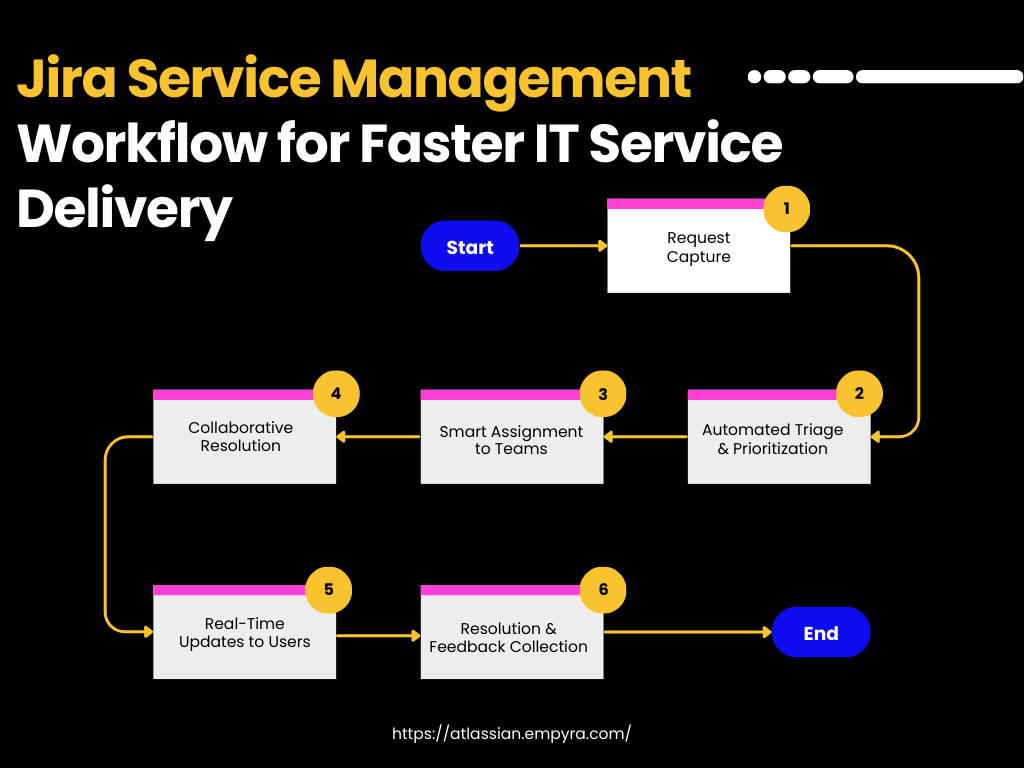
5. How Modern IT Teams Use Jira Service Management for Faster Service Delivery
Speed without sacrificing quality is the hallmark of modern IT service delivery. JSM enables this through intelligent automation and streamlined workflows.
Acceleration strategies:
- Automated ticket routing: Smart algorithms direct requests to the right teams instantly
- Self-service portals: Empower users to resolve common issues independently
- Proactive monitoring integration: Automatically create incidents from monitoring alerts
- Rapid response templates: Pre-configured responses for common scenarios
Real-world implementation example:
A global retail giant transformed its fragmented IT support and request operations by partnering with Empyra’s expert ITSM consulting services to implement Jira Service Management.
By consolidating multiple intake systems into a single unified portal, Victoria’s Secret significantly improved collaboration across development, infrastructure, and support teams. Intelligent routing, dynamic forms, and permission-based workflows enabled smoother triage and reduced resolution times across departments.
Through Empyra’s agile implementation and proof-of-concept validation, the organization was able to reduce process complexity, eliminate redundancies, and create real-time visibility into ticket progress and team accountability.
Today, Victoria’s Secret benefits from a scalable ITSM solution tailored to its unique structure, empowering teams to deliver better service, faster.
6. Why Jira Service Management Fits Seamlessly into the Atlassian Ecosystem
The power of JSM multiplies when combined with other Atlassian tools, creating a unified platform for modern work management.
Ecosystem integration benefits:
- Jira Software: Seamless connection between service requests and development work
- Confluence: Integrated knowledge management and documentation
- Bitbucket: Direct link between code deployments and service incidents
- Opsgenie: Advanced incident management and on-call scheduling
Workflow synergy example:
When a service request requires development work, JSM automatically creates linked issues in Jira Software. Developers can work on solutions while service agents maintain customer communication. Once development is complete, the service request updates automatically, ensuring nothing falls through the cracks.
This integration eliminates the context switching that plagues many IT teams, creating a single source of truth for all work-related activities.
7. Jira Service Management and DevOps: A Perfect Match for High-Velocity Teams
DevOps practices emphasize collaboration, automation, and continuous improvement—values that align perfectly with JSM's design philosophy.
DevOps integration capabilities:
- CI/CD pipeline integration: Automatic incident creation from failed deployments
- Infrastructure as Code: Manage infrastructure changes through standard JSM workflows
- Monitoring tool connections: Real-time alerting from tools like Datadog, New Relic, and Splunk
- Deployment tracking: Link service incidents to specific code releases
Atlassian Intelligence further accelerates ITSM workflows by bringing AI-powered summaries, natural language search, and automated ticket handling directly into JSM — learn how in our guide to Atlassian Intelligence features for ITSM.
High-velocity benefits:
- Faster feedback loops: Immediate notification of service impacts from code changes
- Automated remediation: Trigger rollback procedures automatically based on service metrics
- Continuous improvement: Built-in reporting tools identify bottlenecks and improvement opportunities
For teams scaling these practices across multiple squads, Atlassian Agile consulting helps align JSM workflows with how delivery teams actually work. Teams implementing JSM within their DevOps workflows report 65% faster deployment cycles and 80% reduction in deployment-related incidents.
8. Business Benefits of Switching to Jira Service Management
The business case for JSM extends far beyond IT efficiency improvements. Organizations see measurable impact across multiple dimensions:
| Benefit Category | Specific Improvements | Typical ROI |
| Operational Efficiency | 40% reduction in ticket resolution time | 300% within 12 months |
| Customer Satisfaction | 25% improvement in CSAT scores | Increased retention rates |
| Cost Optimization | 30% reduction in ITSM licensing costs | Immediate savings |
Strategic advantages:
- Improved decision-making: Real-time dashboards provide actionable insights
- Enhanced compliance: Automated audit trails and approval workflows
- Better resource allocation: Clear visibility into team workloads and capacity
- Competitive advantage: Faster time-to-market for new services and features
Organizations implementing modern ITSM frameworks with JSM report significant improvements in both operational metrics and strategic business outcomes.
9. Jira Service Management Cloud vs Data Center: What's Best for Your Team?
Choosing between Atlassian Cloud and Data Center deployments depends on your organization's specific needs, security requirements, and infrastructure preferences.
Cloud Benefits:
- Automatic updates and maintenance
- Rapid deployment and scaling
- Lower total cost of ownership
- Built-in security and compliance features
Data Center Benefits:
- Complete control over infrastructure
- Customization flexibility
- Integration with on-premises systems
- Specific compliance requirements
Decision factors:
- Security requirements: Cloud offers enterprise-grade security, while Data Center provides complete control
- Compliance needs: Both options support major compliance frameworks
- Integration complexity: Cloud excels at SaaS integrations, Data Center handles complex on-premises environments
- Total cost of ownership: Cloud typically offers lower TCO for most organizations
Most organizations opt for Atlassian Cloud migration due to its simplicity and automatic updates, while highly regulated industries often prefer Data Center for greater control.
10. How Empyra Helps You Maximize Value from Jira Service Management
Implementing JSM successfully requires more than just software—it demands strategic planning, technical expertise, and ongoing optimization. Empyra's specialized approach ensures your JSM investment delivers maximum value.
For teams looking to get more from their existing Atlassian setup, our guide to optimizing Atlassian products covers practical strategies across Jira, Confluence, and JSM
Our JSM implementation services:
- Strategic assessment: Evaluate current ITSM practices and identify improvement opportunities
- Custom configuration: Design workflows and automations tailored to your specific needs
- Integration development: Connect JSM with your existing tools and systems
- Training and adoption: Ensure your team can leverage JSM's full capabilities
- Ongoing Atlassian managed services: Continuous improvement based on usage analytics and evolving business needs
Why choose Empyra:
- Proven track record: 100+ successful JSM implementations across various industries
- Atlassian expertise: Certified partners with deep platform knowledge
- Industry experience: Understanding of sector-specific ITSM requirements
- Support commitment: Ongoing partnership beyond initial implementation
11. Conclusion
Jira Service Management represents more than just another ITSM tool—it's a platform that enables modern IT teams to deliver exceptional service while maintaining the agility and collaboration that today's business environment demands.
The evidence is clear: organizations adopting JSM see measurable improvements in service delivery speed, team collaboration, and customer satisfaction. With its seemless Atlassian integration Services capabilities, enterprise-grade security, and flexible deployment options, JSM provides the foundation for both immediate operational improvements and long-term strategic growth.
Whether you're looking to modernize legacy ITSM practices, improve DevOps collaboration, or scale your service delivery capabilities, Jira Service Management offers the tools and flexibility to succeed in today's rapidly evolving IT landscape.
.png?width=364&height=116&name=sales%20radar%20ai%20logo%202026%20%20(280%20x%2084%20px).png)





.svg)