

If your developers use Claude Code, Cursor, Codex or Rovo Dev every day, you need to know how to measure AI agent performance, not just count how often people use it. Atlassian DX, the engineering intelligence platform, now scores every coding agent session and shows whether the right model did the work. Its DX AI Measurement Framework gives you a simple way to track usage, impact and cost.
The gap is real. In Atlassian's 2026 AI SDLC study, 94% of engineering leaders said their teams already use AI, but only 6% said they have the systems to scale and govern it. This guide explains the DX AI Measurement Framework, what DX measures, how to read the Agent Experience Score and Model Fit, and how DX fits with the agent reports in Jira Cloud. It is based on Atlassian's announcements and DX's documentation, and reviewed by Empyra's certified Atlassian consultants.
Key takeaways
- The DX AI Measurement Framework tracks AI coding tools and agents on three things: utilization, impact and cost.
- DX measures coding agents through DX AI Code Insights, a small program that runs on developer machines and captures agent sessions.
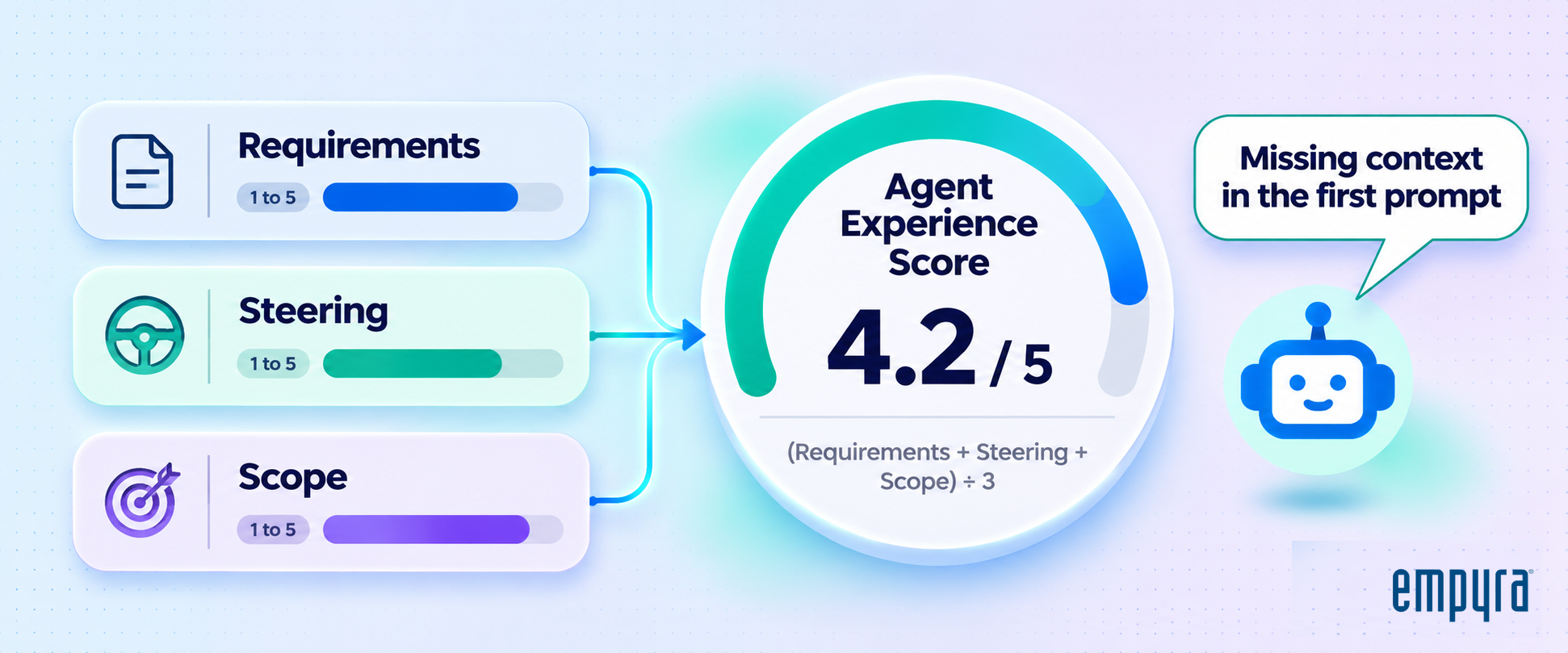
- The Agent Experience Score rates each session from 1 to 5 on requirements, steering and scope, with the agent's own comments.
- Model Fit (beta) shows when a cheaper model would do the job, or when a stronger model would give better results.
- DX scores how agents work. Jira's Agents dashboard tracks agent work linked to Jira work items. Most teams need both.
- A low score usually points to missing context or a task that's too big, not a bad model.
First, a look at why the usual AI numbers fall short.
Why usage numbers don't show if AI agents work
Most teams start by counting licences, active users and prompts. Those numbers tell you people are trying AI. They don't tell you whether agents finish the work, save time or cost more than they should.
DX's view is that agent results depend on the conditions around them. An agent working in a well documented, modular codebase with clear instructions will do far better than the same agent in a sprawling codebase with vague prompts. So to measure AI agent performance properly, you look at three things: what agents work on, how well each session went, and whether the model matched the task.
DX became part of Atlassian in 2025, and Gartner named Atlassian (DX) a Leader in its first Magic Quadrant for Developer Productivity Insight Platforms in 2026.
DX starts with a simple framework for this.
The DX AI Measurement Framework: utilization, impact and cost
The DX AI Measurement Framework is DX's research-based set of metrics for measuring AI code assistants and agents. It looks at three things, in the order most teams need them:
|
Dimension |
The question it answers |
Example metrics |
|
Utilization |
Are developers actually using AI tools? |
Daily and weekly active users, share of pull requests that are AI assisted, share of committed code that is AI generated, tasks assigned to agents |
|
Impact |
Is AI making engineering better? |
Time saved per developer per week, developer satisfaction, human equivalent hours of work done by agents, and changes in DX Core 4 metrics such as PR throughput and change failure rate |
|
Cost |
Is the AI spend worth it? |
AI spend (total and per developer), net time gain per developer (time saved minus AI spend), agent hourly rate (human equivalent hours divided by AI spend) |
Teams usually start with utilization, move to impact once tools are rolled out, then focus on cost and governance as usage grows. DX puts it simply: AI metrics show what's happening, and DX Core 4 metrics confirm whether it's working.
One idea in the framework matters for agents in particular: treat agents as an extension of the team that runs them. When you measure a team's PR throughput, count the pull requests its agents opened too.
DX's industry data gives useful benchmarks. 93% of developers use AI coding tools at least monthly, they save 3.9 hours a week on average, and about 27% of merged code is AI authored. But DX also found that even leading companies reach only around 60% active usage, and quality results vary widely. That's why usage alone isn't enough. Read the full DX AI measurement framework guide for every metric.
The framework tells you what to track. DX's newer agent reports show how each agent session actually went.
What DX measures about AI coding agents
DX brings several reports together for coding agents, including which Skills and MCP servers they use. They all depend on DX AI Code Insights.
|
DX capability |
What it shows |
Status |
|
DX AI Code Insights |
Which commits and pull requests contain AI generated code, and how that code moves through delivery |
Available |
|
Agent sessions |
Each agent conversation, its tool calls, and the issues, pull requests and deployments it fed into |
Available with transcripts turned on |
|
Agent Experience Score |
A 1 to 5 score per session for requirements, steering and scope |
Available with transcripts turned on |
|
Agent effectiveness report |
Scores, work types, model use, Skills and MCP use, by team |
Early access |
|
Model Fit |
Whether the model matched the task's complexity |
Beta |
|
AI Dollar Impact |
An estimated net dollar figure for your AI tool spend |
Available |
AI Code Insights runs as a lightweight program on macOS, Windows and Linux. It captures sessions from Claude Code, Codex, Cursor, GitHub Copilot, Gemini CLI, Devin, Kiro, OpenCode and Rovo Dev, among others.
Most leaders start with one report: the Agent Experience Score. Here's how it works.
How the Agent Experience Score works
The Agent Experience Score asks the agent itself how well the session was set up. After a session ends, DX reviews the transcript with a separate model and rates three things from 1 to 5:
|
Component |
The question it answers |
|
Requirements |
Was the goal clear, and did the first prompt give enough context, such as files, patterns and examples? |
|
Steering |
As the session went on, did the developer give useful feedback and the extra context the agent needed? |
|
Scope |
Was the task the right size, or was it too broad, too fragmented or shifting? |
The session score is the average of the three: (Requirements + Steering + Scope) ÷ 3. Each rating comes with a short comment explaining what the agent ran into.
DX groups scores into four bands (1.0 to 1.9, 2.0 to 2.9, 3.0 to 3.9 and 4.0 to 5.0), so you can open the low scoring sessions and see what went wrong. Sessions without a score are left out of the average.
Know what the score doesn't measure. DX is clear that it rates the interaction, not code quality, employee performance or business impact. Use it to improve how work is handed to agents, not to rank developers.
A good score tells you a session was well set up. The next question is whether the right model did the work, and that's where Model Fit comes in.
How Model Fit shows the right model for the job
Model Fit compares how complex a task was with the model that did it. DX judges task complexity from the transcript, then gives each session one of four results:
- Well matched: the model suits the task.
- Potential savings: a lower cost model would probably be enough.
- Potential quality improvement: a more capable model may give better results.
- Not assessed: DX couldn't judge the task, or the model isn't supported.
Across many sessions, DX groups results by work type and model. According to DX's Model Fit documentation, a pairing counts as well matched unless savings or quality issues apply to 25% or more of its sessions. Where it can, DX suggests a model from the same family that fits better.
The savings can be large. On stage at Team '26 Europe, Atlassian shared that 59% of its own documentation agent runs in one month could have used a cheaper model, as we covered in our guide to Atlassian AI agents and AMP. Treat Model Fit results as opportunities to check, not proven savings. For the full picture of AI spend, read where your Rovo credits really go and check how many Rovo credits each user gets.
With both measures explained, here's how to put them to work in your own teams.

How to measure AI agent performance in DX: 5 steps
- Roll out AI Code Insights. Install the AI Code Insights program on developer machines, starting with one team. Coverage depends on how many machines run it.
- Turn on transcripts and Agent Experience. An admin enables Transcripts & Agent Experience under Admin, then AI Code Insights. Without it, there are no session scores or Model Fit.
- Set who can see what. Decide who can see individual metrics and session transcripts. Transcript access is a separate setting, and anonymity settings can hide rows for small groups.
- Take a baseline. Run for two to four weeks, then note the team's average score, its weakest component, its mix of work types and its Model Fit results.
- Change one thing, then compare. Pick one fix, such as clearer task context, smaller tasks or a different model for one work type. Compare the same team and work mix afterwards.
DX's own guidance is to use the score, work type and model together to choose one specific improvement, then compare the same cohort after the change.
You may already see agent numbers in Jira, though, so it helps to know how the two fit together.
DX or the Jira Agents dashboard: which to use
Jira has its own Agents dashboard, so it's worth knowing which one to use to measure AI agent performance.
|
|
DX Agent effectiveness |
Jira Agents dashboard |
|
Measures |
How well each coding agent session went, and model choice |
Agent adoption and delivery for agent work linked to Jira work items |
|
Key metrics |
Agent Experience Score, Model Fit, work types, Skill and MCP use |
Agent usage, active users, cycle time, resolved work |
|
Where agents run |
Mostly local coding agents on developer machines |
Rovo agents, the Jira Coding Agent and cloud coding agents started from Jira |
|
Best for |
Platform teams and engineering leaders improving how agents work |
Team leads tracking agent work in Jira |
Use Jira to see what agents worked on and how fast it moved. Use DX to see why some sessions go well and others don't. To learn how agent work shows up in Jira, read our guide to Jira agents and agent sessions.
Once the data starts coming in, the real work is acting on low scores.
What to fix when agent scores are low
A low component score points to a specific fix:
|
Low score in |
What it usually means |
What to try |
|
Requirements |
Agents start without enough context |
Add context files and coding conventions to repositories, and write clearer task descriptions |
|
Steering |
Developers aren't guiding agents during the session |
Share prompting practices, and review long sessions that drifted |
|
Scope |
Tasks are too big or keep changing |
Break work into smaller tasks with one clear outcome each |
|
Model Fit: potential savings |
Expensive models used for simple work |
Set a default lower cost model for routine work types |
|
Model Fit: quality improvement |
Weak models used for complex work |
Allow a stronger model for complex refactors and features |
The same habits that help developers help agents too: clear documentation, well structured code and well scoped tasks. Teams that keep Jira work items and Confluence pages clean give agents better context, which our Teamwork Graph guide explains.
Before you roll any of this out, be ready for the first question developers will ask: what does DX collect?
Privacy and access
Developers will ask what DX collects, so be ready with the answers. Source snapshots and raw Git diffs stay on the developer's machine. The AI Code Insights program removes common secrets and personal data patterns before it sends session messages to DX. Admins control who can see individual metrics and transcripts.
Tell your teams up front that the Agent Experience Score measures how work is handed to agents, not individual performance. That keeps trust high and the data honest.
If you'd like help setting this up, that's where Empyra comes in.
How Empyra helps you measure AI agents
Empyra is an Atlassian Platinum Solution Partner with 80+ certified consultants and a specialization in Software Development. Through our Atlassian DX services, we help engineering teams measure AI agent performance and act on it:
- Plan the AI Code Insights rollout, permissions and transcript settings.
- Set a baseline and pick the first fixes from Agent Experience and Model Fit data.
- Connect DX insights with Jira agent reports and your Jira workflows.
- Add context files and clean up Jira and Confluence so agents start with better context.
- Build an Atlassian AI roadmap that covers Rovo agents and coding agents together.
For DX licensing and pricing, talk to an Empyra consultant.
Still have questions? The most common ones are answered below.