.svg)

A Jira ticketing system powered by Jira Service Management helps IT teams centralize requests, automate ticket routing, manage SLAs, and improve resolution times. JSM extends basic ticket management with incident, problem, change, and service request management, along with self-service and knowledge base capabilities. This article explains how Jira Service Management manages the complete ticket lifecycle, its key ITSM features, implementation steps, best practices, and cost considerations.
Modern IT teams can no longer rely on a basic inbox or a spreadsheet to manage employee requests. As organizations grow, IT support volume grows with them, and a simple Jira ticketing system built on ad-hoc processes quickly starts to break down. Requests arrive from email, chat, phone calls, and walk-ins, and without a central system, a single Jira ticket can easily get lost between teams.
Common challenges include scattered requests across multiple channels, manual Jira ticket assignment that slows down agents, poor visibility into what is actually happening across the queue, missed SLA targets, and slow resolution times that frustrate employees and customers alike. These problems compound as teams scale, making a structured, purpose-built ticketing approach essential rather than optional.
This is where Jira Service Management (JSM), Atlassian's IT service management platform, comes in. JSM turns a simple Jira ticketing system into a full ITSM environment, covering everything from incident management to change approvals to self-service knowledge bases. In this article, you will learn what a Jira ticketing system actually is, how JSM manages the full Jira ticket lifecycle, the core features that make it more than a basic help desk tool, how it compares to traditional help desk software, real-world use cases, a step-by-step setup guide, best practices, cost considerations, and how Empyra can help you implement or optimize your JSM environment.
1 . What Is a Jira Ticketing System?
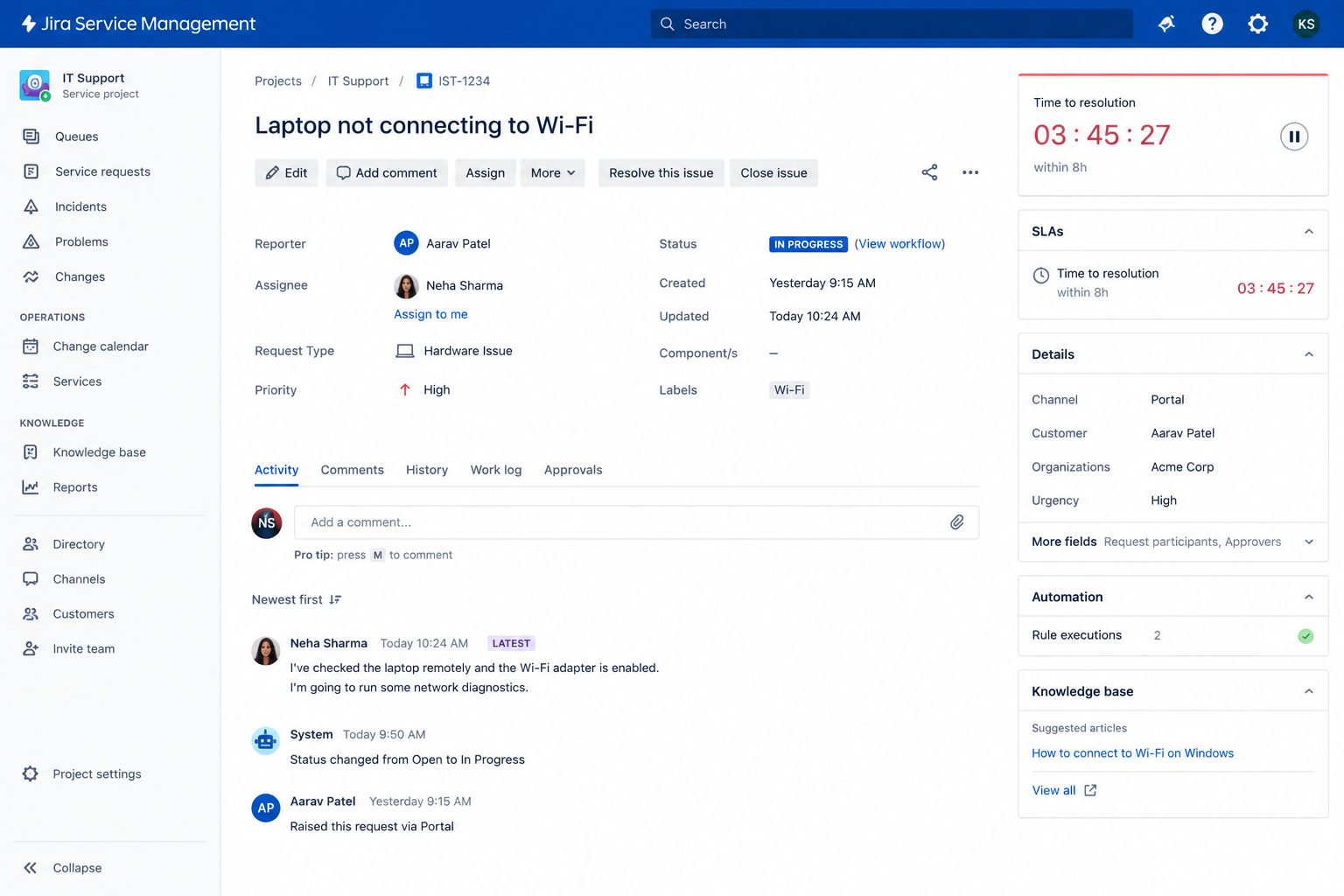
Before diving into Jira Service Management specifically, it helps to understand what a Jira ticketing system actually represents at its core. A Jira ticket is a structured record of a request, incident, question, or task that needs to be tracked, assigned, and resolved by a team.
Every Jira ticket typically captures details such as the requester, description of the issue, priority, category, and status. This structure allows IT teams to track work consistently instead of relying on scattered emails or verbal requests.
- Incidents: Unplanned interruptions or reductions in IT service quality, such as an application outage.
- Service requests: Routine requests like new software installations, hardware provisioning, or access changes.
- Questions: General inquiries that don't require a full technical fix, such as "how do I connect to the VPN?"
- Issues: Broader problems that may need investigation before a resolution is possible.
As a Jira ticket moves through a support workflow, it passes through defined stages — from creation, to triage, to active work, to resolution and closure. This staged movement is what separates a structured Jira ticketing system from an unmanaged list of requests.
It's worth distinguishing between a basic Jira ticketing setup (using core Jira Software or Jira Work Management to track tasks) and a dedicated IT service management approach using Jira Service Management. A basic setup can log and assign tickets, but it typically lacks built-in SLA tracking, incident and problem management, change approval workflows, and a customer-facing service portal — all of which JSM provides out of the box.
2 . How Does Jira Service Management Work as a Ticketing System?
At a high level, every Jira ticket in JSM follows a consistent lifecycle: Request → Ticket Creation → Categorization → Assignment → Prioritization → Resolution → Closure. Understanding this flow helps teams see exactly how a Jira ticketing system keeps support organized from the moment a request comes in.
Ticket Creation
- Customer portal: Employees or customers can submit requests through the Jira ticketing system's customer portal, selecting from predefined request types so the right information is captured upfront.
- Email-based creation: Requests sent to a designated support email address are automatically converted into a new Jira ticket, with the sender set as the reporter.
- Multiple channels: Depending on configuration, tickets can also be created through Slack or Microsoft Teams integrations, forms, or APIs, giving requesters flexibility in how they reach IT.
- Guided forms: Request forms guide users to include the details agents need, reducing back-and-forth clarification once the Jira ticket lands in the queue.
Ticket Categorization and Prioritization
- Request type categorization: Each new Jira ticket is categorized based on its request type (incident, service request, change, problem), which determines the workflow it follows.
- Impact and urgency: Agents or automation rules evaluate impact (how many users are affected) and urgency (how time-sensitive the issue is) to calculate priority.
- Priority assignment: Based on impact and urgency, a Jira ticket priority — such as Highest, High, Medium, or Low — is set, which in turn drives SLA targets.
- Routing high-priority requests: Critical tickets can be automatically flagged and routed to senior agents or on-call teams for faster attention.
Ticket Assignment and Routing
- Assigning to the right agents or teams: Tickets are routed to the appropriate individual or team based on category, request type, or component.
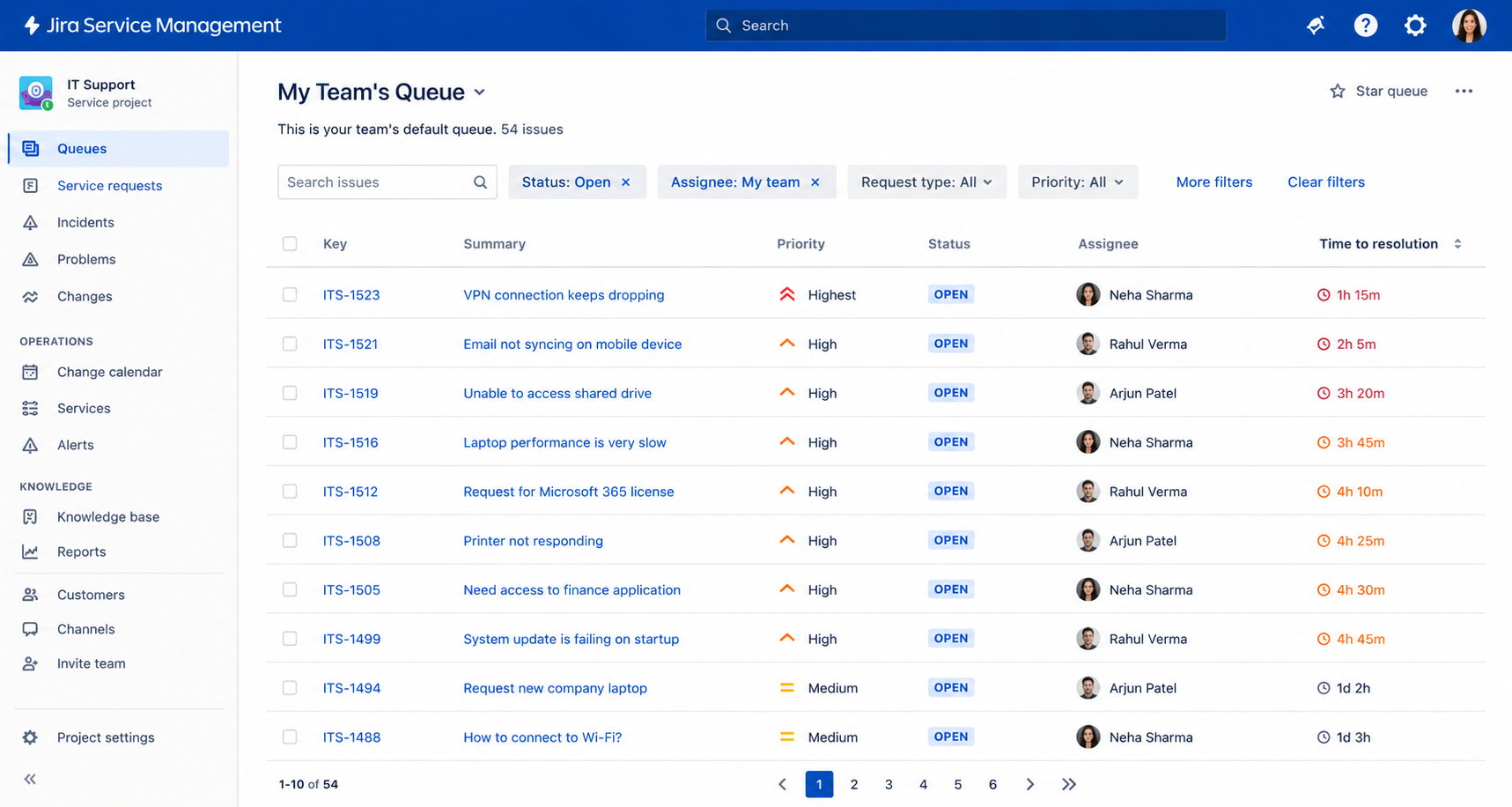
- Queues: Queues within the Jira ticketing system group tickets by criteria such as priority, request type, or team, giving agents a clear, filtered view of their workload.
- Workflow-based routing: Ticket status changes can automatically trigger reassignment, such as moving a Jira ticket to a specialist team once initial triage is complete.
- Automation for assignment: Rules can automatically assign incoming tickets based on workload balancing, keyword matching, or component ownership, reducing manual sorting.
Ticket Resolution and Closure
- Agent collaboration: Agents can loop in other teams, add internal comments, and link related tickets to resolve complex issues together.
- Requester communication: Automated and manual updates keep the requester informed as their Jira ticket progresses through the workflow.
- Progress tracking: Status fields and workflow transitions give both agents and requesters a clear view of where a Jira ticket currently stands.
- Resolution and closure: Once the issue is fixed or the request fulfilled, the Jira ticket is marked resolved and later closed, often with a satisfaction survey sent to the requester.
- Consistency: Standardized workflows ensure every Jira ticket follows the same predictable path, regardless of which agent handles it.
3 . Key Jira Service Management Features for IT Ticket Management
Jira Service Management extends far beyond a basic Jira ticketing system, offering a complete set of ITSM capabilities designed specifically for IT support teams.
Service Request Management
- Employee service requests: Covers everyday requests like password resets, equipment requests, or system access.
- Software and hardware requests: Standardized forms make it easy to request new tools, licenses, or physical devices.
- Access requests: Structured workflows manage requests for system or application access, often tied to approval steps.
- Standardized request types: Predefined categories keep every Jira ticket consistent and easy to route.
Incident Management
- Capturing incidents: Every disruption is logged as a distinct incident Jira ticket, separate from general service requests.
- Prioritizing incidents: Impact and urgency determine how quickly an incident needs attention.
- Escalating critical issues: Major incidents can trigger automatic escalation paths and notify on-call responders.
- Coordinating resolution: The Jira ticketing system supports cross-team collaboration to restore service as quickly as possible.
Problem Management
- Identifying recurring incidents: Patterns across multiple incident tickets can point to an underlying problem.
- Investigating root causes: Problem records allow teams to document and track root cause analysis separately from individual incidents.
- Linking incidents to problems: Related tickets are connected, giving teams full visibility into how widespread an issue is.
- Reducing recurring issues: Addressing root causes helps prevent the same incident from generating repeated tickets.
Change Management
- Planning and tracking changes: IT changes are logged, scheduled, and tracked through a structured workflow.
- Approval processes: Changes can require sign-off from designated approvers before implementation.
- Reducing risk: Structured change workflows help avoid unplanned outages caused by unreviewed changes.
- Visibility into activity: Teams gain a clear calendar and log of upcoming and completed changes.
SLA Management
- Response and resolution targets: SLAs define how quickly a Jira ticket should receive a first response and be resolved.
- SLA monitoring: Countdown timers and dashboards show agents exactly how much time remains on each Jira ticket.
- Escalations: Tickets nearing SLA breach can automatically escalate to managers or senior agents.
- Performance tracking: SLA reports show how consistently the team is meeting its commitments.
Automation
- Automated assignment: Rules route new tickets to the right agent or team without manual sorting.
- Notifications: Requesters and agents receive automatic updates at key stages of the Jira ticket lifecycle.
- Escalations: Automation can flag or reassign tickets that are at risk of breaching SLA.
- Approvals: Approval steps can trigger automatically based on request type or value thresholds.
- Repetitive actions: Common tasks, like closing inactive tickets or adding standard comments, can run automatically.
Knowledge Base and Self-Service
- Knowledge articles: Teams can document solutions to common issues for reuse across the organization.
- Self-service resources: A searchable knowledge base lets users troubleshoot without opening a Jira ticket.
- Faster resolution for users: Employees can often resolve simple issues themselves in minutes.
- Reducing Jira ticket volume: Fewer repetitive Jira tickets means agents can focus on more complex work.
4 . How Jira Ticketing System Improves IT Support
Beyond individual features, it's worth looking at the practical outcomes a well-configured Jira ticketing system delivers for IT teams and the wider business.
Centralized IT Requests
Instead of requests arriving through scattered emails, spreadsheets, and chat messages, every request becomes a trackable Jira ticket inside one organized system. This centralization gives IT leaders a single source of truth for all support activity.
Faster Ticket Resolution
Automation, intelligent routing, prioritization rules, and a searchable knowledge base all work together to reduce the time it takes to resolve a Jira ticket. Agents spend less time triaging and more time solving actual problems.
Better Visibility
- Ticket status: Real-time status updates show exactly where each request stands.
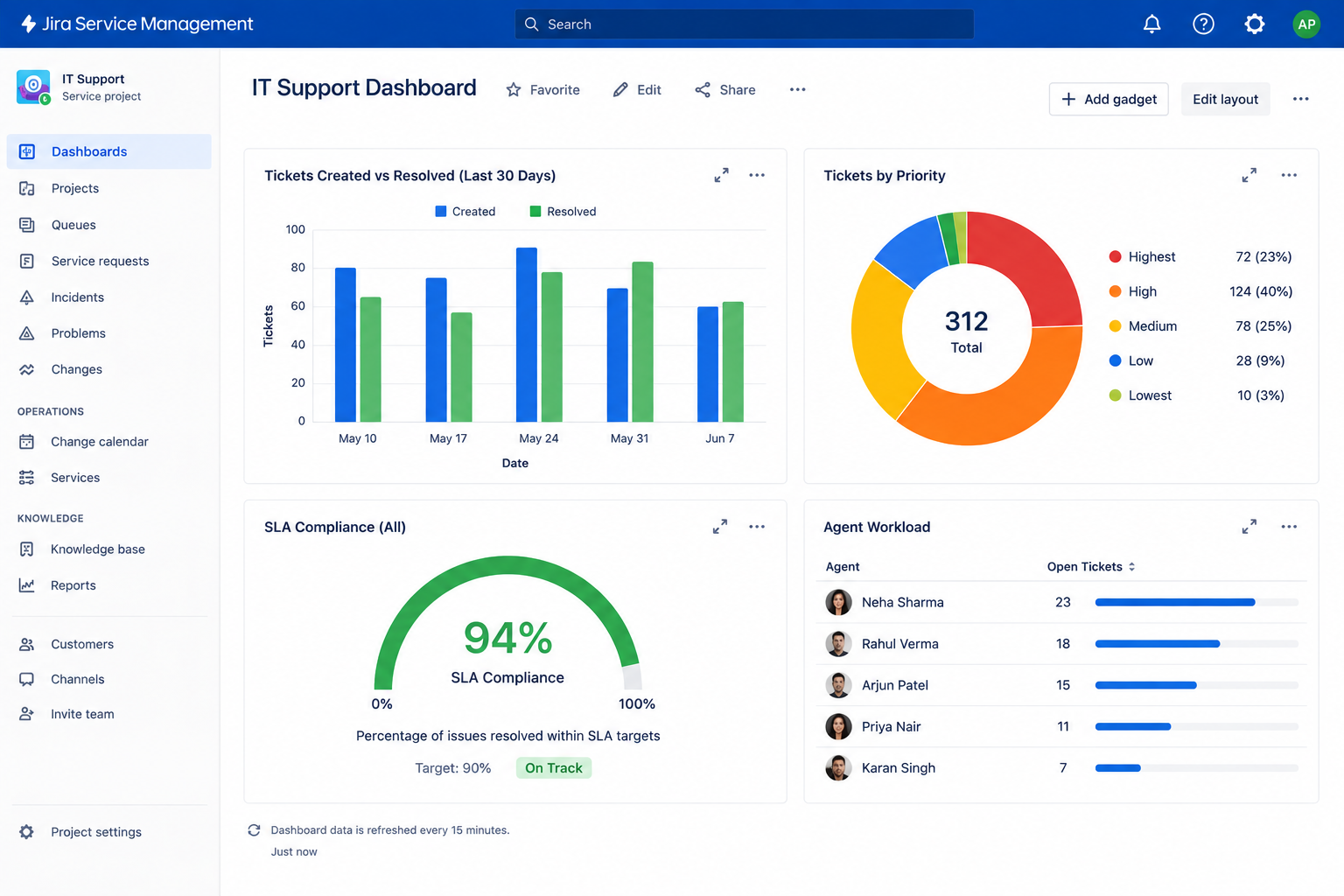
- Agent workload: Managers can see how work is distributed across the team.
- SLA performance: Dashboards highlight tickets at risk of breaching targets.
- Reports: Historical reporting reveals trends in volume, resolution time, and recurring issues.
Consistent IT Workflows
Standardized workflows mean every Jira ticket of a given type follows the same predictable steps, regardless of which agent is handling it. This consistency makes support outcomes more reliable and easier to audit.
Improved Employee Experience
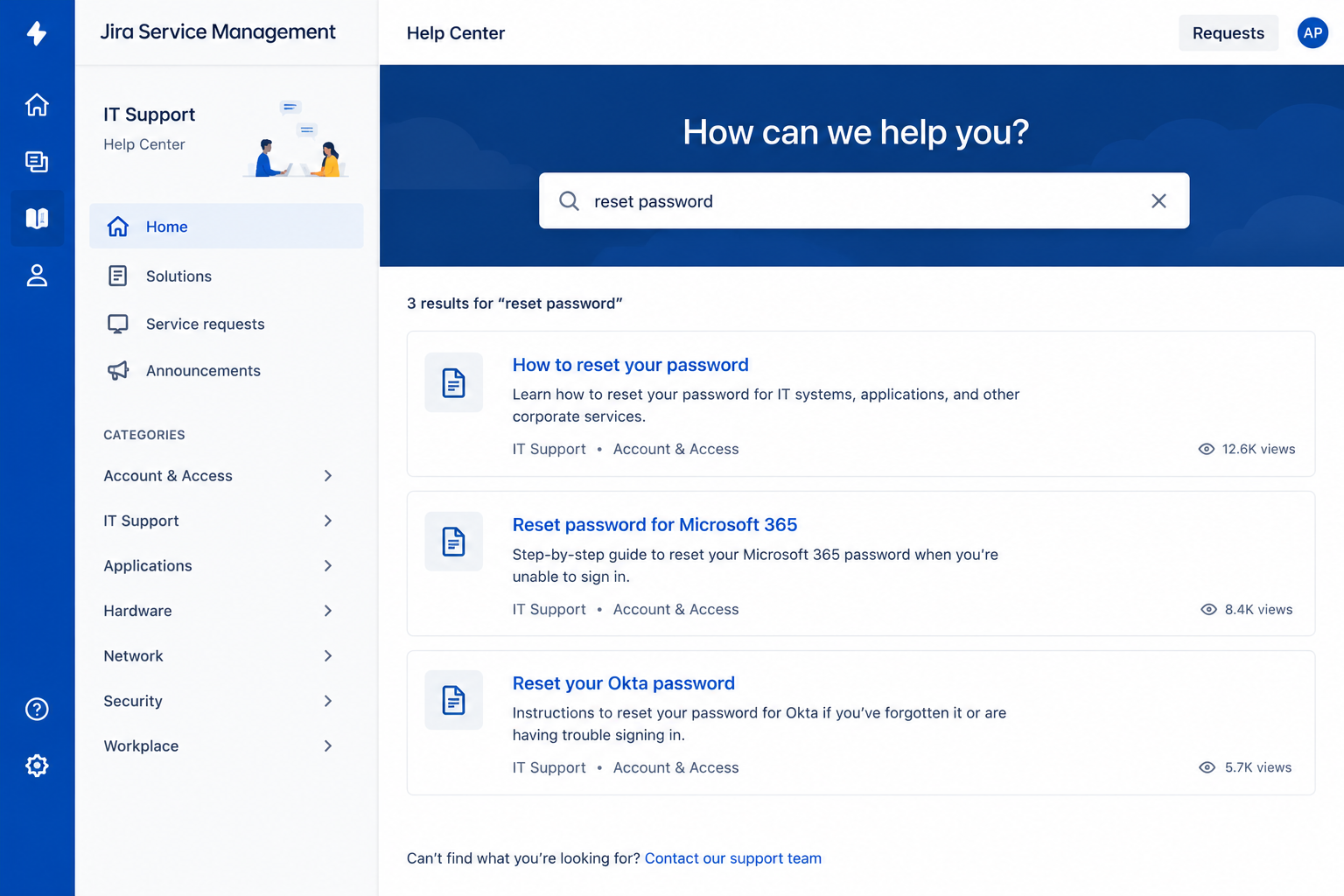
- Service portals: A dedicated portal gives employees a simple way to submit requests.
- Self-service: Knowledge articles help employees resolve common issues without waiting on a Jira ticket.
- Request tracking: Requesters can see the live status of their Jira ticket at any time.
- Notifications: Automatic updates keep employees informed without them needing to follow up manually.
- Easier IT communication: A structured portal and comment thread replace scattered email chains.
5 . Jira Ticketing System vs Traditional Help Desk
Many organizations start with a traditional help desk tool before evaluating a full Jira ticketing system built on Jira Service Management. Both can log and track tickets in a Jira ticketing system fashion, but they differ in how far they extend into complete ITSM territory.
| Capability | Traditional Help Desk | Jira Service Management |
|
Ticket Management |
Yes |
Yes |
|
ITSM Workflows |
Limited / Varies by tool |
Yes |
|
Incident Management |
Yes |
Yes |
|
Change Management |
Limited |
Yes |
|
Automation |
Varies by tool |
Yes |
|
SLA Management |
Yes |
Yes |
|
Self-Service |
Varies by tool |
Yes |
|
Knowledge Base |
Varies by tool |
Yes |
|
Atlassian Integration |
Limited |
Yes |
It's important to note that many traditional help desk tools do offer solid ticket management, incident handling, and SLA tracking — capability varies widely by vendor and plan tier. What tends to set a Jira ticketing system apart is the depth of native ITSM workflows (incident, problem, and change management working together), deep automation, and tight integration with the broader Atlassian ecosystem, including Confluence, Jira Software, and Bitbucket, which is especially valuable for organizations already using those tools.
6 . Jira Ticketing System Use Cases for IT Teams
A Jira ticketing system built on JSM can support a wide range of real-world scenarios beyond a traditional help desk.
IT Help Desk
IT teams can use this Jira ticketing system to manage everyday employee technical issues, from software errors to connectivity problems, ensuring every request becomes a trackable Jira ticket instead of an informal ask.
Employee Service Desk
JSM isn't limited to IT. Organizations often extend the same Jira ticketing system to manage internal requests across HR, facilities, and finance, giving every department a consistent way to handle employee requests.
Incident Management
When outages or major disruptions occur, the Jira ticketing system allows teams to log, prioritize, and coordinate resolution of high-impact incidents, keeping stakeholders informed throughout.
Access and Software Requests
- Application access: Employees request access to internal tools through standardized forms.
- Software requests: New software or license requests follow a defined approval path.
- Hardware requests: Equipment needs are logged, tracked, and fulfilled through the same system.
- Approval workflows: Requests can require manager or IT approval before being fulfilled.
Enterprise Service Management
Organizations increasingly extend Jira Service Management beyond IT to build a broader enterprise service management practice, applying the same ticketing discipline to legal, procurement, and other operational teams.
7 . How to Set Up a Jira Ticketing System with Jira Service Management
For teams ready to move toward implementation, setting up a Jira ticketing system involves several structured steps.
- Define your IT support requirements. Identify the types of requests you'll handle, the support teams involved, your user base, target SLAs, and the underlying business processes each Jira ticket type should follow.
- Create the JSM service project. Configure a dedicated Jira ticketing system project structured around your organization's specific service requirements.
- Configure request types. Define request types so users submit the right kind of Jira ticket with the right information from the start.
- Design Jira ticket workflows. Build out workflows that reflect how different support processes actually move from open to resolved.
- Set up queues. Create queues so agents can organize and prioritize incoming tickets by team, priority, or request type.
- Configure SLAs. Set response and resolution targets appropriate to each request type and priority level.
- Create automation rules. Automate Jira ticket assignment, notifications, escalations, and other repetitive actions to reduce manual work.
- Configure notifications and approvals. Ensure stakeholders and approvers stay informed at each stage of the Jira ticket lifecycle.
- Build the knowledge base. Create self-service articles for frequently reported issues to reduce incoming Jira ticket volume.
- Configure reports and dashboards. Set up visibility into Jira ticket volume, resolution time, SLA performance, team workload, and support trends.
- Test the workflow. Thoroughly test workflows, automation rules, notifications, permissions, and SLAs before going live.
- Launch and continuously optimize. Treat launch as the starting point, refining your Jira ticketing system based on real Jira ticket data, user feedback, and evolving business requirements.
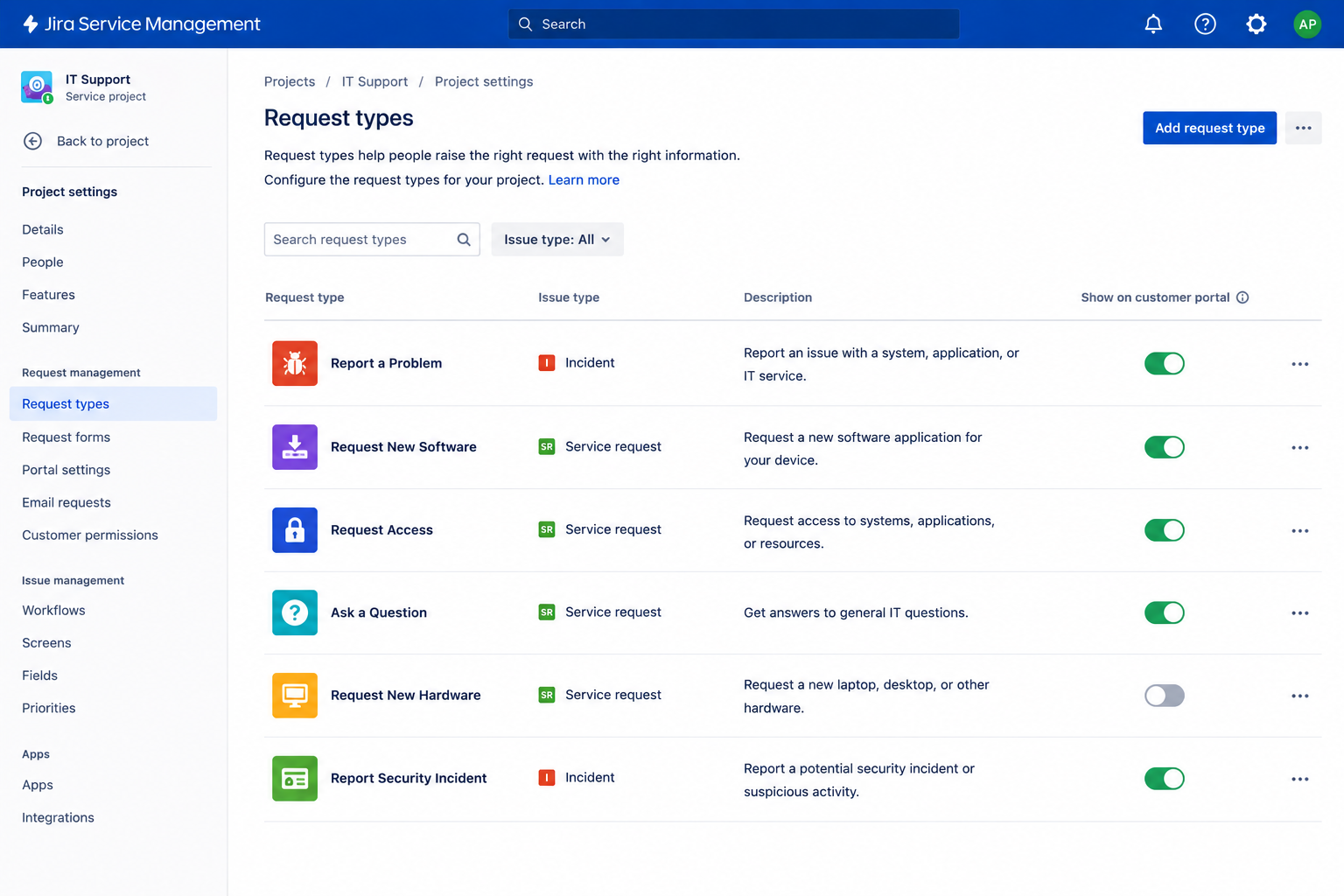
8 . Jira Ticketing System Best Practices
Once your environment is live, following a few best practices helps keep your Jira ticketing system effective as usage grows.
Keep Request Types Simple
Avoid overwhelming users with too many request options. A focused list makes it easier for requesters to choose the right category for their Jira ticket.
Build Workflows Around Actual IT Processes
Design workflows based on how your support team genuinely operates, rather than adopting default templates that don't match reality.
Automate Repetitive Ticket Actions
Use automation for routing, notifications, and escalations so agents can focus on resolving issues rather than manual Jira ticket handling.
Define Realistic SLAs
Set response and resolution targets that your team can consistently meet based on actual capacity and service requirements.
Use Queues for Efficient Ticket Prioritization
Organize incoming Jira tickets into queues so agents always know which requests need attention first.
Create Knowledge Articles for Common Issues
Document solutions to frequently reported problems to encourage self-service and reduce unnecessary ticket creation.
Monitor Ticket and SLA Performance
Regularly review ticket volume, resolution times, and SLA compliance to identify bottlenecks before they grow.
Review Workflows Regularly
Revisit and adjust workflows as your IT processes and business requirements evolve over time.
Avoid Unnecessary Customization
Keep configurations manageable and aligned with genuine business needs rather than adding complexity for its own sake.
Train Agents and Service Users
Make sure both support agents and end users understand how to navigate the Jira ticketing system, from submitting a Jira ticket to tracking its progress.
9. How Much Does a Jira Service Management Ticketing System Cost?
The total cost of running a Jira ticketing system on Jira Service Management depends on several factors specific to your organization. Understanding Jira Service Management pricing can help you evaluate the right plan, licensing model, and additional costs for your ticketing environment.
- Plan tier: Pricing tiers for your Jira ticketing system (such as Free, Standard, Premium, and Enterprise) offer different feature sets and support levels.
- Number of agents: Licensing is typically based on the number of agents who work tickets, not the number of requesters submitting them.
- Number of users/requesters: Some plans account for the scale of your requester base as usage grows.
- Cloud and deployment considerations: Cloud, Data Center, or hybrid deployment choices can affect overall cost.
- Apps and integrations: Marketplace apps or third-party integrations may add to the total spend.
- Implementation and customization: Initial setup, workflow design, and configuration work often require dedicated effort or outside expertise.
- Managed services: Ongoing management can be handled internally or outsourced to a partner.
- Ongoing optimization and support: Ticketing environments need continued tuning as request volume and business needs change.
Because Atlassian's pricing structure and tiers can change over time, it's best to confirm current plan details directly with Atlassian or a certified partner rather than relying on a fixed number here.
10 . When Should You Consider Jira Service Management for Ticket Management?
Not every organization needs to move to a full Jira ticketing system environment immediately, but certain signals suggest it's time to evaluate a more structured Jira ticketing system.
- Growing IT support volumes that overwhelm informal request tracking.
- An increasing number of service requests across multiple departments.
- Manual ticket routing that slows down response times.
- Difficulty tracking SLAs or proving support performance.
- A clear need for greater automation across the ticket lifecycle.
- Requirements for incident, problem, and change management working together.
- An existing Atlassian environment that a Jira ticketing system can integrate with directly.
- A push toward more self-service and knowledge management.
- Plans to extend service management beyond IT to other departments.
- A need for enterprise-grade scalability as the organization grows.
If several of these apply to your organization, it's a strong sign that a dedicated Jira ticketing system built on Jira Service Management is worth serious consideration.
11 . Why Choose Empyra for Jira Service Management?
Successful adoption of Jira Service Management requires more than basic configuration. As an Atlassian Platinum Solution Partner, Empyra helps organizations implement, integrate, customize, and optimize Jira Service Management around their business and ITSM requirements.
- Jira Service Management Implementation: Empyra plans and implements JSM environments based on your workflows, service requirements, user roles, and operational goals.
- ITSM Workflow Design: Design and optimize incident, service request, problem, and change management workflows to support efficient service delivery.
- Automation and Optimization: Automate repetitive ticketing processes, improve request routing, reduce manual work, and streamline the overall support lifecycle.
- Integration and Customization: Connect Jira Service Management with enterprise applications and customize workflows, fields, portals, and processes to fit existing business operations.
- Migration and Transformation: Support organizations migrating from legacy help desks or other service management platforms to a modern Jira Service Management environment.
- Ongoing Support: Provide continuous optimization, configuration updates, workflow improvements, automation support, and expert assistance as business requirements evolve.
With Atlassian expertise and end-to-end JSM capabilities, Empyra can support your organization from implementation and integration through long-term optimization.
Need help implementing or optimizing Jira Service Management? Talk to Empyra's JSM experts.
Conclusion
Build a More Efficient IT Support Process with Jira Service Management
A well-implemented Jira ticketing system does far more than log requests, and that structured approach pays off as support volume grows. Powered by Jira Service Management, it brings centralized ticket management, automated workflows, reliable SLA tracking, coordinated incident and service request management, self-service options, knowledge management, meaningful reporting and visibility, and scalable ITSM processes together in one platform.
Whether you're replacing a basic help desk tool, scaling IT support across a growing organization, or extending service management beyond IT, a properly configured Jira ticketing system gives your team the structure needed to resolve every Jira ticket efficiently and consistently.
Ready to improve your IT support with Jira Service Management? Connect with Empyra to plan, implement, or optimize your JSM environment.
.png?width=364&height=116&name=sales%20radar%20ai%20logo%202026%20%20(280%20x%2084%20px).png)






.svg)