.svg)

Having Jira does not automatically mean a team has an efficient agile workflow. Many teams set up Jira, add a few columns to a board, and expect the process to manage itself. However, poorly designed statuses, unnecessary handoffs, manual updates, and hidden bottlenecks can gradually slow delivery, even when the platform has the capabilities to prevent these issues. In modern Jira agile project management, the tool is not just used for tracking tasks but for managing the entire lifecycle of work—from backlog prioritization and sprint planning to execution, testing, and release. When used effectively, Jira becomes the central system that connects teams, aligns priorities, and provides real-time visibility into progress across the project.
The difference between simply using Jira and running a genuinely efficient agile workflow in Jira often becomes visible only when deadlines begin slipping, work starts piling up, and the team cannot clearly identify where the delays are coming from. This guide is not another step-by-step tutorial for creating a Jira workflow. Instead, it focuses on how to design, evaluate, and optimize an agile workflow in Jira so it supports faster and more predictable delivery. It also looks at how the workflow connects with Jira Agile project management, from planning and development through testing and release.
1 . What Is an Agile Workflow in Project Management?
An agile workflow is the path a piece of work follows from the time it is identified until it is considered complete. Unlike a rigid process that remains unchanged, an agile workflow gives teams regular opportunities to review how work is moving and make adjustments based on what they learn.
The exact stages can vary depending on the team, industry, and type of work. However, several core concepts are common across most effective agile workflows.
Core Stages of an Agile Workflow
A simple agile workflow may include the following core stages:
- Backlog – Contains all identified work items that have not yet been prioritized or scheduled for execution.
- To Do – Represents work that has been prioritized and is ready to be picked up by the team.
- In Progress – Indicates that a team member is actively working on the task.
- Review – Used when the work is completed and requires feedback, peer review, or approval.
- Testing – Ensures the work meets acceptance criteria and functions as expected before release.
- Done – Marks the item as fully completed according to the team’s definition of done.
Not every team needs these exact stages. A marketing team may have a very different workflow from a software development team, and even two engineering teams within the same organization may use different processes.
Agile Workflow vs. Agile Methodology
- Agile (Way of Working): Agile is a mindset or approach to work that focuses on delivering value in small, iterative cycles. It emphasizes continuous improvement through regular feedback, strong collaboration between team members and stakeholders, and the ability to adapt quickly when requirements or priorities change.
- Scrum and Kanban (Frameworks/Methodologies): Scrum and Kanban are structured frameworks that help teams apply Agile principles in practice. Scrum uses defined roles (like Product Owner and Scrum Master), time-boxed iterations called sprints, and ceremonies such as planning and retrospectives. Kanban focuses on visualizing work, limiting work in progress, and improving flow efficiency without fixed iterations.
- Workflow (Work Movement Process): A workflow represents the actual path a task follows from start to completion. It defines the sequence of stages (statuses) such as “To Do,” “In Progress,” “Review,” and “Done,” and the transitions that control how work moves between these stages.
- Scrum vs Kanban in Jira Workflows: Both Scrum and Kanban teams can use the same Jira workflow structure effectively. The key difference is not the workflow itself, but how it is managed—Scrum uses time-based sprints, while Kanban focuses on continuous flow and WIP limits.
- Key Insight (Framework vs Workflow): The framework (Scrum or Kanban) defines how the team operates, while the workflow defines how work physically moves through Jira. This means teams can share similar workflows even if they follow different Agile frameworks, as long as the process supports their way of working.
Why Workflow Design Affects Delivery Speed
Workflow design has a direct impact on how quickly a team can deliver work. Visibility helps everyone understand where an issue currently stands. Handoffs create opportunities for work to wait, while bottlenecks cause issues to accumulate at specific stages.
Key factors that influence delivery speed include:
- Work in progress (WIP): Having too many active items can spread the team’s attention too thin and reduce overall efficiency.
- Cycle time: This shows how long work takes to move through the entire process, from start to completion.
- Clear ownership: Ensures that every issue has a defined responsible person who is accountable for moving it forward.
When these areas are designed properly, an agile workflow in Jira becomes more than a visual representation of work. It becomes a mechanism for improving delivery.
2 . How Jira Supports an Effective Agile Workflow
Jira is designed to help agile teams plan, track, and deliver work rather than simply function as a basic task list. Understanding how Jira’s core features connect with the team’s process is an important part of creating an effective Jira Agile setup.
Jira Issues Represent Different Types of Work
Every piece of work in Jira can be represented through an issue. Epics can be used for larger bodies of work that span multiple sprints, while stories generally represent user-facing functionality. Tasks can capture general work items, bugs can track defects, and sub-tasks can break larger issues into smaller pieces.
These issue types move through the statuses defined by the workflow. Depending on the team’s needs, different issue types can also follow slightly different paths.
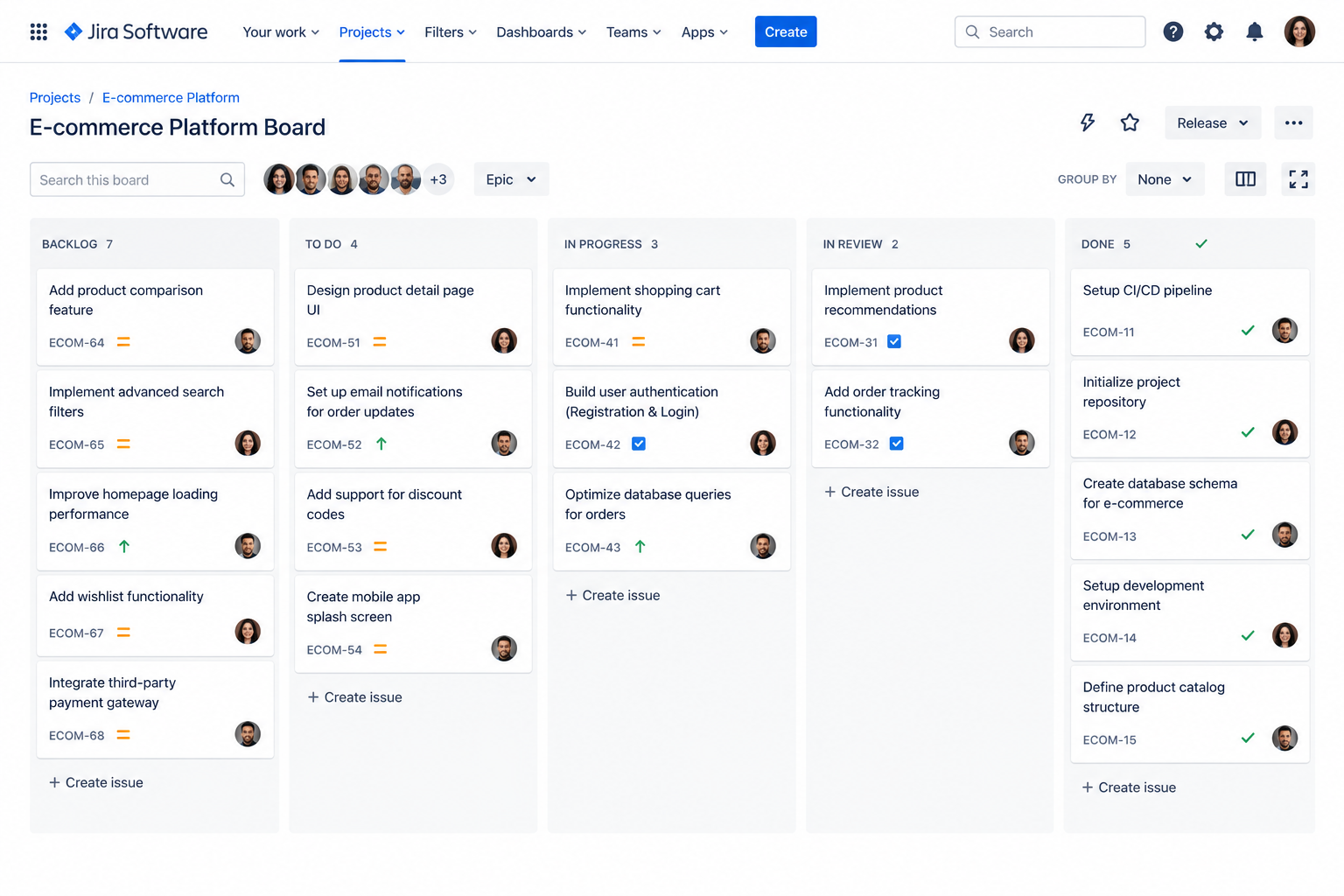
Jira Boards Visualize Workflow Progress
Scrum and Kanban boards provide a visual representation of workflow progress. Issues appear as cards and are organized into columns that correspond to workflow statuses.
For example, if a team sees twelve issues waiting in Testing while Code Review has no items, the problem becomes immediately visible. The team does not necessarily need a separate status meeting to discover that testing has become the current constraint.
Jira Sprints Connect Workflow With Delivery
For Scrum teams, sprints connect the agile workflow with a fixed and repeating delivery cadence. A sprint typically involves selecting work for the sprint backlog, planning the work, managing it through the active sprint board, completing items within the sprint, and reviewing the results.
This connection between workflow and sprint management allows teams to understand not only what work is being completed but also how effectively it is moving through the process.
Jira Automation Reduces Repetitive Work
Jira automation can reduce the amount of manual administration required to maintain a workflow. It can automatically assign issues, send notifications when statuses change, update fields, transition issues based on linked activity, and create sub-tasks.
However, automation should be introduced after the underlying workflow has been properly designed. Automating a poorly structured process does not solve the underlying problem. It can simply make a broken workflow operate faster while making the reason for the problem harder to identify.
3 . What Does an Effective Agile Workflow in Jira Look Like?
An effective agile workflow in Jira should be simple enough for the team to understand, detailed enough to represent meaningful stages, and measurable enough to reveal bottlenecks and support continuous improvement.
Clear and Meaningful Workflow States
Every status should have a clear and unambiguous purpose. Team members should be able to understand what an issue’s current status means without needing to ask for clarification.
If two statuses represent almost the same activity, they may create unnecessary complexity rather than useful visibility.
Clearly Defined Workflow Transitions
A transition is the action that moves an issue from one status to another. For example, an issue may move from In Progress to Code Review after development work has been completed.
Clearly defined transitions turn the workflow from a simple diagram into a practical set of rules that guide how work moves through the team.
A Shared Definition of Done
Done should represent a standard rather than simply being another status. Depending on the team’s process, reaching Done may require development to be completed, code to be reviewed and approved, testing to pass, acceptance criteria to be satisfied, and documentation to be completed where necessary.
Without a shared definition of done, different team members may have different ideas about when an item is actually finished.
Appropriate Work-in-Progress Limits
Work-in-progress, or WIP, limits restrict the number of items that can remain in a particular stage at one time. Although limits may initially feel restrictive, they can help teams identify process problems.
If a stage regularly reaches its WIP limit, that may indicate that the stage needs additional resources, a process change, or more attention from the team.
4 . 10 Best Practices for Improving an Agile Workflow in Jira
Improving an agile workflow in Jira is not about adding more complexity or creating additional layers of control. It is about making the process clearer, faster, and easier for the team to follow. The goal is to remove friction, reduce confusion, and ensure that work moves smoothly from start to finish without unnecessary delays.
A well-optimized workflow helps teams focus on delivery instead of constantly managing the tool. The following best practices are designed to simplify Jira workflows while improving visibility, accountability, and overall delivery speed.
1. Keep Jira Workflow Statuses Simple
A common mistake teams make is creating too many statuses in Jira. While it may seem helpful to track every small step, it often leads to confusion and slows down the workflow. A simple structure with only meaningful stages is far more effective.
Each status should represent a real change in the state of work. If a status does not help the team understand progress or make decisions, it is likely unnecessary. Simplicity improves clarity and makes the workflow easier to manage and scale.
2. Map Jira Statuses to Real Work
Every status in Jira should reflect how the team actually works, not how someone thinks the process should look on paper. When statuses are disconnected from real activities, teams end up forcing work into artificial categories.
Mapping statuses to real work ensures that Jira becomes a true reflection of the delivery process. This makes it easier for teams to track progress, identify issues, and communicate effectively.
3. Define Clear Entry and Exit Criteria
Each workflow stage should have clear rules for when work can enter and when it can move forward. Without this clarity, issues often get stuck or moved prematurely, leading to rework and delays.
Entry and exit criteria remove guesswork. They ensure that everyone understands what needs to be completed before an issue transitions to the next stage, improving consistency across the team.
4. Establish a Shared Definition of Done
A shared definition of done ensures that everyone on the team has the same understanding of what “complete” means. Without it, one person’s finished work may still require additional testing, review, or documentation.
This alignment improves quality and reduces misunderstandings. It also helps teams deliver more predictable results because completion is based on agreed standards rather than individual interpretation.
5. Limit Work in Progress
When too many tasks are in progress at the same time, productivity drops. Team members become overloaded, context switching increases, and work takes longer to complete.
Limiting work in progress helps teams focus on finishing tasks before starting new ones. This improves flow, reduces bottlenecks, and leads to faster overall delivery.
6. Automate Repetitive Workflow Actions
Jira automation can significantly reduce manual effort by handling repetitive tasks such as assignments, notifications, and status updates. This allows teams to focus more on actual development work.
However, automation should only be introduced after the workflow is stable. Automating a poorly designed process can make problems harder to detect and fix.
7. Use Jira Reports to Find Bottlenecks
Jira provides several reports that help teams understand how work is moving through the system. These reports can highlight delays, inefficiencies, and areas where work is getting stuck.
Instead of relying on assumptions, teams should use data to identify where improvements are needed. This makes decision-making more accurate and effective.
8. Review Workflow Performance Regularly
An agile workflow should evolve over time. As teams grow and processes change, the workflow must be reviewed to ensure it still supports efficient delivery.
Regular reviews help identify outdated steps, unnecessary complexity, and new opportunities for improvement. This keeps the workflow aligned with real-world needs.
9. Avoid Unnecessary Jira Customization
While Jira allows extensive customization, not every customization adds value. Too many custom fields, statuses, or rules can make the system harder to manage.
Before adding anything new, teams should evaluate whether it truly improves the workflow. If it does not solve a real problem, it is better to avoid it.
10. Standardize Where It Helps and Customize Where It Matters
Standardization improves consistency, especially across multiple teams. It makes reporting easier and reduces confusion. However, not every team works the same way, so some level of customization is necessary.
The key is balance. Standardize core practices where possible, but allow flexibility where team-specific needs require it.
5 . How to Identify Bottlenecks in a Jira Agile Workflow
Bottlenecks occur when work slows down or gets stuck at a particular stage in the workflow. Identifying them early is essential for maintaining smooth delivery and avoiding project delays.
Look for Issues Stuck in One Status
One of the simplest ways to identify bottlenecks is to check where issues are spending the most time. If work consistently gets stuck in a specific status, that stage may be overloaded or inefficient.
This often indicates a lack of capacity, unclear requirements, or dependency issues that need to be addressed.
Compare Work in Progress Across Workflow Stages
Looking at how many issues exist in each stage can quickly reveal imbalances. If one stage has significantly more work than others, it is likely a bottleneck.
This comparison helps teams understand where work is piling up and where additional attention is needed.
Measure Cycle Time and Lead Time
Cycle time and lead time provide valuable insight into how long work takes to move through the system. Increasing times often indicate inefficiencies or delays in the workflow.
Tracking these metrics over time helps teams understand whether improvements are actually working.
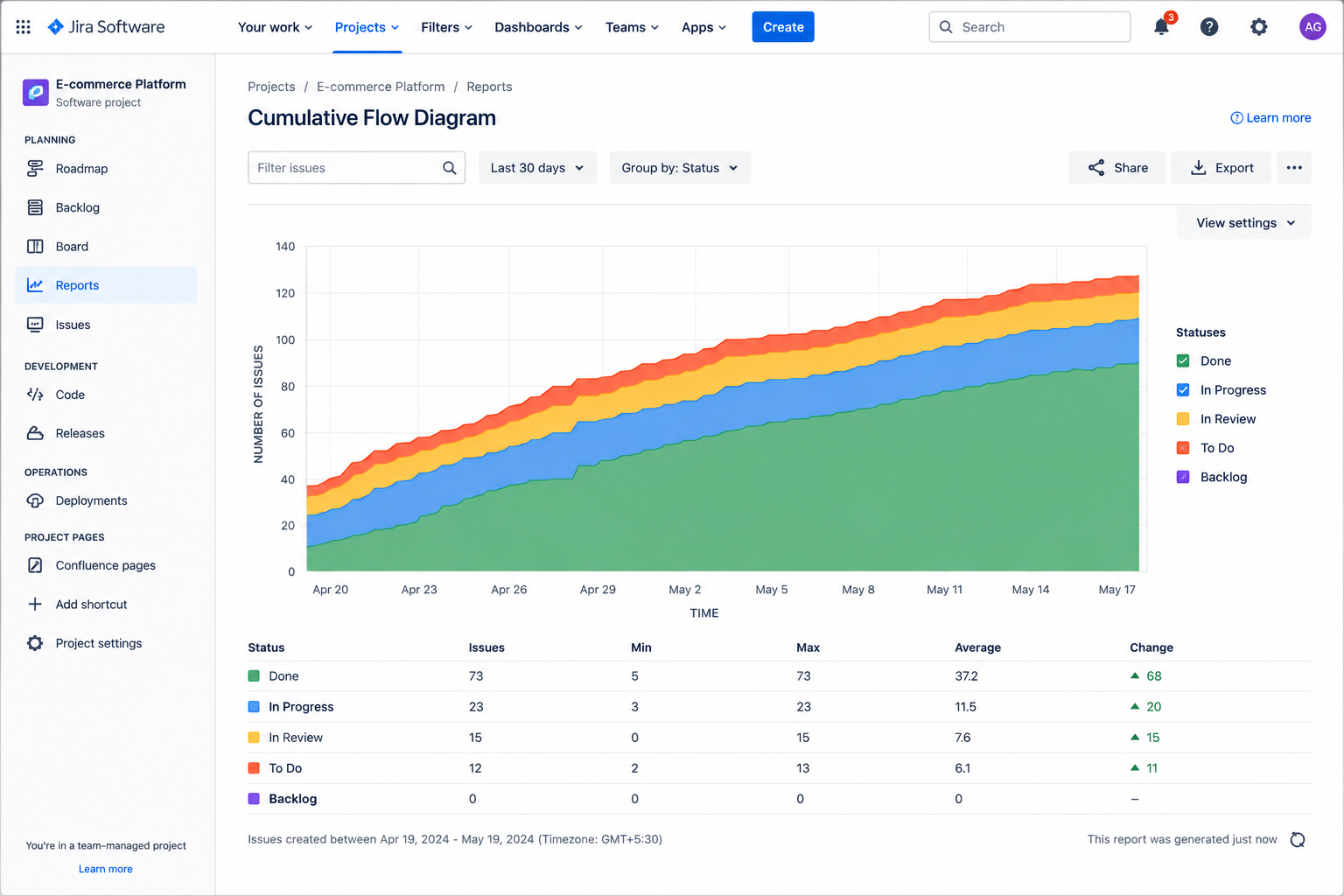
Use Cumulative Flow to Identify Process Problems
A cumulative flow diagram shows how work is distributed across different stages over time. When certain areas widen or flatten, it indicates a buildup of work.
This visual representation makes it easier to spot long-term bottlenecks that may not be obvious from the board alone.
6 . Jira Dashboard Metrics for Monitoring Agile Workflow Performance
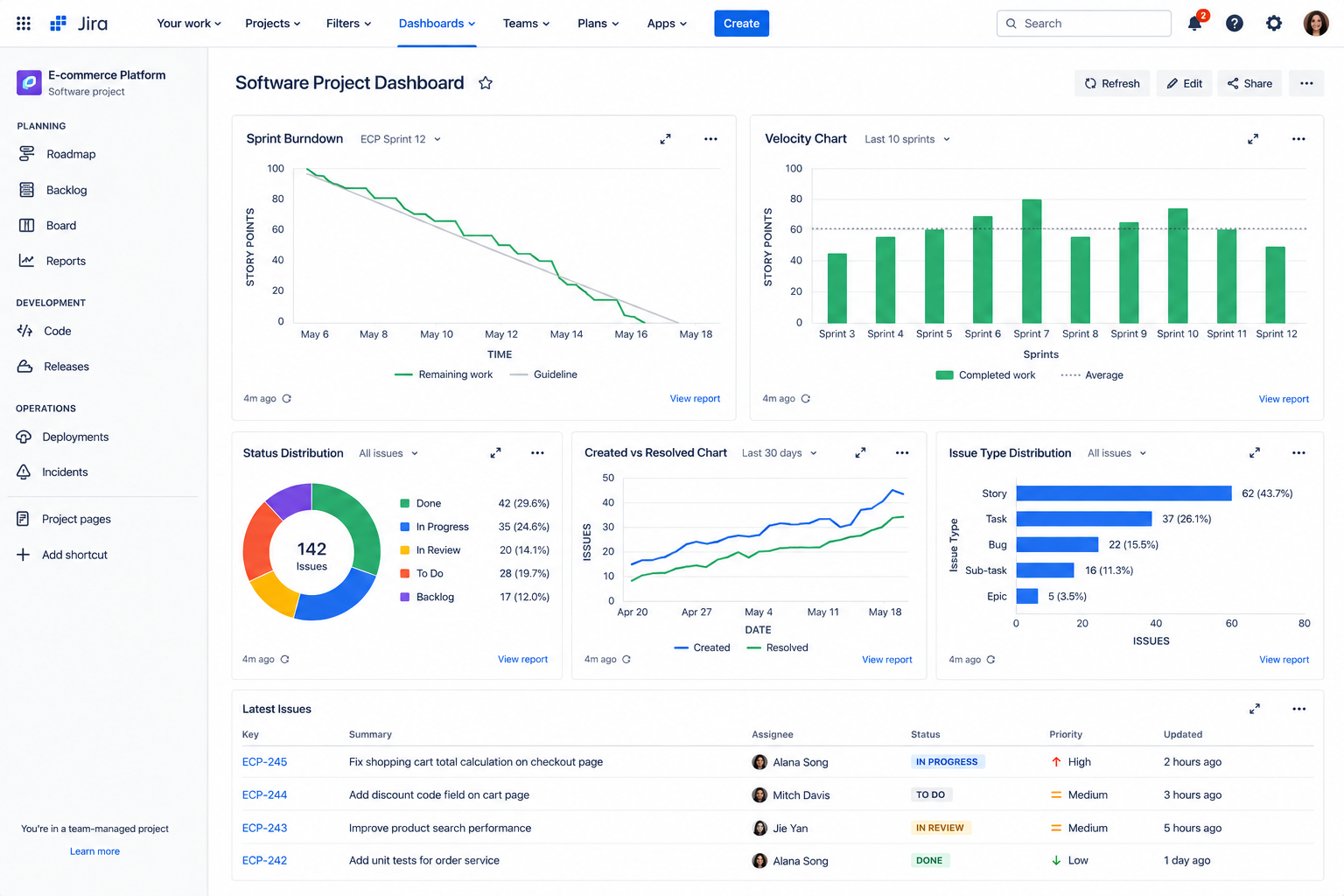
Jira dashboards help teams track key performance indicators in real time. These metrics provide visibility into how well the workflow is functioning and where improvements are needed.
Sprint Progress
Sprint progress shows how much work has been completed compared to what is still pending. It helps teams understand whether they are on track to meet sprint goals.
Work in Progress
Monitoring work in progress helps ensure that teams are not overloaded. It also highlights stages where work may be accumulating unnecessarily.
Cycle Time
Cycle time measures how long it takes for work to move from start to completion. Lower cycle times generally indicate a more efficient workflow.
Velocity and Sprint Predictability
Velocity helps teams understand how much work they can realistically complete in a sprint. Over time, this improves planning accuracy and delivery predictability.
Blocked Issues
Blocked issues highlight work that cannot proceed due to dependencies or external factors. Tracking them ensures that obstacles are addressed quickly.
7 . Example of an Optimized Agile Workflow in Jira
A well-structured agile workflow in Jira should be simple, logical, and aligned with how the team actually delivers work. Each stage should represent a meaningful step in the process.
In Progress to Code Review
Work moves from In Progress to Code Review once development is complete and the code is ready for review. This ensures that only finished work enters the review stage.
Code Review to Testing
After approval, the work transitions to Testing. This ensures that only validated code is tested, reducing unnecessary rework.
Testing to Done
Once testing is complete and all acceptance criteria are met, the issue moves to Done. This confirms that the work is fully completed.
Automation Opportunities
Automation can support this workflow by handling transitions, notifications, and assignments. This reduces manual effort and ensures consistency across the process.
8 . Implementing an Agile Workflow in Jira Successfully
A successful Jira implementation requires careful planning, gradual rollout, and alignment with the team’s working process. When implementing an Agile workflow, organizations should start small, configure workflows and boards correctly, migrate existing issues carefully, and prepare teams before going live. Rushing the implementation can lead to confusion, resistance, and workflow issues.
Start With One Project or Team
It is best to begin with a single team or project. This allows issues to be identified and resolved before scaling the workflow across the organization.
Migrate Existing Issues Carefully
Existing work must be mapped correctly to the new workflow. Poor migration can lead to confusion and disrupt ongoing delivery.
Configure Boards to Match the Workflow
The Jira board should accurately reflect the workflow structure. Misalignment between boards and workflows often leads to misunderstandings.
Add Automation After the Workflow Is Stable
Automation should only be introduced once the workflow is fully defined and stable. This prevents unnecessary rework of automation rules.
Train the Team Before Go-Live
Training ensures that everyone understands the new workflow, including statuses, transitions, and expectations. This reduces resistance and improves adoption.
Run a Short Trial Period
A trial period allows teams to test the workflow in real conditions. Feedback collected during this time can be used to make final improvements.
9 . How to Optimize an Existing Jira Agile Workflow
Optimizing an existing workflow involves identifying inefficiencies and making targeted improvements rather than rebuilding everything from scratch.
Step 1: Audit the Current Workflow
Start by reviewing the entire workflow setup, including statuses, transitions, and configurations. This helps identify areas that need improvement.
Step 2: Identify Unnecessary Workflow Steps
Look for steps that do not add value or are rarely used. Removing them simplifies the workflow and improves efficiency.
Step 3: Find Existing Bottlenecks
Use Jira data to identify where work is slowing down. This provides a clear starting point for improvements.
Step 4: Simplify and Standardize
Reduce complexity wherever possible. A simpler workflow is easier to manage and more effective in the long run.
Step 5: Add Automation
Once the workflow is optimized, automation can be added to reduce manual effort and improve consistency.
Step 6: Measure the Results
Track key metrics before and after changes to ensure that improvements are actually delivering better performance.
10 . Jira Agile Workflow vs. Standard Jira Workflow
A standard Jira workflow is typically simple and generic, designed for basic task tracking. An agile workflow, on the other hand, is structured around iterative delivery, continuous improvement, and team collaboration.
While a standard workflow may be sufficient for small teams, agile workflows are better suited for teams that require visibility, flexibility, and faster delivery cycles.
| Aspect | Standard Jira Workflow | Agile Workflow in Jira |
| Purpose | Basic task tracking and issue management | Iterative delivery and continuous improvement |
| Structure | Simple, fixed, and minimal stages | Flexible stages aligned with team process |
| Visibility | Limited visibility into progress flow | High visibility across all work stages |
| Adaptability | Hard to modify for changing needs | Easily adaptable to evolving workflows |
| Collaboration | Minimal collaboration focus | Strong emphasis on team collaboration |
| Delivery Speed | Slower feedback and release cycles | Faster, incremental delivery cycles |
| Best Suited For | Small teams or simple projects | Agile teams with complex or evolving work |
11 . Why Choose Empyra for Jira Workflow Optimization?
Empyra is an Atlassian Platinum Solution Partner, bringing deep expertise in designing and optimizing Jira workflows for teams of all sizes. Our approach focuses on aligning Jira configurations with real-world delivery processes to improve speed, clarity, and efficiency. We help organizations eliminate workflow bottlenecks and build systems that support predictable, measurable outcomes. With proven Atlassian experience, we ensure Jira works as a true enabler of agile delivery rather than just a tracking tool.
- Certified Jira & Atlassian Expertise
As an Atlassian Platinum Solution Partner, Empyra brings certified expertise and hands-on experience across complex Jira environments. Our recommendations are grounded in proven Atlassian best practices and real implementation experience. - Workflow Audits Built Around Your Process
We analyze how your team actually works before suggesting any changes. This ensures the workflow reflects real delivery patterns instead of forcing a generic structure. - Focus on Measurable Delivery Outcomes
Every improvement is tied to key performance metrics like cycle time, throughput, and predictability. This ensures changes deliver visible and measurable impact. - Implementation Without Unnecessary Disruption
Workflow improvements are introduced in a controlled and phased manner. This helps teams continue their ongoing work without interruptions or confusion. - Support That Scales With Your Organization
Our solutions are designed to evolve as your teams and projects grow. This ensures long-term scalability without needing frequent rework of your Jira setup.
Conclusion
An effective agile workflow in Jira is not something a team configures once and then forgets. It is a living process that should evolve as the work, team, and business requirements change. When statuses are clear, transitions are meaningful, work in progress is controlled, bottlenecks are measured, and repetitive activities are automated thoughtfully, Jira can become much more than a tool for tracking tasks. It can provide the visibility, structure, and feedback needed to support faster and more predictable delivery. The most effective approach is to keep the workflow simple, measure how it performs, and continuously refine it based on what the data and the team reveal.
.png?width=364&height=116&name=sales%20radar%20ai%20logo%202026%20%20(280%20x%2084%20px).png)





.svg)