.svg)

1 . Introduction
Every software team eventually runs into the same problem: work starts to feel scattered. Features stall halfway, nobody's sure what's blocking a release, and progress is hard to see at a glance. Jira solves this with a system of Jira issue types, where each Jira issue has a clear, defined place in the bigger picture.
At the top of that system sits the Jira Epic — a container for large bodies of work that would otherwise be impossible to track as a single item. A Jira Epic can be broken down into smaller, more manageable pieces, and this article walks through exactly how that breakdown works, moving step by step through Jira Epics, Jira Stories, Tasks, Bugs, and Sub-tasks.
By the end, you'll understand how Jira Epics and related Jira issue types connect, when to use each one, and how they help teams structure Jira project management more effectively.
2 .What Is a Jira Epic?
A Jira Epic is the largest unit of work in Jira's standard hierarchy. It represents a significant initiative, feature, or goal too big to complete in a single sprint, and it acts as a container grouping the related Jira Stories, Tasks, and Bugs needed to get there.
Think of a Jira Epic less as a task to be "done" and more as a milestone to be reached. It doesn't get resolved the way an individual Jira issue does — it gets completed as the sum of the smaller work items inside it. Teams use Jira Epics because they need a way to see the forest, not just the trees.
Why teams use Jira Epics:
- Central visibility — One place to check the status of a major initiative.
- Related work, grouped — Everything tied to one goal lives together.
- Easier roadmap planning — Big goals turn into trackable containers.
- Reporting boundary — A natural boundary for burndown tracking and release planning.
When to create an Epic:
- Multi-sprint scope — The work spans multiple sprints or release cycles.
- Multiple contributors — Several team members or teams will contribute.
- Mixed issue types — The initiative mixes Jira Stories, Tasks, and possibly Bugs.
- Leadership visibility — Stakeholders need visibility into the larger goal.
Jira Epics also help organize large initiatives by giving project managers a way to measure progress at a strategic level. Instead of asking "is ticket JIRA-482 done yet," a manager can ask "how much of the E-commerce Website Epic is complete," which is a far more useful question when reporting upward.
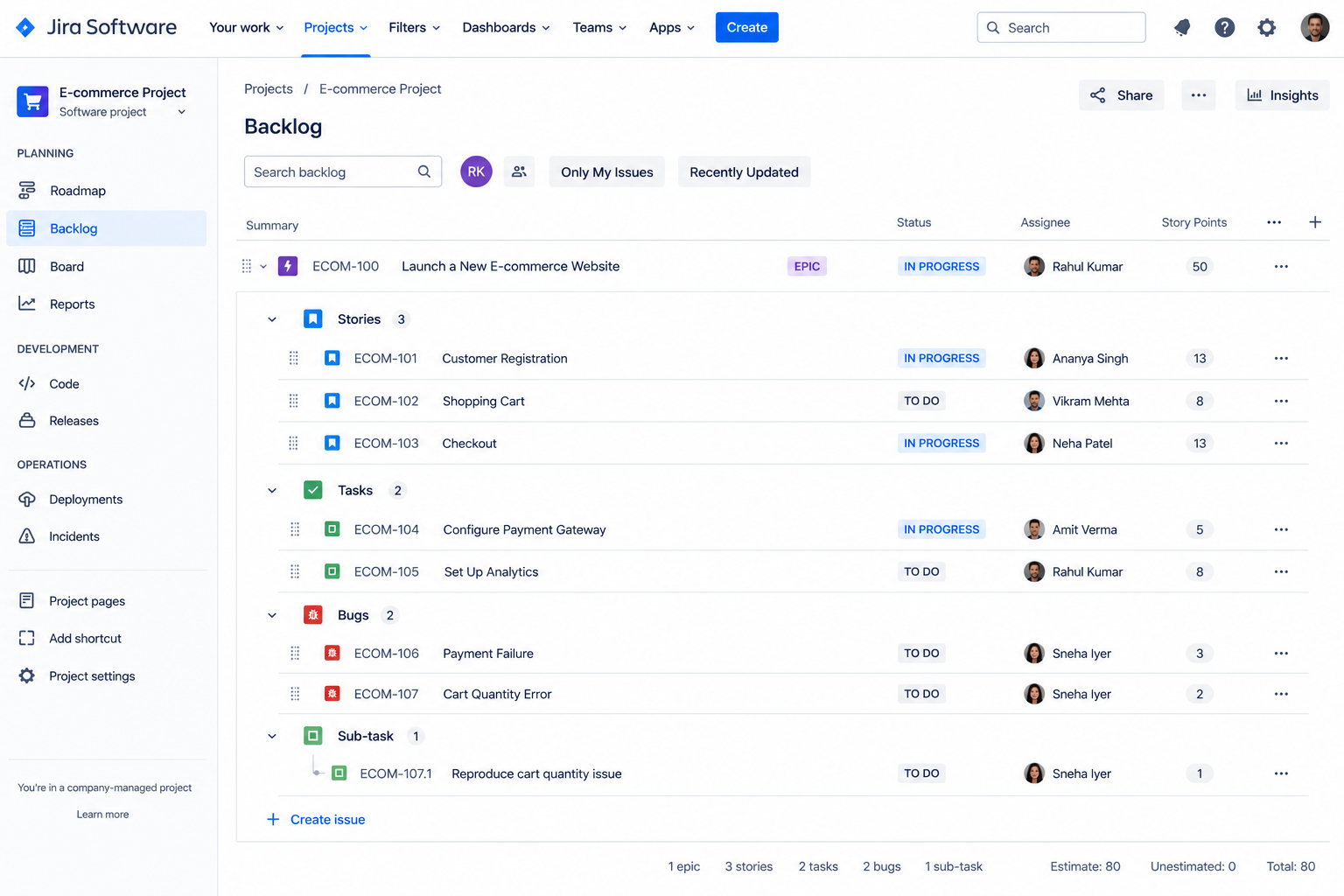
Jira Epic Example
A practical example makes this easier to picture. Say a company wants to launch a brand-new e-commerce website. That entire initiative becomes the Jira Epic, and everything required to get the site live lives underneath it.
Epic: Launch a New E-commerce Website
- Jira Story — Create customer registration: lets new customers sign up and store their details.
- Jira Story — Add shopping cart: lets customers collect items before checkout.
- Task — Configure hosting: sets up the servers the site will run on.
- Bug — Fix checkout error: resolves a defect blocking purchases.
- Sub-task — Write API tests: verifies the registration API behaves correctly.
Notice how the Epic itself doesn't describe a single unit of work — it describes an outcome. Everything nested beneath it gets built, tested, and shipped to make that outcome real.
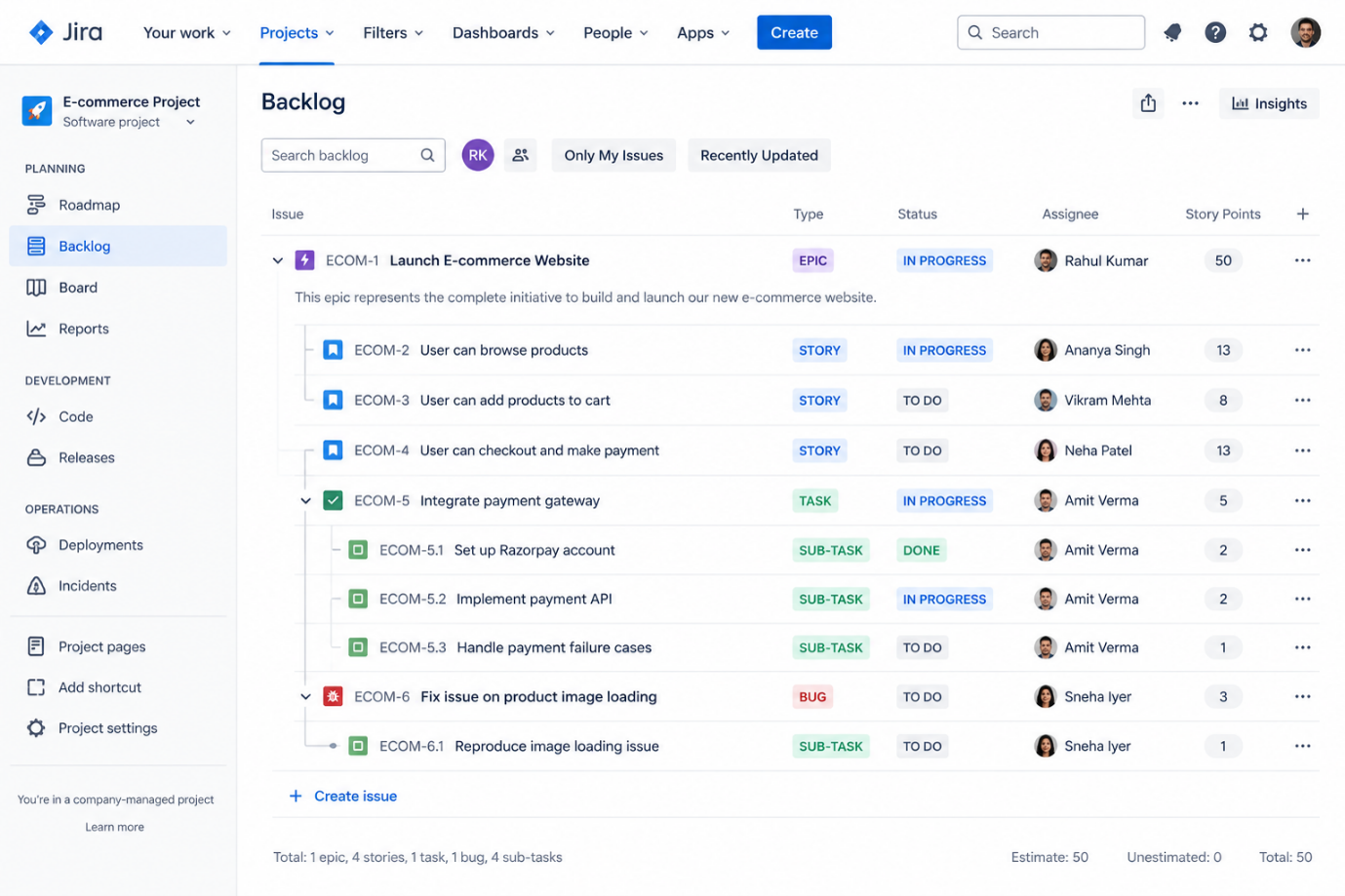
When Should You Use a Jira Epic?
Not every piece of work deserves Epic status. Jira Epics are meant for genuinely large, multi-part efforts — using them too liberally defeats the purpose and clutters your backlog with containers that hold almost nothing.
Good candidates for a Jira Epic include:
- Large features — Functionality that touches multiple parts of a product.
- Product initiatives — Work tied to a specific business goal.
- Major releases — Version launches or milestone releases.
- Business projects — Efforts beyond engineering alone, like marketing or sales.
- Cross-functional work — Initiatives needing coordination across teams.
- Multi-Jira Story efforts — Any work requiring multiple Jira Stories and Tasks.
If a request can be finished by one person in a day or two, it almost certainly doesn't need a Jira Epic. Save that structure for initiatives that genuinely need a home for a lot of moving parts.
3 . Understanding Jira Issue Types Within an Epic
Once you understand what a Jira Epic is, the next step is seeing how the other Jira issue types slot in underneath it. A Jira Epic provides the larger context — the "why" — while the smaller Jira issue types represent the work required to achieve that goal.
The typical flow looks like this:
Epic → Jira Story / Task / Bug → Sub-task
- Jira Story — Captures a piece of functionality from the end user's point of view.
- Task — Captures specific work the team needs to do that isn't necessarily user-facing.
- Bug — Captures something that isn't working as expected and needs to be fixed.
- Sub-task — Breaks any of the above into smaller, more granular pieces of work.
Each of these issue types plays a distinct role, and understanding the difference is what allows a team to structure a Jira project without ambiguity about where a piece of work belongs. We'll go through each one in detail next.
4 . What Is a Jira Story?
A Jira Story represents a piece of functionality described from the end user's perspective. It's one of the most common Jira issue types because it keeps the team focused on what the user actually needs, rather than implementation details too early.
The purpose of a Jira Story is to translate a business or user need into something the development team can plan, estimate, and build. Jira Stories relate to Jira Epics as building blocks that, together, deliver the outcome the Epic represents.
Key elements of a well-written Jira Story:
- User-story format — Written as "As a [user], I want [goal] so that [benefit]."
- Acceptance criteria — Clear conditions defining when the Jira Story is done.
- Single focus — Centered on one specific piece of functionality.
- Sprint-sized scope — Small enough to complete within a single sprint.
- User-value framing — Written around value delivered to the user, not implementation steps.
When to create a Jira Story:
- New capability — A new feature needs to be delivered to users.
- Clear user benefit — The work can be described in terms of what the user gains.
- Sprint-ready scope — Small enough to estimate and complete in one sprint.
Jira Story Example
Epic: Launch E-commerce Website
Jira Story: As a customer, I want to create an account so I can save my personal information.
To complete this Jira Story, the team might need to design a registration form, build the backend logic to store user data securely, add email verification, and test the flow across devices. Each of those pieces of work could become its own Sub-task, which we'll cover further down.
Jira Epic vs Jira Story
| Jira Epic | Jira Story |
| Large body of work | Smaller user requirement |
| Contains related work | Contributes toward an Epic |
| Broader objective | Specific functionality |
This is a simplified comparison, and a dedicated Jira Epic vs Jira Story article can go much deeper into the nuances. For now, the key takeaway is that a Jira Story is one Jira issue among potentially many contributing toward the larger goal a Jira Epic represents.
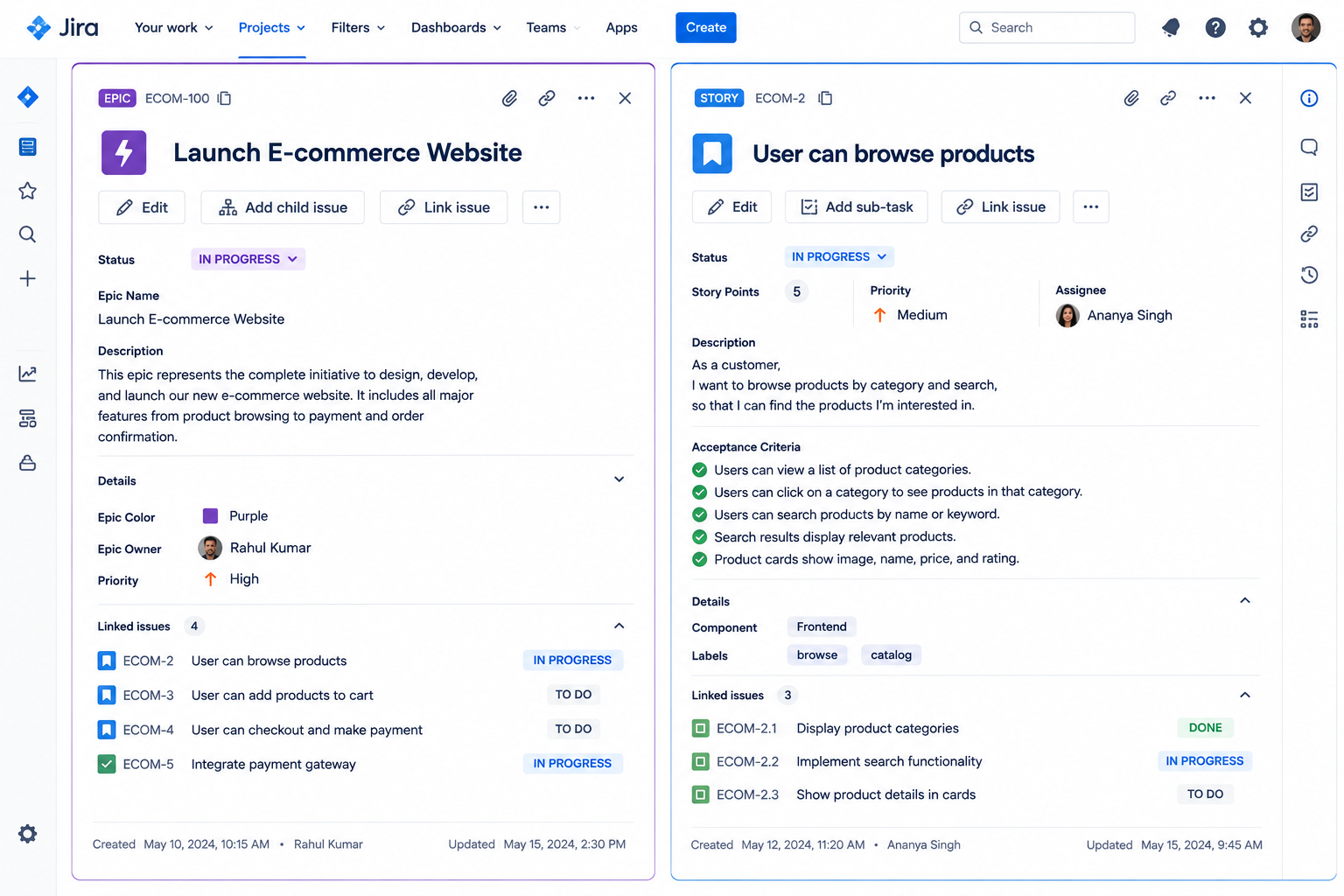
5 . What Is a Jira Task?
A Jira Task represents specific work that needs to be completed, but doesn't necessarily describe functionality from an end-user perspective. Where a Jira Story is about what the user experiences, a Task is about what the team needs to do.
When to use a Task:
- Non-user-facing work — The issue is technical or operational rather than user-facing.
- No natural user framing — No clear "as a user, I want..." angle fits.
- Epic support work — Supports the broader Epic but isn't a feature itself.
Task vs Jira Story: a Jira Story describes value to the user; a Task describes an activity the team must carry out. Both are Jira issue types that contribute to an Epic, but they answer different questions — one asks what the user gets, the other asks what needs to get done.
Jira Task Example
Epic: Launch E-commerce Website
Tasks:
- Configure production server — Prepares the environment the live site runs on.
- Set up analytics — Adds tracking to measure traffic and behavior.
- Configure payment gateway — Connects the site to a payment provider.
- Create deployment documentation — Records the steps to release the site safely.
None of these Tasks describe a user-facing feature on their own, but all of them are necessary for the Jira Epic to succeed. That's the role a Task plays within the larger structure.
Jira Story vs Task
Put simply:
- Jira Story — What the user needs.
- Task — Specific work the team needs to perform.
Keeping this distinction clear prevents a backlog from turning into a confusing mix where nobody can tell, at a glance, whether an issue represents a feature or a chore.
6 . What Is a Jira Bug?
A Jira Bug is a Jira issue type used to flag something that isn't working as expected. Unlike a Jira Story or Task, a Bug represents an unplanned problem that needs fixing — usually because something behaves differently than intended once it's built and tested.
When to log this Jira issue as a Bug:
- Regression — A previously working feature stops functioning correctly.
- Pre-release defect — Testing reveals unexpected behavior before release.
- Customer report — A customer reports an issue in production.
- Acceptance failure — The code doesn't meet the related Jira Story's acceptance criteria.
Bug reporting workflow basics:
- Log with repro steps — Logged along with clear steps to reproduce it.
- Priority and severity — Assigned so the team knows how urgently to act.
- Triage and assignment — Triaged and assigned to the right developer or team.
- Fix and verify — Fixed, tested, and closed once verified.
Bugs relate to Jira Epics the same way Jira Stories and Tasks do — they can be linked to the Epic they affect, giving the team visibility into quality issues tied to a specific initiative rather than a general backlog of defects.
Jira Bug Example
Epic: Launch E-commerce Website
Bug: Checkout page returns an error when customers use a credit card.
This Bug would be tracked alongside the Jira Stories and Tasks tied to the same Jira Epic, so the team can see at a glance that checkout — even though it was "built" — still has an outstanding issue blocking a clean launch.
Jira Bug vs Task
- Task — Work that needs to be done.
- Bug — Something that is not working as expected and needs to be fixed.
The distinction matters for reporting: mixing Bugs into the Task category (or vice versa) makes it much harder to separate planned development effort from unplanned rework.
7 . What Is a Jira Sub-task?
A Jira Sub-task is used to break an individual Jira issue — a Jira Story, Task, or Bug — into smaller pieces of work. It sits one level below its parent issue and can't exist on its own; it's always tied to the issue it belongs to.
When should you create a Sub-task:
- Multiple distinct steps — A Jira Story, Task, or Bug involves several steps different people might handle.
- Granular tracking needed — The parent issue is large enough that detailed tracking helps.
- Split assignment — The team wants to assign different pieces to different people.
Parent issue and Sub-task relationship: the Sub-task inherits context from its parent — it exists to support the completion of that specific issue, not to stand alone as its own deliverable. Once every Sub-task under a parent is complete, the parent issue itself can typically be marked done.
Jira Sub-task Example
Jira Story: Implement customer registration
Sub-tasks:
- Create registration UI — Builds the form customers will fill out.
- Build registration API — Handles the backend logic behind account creation.
- Configure database — Sets up where customer data will be stored.
- Write automated tests — Confirms the registration flow works.
Here, the Sub-tasks represent the actual day-to-day work items a developer or QA engineer would pick up individually, even though they all roll up into the same parent Jira Story.
8 . Jira Epic vs Jira Story vs Task vs Bug vs Sub-task
With all five Jira issue types covered individually, it helps to see every Jira issue side by side in one place.
|
Issue Type |
Purpose |
Typical Use |
|
Epic |
Represents a large body of work |
Major initiative |
|
Story |
Represents user functionality/requirement |
Product feature |
|
Task |
Represents specific work |
Configuration or technical work |
|
Bug |
Tracks something that isn't working |
Defect/fix |
|
Sub-task |
Breaks an issue into smaller work |
Individual activities |
The differences between these Jira issue types come down to scope and purpose. A Jira Epic sits at the top as the broadest container. Jira Stories, Tasks, and Bugs sit at the middle layer, each representing a distinct kind of work. Sub-tasks sit at the bottom, breaking any middle-layer issue into pieces one person can complete quickly.
Understanding where each Jira issue type fits isn't just terminology — it directly affects how accurately a team can report progress and spot bottlenecks before they become serious problems.
9 . How Jira Epics, Jira Stories, Tasks, Bugs & Sub-tasks Work Together
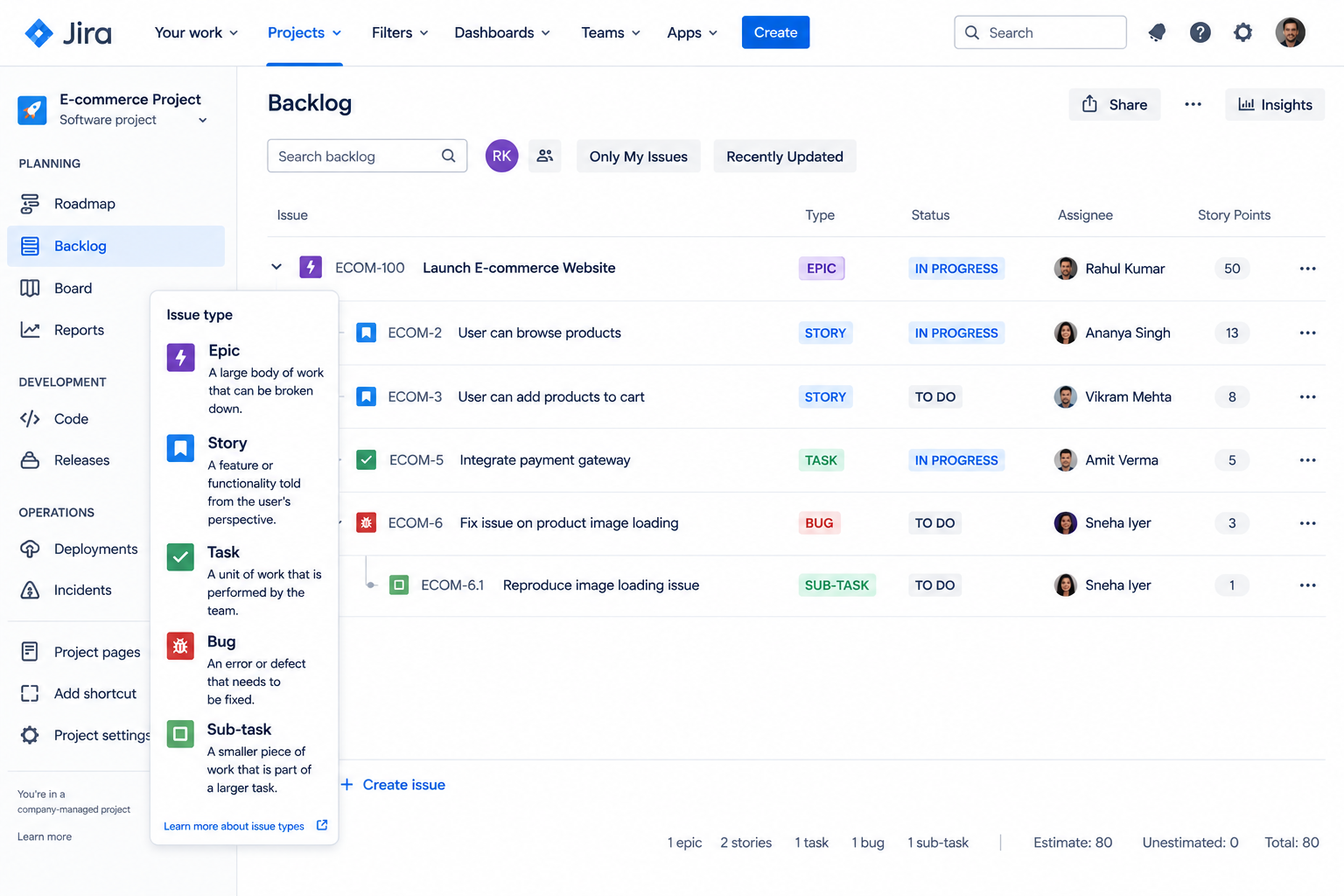
The clearest way to see how these pieces fit together is to follow one initiative from top to bottom.
Epic: Launch E-commerce Website
Jira Stories
- Customer registration — Lets users create and manage an account.
- Shopping cart — Lets users collect items before checkout.
- Checkout — Lets users complete a purchase.
Tasks
- Configure payment gateway — Connects the site to a payment processor.
- Set up analytics — Adds tracking for traffic and conversions.
Bugs
- Payment failure — A defect preventing successful transactions.
- Cart quantity error — A defect miscounting items in the cart.
Sub-tasks
- Build API — Implements the backend logic behind a feature.
- Write tests — Verifies the feature works as expected.
- Update documentation — Records how the feature works.
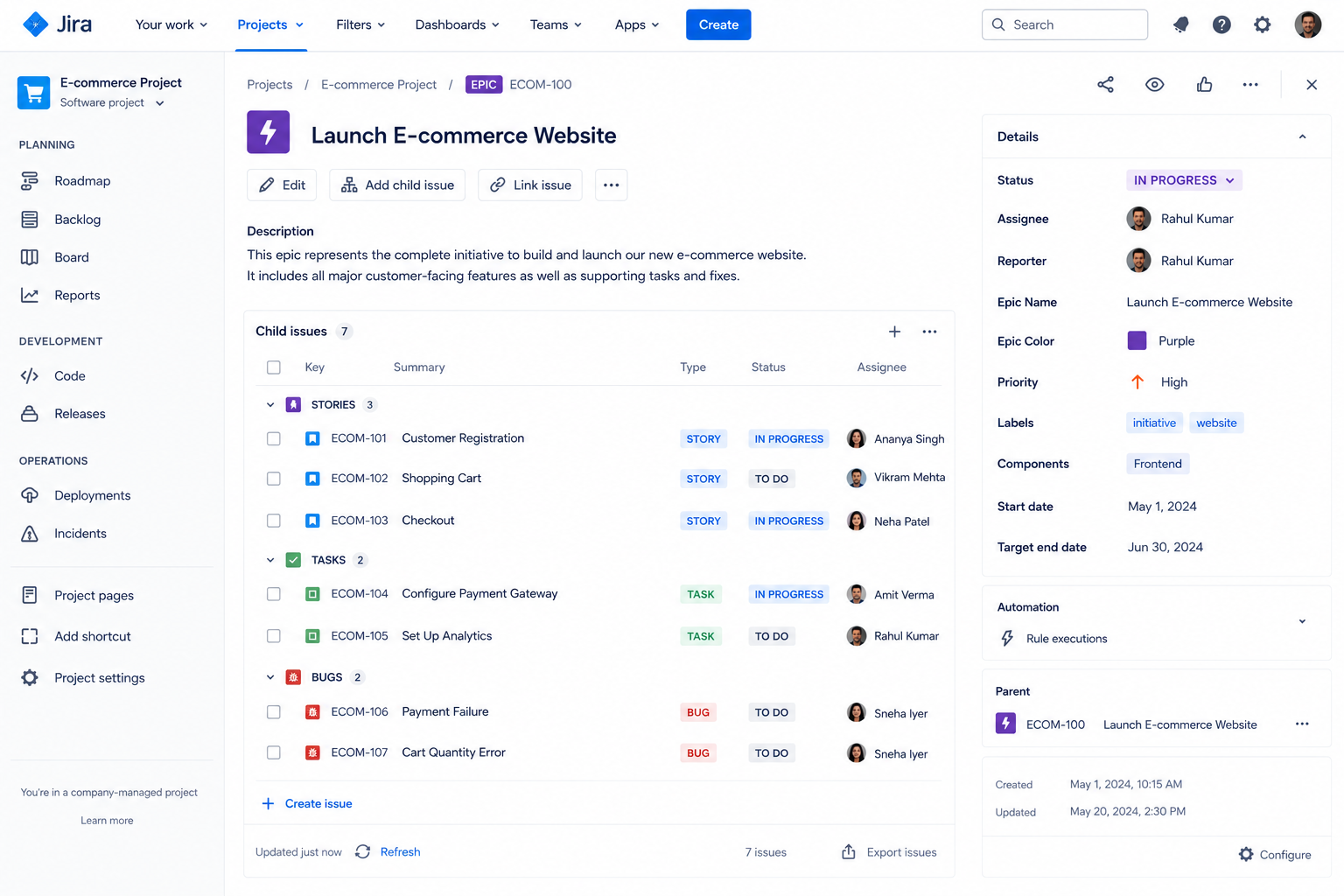
Read top to bottom, this structure tells a complete story. The Jira Epic defines the goal. The Jira Stories define what users will do once it's live. The Tasks capture technical groundwork. The Bugs capture problems found along the way. The Sub-tasks capture the granular steps needed to close out each issue.
Teams use this hierarchy to track progress at every level — a manager can check the Jira Epic's overall completion, while a developer can see exactly which Sub-task is next. That flexibility is why Jira project management has become the standard for so many software teams.
10 . How to Create a Jira Epic
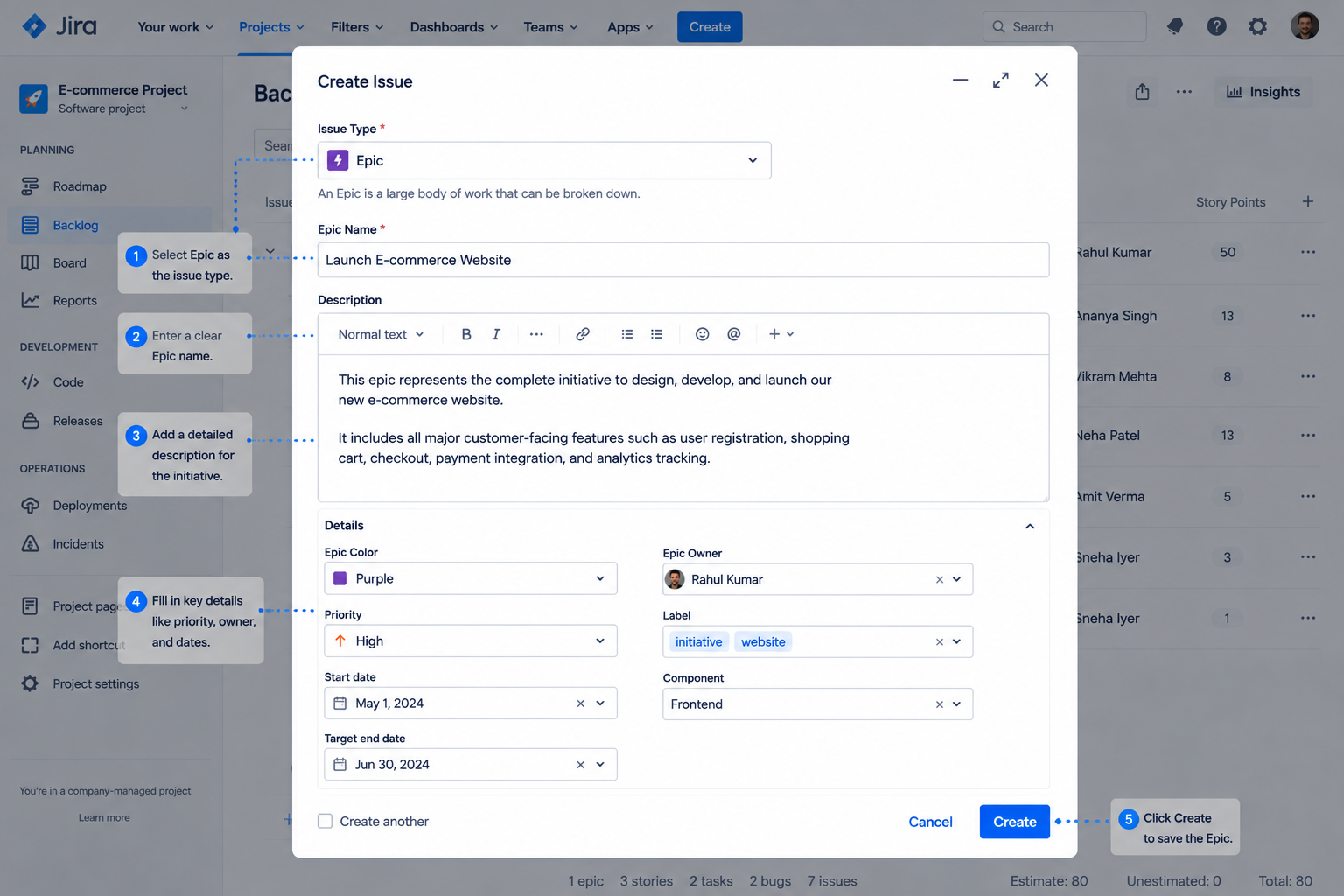
Creating a Jira Epic is straightforward, though exact steps can vary slightly depending on your Jira setup and project type.
- Open the project — Go into the relevant Jira project.
- Go to the backlog — Navigate to the backlog or project view.
- Select "Create Epic" — Choose the option to create an Epic.
- Add the Epic name — Keep it short and outcome-focused.
- Write a description — Explain the goal and scope.
- Add supporting details — Include labels, priority, or a target release.
- Create the Epic — Save it so it appears in the backlog.
- Link related work — Associate Jira Stories, Tasks, and Bugs with it.
It's worth keeping in mind that Atlassian periodically updates Jira's interface, so exact menu names or button placements may shift over time. The underlying concept — a container issue that groups related work — has stayed consistent across Jira's evolution.
11 . Best Practices for Using Jira Epics and Issue Types
Getting the most out of Jira project management isn't just about knowing what each Jira issue type is — it's about using Jira Epics consistently and thoughtfully.
Keep Epics Focused on Meaningful Outcomes
Don't make an Epic so broad that it becomes a catch-all container. An Epic titled "Improvements" or "Miscellaneous Work" defeats the purpose of having a hierarchy in the first place, since it no longer represents a specific, trackable outcome.
Break Large Epics into Manageable Jira Stories and Tasks
Each issue underneath an Epic should represent work that the team can realistically plan, estimate, and track. If a Jira Story is too large to complete in a sprint, it's usually a sign it needs to be split further.
Use Jira Stories for User-focused Functionality
Don't turn every technical activity into a Jira Story just because it's convenient. Reserve the Jira Story format for work that genuinely delivers value from the user's perspective.
Use Tasks for Specific Operational or Technical Work
Keep Tasks distinct from user requirements. When a Task starts to look like it describes a feature, it might actually belong in a Jira Story instead.
Track Defects as Bugs
Avoid mixing defects with normal feature development when a dedicated Bug issue type provides clearer tracking. This keeps quality metrics accurate and separates planned work from unplanned fixes.
Use Sub-tasks Only When Additional Breakdown Is Useful
Don't create unnecessary layers of Sub-tasks for work that's already small enough to track as a single issue. Over-fragmenting a backlog can make it harder to see progress, not easier.
Keep Naming Consistent
Use clear, descriptive titles for every Jira issue you create. Consistent naming makes it much easier to search, filter, and report on work later, especially as a project grows.
Review Epic Progress Regularly
Track whether the work contributing to the Epic is actually moving toward the intended outcome, not just accumulating completed tickets. Periodic Epic reviews help catch scope creep early.
12 . Common Mistakes When Using Jira Issue Types
Even experienced teams fall into familiar traps when working with Jira issue types. Watching for these can save a lot of backlog cleanup down the road.
- Too many Epics — Diluting their usefulness as high-level containers.
- Epics for small tasks — Using Epics for work that doesn't need that structure.
- Jira Stories and Tasks confused — Treating them as interchangeable blurs reporting.
- Bugs logged as Tasks — Hides defect trends from quality metrics.
- Excess Sub-tasks — Creating unnecessary breakdown for granular work.
- Oversized Jira Stories — Too large to fit realistically within a sprint.
- Unrelated work bundled in — Mixing unrelated work under one Epic.
- Vague acceptance criteria — No clear "done" conditions defined.
- Inconsistent naming — Naming conventions vary across issues and projects.
Most of these mistakes stem from moving quickly without pausing to ask which Jira issue type actually fits the work at hand. A few extra seconds of thought when creating a Jira issue can prevent a lot of confusion later.
13 . How to Choose the Right Jira Issue Type
When in doubt, a simple decision framework can clear up most of the confusion around which issue type to use.
- Large initiative? — Use an Epic.
- User-facing functionality? — Use a Jira Story.
- Specific work to complete? — Use a Task.
- Something broken? — Use a Bug.
- Needs further breakdown? — Use a Sub-task.
This framework works well as a quick mental checklist, and many teams turn it into a simple decision tree posted where the whole team can see it — sprint planning is a great place to put it into practice.
14 . Why Choose Empyra for Jira Consulting and Implementation?
Understanding Jira Epics and Jira issue types on paper is one thing, but a successful Jira implementation that truly reflects how your organization works is another. This is where experienced Jira consulting and Jira implementation expertise can make a real difference.
As an Atlassian Platinum Solution Partner, Empyra brings hands-on Jira expertise to help organizations design, implement, and optimize Jira environments aligned with their business processes, project workflows, and team requirements.
How Empyra helps teams get the most out of Jira:
- Project setup — Configuration tailored to how your teams operate.
- Workflow design — Reflects your real approval and development processes.
- Issue type configuration — Including custom issue types where standard ones don't fit.
- Epic structure planning — Scales as your organization grows.
- Migration and optimization — For teams moving tools or cleaning up a messy instance.
- Agile support — Scrum implementation, including sprint and board setup.
- Integration and automation — Connects Jira with the other tools your team uses.
- Training and support — Helps your team maintain the system long after setup.
A well-structured Jira environment makes it easier for teams to organize Epics, Jira Stories, Tasks, Bugs, and Sub-tasks while maintaining consistent workflows and visibility. Without that structure, even a powerful tool like Jira can end up feeling just as chaotic as the spreadsheets it replaced.
Need help structuring Jira for your team? Talk to Empyra's Jira experts.
Conclusion
Jira's issue hierarchy exists to bring order to work that would otherwise be difficult to track at scale. Jira Epics help teams organize large initiatives by giving them a single, trackable container. Jira Stories represent user-focused requirements. Tasks represent the behind-the-scenes work needed to support those Jira Stories. Bugs track defects so quality issues don't get lost among planned feature work. And Sub-tasks break individual issues into smaller activities teams can divide, assign, and complete efficiently.
Using the right issue type for the right kind of work creates better organization and visibility across an entire project, not just within a single team's backlog. A well-defined Jira hierarchy can meaningfully improve project planning and delivery, reducing the ambiguity that so often slows teams down.
Ultimately, understanding how Jira Epics and related issue types work together isn't just a technical detail — it's a foundational skill for creating a scalable Jira project structure that can grow alongside your organization's ambitions.
.png?width=364&height=116&name=sales%20radar%20ai%20logo%202026%20%20(280%20x%2084%20px).png)






.svg)