
The Jira vs Trello decision sounds simple until your team outgrows one tool or drowns in the other’s setup. Choosing wrong means wasted licenses, frustrated teams, and a painful migration later. That is why a clear Jira vs Trello comparison matters before you commit.
Both tools come from Atlassian, yet they solve very different problems. Trello is a visual board you can learn in minutes. Jira is a full work management system built for software delivery, sprints, and reporting.
The short answer: choose Trello for simple, visual workflows and Jira for structured, software-focused work. Many growing teams end up using both. This Jira vs Trello guide compares them side by side so you can decide with confidence.
In this guide, you will learn:
- How Jira vs Trello compares on features, views, automation, and reporting
- What each tool really costs for teams of 5, 15, and 50 users
- Which tool fits your team size, process, and industry
- How to use Jira and Trello together
- When to switch, and how to migrate safely
1. Jira vs Trello at a Glance: Key Differences and Best Use Cases
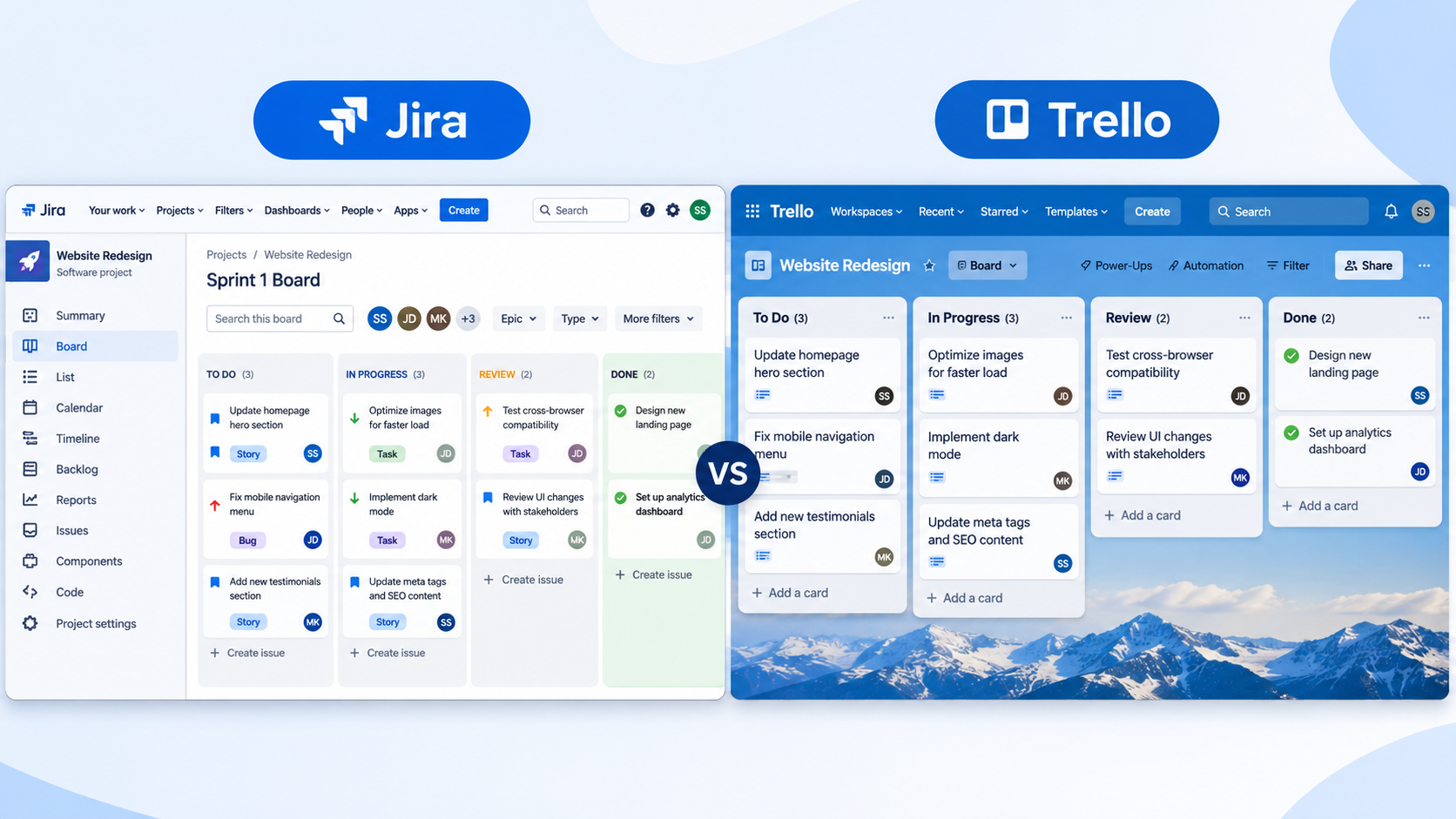
If you only have two minutes, start here. In the Jira vs Trello comparison, Jira is built for software and engineering teams that need sprints, backlogs, releases, and deep reporting. Trello is a flexible Kanban tool for any team that wants to see work move across a board. The table below covers the points that matter most when you are choosing.
| Feature | Jira | Trello | Better For |
| Best suited to | Software, IT, and engineering teams | Marketing, ops, design, HR, small teams | Depends on team type |
| Learning curve | Steeper, especially for non-technical users | Minimal, drag and drop | Trello |
| Main views | Scrum and Kanban boards, backlog, timeline, roadmap, list | Kanban boards, plus calendar, timeline, table, dashboard, and map on Premium | Jira For Planning |
| Workflow customization | Highly configurable statuses, fields, and rules | Lightweight lists, labels, and custom fields | Jira |
| Reporting | Burndown, velocity, and other agile reports | Basic, with dashboards on higher plans | Jira |
| Developer tools | Deep GitHub and Bitbucket integration, releases | Limited linking through Power-Ups | Jira |
| Extensions | 3,000+ Atlassian Marketplace apps | 200+ Power-Ups | Jira for depth |
| Free plan | Up to 10 users | Up to 10 collaborators and 10 boards per Workspace | Trello |
| Hosting | Cloud, plus self-managed options | Cloud only | Jira |
2. What Is Jira? Features, Strengths, and Limitations for Growing Teams
Jira is Atlassian’s work management platform, originally created for bug and issue tracking and now used by software, IT, and business teams. Work is tracked as issues that move through customizable workflows, and those issues can be grouped into epics, sprints, and releases. In any Jira vs Trello comparison, Jira is the option built for process, traceability, and measurable delivery. If you are exploring the platform in depth, this overview of Jira Software Cloud explains how it fits into the wider Atlassian ecosystem.
Key Features of Jira
- Scrum and Kanban boards with backlogs and sprint planning
- Epics, stories, tasks, and bugs with custom fields
- Roadmaps and timelines for release planning
- Automation rules to remove repetitive manual updates
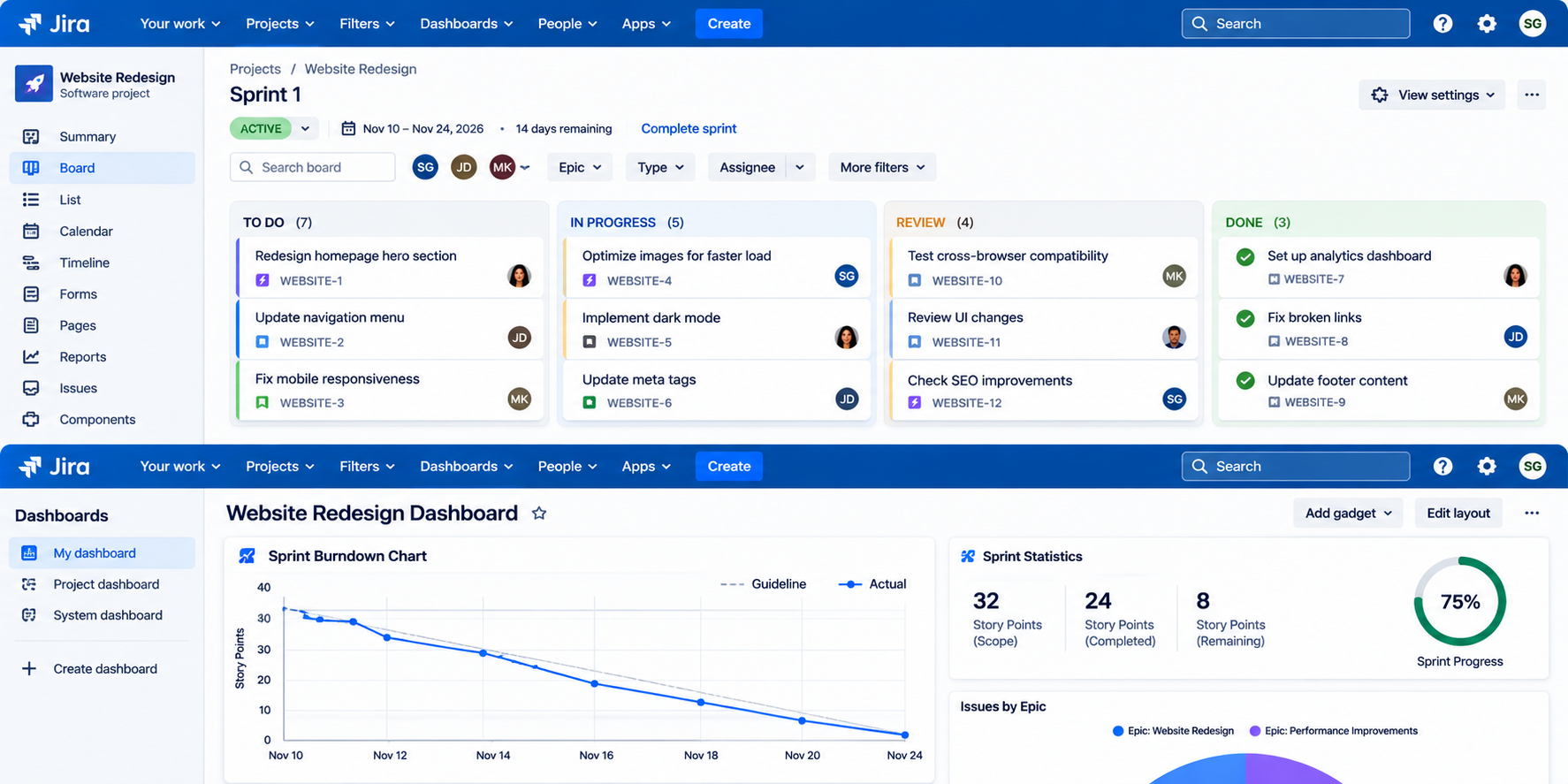
- Agile reports such as burndown and velocity charts
- Deep integration with GitHub, Bitbucket, Slack, and Confluence
Jira Pros and Cons
- Pros: powerful workflows, strong reporting, scales to large organizations, huge app marketplace
- Cons: steeper learning curve, can feel heavy for simple projects, needs admin attention as it grows
3. What Is Trello? Features, Strengths, and Limitations for Simple Workflows
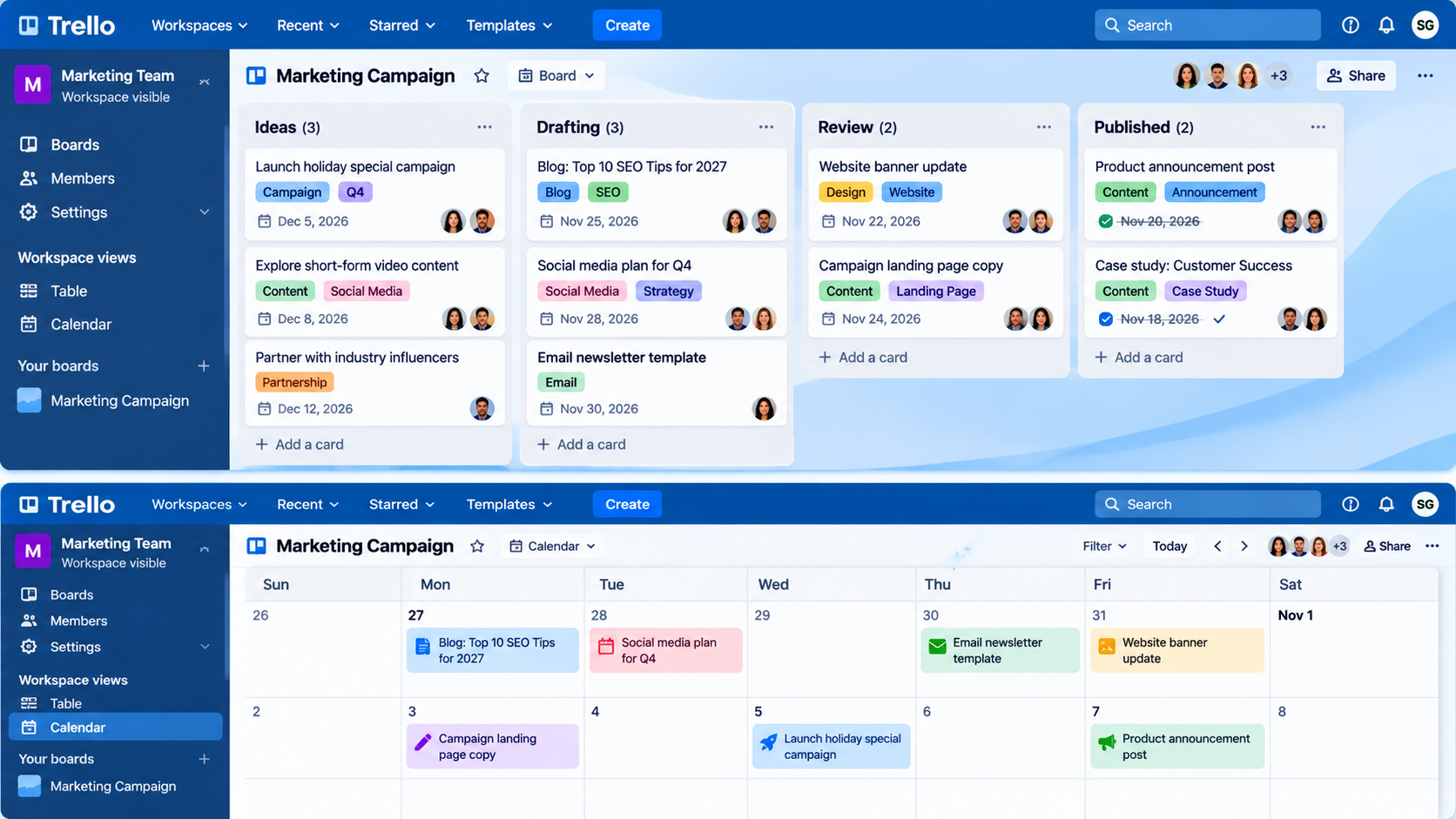
Trello is a visual project management tool built on boards, lists, and cards. You create a card for each task and drag it from one list to the next as work progresses. The simplicity is the whole point: most people can start using it within minutes, with no training or complex setup. In the Jira vs Trello debate, that makes Trello a favorite for content calendars, campaign planning, event planning, onboarding, and everyday team coordination.
Key Features of Trello
- Boards, lists, and cards with checklists, due dates, labels, and attachments
- Power-Ups to add calendars, integrations, and extra functionality
- Butler automation for rules, buttons, and scheduled actions
- Extra views on Premium, including calendar, timeline, table, dashboard, and map
- Templates for common workflows, from editorial calendars to hiring pipelines
Trello Pros and Cons
- Pros: very easy to learn, flexible, visual, affordable for small teams
- Cons: limited reporting, not built for sprints or complex dependencies, can get cluttered at scale
4. Jira vs Trello Head-to-Head Comparison: Features, Automation, Integrations, and Security
Now we get into the detail of Jira vs Trello. Both tools help teams organize work, but they differ in how much structure they impose and how much control they give you. Below, we compare them across the areas that most often decide the choice. Keep your own team size, skills, and process maturity in mind as you read.
Ease of Use and Learning Curve
- Jira: steeper to learn, with issue types, workflows, and permissions to set up.
- Trello: easy to start, since you can create a board and move cards on day one.
In the Jira vs Trello contest for ease of use, Trello wins. A new user can create a board and move cards on day one. Jira asks more of you: issue types, workflows, and permissions all need some thought. For non-technical teams, that extra setup often slows adoption, so structured onboarding and Atlassian training can make a real difference.
Project Views and Planning
- Jira: Scrum boards, backlogs, timelines, and roadmaps for sprint and release planning.
- Trello: Kanban boards, with calendar, timeline, table, dashboard, and map views on paid plans.
Trello centers on the Kanban board and adds extra views as you upgrade. Jira offers Scrum boards, backlogs, timelines, and roadmaps, which makes it better for planning across sprints and releases. For planning, Jira vs Trello favors Jira if you run agile sprints, and product teams that also plan features from customer ideas can look at Jira Product Discovery.
Workflow Customization
- Jira: custom statuses, transitions, required fields, and approval steps.
- Trello: flexible lists, labels, custom fields, and automation rules.
Jira lets you design workflows that enforce your process, while Trello keeps things loose and easy to change. Choose Jira when your process must be enforced, and Trello when you want flexibility. If you want workflows built around how your teams really work, Jira implementation services can set them up correctly from the start.
Automation and AI
- Jira: cross-project automation rules, with deeper AI through Atlassian’s Rovo.
- Trello: Butler rules, buttons, and scheduled actions for everyday tasks.
Both tools include automation and connect to Atlassian’s AI features, though the AI is more deeply built into Jira and the wider Atlassian platform. In Jira vs Trello automation, Trello’s Butler handles rules and buttons well, while Jira supports more complex, cross-project logic. Atlassian’s Rovo AI adds search and agents across your tools, and Atlassian Intelligence services help you put those features to work. To see where this is heading, read about Rovo Work and the Artifacts app and what longer AI tasks mean for your team.
Integrations
- Jira: 3,000+ Marketplace apps, plus native GitHub and Bitbucket integration.
- Trello: 200+ Power-Ups for common tools and simple connections.
For simple needs, Trello’s options are plenty. For engineering pipelines, CI/CD, test management, and enterprise systems, Jira goes much further. Complex connections are easier with experienced help from Atlassian integration services.
Reporting and Analytics
- Jira: burndown and velocity reports, dashboards, and time tracking options.
- Trello: basic visibility, with dashboards on Premium and more detail through Power-Ups.
On reporting, Jira vs Trello is a clear win for Jira when leadership needs delivery metrics. Trello is enough when you only need to see what is in progress. Building dashboards that leaders will actually use is a common part of Atlassian consulting services.
Collaboration and Permissions
- Jira: roles and project-level permissions for finer access control.
- Trello: easy sharing, including guests and external collaborators.
Trello makes sharing quick, while Jira gives you tighter control when different teams or clients need different access. If customers or clients need a request portal as well, Jira Service Management consulting can help you design it.
Security and Compliance
- Jira: self-managed options and enterprise controls on higher plans.
- Trello: cloud only, with SSO through Atlassian Guard on Enterprise.
Both tools can meet enterprise requirements on higher plans, and Jira also supports self-managed deployments, which some regulated organizations need. If compliance is critical, review plan features carefully before you commit. Ongoing Atlassian managed services can keep security settings, permissions, and upgrades under control as you grow.
5. Jira vs Trello Pricing in 2027: Plan Costs, Hidden Fees, and Team Budgets
Jira vs Trello pricing starts with a free plan for each tool and then moves to per-user paid tiers. Trello is cheaper per seat, while Jira costs more but includes deeper planning, reporting, and administration. Prices change often, and Atlassian raised Jira Cloud prices again in October 2026, so confirm current figures on each vendor’s pricing page before you decide. The table below summarizes the typical structure.
| Plan | Trello (billed annually) | Jira Cloud (approximate) |
| Free | $0, up to 10 collaborators and 10 boards per Workspace | $0, up to 10 users |
| Standard | $5 per user/month | Roughly $8 to $10 per user/month |
| Premium | $10 per user/month | Roughly $15 to $20 per user/month |
| Enterprise | $17.50 per user/month, annual only | Custom, annual only |
Jira’s per-user rate drops as your seat count rises, and monthly and annual billing differ, so treat those ranges as estimates. To see what Jira vs Trello means for your budget, here is a rough monthly comparison using rounded figures.
| Team size | Trello Standard | Trello Premium | Jira Standard (est.) | Jira Premium (est.) |
| 5 users | $25 | $50 | $0 on Free, or about $45 | about $90 |
| 15 users | $75 | $150 | about $135 | about $270 |
| 50 users | $250 | $500 | about $450 | about $900 |
Hidden Costs to Watch
- Marketplace apps and Power-Ups: useful add-ons can cost extra per user
- Security add-ons: SSO and advanced security may require Atlassian Guard on lower plans
- Administration time: Jira needs more configuration and ongoing care
- AI usage: credits and plan limits can affect cost, as explained in this guide to Atlassian AI costs
When you compare Jira vs Trello costs across many seats or multiple Atlassian products, professional Atlassian license management can help you avoid paying for unused licenses.
Planning to use Atlassian’s AI features across many users? A review from Atlassian AI consulting helps you forecast usage before it affects your bill.
6. Jira vs Trello: Which Tool Is Better for Your Team? A Practical Decision Guide by Team Type
The Jira vs Trello choice depends less on features and more on how your team works. Ask what kind of work you manage, how much process you need, and who will use the tool every day. The guidance below turns that into a practical decision.
Choose Trello If...
- You manage marketing, content, HR, operations, or personal tasks
- You want visual boards that anyone can use without training
- Your team is small and your process is flexible
- You need something running today with minimal cost
Choose Jira If...
- You build software or manage IT and engineering work
- You run Scrum sprints and need backlogs, releases, and velocity data
- You need enforced workflows, permissions, and audit trails
- You expect to scale across many teams or projects
Real-World Scenarios
- A five-person startup: begin with Trello’s free plan, or Jira Free if you are building a product and want sprints from the start.
- A design or marketing agency: Trello boards for each client keep work visible and simple.
- A 40-person development team: Jira, for sprint planning, bug tracking, and release management.
- An IT or support team: consider Jira Service Management for requests and incidents instead of a general task tool.
IT and support teams weighing Jira vs Trello should also look beyond a task board when they need request queues, SLAs, and incident handling. Empyra’s ITSM consulting services show how Jira Service Management can fit that need.
7. Jira vs Trello Together: Can You Use Both Tools? Smart Ways to Connect Them
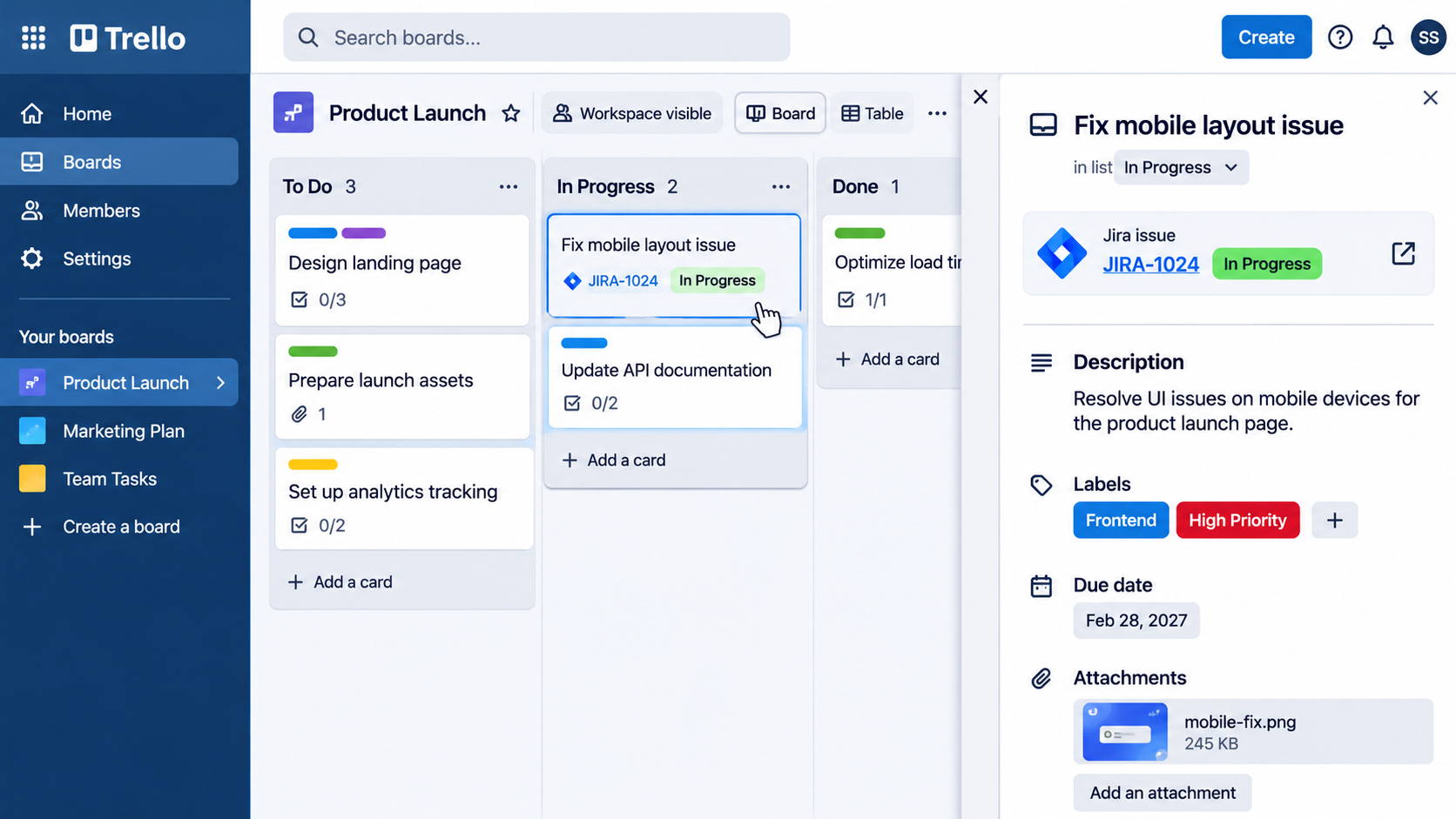
Jira vs Trello does not have to be an either-or choice, and many organizations use both. Because both are Atlassian products, you can link Jira work into Trello boards, for example by adding Jira projects as Smart Links. This lets engineering run sprints in Jira while marketing, design, or operations track their own work in Trello, without losing visibility across departments. The key is deciding which tool is the source of truth for each type of work.
- Use Jira for development, bugs, and releases
- Use Trello for campaigns, content, and cross-team coordination
- Link the two so stakeholders can follow progress without switching tools
Many teams also add Confluence for documentation, so project plans and meeting notes sit beside the work. If you want the tools set up to work as one system, Confluence services are worth a look.
8. Jira vs Trello Switching Guide: Warning Signs, Migration Tips, and When to Move
Tools should change as your team does, and the Jira vs Trello answer can change with it. A board that worked for five people can become a bottleneck at fifty, while a heavy system can frustrate a small team that just wants to ship. Watch for the signs below, then plan any change carefully so you keep your history and your team’s trust.
Signs You Have Outgrown Trello
- You are juggling dozens of boards and cannot see the full picture
- You need sprints, story points, or burndown reporting
- Work depends on other work, and dependencies are hard to track
- Leadership wants reliable delivery metrics
Signs Jira Is Too Heavy
- Team members avoid updating tickets
- Admins spend more time configuring than the team spends delivering
- Your projects are simple and your workflows rarely change
Migration Tips
- Audit your boards, labels, and custom fields before moving anything
- Map Trello lists to Jira statuses and cards to issue types
- Start with one pilot team, then expand
- Train users early to protect adoption
If you decide to move after weighing Jira vs Trello, an expert-led approach to migrating from Trello to Jira protects your data and limits downtime.
For a real example of a smooth move, read the Rakuten Atlassian Cloud migration case study, which covers the migration, two-factor authentication, and cost savings.
9 . Why Choose Empyra, an Atlassian Platinum Solution Partner, for Expert Jira and Trello Support
Choosing a tool is only the first step. Getting real value means configuring it properly, training your people, and keeping it aligned with how your business works. Whether you are still deciding on Jira vs Trello or already running one of them, Empyra, an Atlassian Platinum Solution Partner, helps. Empyra reports more than 30 years of experience, over 80 certified Atlassian experts, and more than 1,000 consulting and implementation engagements.
What Empyra Can Help You With
- Implementation: fast, well-structured setups through Jira implementation services, covering workflows, permissions, dashboards, and automation
- Migration: moves to Atlassian Cloud, including migrations from third-party tools such as Trello, with minimal disruption
- Consulting: advice on process, tooling, and scaling through Atlassian consulting services
- AI and Rovo: deploying Atlassian’s AI capabilities to automate repetitive work
- Training and licensing: role-based enablement and cost control for the long term
Whether you are starting with Trello, scaling with Jira, or settling the Jira vs Trello question by running both, a partner with deep Atlassian experience helps you avoid expensive trial and error.
Want proof before you decide? Browse Empyra’s customer case studies or read more Jira and Atlassian guides on the Empyra blog.
Conclusion: Choosing Between Jira vs Trello for Your Team in 2027
In the Jira vs Trello decision, both are excellent tools, but they are built for different jobs. Trello gives you speed, simplicity, and a low price, which suits small teams and visual workflows. Jira gives you structure, planning depth, and reporting, which suits software teams and organizations that need control as they scale. The best choice in 2027 is the one that matches how your team actually works today, with room to grow. Whatever you decide in the Jira vs Trello debate, start with free plans, test with a real project, and involve the people who will use the tool daily.