
Every sales team has the same quiet problem. A form submission lands in one inbox, a trade-show list sits in a spreadsheet, and a hot referral lives in someone’s WhatsApp. By the time anyone follows up, the lead has gone cold.
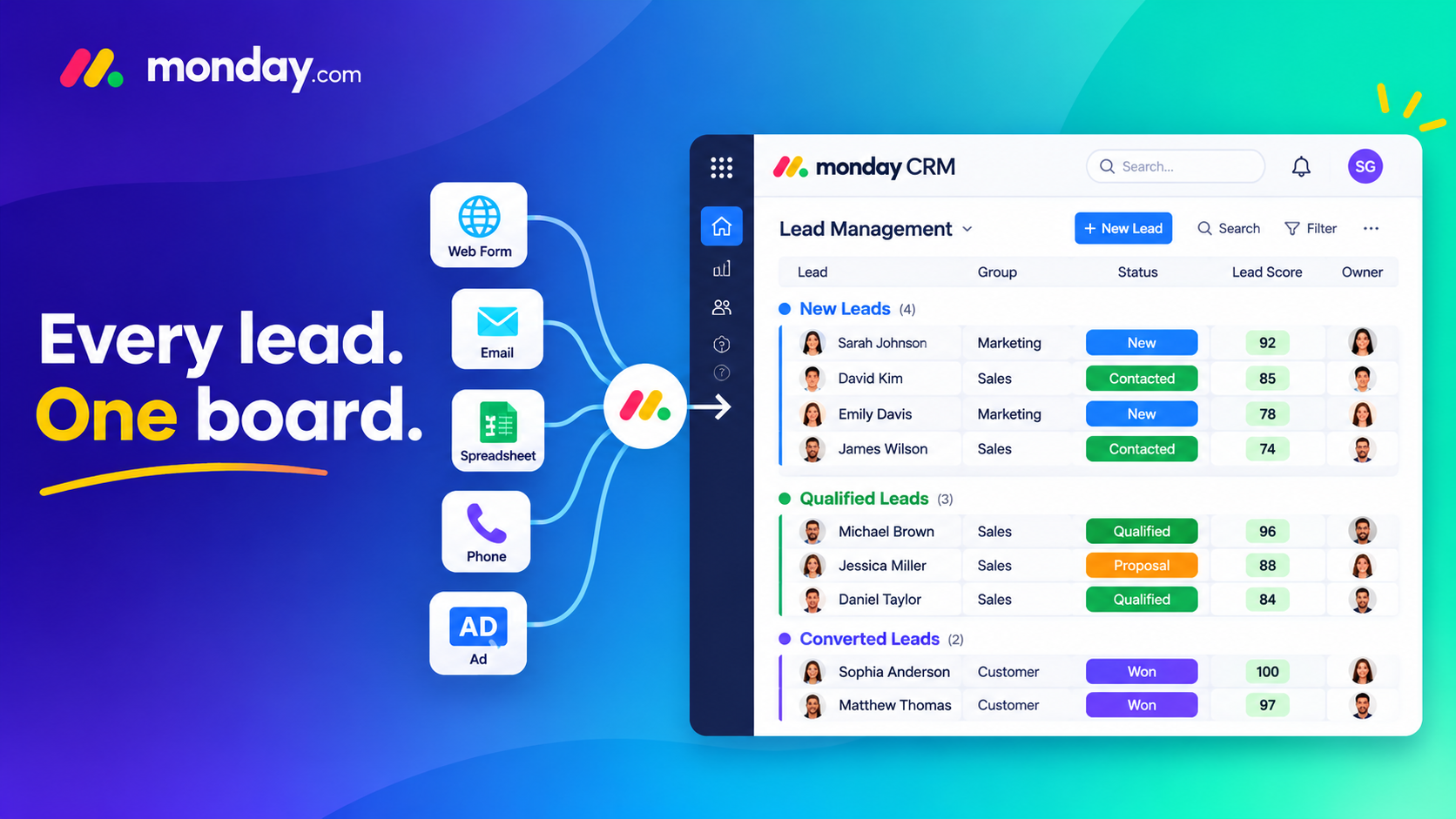
The best lead management software fixes this by putting every enquiry in one place, showing who owns it and telling your team which leads deserve attention first. monday CRM does this through its Leads board, and because the platform is no-code, you can shape it around the way your team actually sells.
In this guide, we’ll look at what makes the best lead management software worth choosing, and how lead management software works inside monday CRM: how the board is structured, how leads come in, how duplicates get caught, how scoring and automation work, and how a qualified lead becomes a deal. We’re a monday.com Platinum Partner and we set these boards up for sales teams all the time, so you’ll also find a few lessons we’ve picked up along the way.
1 . What Is Lead Management Software and Why Does It Matter?
Lead management software helps you capture, track, qualify and follow up with potential customers until they’re ready to buy. Some teams call it a lead management system, and others see it as the front end of a CRM. Either way, everything that happens before a deal exists, from the first enquiry to the qualification call, lives here.
Without a central system, the same problems show up again and again:
- Leads arrive from five places and get stored in five different formats
- Nobody is sure who owns a lead, so nobody follows up
- The same company gets contacted twice by two different reps
- Reps spend their time on low-potential leads because nothing tells them otherwise
- Managers can’t see where leads come from or where they get stuck
What Makes the Best Lead Management Software?
The best lead management software isn’t the one with the longest feature list. It’s the one that covers the basics well and that your reps actually use. Look for these:
- Lead capture from forms, email, imports and integrations
- Duplicate detection, so no one is contacted twice
- Lead scoring that ranks leads by potential
- Clear ownership and status on every lead
- Email and activity tracking in the same place
- Dashboards that show sources, stages and bottlenecks
- A setup simple enough that reps keep it up to date
Why spreadsheets stop working
Spreadsheets are fine for the first twenty leads. After that, versions multiply, nobody updates the “last contacted” column, and there’s no reminder when a lead goes quiet. That’s usually the moment teams start looking for proper lead management software.
2 . Why Choose monday CRM as Your Lead Management Software?
Is monday CRM the best lead management software for every team? No tool is. But it sits in an interesting spot. It’s built on a flexible work platform, so it adapts to your process instead of forcing you into a fixed one. In our experience, three things set it apart.
It’s flexible without needing a developer
You can add columns, change statuses, build automations and edit dashboards yourself. When your sales process changes next quarter, the board changes with it.
It connects the whole journey
Leads don’t live in isolation. A lead can connect to contacts, accounts and deals, so nobody retypes information the moment a lead qualifies. And because monday CRM sits on the same platform as monday work management, your delivery team can see what sales has promised.
People actually use it
Most reps already understand boards, statuses and columns. That familiarity matters more than any feature list, because a tool nobody updates is just an expensive spreadsheet.
If you’re comparing lead management software options, here’s how the three common approaches stack up:
| Spreadsheets | Traditional CRM | monday CRM | |
| Setup speed | Instant, but manual | Often slow, may need an admin | Fast, no-code |
| Duplicate detection | Manual checks | Varies by tool | Built-in indicator and merge tool |
| Lead scoring | Hand-built formulas | Often an add-on | Formula-based and customizable |
| Automation | None | Needs configuration | Ready-made automations included |
| Flexibility | High but fragile | Often rigid | High and no-code |
Choosing for a smaller team or a specific industry? Our guides to the best CRM for small business and the best CRM for real estate compare more options.
3 . Inside the Leads Board: Structure and Columns of monday CRM Lead Management Software
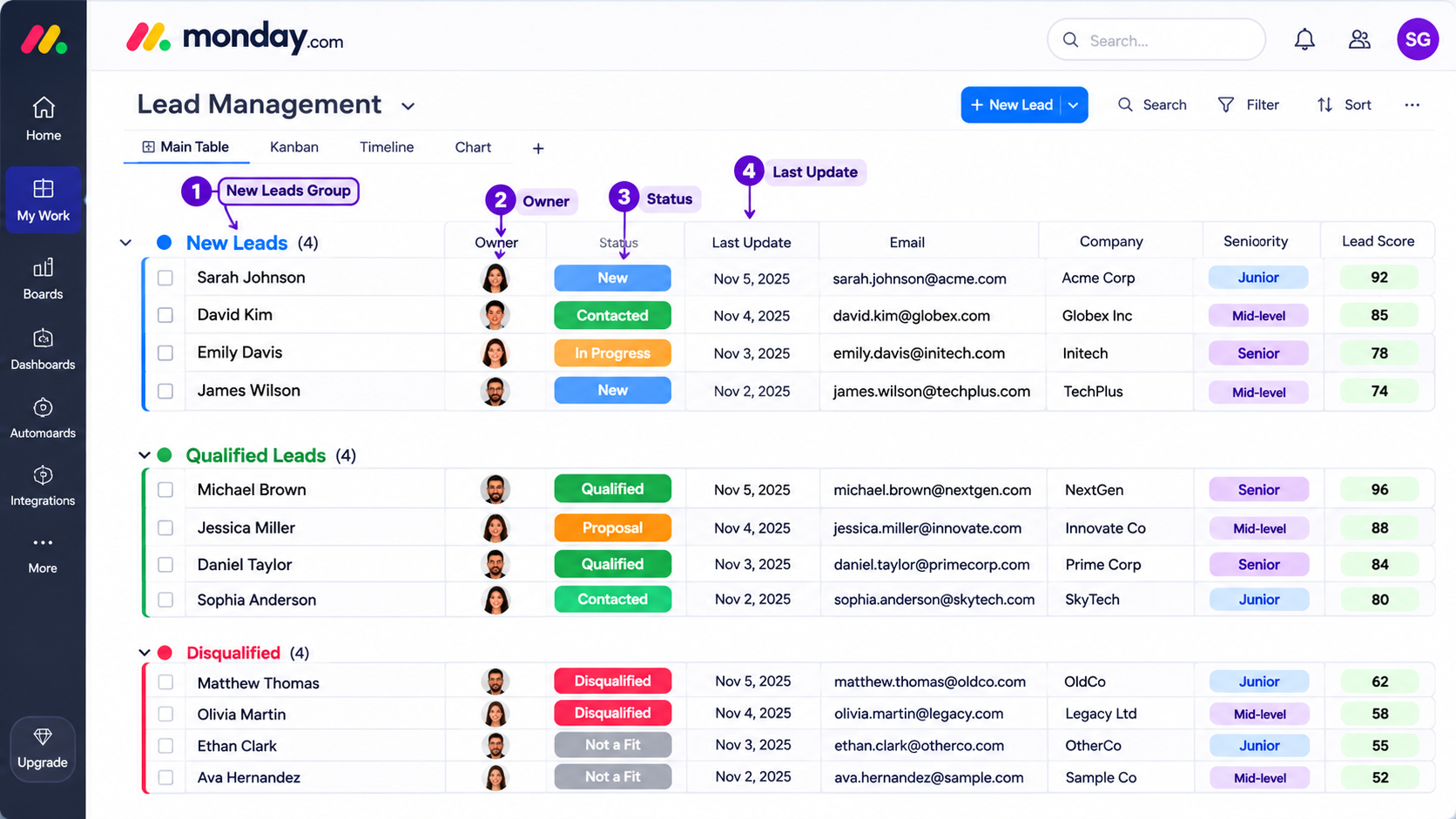
The Leads board is the heart of the setup. Think of it as the control panel for your lead management software. Every item on the board is one lead, and the board starts with three groups: New Leads, Qualified Leads and Disqualified. You can rename, add or remove groups to match your process, but the default is a sensible starting point.
Columns that manage the lead
- Owner (People column): the teammate responsible for the lead. This one column does more for accountability than any report.
- Status: the default labels run from New Lead and Attempted to Contact through Contacted, Qualified and Unqualified.
- Last update (Date column): updates automatically when an email or activity is logged, so you can see at a glance how long a lead has been waiting.
- Comments: a text column for quick notes between SDRs and other teammates.
Columns that help you connect
The email and phone columns let reps reach out in a click. Clicking an email address opens Emails & Activities, so the conversation stays on the lead. Region and location columns help you choose the right time to call and the right product to talk about.
Columns that help you qualify
Company name, seniority (C-level, VP, Director, Manager or Team Member), specific role, estimated employees and estimated licenses all sit here. They’re not just descriptive. They feed the lead score we’ll cover shortly.
Empyra tip: Add a lead source column and a product interest column early. They make reporting far more useful later. But keep the board lean, because every extra column is something a rep has to fill in. If you’re planning a full rollout, our monday CRM implementation guide walks through the steps.
4 . How to Capture Leads in Your Lead Management Software: Forms, Imports and Integrations
Even the best lead management software is only as good as the data flowing into it. Lead capture in monday CRM works through several routes.
WorkForms
WorkForms let anyone with a link submit their details, and every submission creates a new lead item on the board. You can share the link in emails or embed the form on your website. A shorter form usually converts better, so ask only what you really need.
Imports
You can bring in leads from Excel or CSV files. One habit pays off every time: clean the file before you import it. Fix inconsistent company names, remove obvious duplicates and standardize job titles.
Integrations
Website forms, marketing platforms, ad tools and email can all feed the board, so leads arrive without anyone copying and pasting. If you need to connect tools that don’t talk to each other out of the box, our monday.com integration services cover that.
Data enrichment
The CRM data enrichment app can add company details pulled from Crunchbase to what a lead submits. That means you can keep your forms short and still end up with a useful record.
5 . Duplicate Lead Detection: A Must-Have in the Best Lead Management Software
Duplicates are more than an annoyance. They inflate your pipeline numbers, cause two reps to email the same person and make your team look disorganized.
The Indications column
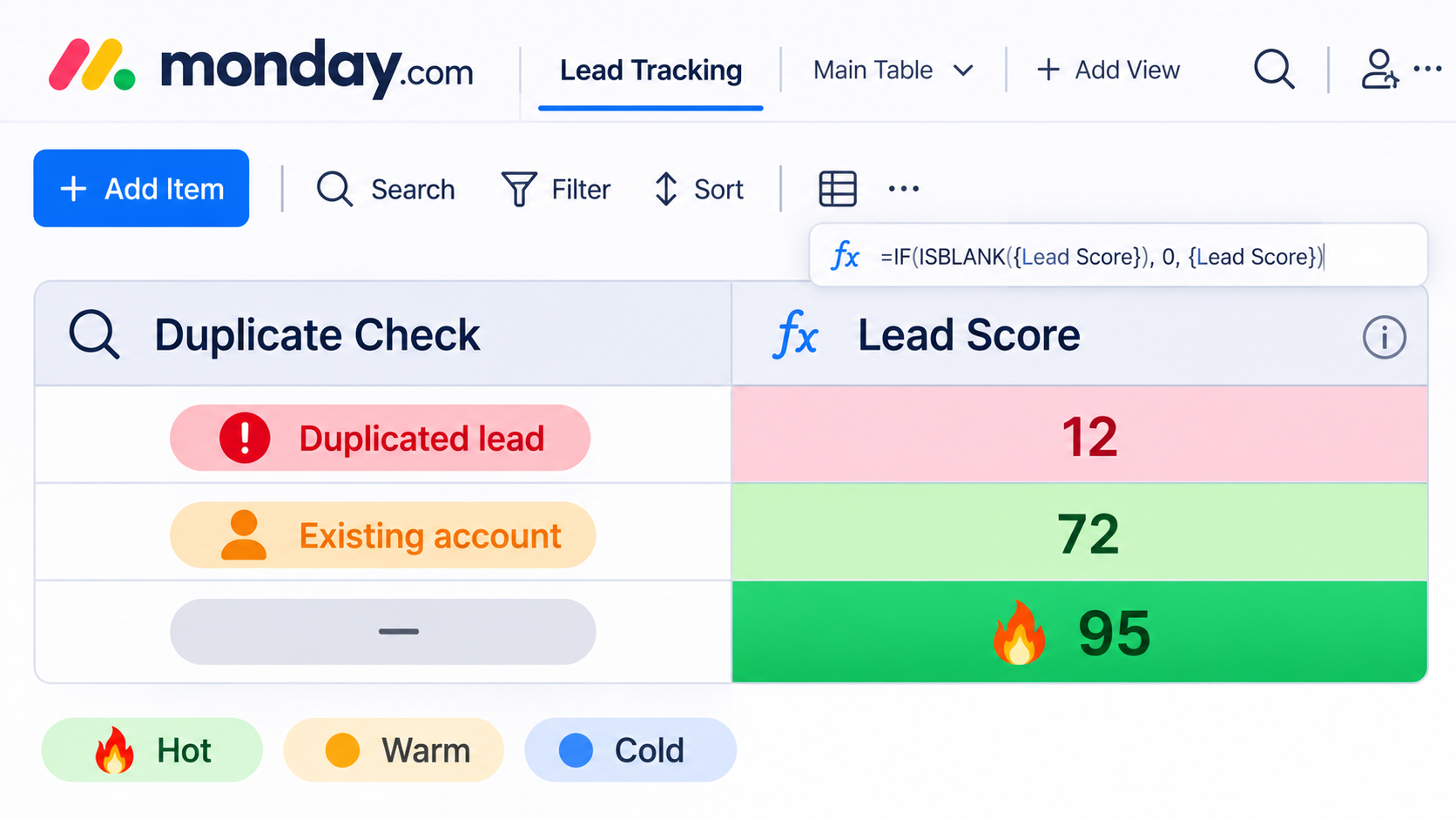
When a new lead is added, a formula checks the board for duplicates based on email and company. It also checks your Accounts board for existing accounts. The column then shows one of three results: “Duplicated lead”, “Existing account”, or a simple dash for a unique lead.
Merging duplicates manually
On Standard, Pro and Enterprise plans, you can also merge duplicates yourself at any time. You pick the column to match on, such as email, phone or company.
Our advice
Decide on a single matching rule before your first import. Email first, company second works for most B2B teams. And if a lead matches an existing account, route it to the account owner instead of the general queue.
6 . Lead Scoring in Your Lead Management Software: Focus on the Leads That Will Close
Scoring answers the question every rep asks on Monday morning: who should I call first? Most lead management software offers some form of scoring, but it’s often hidden behind an add-on or a complicated setup. In monday CRM it’s a formula column on the board.
How the default score works
The default score looks at three things: the lead’s title, the size of their company and the number of licenses they’re interested in. The higher the score, the greater the potential return, and conditional coloring makes the hot leads easy to spot.
Making the score fit your business
The default is a good starting point, but your ideal customer isn’t generic. You can add weight for industry, budget, lead source, engagement or region. Here’s a simple example of how a custom model might look:
| Signal | Example points |
| C-level or VP title | +30 |
| Director title | +20 |
| Company with 500+ employees | +20 |
| Requested a demo | +25 |
| Target industry | +15 |
| Personal email address | -15 |
You might call 70 and above Hot, 40 to 69 Warm and anything lower Cold. These numbers are only an illustration. The right weights come from your own win data.
Revisit it every quarter
Look at the last quarter’s closed-won deals and ask what they had in common. If your high-scoring leads aren’t converting, the model needs adjusting.
7 . Automate Your Lead Management Software Workflow in monday CRM
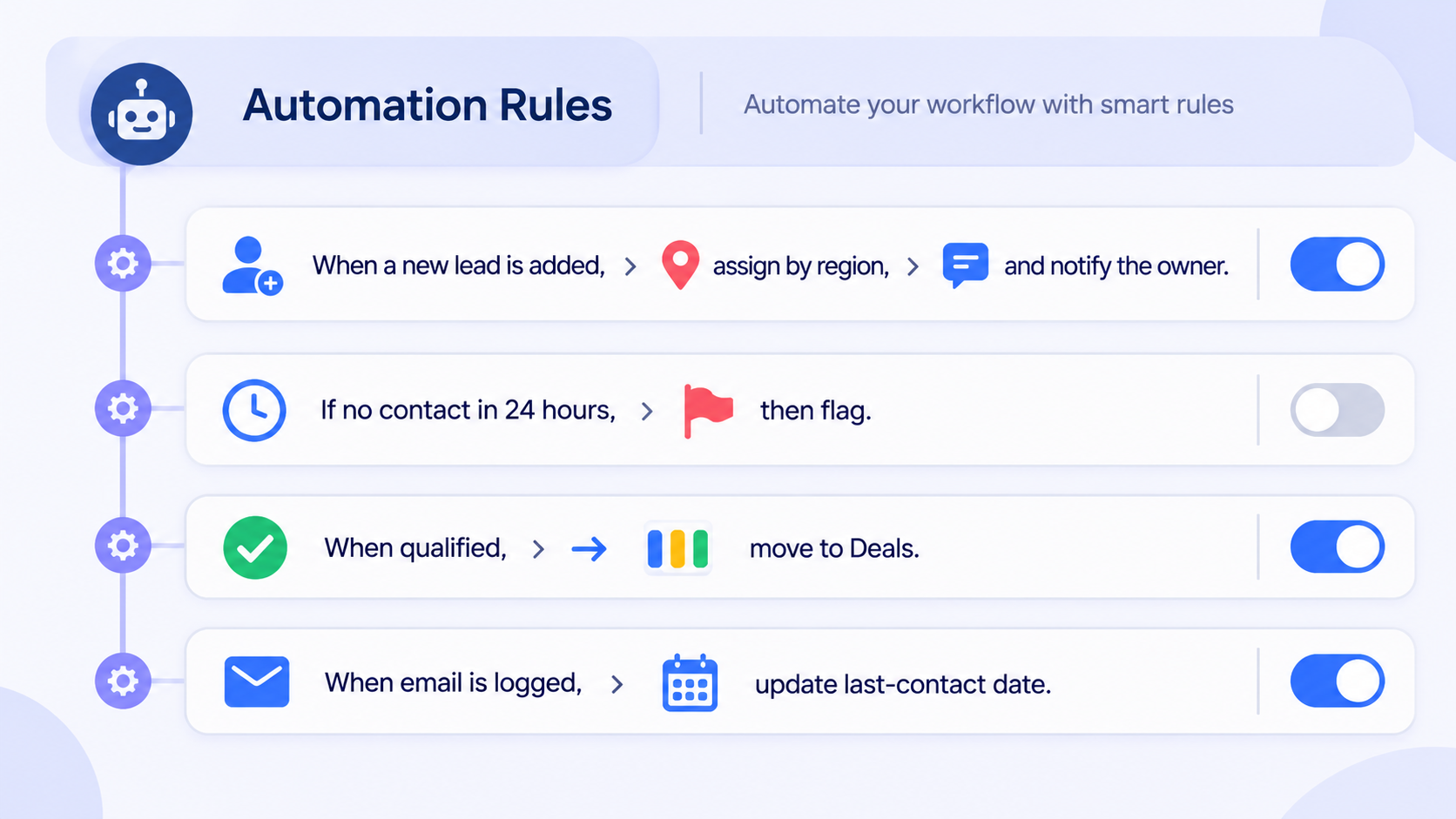
The Leads board comes with ready-made automations (16 at the time of writing, so check the current count). They handle jobs like sorting leads by qualification, creating items on other CRM boards, connecting related items and managing duplicates. This is where lead management software earns its keep: it takes the repetitive admin off your reps so they can spend time talking to people.
Automation recipes worth setting up
- Assign new leads to a rep by region or in round-robin order
- Notify the owner in Slack or email when a high-scoring lead arrives
- Flag any lead that hasn’t been contacted within 24 hours
- Move a qualified lead to the Deals board automatically
- Update the last-contact date whenever an email or activity is logged
Keep it simple
It’s tempting to automate everything on day one. Don’t. Start with three or four rules, name them clearly and make sure the team understands what each one does. You can always add more once the basics are working. Automation limits depend on your plan, so check them before you build anything large.
8 . Follow Up Faster with Emails and Activities in monday CRM
Leads rarely convert on the first touch, which makes follow-up the part of the process that most often falls apart.
Emails & Activities
Emails & Activities connects to your email provider, so reps can send and receive messages from inside the lead item. You can write from scratch, use a shared template or ask monday AI to draft something. Everything stays on the lead’s timeline, so anyone on the team can see the full conversation.
Logging calls, meetings and notes
On Pro and Enterprise plans, you can log calls, meetings and call summaries in the same timeline as your emails. It sounds like a small thing, but it’s the difference between a rep who knows the history and one who asks the lead to repeat themselves.
Build the habit
Statuses like “Attempted to contact” exist for a reason. When reps update them consistently, managers can spot stalled leads without chasing people for updates.
9 . From Lead to Deal: Converting Qualified Leads with Your Lead Management Software
Qualification is where leads either move forward or drop out, so it’s worth agreeing on what “qualified” means before you build anything. Sales and marketing should sign off on the same definition: budget, authority, need and timing, or whatever framework suits you.
Once a lead is marked as qualified, automations can create the matching items on your Contacts, Accounts and Deals boards and link them together. Good lead management software makes this hand-off boring, and boring is exactly what you want. Once a deal leaves the Leads board, our guide to pipeline CRM with monday.com shows how AI can help keep it moving.
Don’t ignore disqualified leads either. Add a reason when you disqualify someone, such as wrong size, wrong industry or no budget. After a few months, those reasons tell you a lot about your marketing channels and your targeting.
10 . Track Lead Performance with Dashboards in the Best Lead Management Software
A good lead management software setup should answer two questions without anyone building a report by hand: where are leads coming from, and where are they getting stuck?
What the default dashboard shows
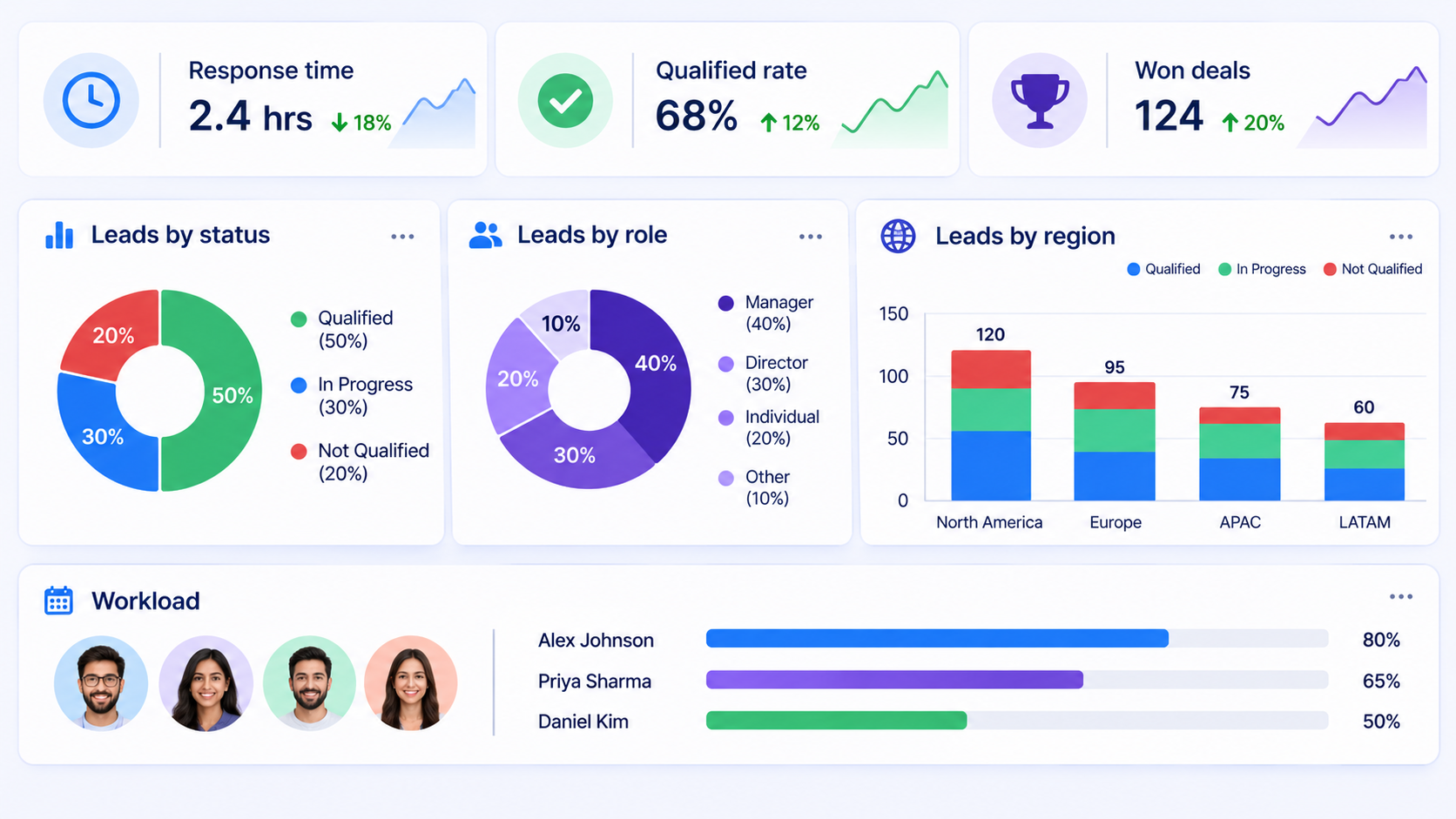
The Leads board includes a dashboard with three widgets: a pie chart of new, qualified and disqualified leads, a pie chart of lead roles and titles, and a stacked chart of leads and statuses by region.
Adding your own charts and widgets
You can add bar, line and stacked charts, plus widgets such as workload, battery and calendar views. Build the ones that match how your team reviews performance.
Metrics worth tracking
- Lead response time
- Lead-to-qualified rate
- Qualified-to-deal rate
- Conversion by lead source
- Average score of leads that become customers
11 . Where AI Fits into Modern Lead Management Software
AI features in lead management software are most useful when they remove busywork, not when they try to replace judgment. monday has been adding AI across its products, including email drafting and tools that help summarize, prioritize and act on information. Availability depends on your plan, so confirm what’s included before you promise anything to your team.
We see three practical uses:
- Drafting and summarizing: quick first drafts of follow-up emails and short summaries of long threads, powered by monday AI
- Assistants: monday Sidekick can answer questions about your board and help with routine tasks
- Agents: AI agents can handle repeatable steps such as sorting and prioritizing incoming leads
What AI can’t do is decide whether a lead is a genuine fit or build trust on a call. Use it to give your reps more time for that, not less. For a feature-by-feature walkthrough, read our guide on how to use monday AI.
12 . Best Practices for Getting More from Your Lead Management Software
Treat your lead management software as a living process, not a one-off project. Even the best lead management software fails without good habits:
- Keep statuses few and clear. If reps have to think about which label to pick, they’ll skip it.
- Give every lead an owner from day one. Unassigned leads are the ones that get lost.
- Set a first-contact target. For example, every new lead gets a response within one business day.
- Clean data before importing. It’s much easier than fixing it afterwards.
- Review scoring and automations quarterly. Your market and your team change.
- Train the team. Fifteen minutes on how and why to log activities saves hours of confusion later.
13 . Common Mistakes to Avoid When Setting Up Lead Management Software
Most lead management software rollouts that struggle fail for people reasons, not technical ones. These are the mistakes we see most often:
- Too many columns. Reps stop filling them in, and the data becomes unreliable.
- No shared definition of “qualified”. Sales and marketing argue about lead quality instead of fixing it.
- Skipping the duplicate check. One messy import can undo months of clean data.
- Over-engineered automations. If nobody can explain a rule, nobody trusts it.
- No training. A great board still fails if the team doesn’t know why it exists.
14 . Is monday CRM the Best Lead Management Software for Your Team?
Honestly, it depends on how you sell. monday CRM is a strong fit if you want a flexible, no-code setup, if your process changes often, or if sales needs to work closely with delivery teams on the same platform. It may be a weaker fit if you need very specialized sales tooling out of the box, so check those requirements against the current plans before you commit.
The best lead management software is the one that matches how you sell, so run a short pilot with real leads before you roll it out to everyone. A two-week test on a copy of your current lead list will tell you more than any feature comparison.
15 . How Empyra Helps You Set Up Lead Management Software in monday CRM
Setting up a board is easy. Setting it up so your team actually adopts it takes more thought. Empyra is a monday.com Platinum Solution Partner with 30+ years of experience, and our certified consultants help teams get real value from monday.com through implementation, integration, migration and AI-powered solutions. We configure lead management software around your sales process rather than the other way around, and you can see everything we offer under our monday.com consulting services.
Implementation and board design
We design the Leads board, statuses, forms and dashboards to match how you sell. Learn more about our monday.com implementation services.
Custom scoring and automation
We build scoring models and automation rules around your ideal customer, then test them with your team before launch.
Integrations
We connect your website, marketing tools, ERP and communication apps so leads flow in without manual work.
Migration
Moving from spreadsheets, or from another lead management software tool? Our monday.com migration team can bring your data across and preserve your history.
Custom apps
If you need something beyond the standard setup, appserve.ai lets us build custom apps on top of monday.com. Smaller teams can also use monday Vibe to create simple apps from plain-language prompts, and our guide to vibe coding with monday Vibe shows how that works.
See it in practice
Browse our case studies to see how we’ve rolled out monday.com for other teams, including a customized monday.com Work OS rollout for Sally Beauty.
Final Thoughts: Choosing the Best Lead Management Software
The best lead management software is the one your team will actually open every morning. monday CRM makes that easier by putting lead capture, duplicate detection, scoring, follow-up and reporting on a single board your reps already understand. Start with the simple setup, test it on real leads, and add custom scoring and automation as your process matures. If you’d like help shaping a Leads board around how your team sells, we’re happy to talk it through.