.svg)

What if a business team could turn an idea into a working application simply by describing what the app should do? Instead of starting with traditional development, teams can explain a workflow, define the information they need, and use AI to generate an application around that requirement. This approach is changing how businesses think about custom software, especially for teams that need practical tools without building every feature from scratch.
Vibe Coding is an AI-assisted approach to software development that allows users to describe an application in natural language instead of writing every line of code manually. Users can explain the desired outcome, review the generated application, and refine it through follow-up prompts. This makes it easier for project managers, operations teams, marketers, sales professionals, and other business users to create tools that address specific workflow gaps.
Monday Vibe brings this conversational app-building approach into the monday.com environment. It allows users to create custom work apps by describing their requirements, data, users, and desired functionality through natural-language prompts. Teams can build project dashboards, resource planners, approval applications, time-tracking tools, internal portals, and other workflow-specific solutions connected to their monday.com processes.
This guide explains how Monday Vibe works, how Vibe Coding supports AI-powered app development, how to write effective prompts, and what types of custom applications businesses can create. It also covers best practices, practical considerations, monday.com workflow connections, and how an experienced monday.com partner can help turn an AI-generated application into a scalable business solution.
1 . What Is Monday Vibe for Modern Workflows?
Monday Vibe is an AI-powered application-building capability that allows users to create custom work applications using natural-language instructions. Rather than beginning with a traditional software development process, users can explain the desired application and allow the AI-powered builder to generate an initial version.
The application can then be reviewed and refined through additional instructions. This makes the process more conversational: users describe what they want, evaluate the result, and ask for changes instead of manually building every interface element.
According to monday.com-focused implementation guidance, Monday Vibe can be used for business applications, dashboards, planners, widgets, forms, and other workflow-oriented solutions. It can also work with information from selected monday.com boards and existing workflows.
1.1 How Monday Vibe Works in Practice
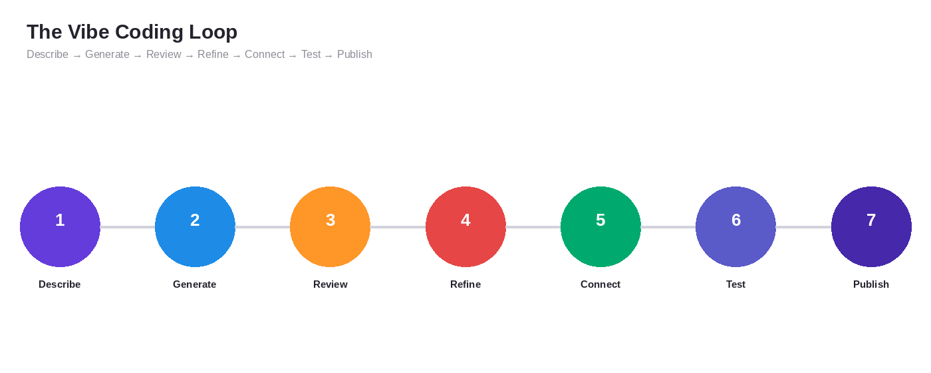
The basic process can be viewed as a continuous application-building loop:
Describe → Generate → Review → Refine → Connect → Test → Publish
- Describe: Explain the purpose, users, data, functionality, and desired interface.
- Generate: Monday Vibe interprets the prompt and creates an initial application.
- Review: Check whether the generated app matches the original business requirement.
- Refine: Use additional prompts to change layouts, fields, filters, charts, or workflows.
- Connect: Work with relevant monday.com boards and information.
- Test: Validate the application and its workflow before wider use.
- Publish: Make the completed application available according to the workspace's configuration and permissions.
This iterative approach is one of the most important concepts to understand. The first generated application does not necessarily need to be the final version. The value comes from being able to continuously describe improvements and turn those instructions into application changes.
Try Monday Vibe
1.2 What Makes Monday Vibe Different for Businesses?
Traditional application development generally separates business requirements from technical implementation. A business team describes what it needs, developers translate those requirements into technical specifications, and the application is then designed, developed, tested, and deployed.
Monday Vibe brings more of that process into a conversational interface.
| Traditional App Development | Monday Vibe Approach |
| Requirements are translated into technical specifications | Requirements can be described using natural language |
| Developers write and maintain application code | AI generates the initial application experience |
| Changes typically go through a development cycle | Users can request iterative changes through prompts |
| Development and business users may work in separate environments | Applications can be created around monday.com workflows |
| Prototyping can require technical resources | Business teams can experiment with application ideas more directly |
2. What Is Vibe Coding for AI App Development?
Vibe Coding is a way of interacting with AI during software creation by describing the desired outcome in natural language rather than manually writing every line of code. The term became widely associated with AI-assisted software development , and the concept has since expanded into tools that allow non-developers to create functional applications through prompts.
In practical terms, Vibe Coding changes the starting point. Instead of asking, "Which programming language should be used?" the user can begin with, "I need an application that helps project managers monitor deadlines, budgets, risks, and workload."
The AI then translates that description into an application structure. The user can continue the process by asking for changes, adding functionality, or improving the interface.
2.1 How Vibe Coding Works With AI Prompts
The process can be simplified into four stages:
- Describe the outcome:-Explain what the application should accomplish.
- Generate the application:-AI interprets the instructions and produces an initial version.
- Review the result:-Check the application against the business requirement.
- Iterate through prompts:-Ask the AI to add, remove, reorganize, or improve specific functionality.
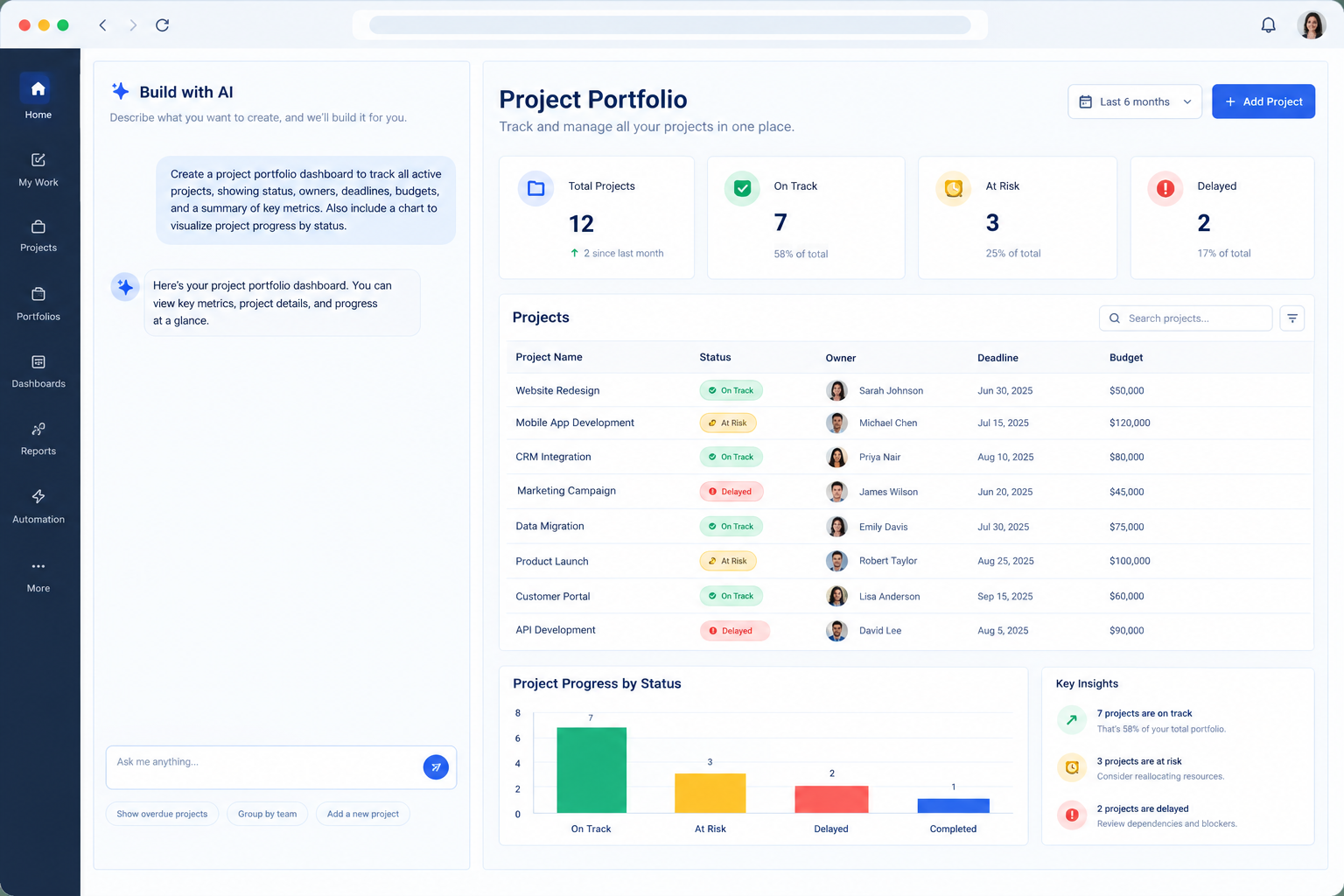
For example, a project manager might start with:
Build a project portfolio dashboard that shows project status, project owner, deadline, budget, risks, and overdue tasks.
The next prompts could be:
- Add a status filter.
- Show overdue projects at the top.
- Add a chart showing projects by status.
- Add a budget summary.
- Create a separate view for project managers.
- Make the dashboard easier to use on smaller screens.
This illustrates the central idea behind Vibe Coding: the prompt becomes part of the development process.
2.2 Vibe Coding vs. Traditional Coding Methods
Vibe Coding does not mean that software engineering has disappeared. Instead, it changes how people interact with software-building tools.
For simple internal applications, business users can potentially accomplish much more themselves. For complex or high-risk applications, developers and consultants can still provide architecture, integration, governance, security, testing, and optimization expertise.
That makes Vibe Coding particularly useful as an additional development approach rather than a universal replacement for software engineering.
3. Monday Vibe and Vibe Coding: How They Work Together
Monday Vibe and Vibe Coding are related, but they are not exactly the same thing. Vibe Coding is the approach, while Monday Vibe is the application-building capability that brings conversational app creation into the monday.com environment.
This distinction is important because it helps businesses understand where the technology fits. A user is not simply asking AI a question and receiving an answer. The goal is to describe a useful business application and iteratively shape the result.
The relationship can be represented as:
Business Requirement → AI Prompt → Monday Vibe → Custom App → Refinement → monday.com Workflow
3.1 From Business Requirement to Application
Consider a marketing team that needs a campaign health tracker.
The business requirement could be:
"Marketing managers need one place to monitor campaign status, content progress, owners, deadlines, and performance."
Instead of immediately requesting dozens of features, the team can begin with the core requirement. Monday Vibe can then be used to generate an initial application structure.
The team can progressively add requirements:
- Campaign status filters
- Content approval status
- Owner information
- Deadline alerts
- Performance summaries
- Campaign categories
- Executive reporting
This approach keeps application development connected to actual business needs.
3.2 Why Iteration Matters for App Quality
The strongest results generally come from treating the first application as a starting point rather than the final product.
A useful iteration cycle is:
Prompt → Review → Identify Gap → New Prompt → Test → Repeat
Competitor guidance around Monday Vibe similarly emphasizes starting with a focused request, being specific, and refining the application through subsequent prompts.
4. How to Build a Custom App With Monday Vibe
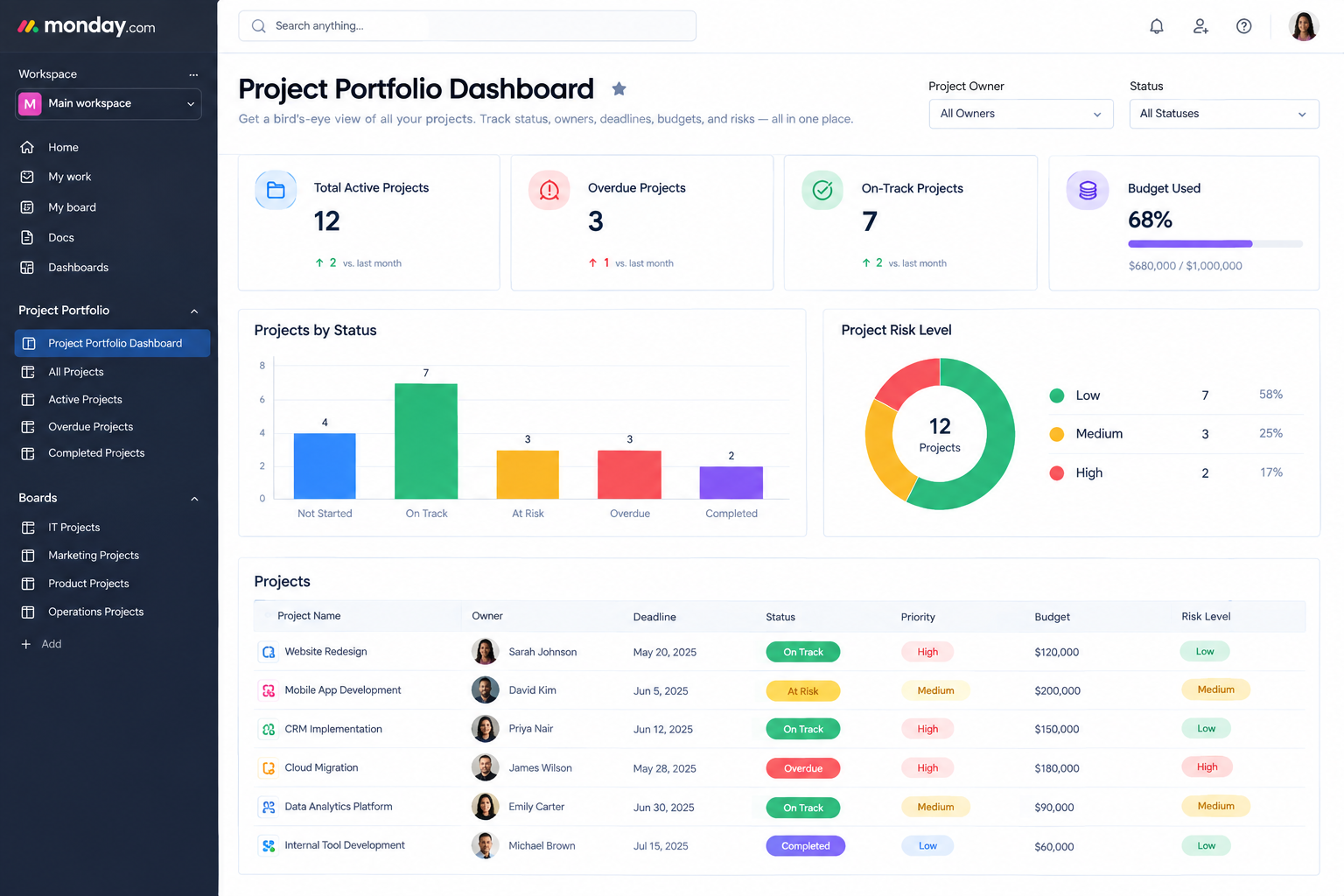
Building a custom application with Monday Vibe starts with the business problem rather than the interface. Before writing a prompt, define what the application needs to accomplish, who will use it, and what information it needs to work with.
Once the initial requirements are clear, the process becomes iterative. A first prompt establishes the application, while additional prompts help refine functionality and presentation.
4.1 Step 1: Define What Your App Should Do
Before opening the builder, identify:
- The business problem
- The target users
- The information the application needs
- The actions users should perform
- The desired interface
- Any existing monday.com workflow involved
For example:
-
Business problem: Project managers have difficulty seeing project health across multiple initiatives.
-
Target users: Project managers and executives.
-
Required information: Status, owner, deadline, budget, risks, dependencies.
-
Desired output: A portfolio dashboard with filters and visual summaries.
A clear requirement produces a much better foundation for the initial AI prompt.
4.2 Step 2: Write Your First AI Prompt
A useful prompt should communicate more than the name of the application.
Include:
- What you are building
- Who will use it
- What tasks it should perform
- What information it should display
- How users should interact with it
- What the interface should look like
A useful structure is:
Build + Purpose + Users + Data + Functions + Interface
For example:
Build a project portfolio dashboard for project managers. Use project information from our monday.com project board. Display project status, owner, deadline, budget, risks, and overdue tasks. Include filters for project owner and status, and create a clean executive-style dashboard with summary cards and charts.
This provides the AI with context instead of simply saying, "Build a project dashboard."
4.3 Step 3: Generate the First App Version
Once the prompt is submitted, review the generated application carefully.
Check whether:
- The right information is displayed.
- The navigation makes sense.
- Required filters are present.
- The application supports the intended workflow.
- The layout is understandable.
- The application is using the correct data context.
Do not judge the first version only by appearance. The most important question is whether it supports the underlying business process.
4.4 Step 4: Refine the App With Follow-Up Prompts
This is where Vibe Coding becomes particularly useful.
Instead of rebuilding the application manually, describe the next change.
Examples include:
- "Add a filter for project owner."
- "Add a chart showing projects by status."
- "Move overdue projects to the top."
- "Add a budget summary card."
- "Create a separate executive view."
- "Make the navigation easier to understand."
- "Add a search field."
- "Show projects with high risk separately."
The important principle is to make each request specific enough that the intended change is clear.
4.5 Step 5: Connect Your Monday.com Data
Custom applications become more useful when they reflect real business information.
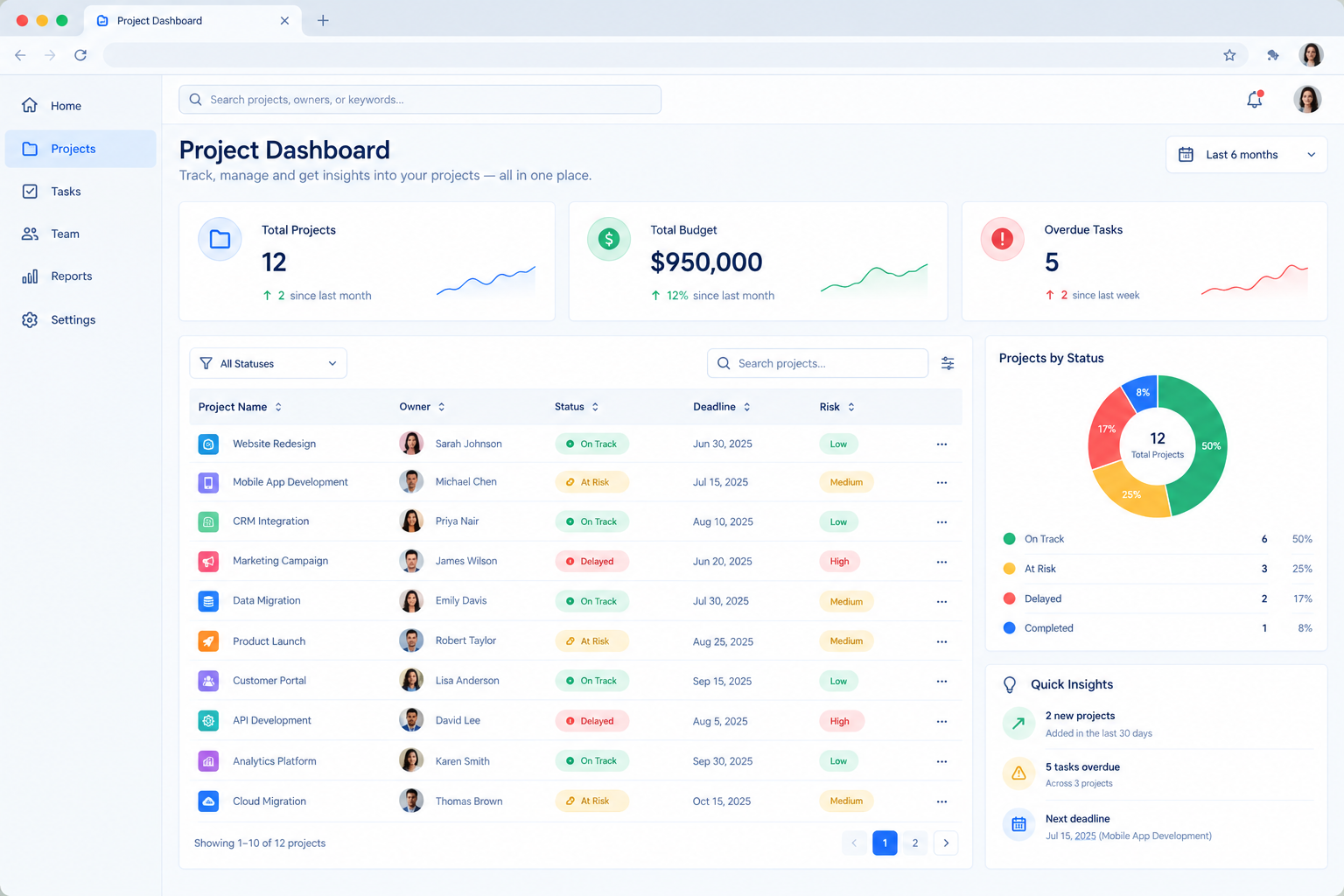
Depending on the application and configuration, teams can work with monday.com boards and workflow information rather than creating isolated mock data.
For example, a project management application could use information related to:
- Projects
- Tasks
- Owners
- Status
- Deadlines
- Budgets
- Dependencies
This makes the application part of the existing work environment instead of another disconnected tool.
4.6 Step 6: Test and Publish the Completed App
Before making the application available to a wider group, test the complete workflow.
Check:
- Data accuracy
- User experience
- Filters
- Navigation
- Actions
- Permissions
- Responsiveness
- Workflow behavior
Once the application meets the intended requirements, it can be published and made available according to the organization's monday.com configuration.
5. What Can You Build With Monday Vibe for Business?
The real value of Monday Vibe becomes easier to understand when looking at practical business applications. Teams do not necessarily need to create a large enterprise application. A small, focused internal tool can eliminate a workflow gap and make existing monday.com data easier to use.
The following examples show how custom apps can support different departments.
5.1 Project Management Apps
Project teams can use custom applications to create:
- Project portfolio dashboards
- Resource planners
- Project health trackers
- Dependency views
- Executive project summaries
- Delivery tracking applications
For example, a project portfolio application could combine status, schedule, budget, ownership, and risk information into a single interface.
5.2 Sales and CRM Apps
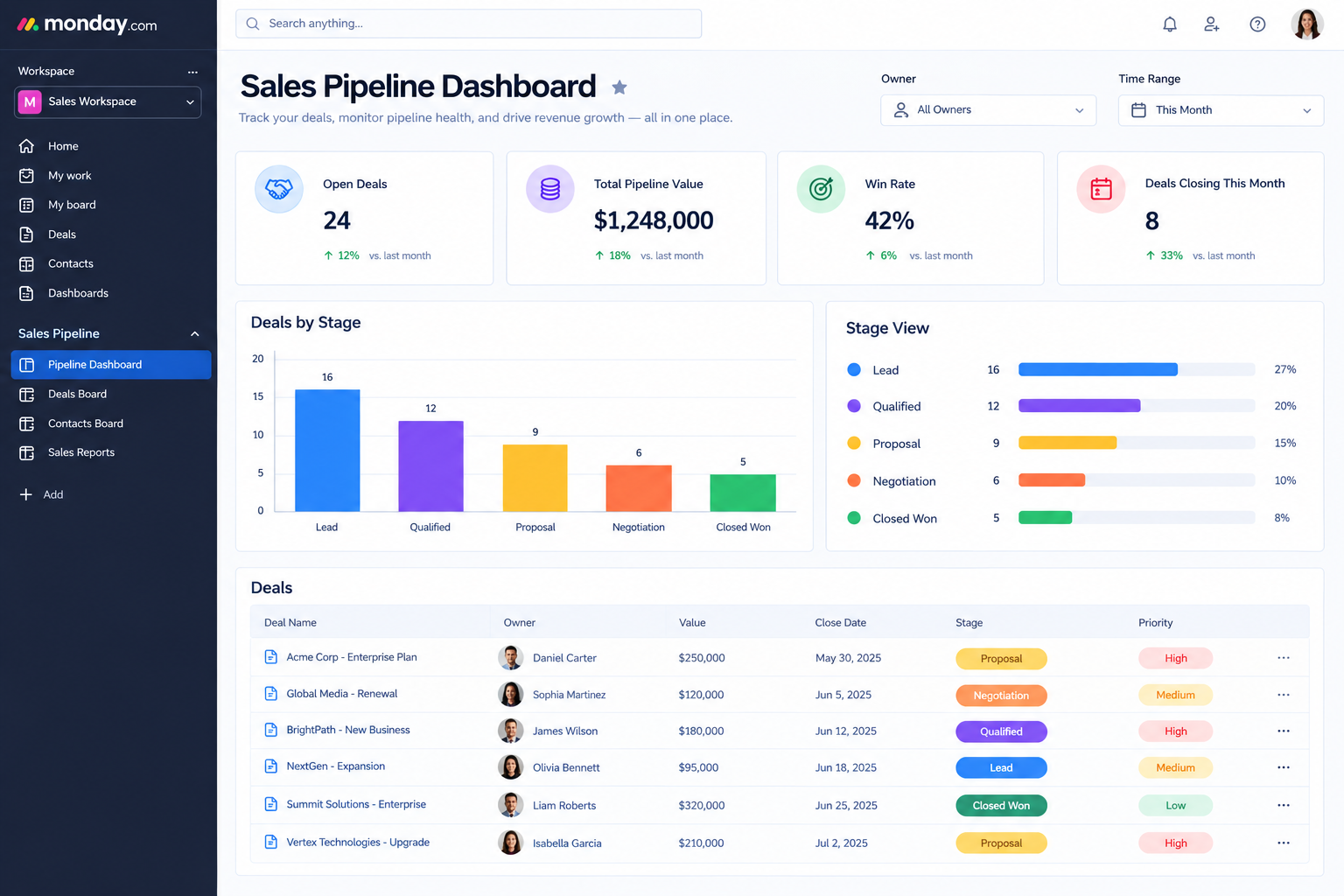
Sales teams can create applications around:
- Deal tracking
- Sales forecasting
- Commission calculations
- Account portfolio management
- Customer segmentation
- Pipeline analysis
The application can focus on a specific sales process rather than forcing every team to use the same dashboard.
5.3 Marketing Apps
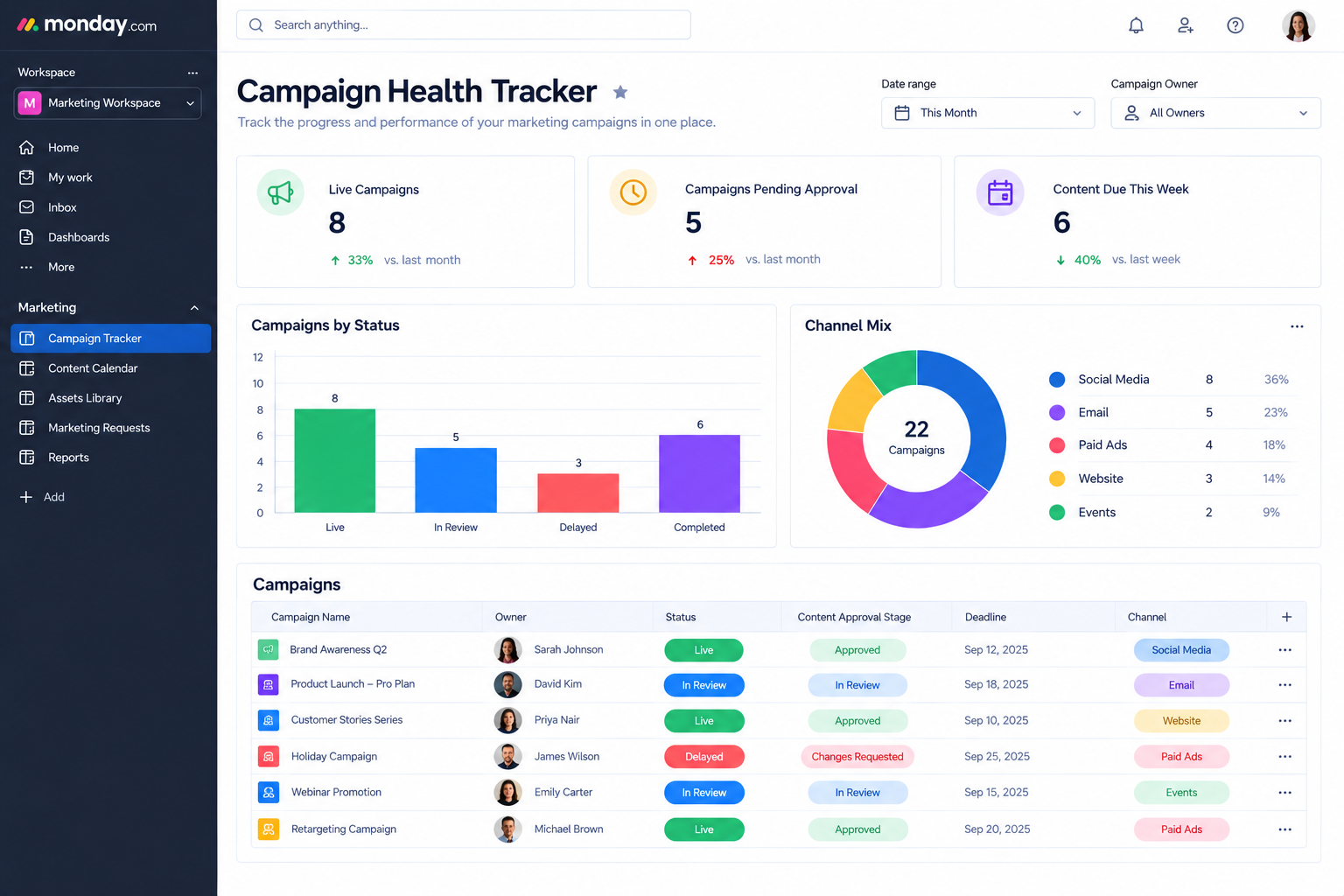
Marketing teams can build:
- Campaign health trackers
- Content calendars
- Campaign approval tools
- Marketing dashboards
- Social media planning tools
- Content production trackers
A custom application can give marketing teams a specialized interface while still working with their existing monday.com workflows.
5.4 HR and Employee Apps

HR teams can explore applications such as:
- Employee directories
- Onboarding portals
- Internal resource directories
- Organizational charts
- Employee request tools
These applications can help centralize information and simplify common employee workflows.
5.5 Operations Apps
Operations teams may benefit from:
- Inventory trackers
- Approval applications
- Resource planners
- Internal request portals
- Time tracking tools
- Process monitoring dashboards
Competitor examples similarly highlight dashboards, time trackers, organizational charts, sales tools, campaign trackers, employee portals, and operational applications as potential Monday Vibe use cases.
6. How to Write Better AI Prompts for Monday Vibe
The quality of the initial prompt can significantly affect the starting point of the application. A vague prompt may produce something that looks useful but does not fully reflect the business process.
A stronger prompt provides context, users, functionality, data requirements, and design expectations. However, the goal is not to write an enormous prompt containing every possible requirement. Start with the core workflow and add complexity through iteration.
6.1 Be Specific About the App's Purpose
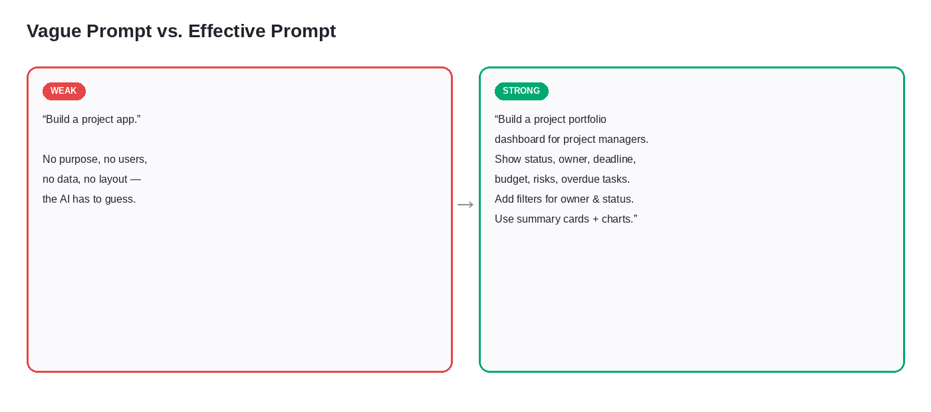
Instead of:
Build a project app.
Try:
Build a project portfolio application that helps project managers monitor project health, deadlines, budget, risks, and ownership.
The second prompt gives the AI a clear business objective.
6.2 Define the Users Clearly
Explain who will use the application.
For example:
This app is for project managers who need a quick view of project health.
Or:
This dashboard is for executives who need a high-level view of project status and risk.
Different users may need different levels of detail.
6.3 Describe the Data Requirements
Explain the information that should be displayed.
For a project application:
- Project name
- Project owner
- Status
- Deadline
- Budget
- Risk
- Priority
- Progress
This helps create a more meaningful application structure.
6.4 Explain the Desired Layout Clearly
If the interface matters, describe it.
For example:
Use summary cards at the top, a project table in the center, and charts below the table. Add filters for project status and owner.
This is more useful than simply saying, "Make it look professional."
6.5 Build in Small Iterations
Avoid trying to create every feature in the first prompt.
A better process is:
Core application → Essential features → Data connections → Filters → Visualizations → Advanced functionality
This makes it easier to identify what is working and what needs improvement.
7. Monday Vibe Best Practices for Better Results
Using Monday Vibe effectively requires more than knowing how to submit an AI prompt. Teams should approach application creation like a lightweight product-design process: understand the requirement, define the users, build a focused first version, test it, and refine it.
This approach also reduces unnecessary complexity. Instead of asking the AI to create an application with dozens of features immediately, start with the most important workflow and build from there.
7.1 Start With a Clear Business Requirement
Define the business problem before defining the application.
Ask:
- What problem are we solving?
- Who has the problem?
- What information do they need?
- What action should the application help them take?
7.2 Start Small With Core Features
A focused application is easier to test and improve.
For example, begin with a project status dashboard instead of trying to build an entire project management platform.
Once the core workflow works, add:
- Filters
- Charts
- Notifications
- Additional views
- More data
- Additional user roles
7.3 Be Specific With AI Prompts
Mention the intended users, tasks, information, and layout.
Current monday.com guidance similarly recommends structuring prompts around what is being built, who it is for, what it should do, and how it should look.
7.4 Refine Instead of Restarting the App
If an application is mostly correct, refine it.
For example:
Keep the existing project dashboard but add a risk filter and a chart showing projects by status.
This is often more useful than starting over with a completely new prompt.
7.5 Test the Complete Business Workflow
An application can look polished and still fail to solve the intended problem.
Test the actual workflow:
Input → Processing → Action → Result
Ask users to perform real tasks and identify where the experience needs improvement.
7.6 Review Governance and Permissions Carefully
AI-assisted application creation does not eliminate the need for governance.
Before wider deployment, organizations should consider:
- Who can create applications?
- Who can publish them?
- Who can access the underlying information?
- Which users need editing rights?
- What data should be visible?
- How should the application be maintained?
Security, permissions, and governance should remain part of the implementation process.
8. Is Monday Vibe Really a No-Code Platform?
For many business application scenarios, Monday Vibe allows users to create applications without manually writing traditional application code. The user communicates requirements through natural language and uses AI to generate and refine the application.
However, "no-code" should not be interpreted as "no planning required."
A successful business application still needs:
- Clear requirements
- Data planning
- User testing
- Workflow design
- Access controls
- Governance
- Ongoing optimization
For straightforward internal tools, a business user may be able to accomplish much of the application creation independently. More complex enterprise requirements may benefit from a monday.com consultant or implementation partner.
9. Benefits of Using Monday Vibe for Custom Business Apps
Monday Vibe can help organizations close the gap between standard platform functionality and specialized business requirements. Instead of immediately purchasing or commissioning a separate application, teams can explore whether a focused custom app can address the workflow.
9.1 Faster Application Prototyping
Teams can move from an idea to a working prototype more quickly by starting with natural-language instructions.This is especially useful when a team wants to test an idea before investing in a larger development project.
9.2 Custom Business Workflows
Not every organization operates in exactly the same way.A custom application can be designed around specific processes, terminology, information, and users.
9.3 Less Manual Application Building
AI can accelerate the creation of the initial application experience, reducing some of the repetitive work involved in building interfaces.
9.4 Easier Iteration and Refinement
Users can explain what needs to change instead of rebuilding an application from the beginning.
9.5 Better Use of Existing monday.com Workflows
When custom applications are connected to relevant monday.com information, teams can create specialized experiences without necessarily moving work into an entirely separate system.
10. When Should You Use Monday Vibe for Workflows?
Monday Vibe is most useful when a business has a specific workflow requirement that is not adequately addressed by its existing views, boards, dashboards, or standard configuration.
It can be particularly useful for teams that want to experiment with an application idea before committing to a larger development project.
10.1 Good Use Cases for Monday Vibe
Consider Monday Vibe when:
- A team needs a specialized internal tool.
- Existing monday.com views do not provide the desired experience.
- A department needs a focused dashboard.
- A business wants to prototype a workflow quickly.
- A team wants a custom interface around existing work data.
- A process needs a specialized form or portal.
- A team wants to experiment with AI-assisted application development.
10.2 When Additional Technical Expertise May Be Needed
Some requirements deserve deeper technical evaluation.
These may include:
- Complex third-party integrations
- Advanced business logic
- Large-scale enterprise deployments
- Sensitive business data
- Complex permission models
- Mission-critical workflows
- Advanced automation
- Custom application architecture
In these cases, Monday Vibe can still be part of the solution, but implementation should include appropriate architecture, governance, testing, and technical oversight.
11. How Monday Vibe Supports monday.com Project Management
Project management is one of the strongest areas for applying custom apps because project teams often need information presented differently depending on their role.
A project manager may need task-level details, while an executive may need only project health, budget, schedule, and risk.
Empyra's monday.com project management approach highlights planning, task and workflow management, centralized collaboration, customizable views, dashboards, and AI capabilities as part of the broader project environment.
11.1 Build Project-Specific Applications
Teams can create specialized tools around:
- Project portfolio visibility
- Resource planning
- Project status
- Risk tracking
- Budget monitoring
- Executive reporting
- Delivery metrics
11.2 Combine Project Management With AI
Monday Vibe can complement existing monday.com capabilities rather than functioning as an isolated feature.
For example:
monday.com project boards → workflow automation → AI capabilities → Monday Vibe custom application
This creates an opportunity to provide different user groups with different interfaces around the same operational environment.
11.3 Why Implementation Matters for Project Success
Creating an application is only one part of a successful project management transformation.
Organizations also need to consider:
- Board architecture
- Workflow design
- Automations
- Data structure
- User roles
- Reporting
- Adoption
- Training
- Ongoing optimization
That is where professional monday.com implementation can add value.
12. Why Choose Empyra for Monday Vibe Services?
Monday Vibe can simplify the creation of custom applications, but turning an AI-generated application into a scalable business solution requires more than writing a prompt. The application needs to fit the organization's workflows, data structure, project management model, automation strategy, user roles, and long-term goals.
Empyra provides monday.com consulting, monday.com implementation, workflow optimization, monday.com integrations, custom application development, training, and ongoing support. Its monday.com consulting approach covers discovery, design and configuration, implementation, optimization, and ongoing support.
12.1 monday.com Platinum Solution Partner Expertise
Empyra is a monday.com Platinum Solution Partner with expertise in monday.com implementation, optimization, and Monday Vibe applications. Its team helps organizations configure AI-powered workflows and turn initial concepts into repeatable business solutions.
12.2 monday.com Project Management Expertise
Empyra helps organizations design monday.com environments for project planning, task management, workflow automation, reporting, collaboration, and AI-enabled work management. This ensures custom applications support existing project workflows instead of becoming disconnected tools.
12.3 monday.com Implementation and Configuration Services
Empyra's implementation services include requirements discovery, monday.com configuration, workflow design, automation, integrations, data migration, user training, adoption, governance, and ongoing optimization. Its consultants align boards, dashboards, and workflows with each organization's business requirements.
12.4 Custom App Development and Integration Services
Empyra provides custom app development and integration services for organizations that need more than a standalone Monday Vibe application. These services help connect custom applications with broader business workflows and existing systems.
12.5 From AI Prototype to Scalable Business Solution
Empyra supports the process from business requirement and monday.com design to Monday Vibe app development, integration, training, and optimization. The goal is to create applications that fit how teams work and can evolve as business needs change.
Conclusion: Building Better Apps With Monday Vibe
Monday Vibe is changing how teams approach custom application development in monday.com. Users can describe a business requirement, generate an application, review the result, and refine it through conversational prompts.
The combination of Monday Vibe and Vibe Coding helps organizations create specialized tools without developing separate software for every workflow. Teams can build project dashboards, resource planners, marketing trackers, sales applications, and internal portals tailored to their needs.
The best results come from an iterative process: define the problem, write a focused prompt, test the application, refine it, connect the right data, and establish appropriate governance.
For organizations already using monday.com, custom applications can extend existing workflows instead of creating disconnected systems.
With the right strategy, Monday Vibe can become a practical part of a broader monday.com transformation. Empyra's consulting, implementation, project management, integration, and custom application expertise can help organizations build and optimize the right solution.
Ready to explore what Monday Vibe can do for your organization? Talk to Empyra's monday.com experts about building AI-powered custom applications around your business workflows.
.png?width=364&height=116&name=sales%20radar%20ai%20logo%202026%20%20(280%20x%2084%20px).png)





.svg)